
Configuration - Gateway View
The Gateway view lets you enable and disable warnings and define the auto addressing method of the
EtherNet/IP™
In-cabinet network end nodes.Gateway View
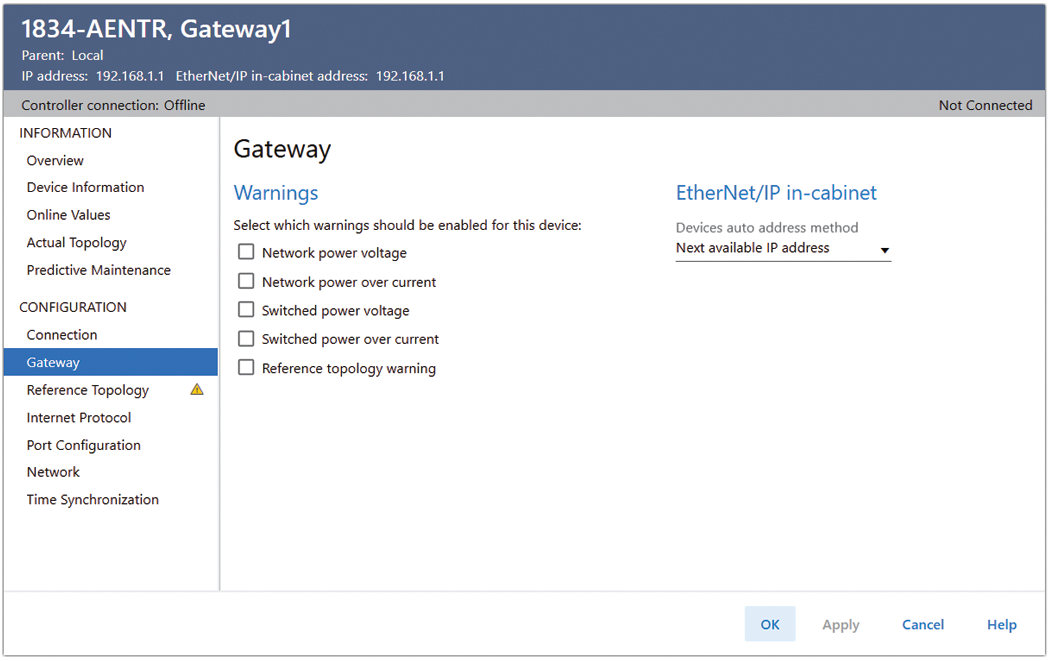
Warning | Description |
|---|---|
Network power voltage | Enables a warning that network power is nearing the working limit. Default is unchecked. Select to enable. |
Network power over current | Enables a warning that current for the network power is nearing the working limit. If disabled, a warning is not indicated even if current for the network power exceeds its working limit. Default is unchecked and a warning is not sent. Select to enable. |
Switched power voltage | Enables a warning that switched power voltage is nearing the working limit. Default is unchecked and a warning is not sent. Select to enable. |
Switched power over current | Enables a warning that current for the switched power is nearing the working limit. If disabled, a warning is not indicated even if current for the switched power exceeds its design working limit. |
Reference Topology warning | Enable a warning if the reference topology does not match the actual hardware. If disabled, a warning is not indicated even if Commissioning Object indicates warnings. Default is unchecked and a warning is not sent. Select to enable. |
Devices auto address method | Defines the device addressing method when the device is not addressed by using the reference topology. Values allowed:
|
Provide Feedback