Loading
Innovation Center LOGO
Recent ActivityRecent Activity

Emulación de un pozo de petróleo y gas utilizando Logix AI

Aproveche la IA de Logix para integrar datos sintéticos de pozos de petróleo y gas y desarrollar modelos representativos que puedan implementarse en Studio 5000 y Logix Echo para la puesta en marcha virtual y la representación del rendimiento del pozo. - [Tiempo de Implementacíon: 60 minutos]
Innovation Center Home Page
A hydraulic fracturing site features advanced drilling and pumping equipment actively engaged in extracting natural resources. The site is complex and densely organized.
Innovation Center LOGO
  • Visión General
  • Guía de Implementación
  • Descarga
  • Contáctanos
  • Suscríbase
Innovation Center Home Page
 

La inteligencia artificial ha sido un habilitador en la industria de Oil & Gas, particularmente sobre las conficiones de un mercado altamente caracterizado por la volatilidad de los precios e incremento en la presión para reducir los costos operativos y consumo. La solución basada en AI soporta ambas on-shore y off-shore para la optimización de eficiencia energética, mejora la producción en equipos de superficie y pozos, y producción avanzada a través de un mejor control de parámetros como Sedimentos y Agua, BSW por sus siglas en ingles

En este contexto, el desarrollo de modelos predictivos para sensores inferenciales es un enfoque estratégico para mejorar la monitorización y la toma de decisiones en tiempo real. Estos modelos permiten estimar variables críticas de producción y yacimiento—incluyendo volumen de petróleo, tasa total de líquido, volumen de gas, corte de agua, nivel dinámico de fluidos y presión en el yacimiento—sin depender exclusivamente de sensores físicos, reduciendo así el CAPEX, OPEX y el riesgo operativo, manteniendo la fiabilidad de la producción.

¿Qué hace esta aplicación?

La emulación del Volumen de Petróleo, en un pozo de Petróleo y Gas, es muy importante porque se utilizará para la puesta en marcha virtual y la representación del rendimiento del pozo, así como escenarios como una caja de arena para la formación de los operadores. La implementación utiliza el modelo de un Logix AI para la representación del volumen de aceite, FT Studio 5000 para la emulación y FT Logix Echo para representar el controlador.

Características generales

Una emulación de un pozo de petróleo y gas, con un enfoque en el volumen de petróleo, ofrece las siguientes características:

  • La identificación del VOI es el volumen de petróleo en [m3/día]
  • La selección de la Entrada 1 es el volumen del líquido {m3/día]
  • La selección de la Entrada 2 es el volumen de gas [m3/día]
  • La selección de la entrada 3 es volumen de gas Volumen de agua [m3/día]

Ventajas

  • Muestra el uso de Logix AI.
  • Acelera la puesta en marcha virtual y el rendimiento del Oil Volumen en pozos de petróleo y gas.
  • Muestra escalabilidad y repetibilidad para adaptarse a diversos entornos industriales.
  • Permitir modificaciones ágiles y precisas según las necesidades cambiantes.
  • Optimiza el rendimiento en términos de eficiencia y productividad.
 
AHIC Download ICON VF.png

Descarga

Tenga en cuenta: deberá aceptar los Términos y Condiciones para cada descarga.

Archivo descargable ›
Legal Disclaimer Acceptance. ROCKWELL AUTOMATION WILL PROVIDE ACCESS TO ROCKWELL PRODUCTS (BEST PRACTICES, APPLICATIONS AND KNOWLEDGE) ON THE CONDITION THAT YOU ACCEPT AND COMPLY WITH THE FOLLOWING TERMS AND CONDITIONS. YOU ACCEPT AND AGREE TO BE BOUND BY THE TERMS OF THIS AGREEMENT BY DOWNLOADING, INSTALLING, COPYING, OR OTHERWISE USING PRODUCTS. IF YOU ARE ACCEPTING THESE TERMS ON BEHALF OF ANOTHER PERSON, COMPANY, OR OTHER LEGAL ENTITY, YOU REPRESENT AND WARRANT THAT YOU HAVE FULL AUTHORITY TO BIND THAT PERSON, COMPANY, OR LEGAL ENTITY TO THESE TERMS. IF YOU DO NOT AGREE TO THESE TERMS, DO NOT DOWNLOAD, INSTALL, COPY, ACCESS, OR USE THE PRODUCTS, SOFTWARE AND/OR CLOUD SERVICES. 1. Rockwell Automation retains full ownership and title to all Products and related documentation. No rights or licenses are granted other than those set forth in this Agreement. Company grants to Rockwell Automation a non-exclusive, worldwide, royalty-free, perpetual, non-revocable license to use any feedback Company provides regarding the Products, even if Company has designated the feedback as confidential. Rockwell Automation will be entitled to use the feedback without restriction or compensation to Company. 2. Company may not lease sub-lease, assign, license, sub-license or otherwise transfer any of the Products without the prior written consent of Rockwell Automation. Company may not assign or otherwise transfer access rights to the Products without the prior written consent of Rockwell Automation. Any reverse assembly, reverse engineering, decompilation, and creation of derivative works based on the Products by Company is prohibited. 3. Company acknowledges that Products provided under this Agreement are Rockwell Automation’s Confidential Information and are covered by effective or pending copyrights, patents, trademarks and/or trade secrets of Rockwell Automation, and Company agrees to maintain confidentiality by not disclosing Products or documentation to any third party without the prior written consent of Rockwell Automation and to protect the confidentiality of the Products as it would Company’s own confidential information. Company agrees that its obligation of confidentiality under this paragraph shall survive expiration or termination of this Agreement. 4. Company agrees that Products provided under this Agreement are prototypes and examples and its application and results may vary depending on each customer and project conditions. Rockwell Automation do not warranty the same results. This Agreement shall in no way be construed as a commitment by Rockwell Automation at any time to manufacture and/or offer Products for sale. There is no explicit or implicit service level agreement associated with using the Products. Rockwell Automation does not warrant that the functions contained in the Products will meet Company’s requirements. Company agrees to use all Products only in accordance with the instructions and only for the intended usages identified in the documentation. 5. EXCLUSION OF WARRANTIES AND LIMITATION OF LIABILITY. THE PRODUCTS ARE PROVIDED "AS IS". ROCKWELL AUTOMATION DISCLAIMS ANY AND ALL WARRANTIES, EXPRESS, IMPLIED OR STATUTORY, INCLUDING WITHOUT LIMITATION ANY WARRANTIES OF MERCHANTABILITY OR FITNESS FOR A PARTICULAR PURPOSE. ROCKWELL AUTOMATION EXPLICITLY DISCLAIMS ALL WARRANTIES OF NON- INFRINGEMENT AND EXPRESSLY DOES NOT WARRANT THAT THE PRODUCTS, IN WHOLE OR IN PART, WILL BE ERROR FREE OR FREE FROM SECURITY VULNERABILITIES. IN NO EVENT SHALL ROCKWELL AUTOMATION BE LIABLE FOR (i) LOST PROFITS, LOST SAVINGS, DOWNTIME, SPECIAL, INDIRECT OR CONSEQUENTIAL DAMAGES OF ANY KIND, OR (ii) ANY PERSONAL INJURY, PROPERTY DAMAGE OR ENVIRONMENTAL DAMAGE ARISING OUT OF OR IN CONNECTION WITH THIS AGREEMENT, WHETHER IN AN ACTION IN CONTRACT, STRICT LIABILITY OR IN TORT INCLUDING NEGLIGENCE. 6. COMPANY AGREES TO INDEMNIFY AND HOLD ROCKWELL AUTOMATION HARMLESS FROM ALL COSTS, AWARDS, DAMAGES, EXPENSES AND FEES (INCLUDING ATTORNEYS FEES) RESULTING FROM OR RELATED TO ANY THIRD-PARTY CLAIMS (INCLUDING EMPLOYEES AND AGENTS OF COMPANY) AGAINST ROCKWELL AUTOMATION, ITS DISTRIBUTORS, AGENTS, OFFICERS, DIRECTORS OR EMPLOYEES FOR PERSONAL INJURY (INCLUDING DEATH), PROPERTY DAMAGE OR ENVIRONMENTAL DAMAGE RELATED TO OR RESULTING FROM THE USE OF THE PRODUCTS. 7. In the event a Product is exported, Company agrees to comply with all applicable United States Export Control Law and Regulations, and the applicable export control laws of other countries. This Agreement shall be governed by the laws of the state of Wisconsin. This Agreement is the complete and exclusive Agreement between Rockwell Automation and the Company, and supersedes all prior agreements, whether written or oral, relating to the Products.
AHIC NEED HELP ICON VF.png

¿Necesita ayuda?

Si necesita ayuda con alguna aplicación o tiene comentarios acerca del Innovation Center, por favor contáctenos.


¿Esta aplicación es relevante para mí?

La predicción del volumen de petróleo usando Logix AI es útil, porque se usará para emular una puesta en marcha virtual y el rendimiento del volumen de petróleo.


¿Cómo puedo hacerlo funcionar?

Requisitos: productos, herramientas y conocimientos previos.

Hardware

  • 1756-L85EP

Software

  • Studio 5000 - Versión 37
  • FactoryTalk Logix Echo - Versión 3.00.00
  • FT Logix AI FactoryTalk® Analytics LogixAI ® 

Conocimientos Previos

  • Productos: Logix AI, Studio 5000 y LogixEcho
  • Herramientas: Studio 5000, FT LogixEcho y FT Logix AI
 

Enlaces de interés (internos o externos)

  • https://www.rockwellautomation.com/en-us/products/software/factorytalk/operationsuite/analytics-logixai.html
  • https://www.rockwellautomation.com/en-us/products/software/factorytalk/designsuite/studio-5000/studio-5000-logix-designer.html
  • https://www.rockwellautomation.com/en-us/products/software/factorytalk/designsuite/logix-echo.html
  • https://www.rockwellautomation.com/en-us/industries/oil-gas.html%20.html
AHIC STEP ICON.png

Guía de Implementación

 
  1. Paso 1
  2. Paso 2
  3. Paso 3
  4. Paso 4
  5. Paso 5
  6. Paso 6
  7. Paso 7
  8. Paso 8
  9. Paso 9
  10. Paso 10
  11. Paso 11
  12. Paso 12
  13. Paso 13
Open All Close All
Paso 1
 

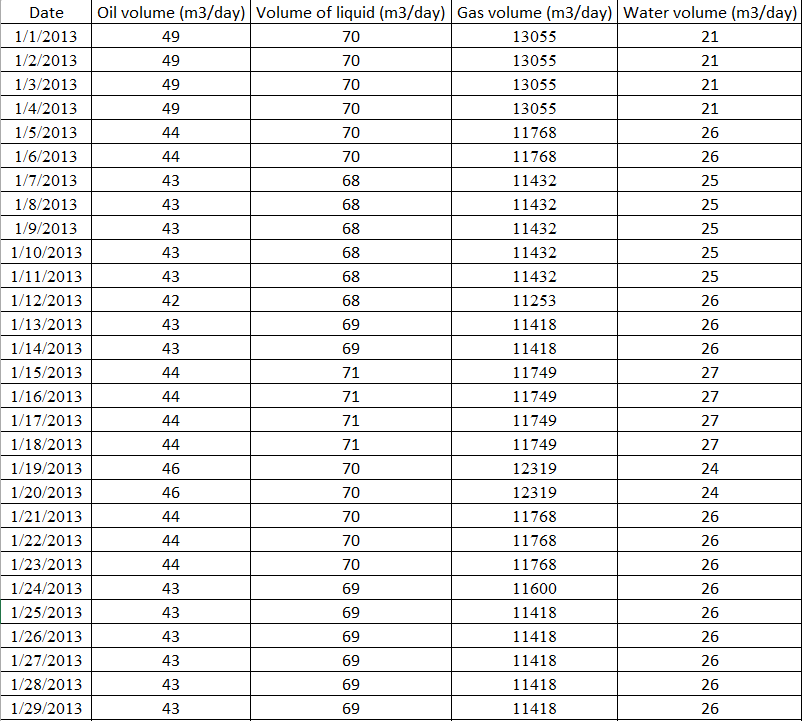
Revisa los datos sintéticos históricos en un archivo .xlm

 
oil-gas-well-emulation-using-logix-ai_1_Historical_Synthetic_Data_Oil_and_Gas_Well.png

oil-gas-well-emulation-using-logix-ai_1_Historical_Synthetic_Data_Oil_and_Gas_Well.png

Paso 2
 

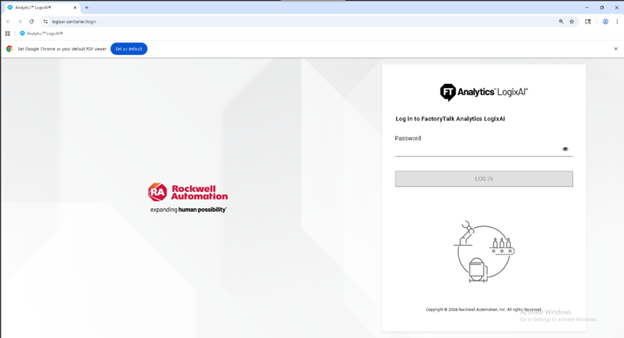
Abre el portal de IA de Logix.

oil-gas-well-emulation-using-logix-ai_2_Open_Logix_AI.png

oil-gas-well-emulation-using-logix-ai_2_Open_Logix_AI.png

Paso 3
 

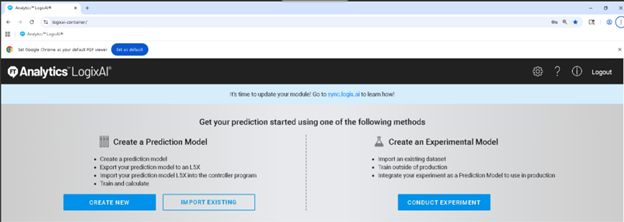
Selecciona  "Conduct Experiment" (Realizar experimento), resaltado en azul.

oil-gas-well-emulation-using-logix-ai_3_Create_an_Experimental_Model_ highlighted in blue.png

oil-gas-well-emulation-using-logix-ai_3_Create_an_Experimental_Model_ highlighted in blue.png

Paso 4
 

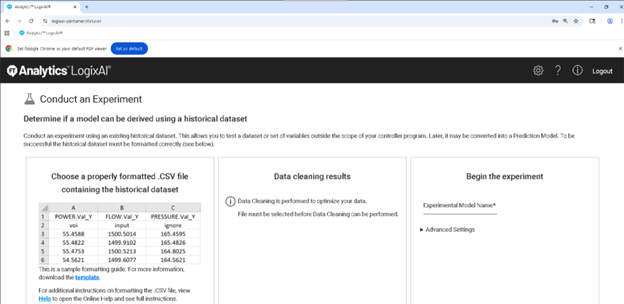
Selecciona "Template", resaltado en azul.

oil-gas-well-emulation-using-logix-ai_4_template_highlighted_in_blue.png

oil-gas-well-emulation-using-logix-ai_4_template_highlighted_in_blue.png

Paso 5
 

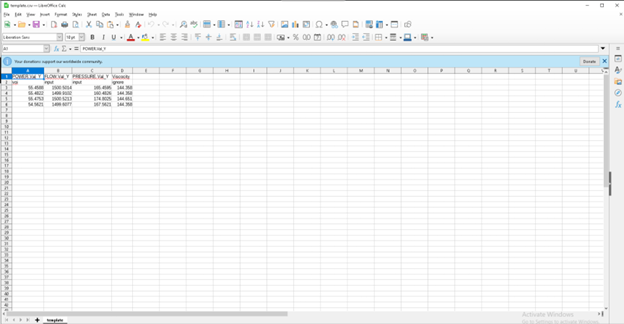
Revisa el archivo "template.csv" 

oil-gas-well-emulation-using-logix-ai_5_template_csv_file.png

oil-gas-well-emulation-using-logix-ai_5_template_csv_file.png

Paso 6
 

Toma los datos de Historical_Sintetic_Data_Oil_&_Gas_Well y vuelve a colocar los cambios realizados en el archivo plantilla, será así:

oil-gas-well-emulation-using-logix-ai_6_6_ data_from_de_Historical_Sintetic_Data_Oil_and_Gas_Well.png

oil-gas-well-emulation-using-logix-ai_6_6_ data_from_de_Historical_Sintetic_Data_Oil_and_Gas_Well.png

Paso 7
 

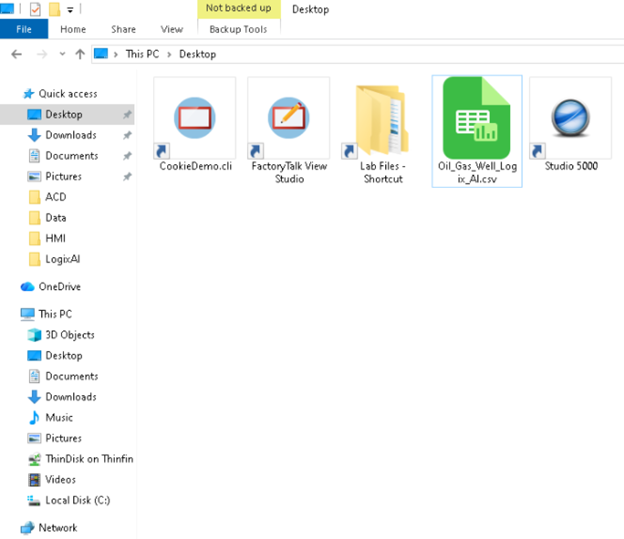
Guarda el archivo, como "Oil_Gas_Well_Logix_AI".

oil-gas-well-emulation-using-logix-ai_7_ Oil_Gas_Well_Logix_AI.png

oil-gas-well-emulation-using-logix-ai_6_6_ data_from_de_Historical_Sintetic_Data_Oil_and_Gas_Well.png

Paso 8
 

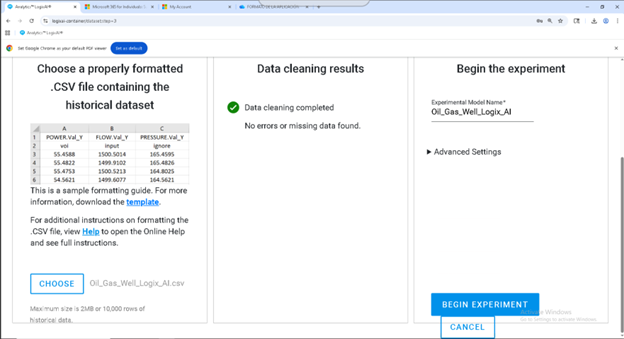
Selecciona el archivo CHOOSE (Elegir), la plataforma de IA Logix será así:

oil-gas-well-emulation-using-logix-ai_8_ Select the file CHOOSE, the Logix AI platform will be look like this.png

oil-gas-well-emulation-using-logix-ai_8_ Select the file CHOOSE, the Logix AI platform will be look like this.png

Paso 9
 

Nombra el archivo como “Oil_Gas_Well_Logix_AI” y selecciona “Begin Experiment” (Iniciar experimento), resaltado en  azul.

oil-gas-well-emulation-using-logix-ai_9 Begin Experiment.png

oil-gas-well-emulation-using-logix-ai_9 Begin Experiment.png

Paso 10
 

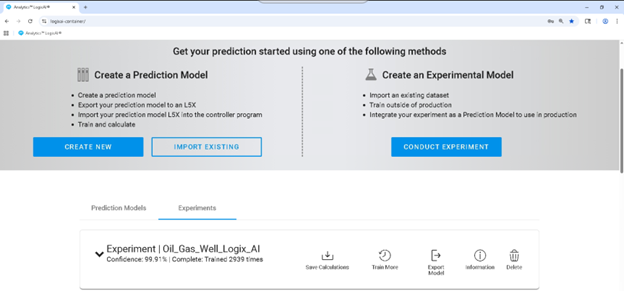
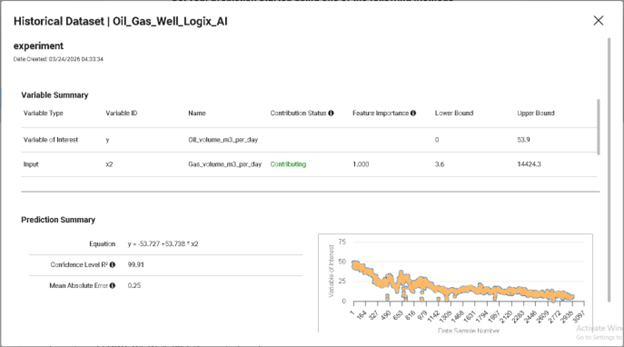
El Experimento de IA Logix| Oil_Gas_Well_Logix_AI, será así:

oil-gas-well-emulation-using-logix-ai_10_The Logix AI Experiment.png

oil-gas-well-emulation-using-logix-ai_10_The Logix AI Experiment.png

Paso 11
 

Información

oil-gas-well-emulation-using-logix-ai_11_Information_Contributing.png

oil-gas-well-emulation-using-logix-ai_11_Information_Contributing.png

Paso 12
 

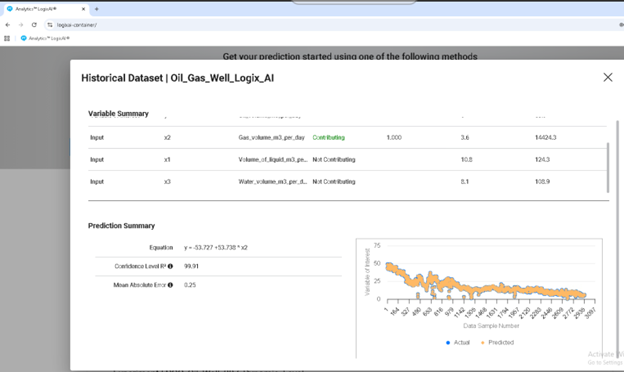
Información

oil-gas-well-emulation-using-logix-ai_12_Information_Not_Contributing.png

oil-gas-well-emulation-using-logix-ai_12_Information_Not_Contributing.png

Paso 13
 

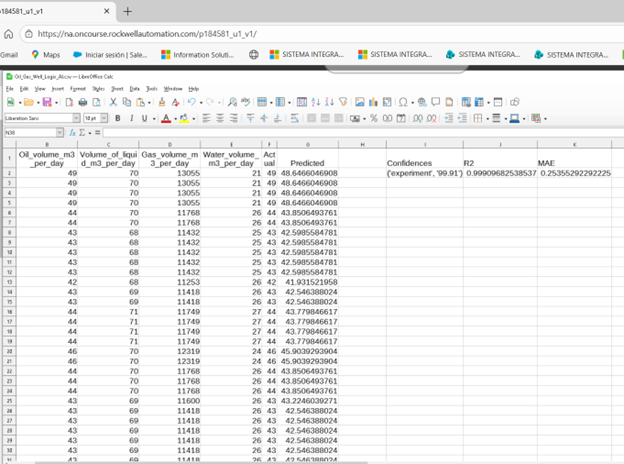
Vista de cálculo

oil-gas-well-emulation-using-logix-ai_13_Calculation_View.png

oil-gas-well-emulation-using-logix-ai_13_Calculation_View.png

oil-gas-well-emulation-using-logix-ai_1_Historical_Synthetic_Data_Oil_and_Gas_Well.png

oil-gas-well-emulation-using-logix-ai_1_Historical_Synthetic_Data_Oil_and_Gas_Well.png

oil-gas-well-emulation-using-logix-ai_2_Open_Logix_AI.png

oil-gas-well-emulation-using-logix-ai_2_Open_Logix_AI.png

oil-gas-well-emulation-using-logix-ai_3_Create_an_Experimental_Model_ highlighted in blue.png

oil-gas-well-emulation-using-logix-ai_3_Create_an_Experimental_Model_ highlighted in blue.png

oil-gas-well-emulation-using-logix-ai_4_template_highlighted_in_blue.png

oil-gas-well-emulation-using-logix-ai_4_template_highlighted_in_blue.png

oil-gas-well-emulation-using-logix-ai_5_template_csv_file.png

oil-gas-well-emulation-using-logix-ai_5_template_csv_file.png

oil-gas-well-emulation-using-logix-ai_6_6_ data_from_de_Historical_Sintetic_Data_Oil_and_Gas_Well.png

oil-gas-well-emulation-using-logix-ai_6_6_ data_from_de_Historical_Sintetic_Data_Oil_and_Gas_Well.png

oil-gas-well-emulation-using-logix-ai_7_ Oil_Gas_Well_Logix_AI.png

oil-gas-well-emulation-using-logix-ai_7_ Oil_Gas_Well_Logix_AI.png

oil-gas-well-emulation-using-logix-ai_8_ Select the file CHOOSE, the Logix AI platform will be look like this.png

oil-gas-well-emulation-using-logix-ai_8_ Select the file CHOOSE, the Logix AI platform will be look like this.png

oil-gas-well-emulation-using-logix-ai_9 Begin Experiment.png

oil-gas-well-emulation-using-logix-ai_9 Begin Experiment.png

oil-gas-well-emulation-using-logix-ai_10_The Logix AI Experiment.png

oil-gas-well-emulation-using-logix-ai_10_The Logix AI Experiment.png

oil-gas-well-emulation-using-logix-ai_11_Information_Contributing.png

oil-gas-well-emulation-using-logix-ai_11_Information_Contributing.png

oil-gas-well-emulation-using-logix-ai_12_Information_Not_Contributing.png

oil-gas-well-emulation-using-logix-ai_12_Information_Not_Contributing.png

oil-gas-well-emulation-using-logix-ai_13_Calculation_View.png

oil-gas-well-emulation-using-logix-ai_13_Calculation_View.png


Emulación de un pozo de petróleo y gas utilizando Logix AI

Versión 1.0 - Septiembre de 2026

 
AHIC White Logo

Reciba nuevas aplicaciones y novedades del Centro de Innovación directamente en su correo electrónico.

¡Suscríbase!
  1. Chevron LeftChevron Left Página principal de Rockwell Automation
  2. Chevron LeftChevron Left Asi...
  3. Chevron LeftChevron Left Sop...
  4. Chevron LeftChevron Left Descargas
  5. Chevron LeftChevron Left Application Hub - Innovation Center
  6. Chevron LeftChevron Left Emulación de un pozo de petróleo y gas utilizando Logix AI
El contenido de este sitio ha sido traducido mediante inteligencia artificial (IA) sin revisión humana o ediciones. El contenido podría contener errores o inexactitudes, y se proporciona “tal cual” sin ninguna garantía. El texto oficial es la versión en inglés del contenido.
Actualice sus preferencias de cookies para continuar.
Esta función requiere cookies para mejorar su experiencia. Actualice sus preferencias para permitir estas cookies.:
  • Cookies de Redes Sociales
  • Cookies Funcionales
  • Cookies de Performance
  • Cookies de Marketing
  • Todas las cookies
Puede actualizar sus preferencias en cualquier momento. Para más información, vea nuestro {0} Política de Privacidad
CloseClose