Loading
Innovation Center LOGO
Recent ActivityRecent Activity

Solutions for enabling IT/OT convergence
Learn how to use a software based solution for connecting Industrial Data Sources and Control or Automation systems. No need for IT technical expertise. - [Implementation time: 60 minutes]
Innovation Center Home Page
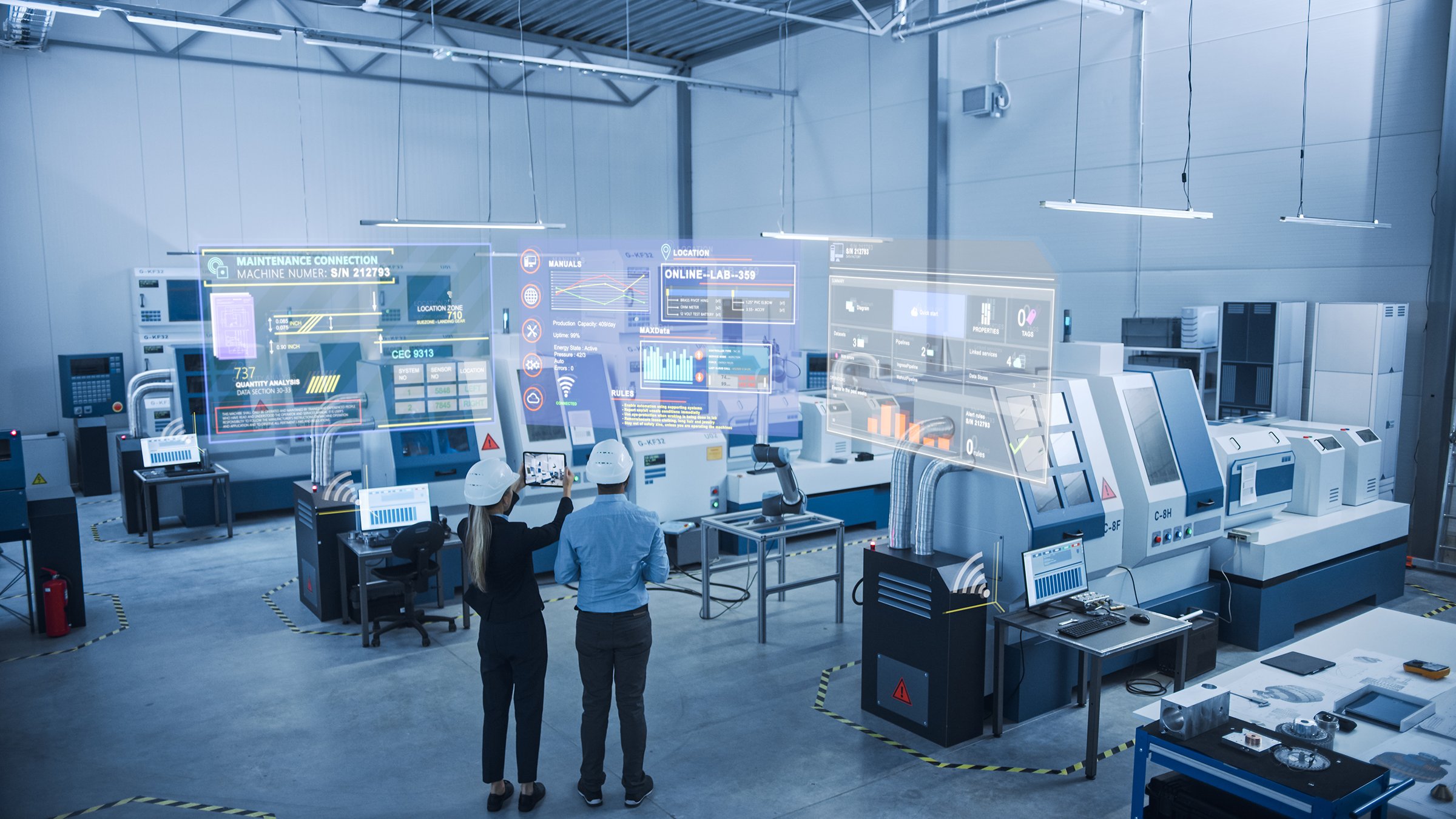
Two Engineers Use augmented reality software on tablet to connect with industrial Robot and Visualize equipment Maintenance
Innovation Center LOGO
  • What is this for?
  • Installation guide
  • Downloads
Innovation Center Home Page

What is this for?

OT/IT Convergence Solution provides the right foundation to drive edge-to-cloud integration at the enterprise level to accelerate IIoT digital transformation. It simplifies and automates collection, contextualization, and organization of industrial equipment data across machines, devices and automation assets at the plant floor while enabling high data integrity.

This is especially useful when working with operational data locked in disparate devices or siloed in systems of record. High-speed, contextualized OT data from controllers is discovered and packaged automatically in a logical, common information model that control engineers can configure. This common information model speeds setup for similar assembly lines and can be enriched with third-party data. It can be mapped to on-prem or cloud applications and easily consumed. Solution unifies data from industrial sources and control or automation systems.

It integrates with a variety of cloud, IIoT, and big data applications including ThingWorx, Microsoft Azure IoT Hub, Microsoft SQL and more. It also uses OPC-DA to access KEPServer Enterprise data for third party connectivity. With access to OT contextualized data, IT applications can help users to extract equipment insights across the enterprise: Quickly, easily and proactively identify process and production inefficiencies and product defects; allowing to focus on using the data to detect and resolve equipment issues and improve production output.

General Features

The  OT/IT convergence solution provides the following features: 

  • Simplifies and automates industrial data collection, contextualization and organization across equipment, devices and automation assets.
  • Unlocks key industrial performance insights from OT data.
  • Enables high IT data integrity.
  • Integrates with a variety of cloud, IIoT and big data applications.
  • Reduces the need for IT technical expertise.
  • Automatic creation of information, application content and databases.
  • Organize large volume of high-speed data with OT-based information models.
  • Connect disparate data sources, add application context and enable contextual data delivery.


Advantages

Supports OT/IT collaboration by empowering control engineers to identify the most appropriate data sets and send information directly to the IT layer.

Limitations/Disadvantages

  • Licensed software required, subscription only.
  • License tag counts are not additive.
  • Tags are counted when information models are deployed, a tag used in multiple applications on the same gateway is counted only once.


Downloads

Please note: You will need to agree to the Terms & Conditions for each download.

OT/IT Convergence application files ›
Legal Disclaimer Acceptance. ROCKWELL AUTOMATION WILL PROVIDE ACCESS TO ROCKWELL PRODUCTS (BEST PRACTICES, APPLICATIONS AND KNOWLEDGE) ON THE CONDITION THAT YOU ACCEPT AND COMPLY WITH THE FOLLOWING TERMS AND CONDITIONS. YOU ACCEPT AND AGREE TO BE BOUND BY THE TERMS OF THIS AGREEMENT BY DOWNLOADING, INSTALLING, COPYING, OR OTHERWISE USING PRODUCTS. IF YOU ARE ACCEPTING THESE TERMS ON BEHALF OF ANOTHER PERSON, COMPANY, OR OTHER LEGAL ENTITY, YOU REPRESENT AND WARRANT THAT YOU HAVE FULL AUTHORITY TO BIND THAT PERSON, COMPANY, OR LEGAL ENTITY TO THESE TERMS. IF YOU DO NOT AGREE TO THESE TERMS, DO NOT DOWNLOAD, INSTALL, COPY, ACCESS, OR USE THE PRODUCTS, SOFTWARE AND/OR CLOUD SERVICES. 1. Rockwell Automation retains full ownership and title to all Products and related documentation. No rights or licenses are granted other than those set forth in this Agreement. Company grants to Rockwell Automation a non-exclusive, worldwide, royalty-free, perpetual, non-revocable license to use any feedback Company provides regarding the Products, even if Company has designated the feedback as confidential. Rockwell Automation will be entitled to use the feedback without restriction or compensation to Company. 2. Company may not lease sub-lease, assign, license, sub-license or otherwise transfer any of the Products without the prior written consent of Rockwell Automation. Company may not assign or otherwise transfer access rights to the Products without the prior written consent of Rockwell Automation. Any reverse assembly, reverse engineering, decompilation, and creation of derivative works based on the Products by Company is prohibited. 3. Company acknowledges that Products provided under this Agreement are Rockwell Automation’s Confidential Information and are covered by effective or pending copyrights, patents, trademarks and/or trade secrets of Rockwell Automation, and Company agrees to maintain confidentiality by not disclosing Products or documentation to any third party without the prior written consent of Rockwell Automation and to protect the confidentiality of the Products as it would Company’s own confidential information. Company agrees that its obligation of confidentiality under this paragraph shall survive expiration or termination of this Agreement. 4. Company agrees that Products provided under this Agreement are prototypes and examples and its application and results may vary depending on each customer and project conditions. Rockwell Automation do not warranty the same results. This Agreement shall in no way be construed as a commitment by Rockwell Automation at any time to manufacture and/or offer Products for sale. There is no explicit or implicit service level agreement associated with using the Products. Rockwell Automation does not warrant that the functions contained in the Products will meet Company’s requirements. Company agrees to use all Products only in accordance with the instructions and only for the intended usages identified in the documentation. 5. EXCLUSION OF WARRANTIES AND LIMITATION OF LIABILITY. THE PRODUCTS ARE PROVIDED "AS IS". ROCKWELL AUTOMATION DISCLAIMS ANY AND ALL WARRANTIES, EXPRESS, IMPLIED OR STATUTORY, INCLUDING WITHOUT LIMITATION ANY WARRANTIES OF MERCHANTABILITY OR FITNESS FOR A PARTICULAR PURPOSE. ROCKWELL AUTOMATION EXPLICITLY DISCLAIMS ALL WARRANTIES OF NON- INFRINGEMENT AND EXPRESSLY DOES NOT WARRANT THAT THE PRODUCTS, IN WHOLE OR IN PART, WILL BE ERROR FREE OR FREE FROM SECURITY VULNERABILITIES. IN NO EVENT SHALL ROCKWELL AUTOMATION BE LIABLE FOR (i) LOST PROFITS, LOST SAVINGS, DOWNTIME, SPECIAL, INDIRECT OR CONSEQUENTIAL DAMAGES OF ANY KIND, OR (ii) ANY PERSONAL INJURY, PROPERTY DAMAGE OR ENVIRONMENTAL DAMAGE ARISING OUT OF OR IN CONNECTION WITH THIS AGREEMENT, WHETHER IN AN ACTION IN CONTRACT, STRICT LIABILITY OR IN TORT INCLUDING NEGLIGENCE. 6. COMPANY AGREES TO INDEMNIFY AND HOLD ROCKWELL AUTOMATION HARMLESS FROM ALL COSTS, AWARDS, DAMAGES, EXPENSES AND FEES (INCLUDING ATTORNEYS FEES) RESULTING FROM OR RELATED TO ANY THIRD-PARTY CLAIMS (INCLUDING EMPLOYEES AND AGENTS OF COMPANY) AGAINST ROCKWELL AUTOMATION, ITS DISTRIBUTORS, AGENTS, OFFICERS, DIRECTORS OR EMPLOYEES FOR PERSONAL INJURY (INCLUDING DEATH), PROPERTY DAMAGE OR ENVIRONMENTAL DAMAGE RELATED TO OR RESULTING FROM THE USE OF THE PRODUCTS. 7. In the event a Product is exported, Company agrees to comply with all applicable United States Export Control Law and Regulations, and the applicable export control laws of other countries. This Agreement shall be governed by the laws of the state of Wisconsin. This Agreement is the complete and exclusive Agreement between Rockwell Automation and the Company, and supersedes all prior agreements, whether written or oral, relating to the Products.


Need Help?

If you need help with an application or have feedback from the Innovation Center, please contact us.

Is this useful for me?

Convergence solutions are suitable for OT engineers interested in automate the contextualization of the operational data as close to the source before populating the information at the IT level for other analytical applications. Typical use case examples:

  • Data collection and contextualization.
  • Create organization structure aligned with intended data analysis utilization whether via information modeling alone or smart objects and information modeling combined.
  • Perform intended data analysis with other analytics software.

Application areas

Food and Beverage, Automotive and Tire, Manufacturing, etc.

Benefits of applications with OT/IT convergence solutions:

  • Baseline benefit comes from the information model and ability to contextualize to the asset hierarchy.
  • For users that have a Rockwell Automation Integrated Architecture system, additional benefit is realized by adding Smart Objects configuration properties and achieving synchronized data collection at high resolutions.
  • The data collection and organization capabilities provide value by empowering OT collaboration with IT and also provides the ability to egress contextualized data sets for big data analysis projects.
  • Improve engineering efficiency for project deployment and accessibility to data.


How can I make it work?

Hardware

  • PowerFlex 525
  • CompactLogix, ControlLogix 
  • Firmware revision 30 or high.

Software

  • Programs: FTEGSmartObjects.ACD, ACMTR88HMI.apa
  • Studio 5000 Logix Emulate v33
  • Studio 5000 Logix Designer v34
  • FactoryTalk Logix Echo v33.11.00
  • Studio 5000 Application Code Manager v4.02.00
  • FactoryTalk ViewME v12.00.00
  • FactoryTalk Edge Gateway v3.00.00
  • ThingWorx 9.0
  • FactoryTalk Administration Console v6.30.00
  • Microsoft SQL Server Management Studio v18.9.1
  • SQLServer/SQLExpress
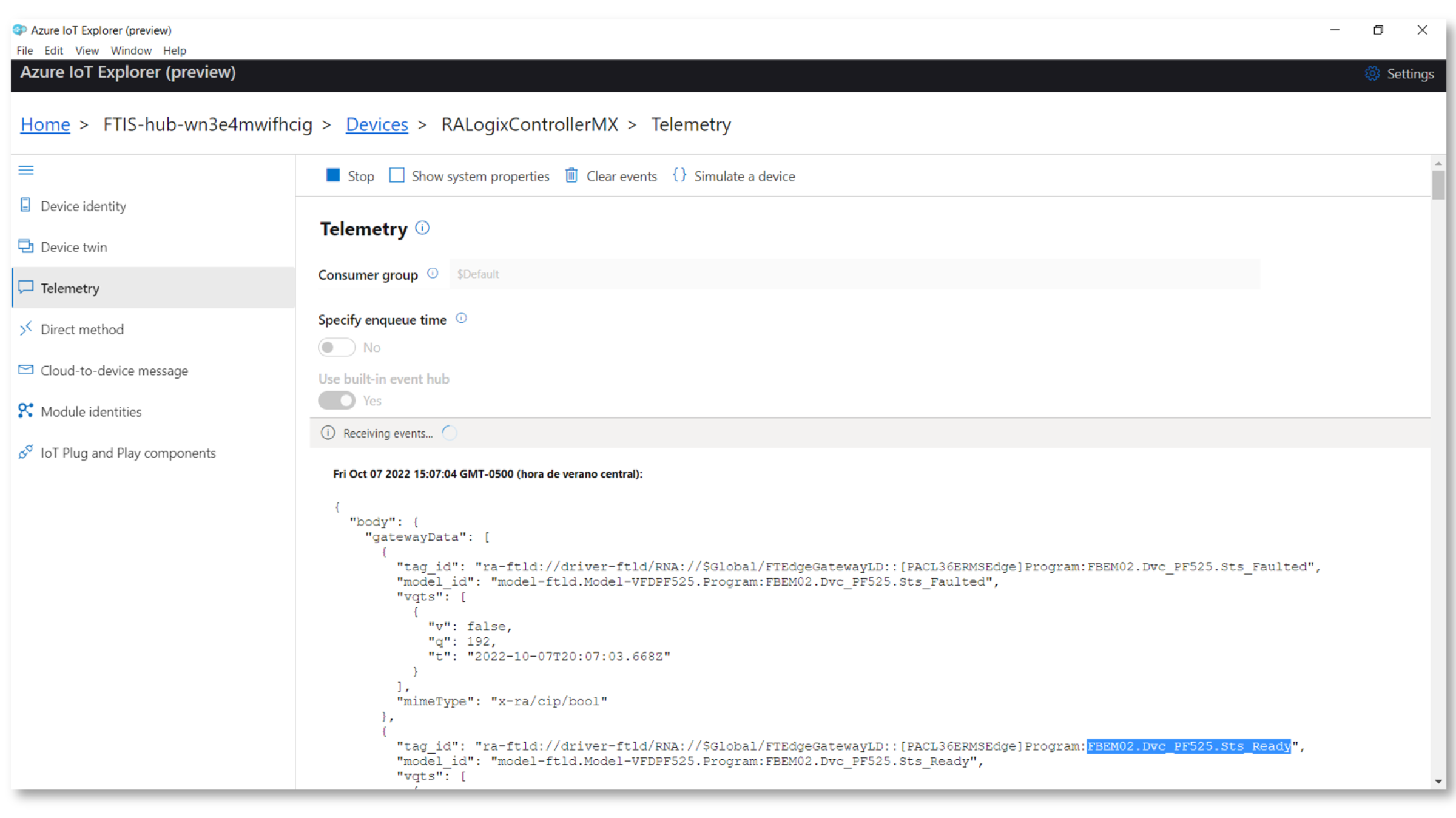
  • Azure IoT Explorer Preview v15.00
  • Azure IoT Hub

Knowledge

Familiarity with control theory, controller coding skills, application knowledge (Preferable OT engineer) that can relate with the intended use case and analysis once the data has reached its intended destination. Intermediate knowledge of programming and configuration in Logix Design Studio 5000 software.

Installation Guide 

Step 1:

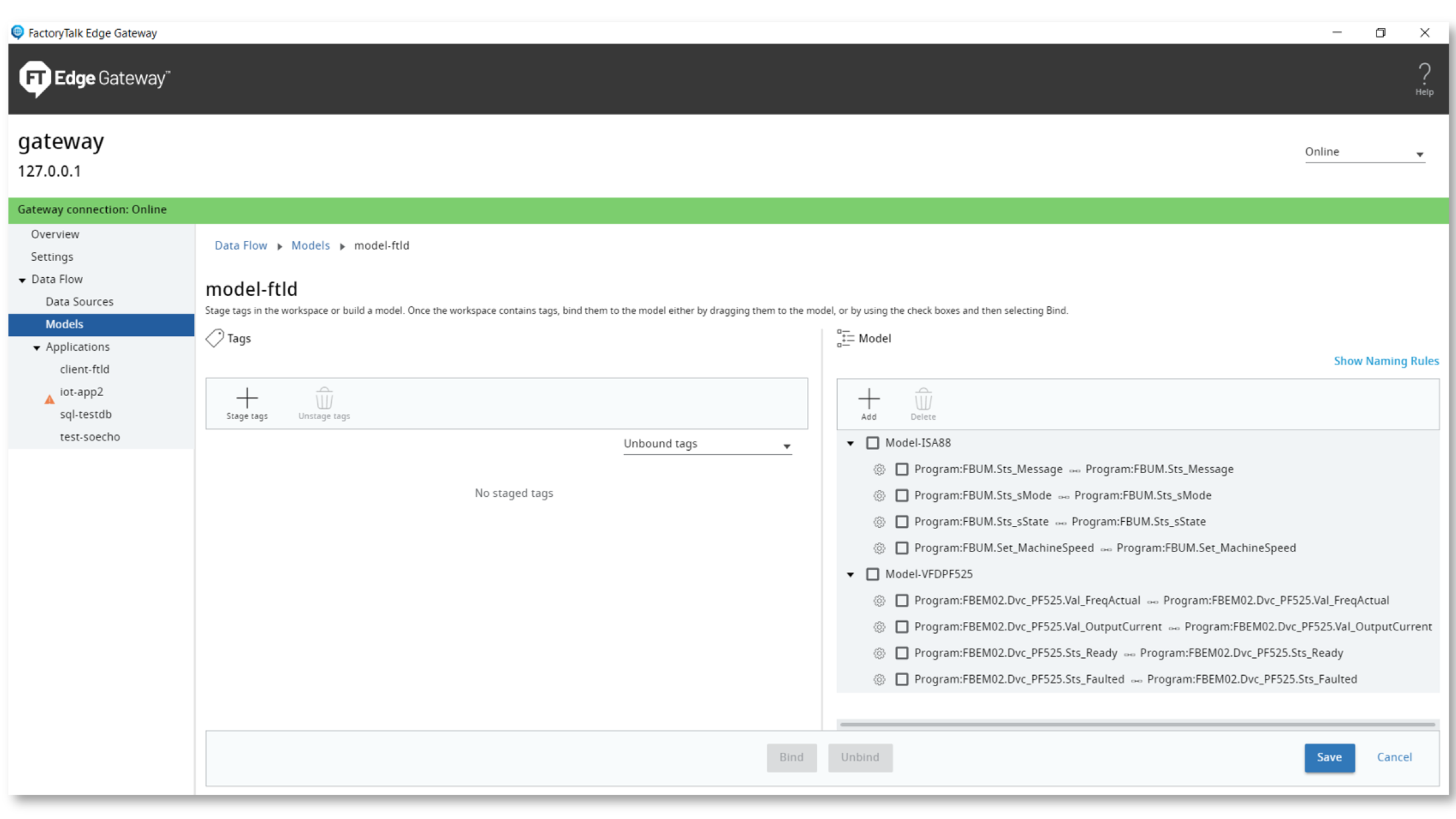
1. Identify the use cases for implementation:

1.1 Test Client Application

1.2. ThingWorx Application

1.3. SQL Server Application

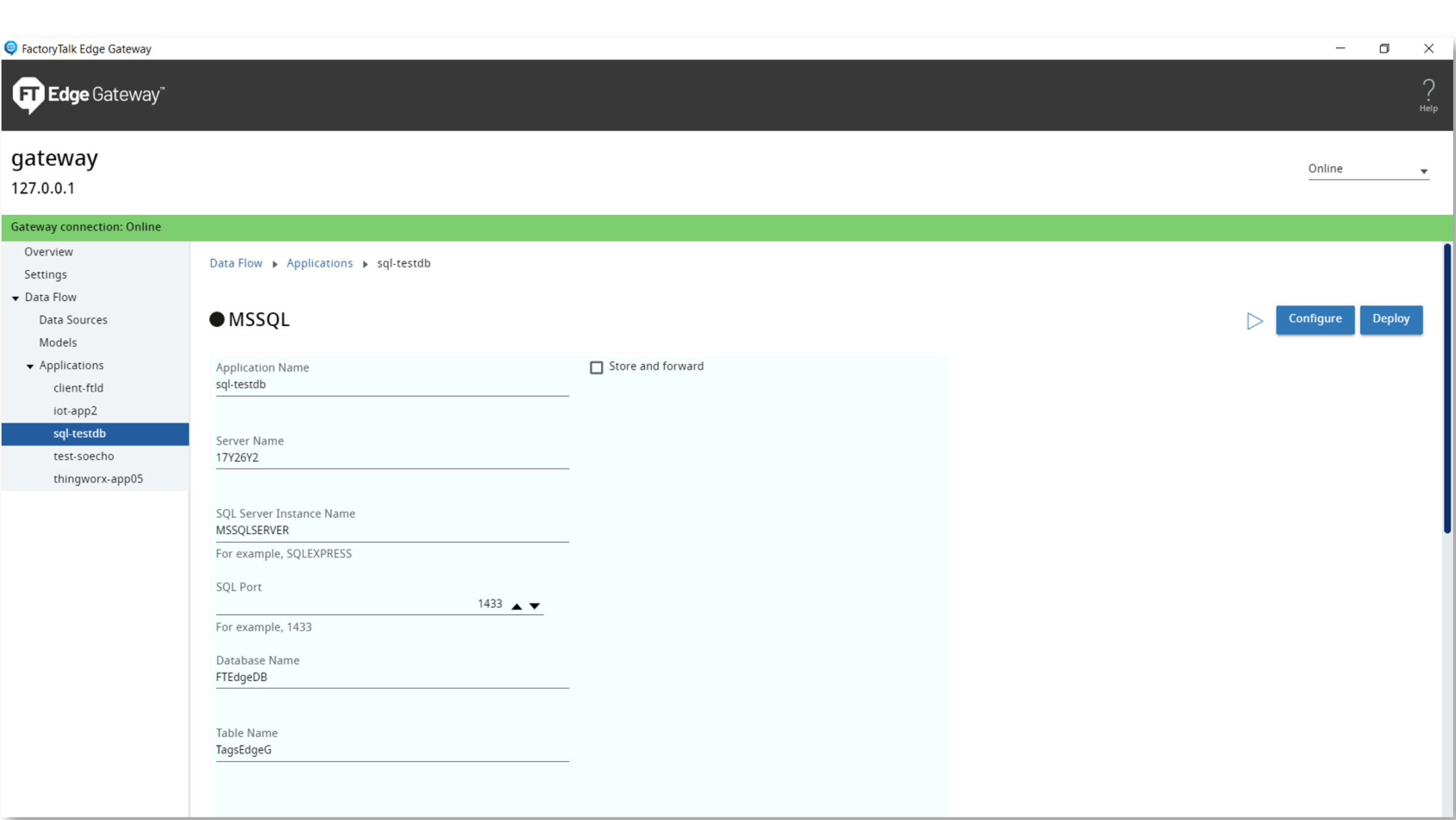
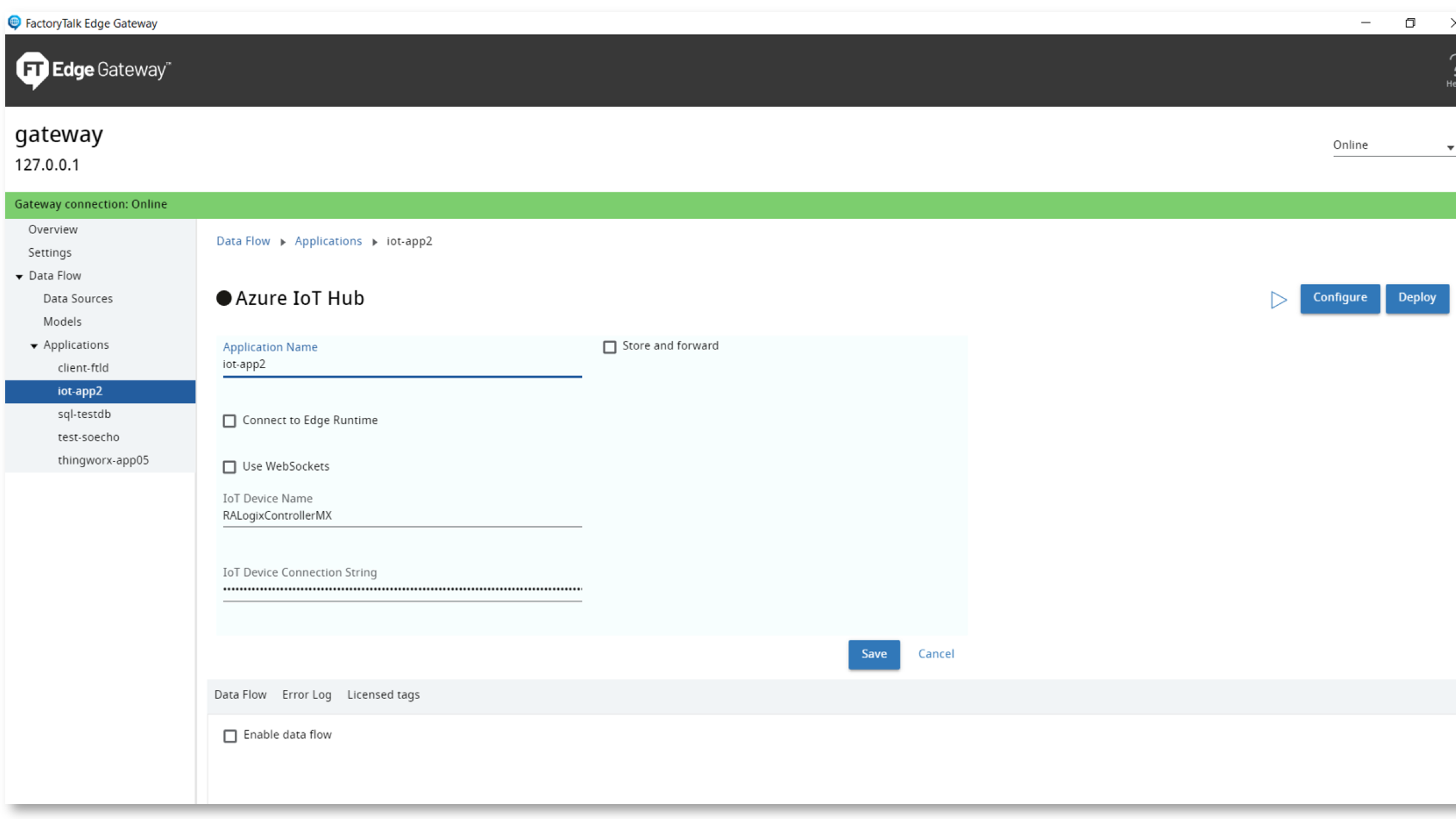
1.4. Azure IoT Hub Application

  • Step 1 - screenshot

    Step 1 - Image 1

  • Step 1 - screenshot

    Step 1 - Image 2

  • Step 1 - screenshot

    Step 1 - Image 3

  • Step 1 - screenshot

    Step 1 - Image 4

Step 1 - screenshot
Step 1 - screenshot
Step 1 - screenshot
Step 1 - screenshot

Step 2

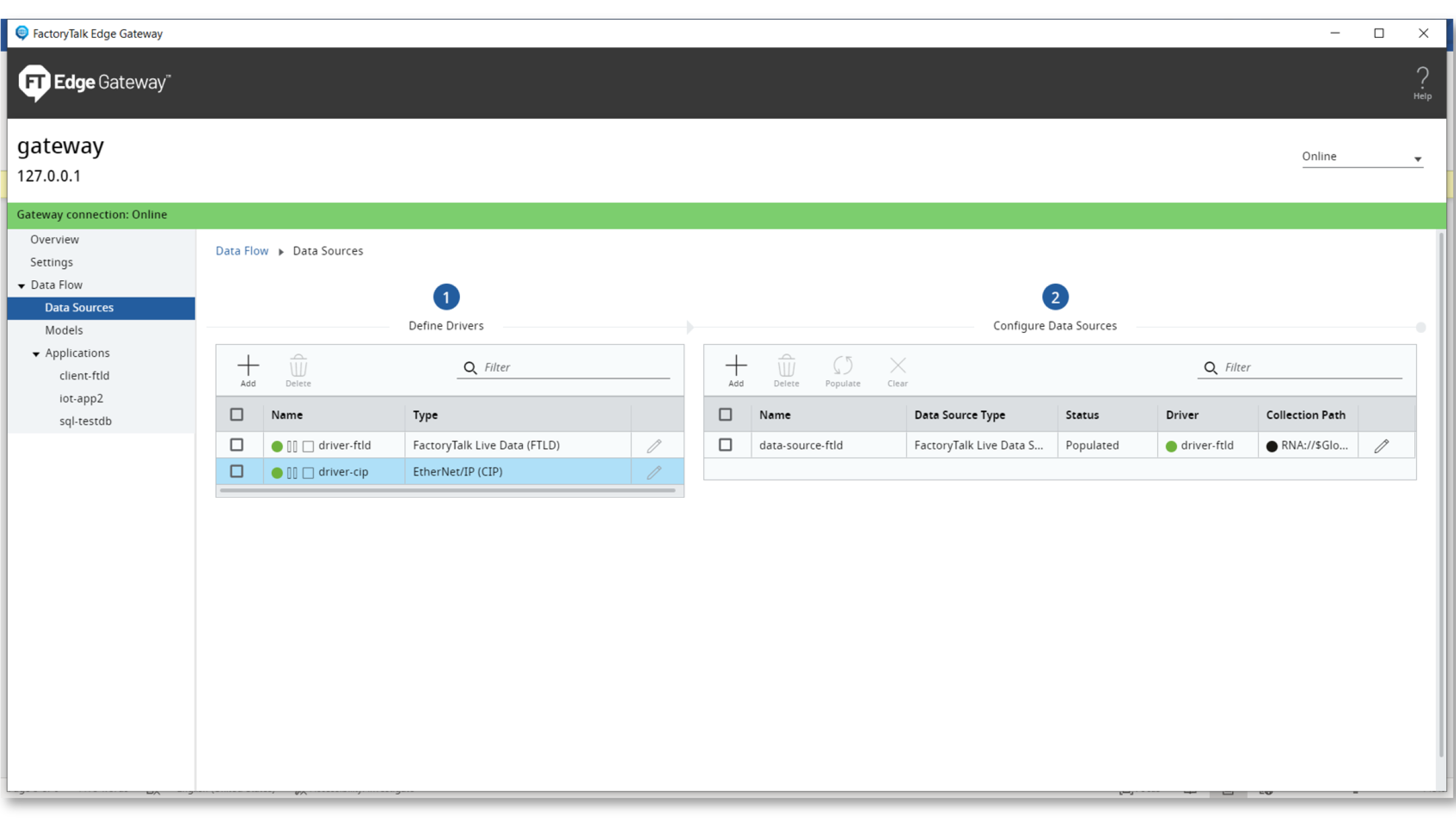
Add a driver:

1. Select Data Flow > Data Sources.

2. From Define Drivers, select Add to add a driver to the gateway.

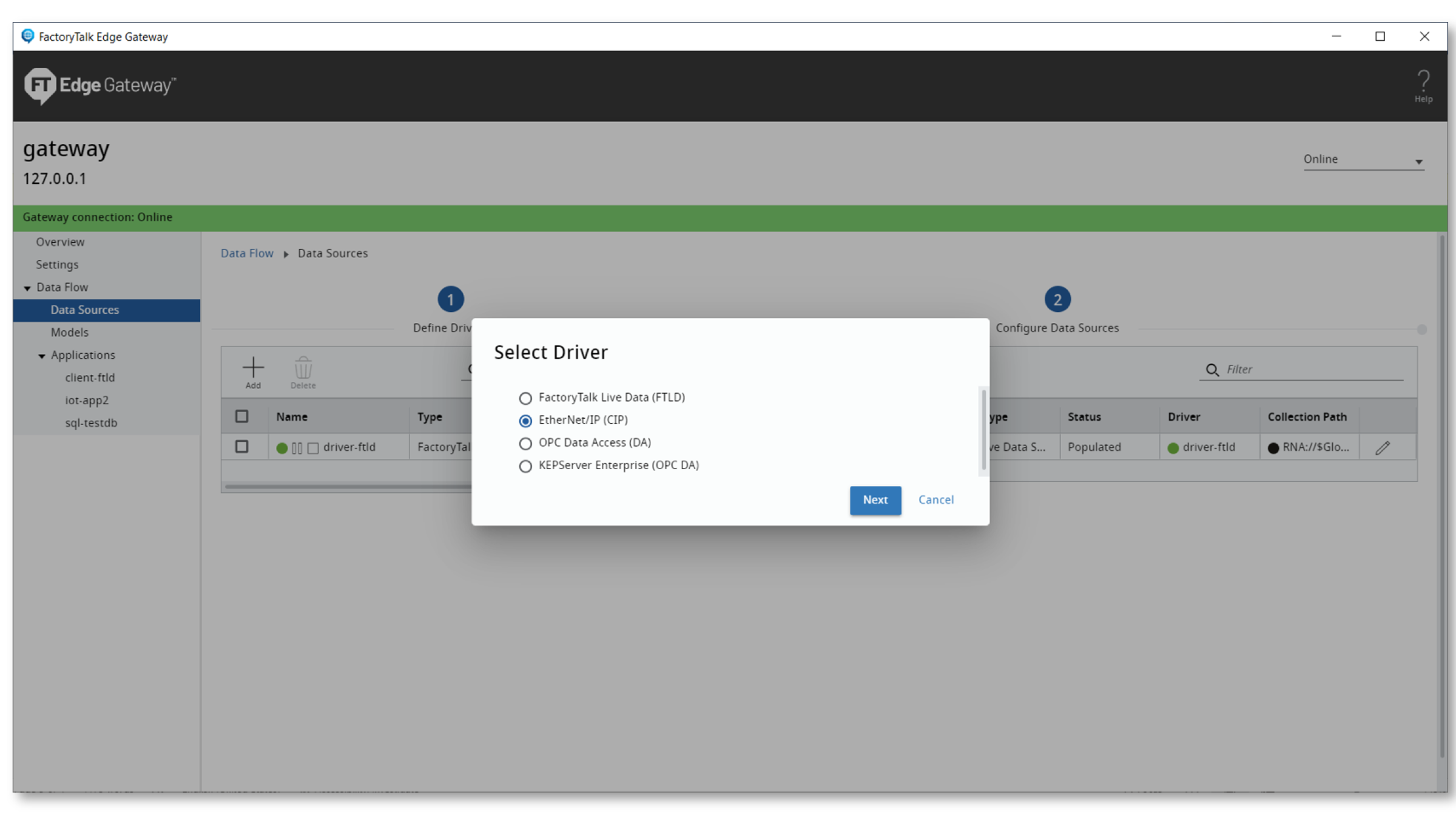
3. From Select Driver, select the driver type to configure:

  • FactoryTalk Live Data (FTLD)
  • EtherNet/IP (CIP)

4. Select Next. 

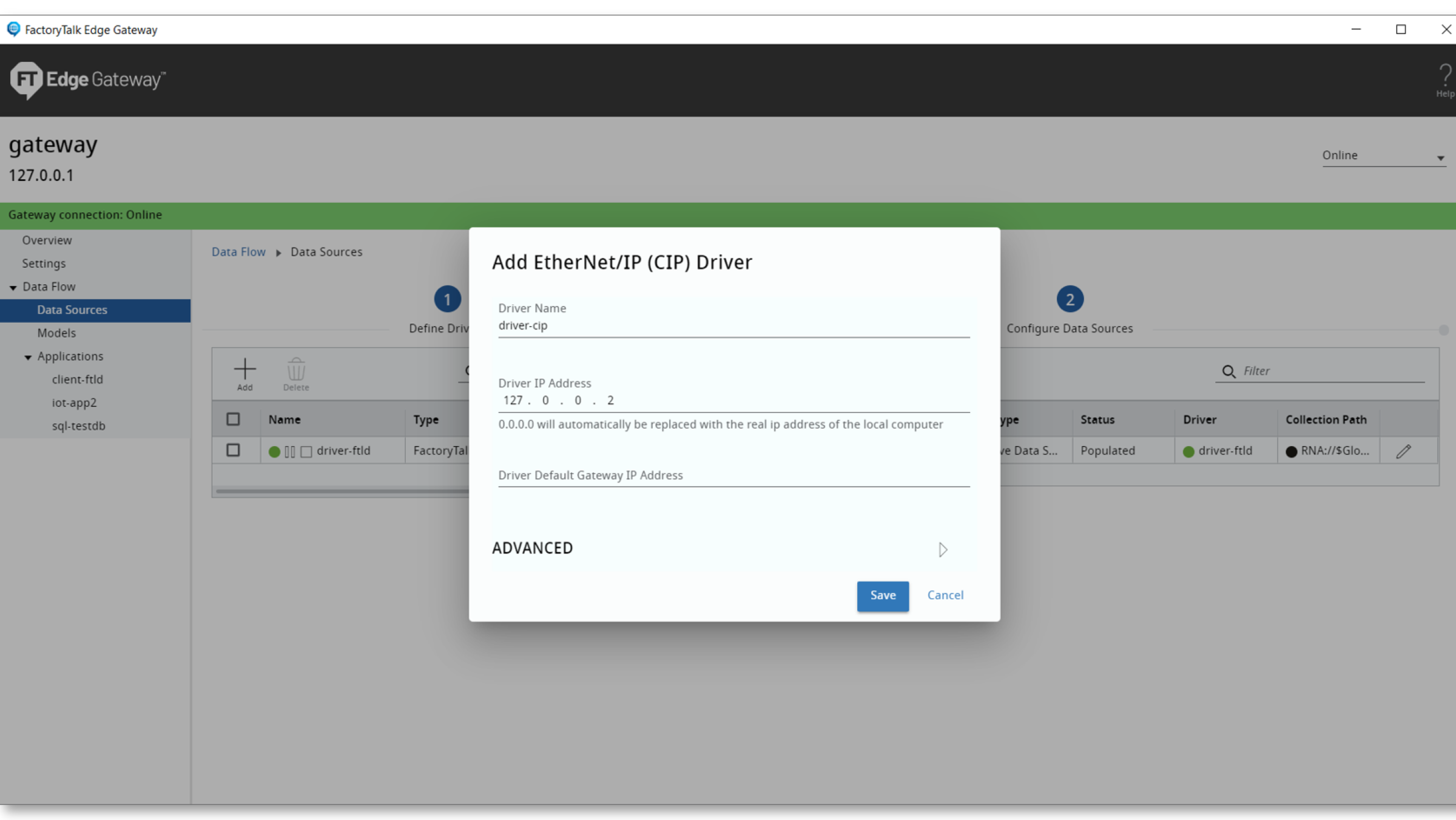
5. Enter the Driver Name and define the settings.

  • The name must contain only letters, numbers, and hyphens.
  • The settings differ for each driver type. 

6. Select Save. 

  • Step 2 - screenshot

    Step 2 - Image 1

  • Step 2 - screenshot

    Step 2 - Image 2

  • Step 2 - screenshot

    Step 2 - Image 3

Step 2 - screenshot
Step 2 - screenshot
Step 2 - screenshot

Step 3:

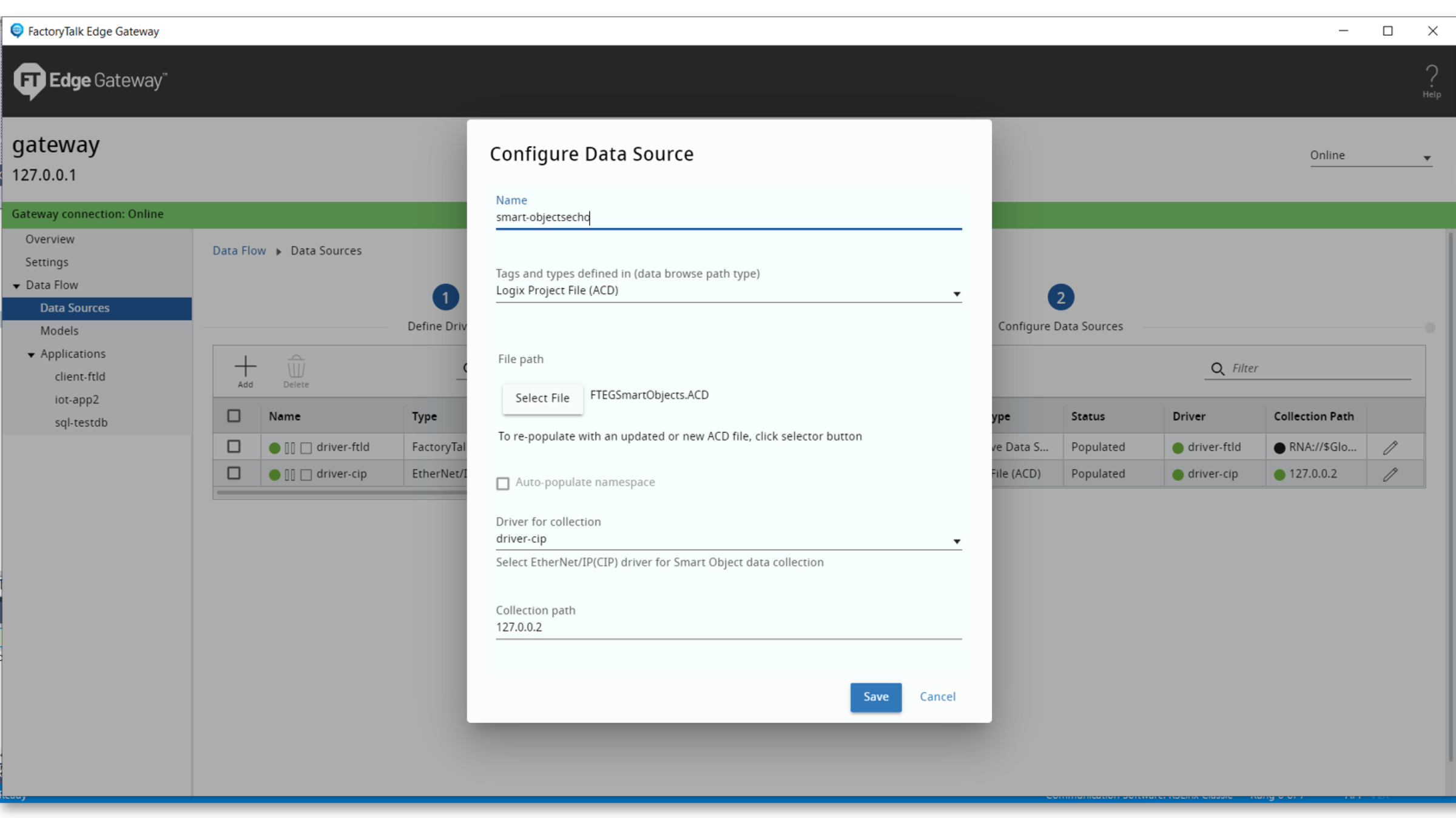
Add a data source:

1. Select Data Flow > Data Sources, and then from Configure Data Sources, add a data source.

  • To add the first data source, select Add Data Sources.
  • To add a subsequent data source, select Add. 

2. Enter the name and then from Data Browse Path Type, select Logix Project File (FTEGSmartObjects.ACD). 

• The name must contain only letters, numbers, and hyphens. 

3. Browse for the file path and select the .acd file. 

4. (optional) To generate the namespace, select Auto-populate namespace. 

5. From Driver for Collection, select the FactoryTalk Live Data or EtherNet/IP (CIP) driver. 

6. Enter the collection path.

7. Select Save to add the data source.

  • Step 3 - screenshot

    Step 3 - Image 1

  • Step 3 - screenshot

    Step 3 - Image 2

  • Step 3 - screenshot

    Step 3 - Image 3

  • Step 3 - screenshot

    Step 3 - Image 4

Step 3 - screenshot
Step 3 - screenshot
Step 3 - screenshot
Step 3 - screenshot

Step 4

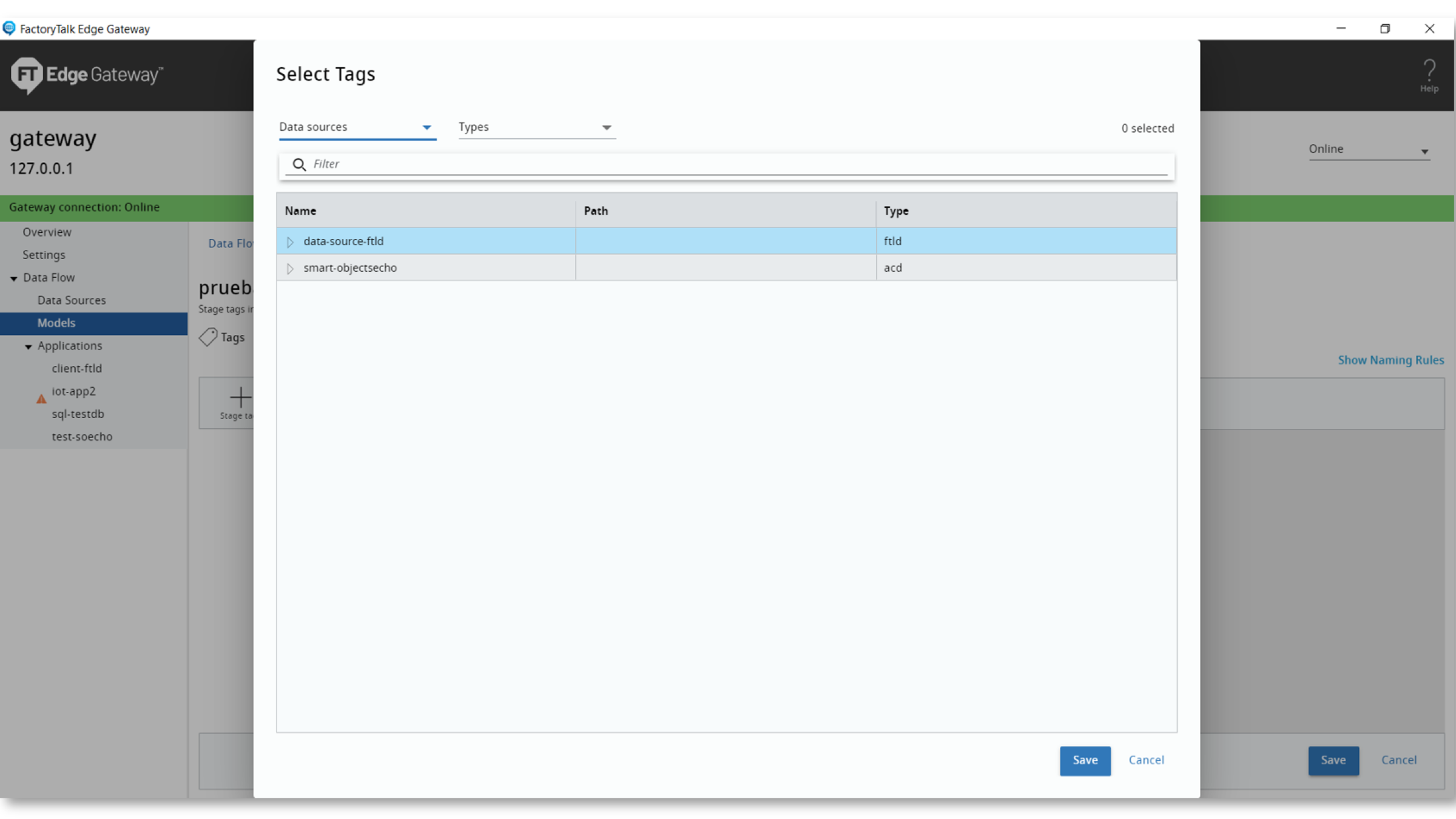
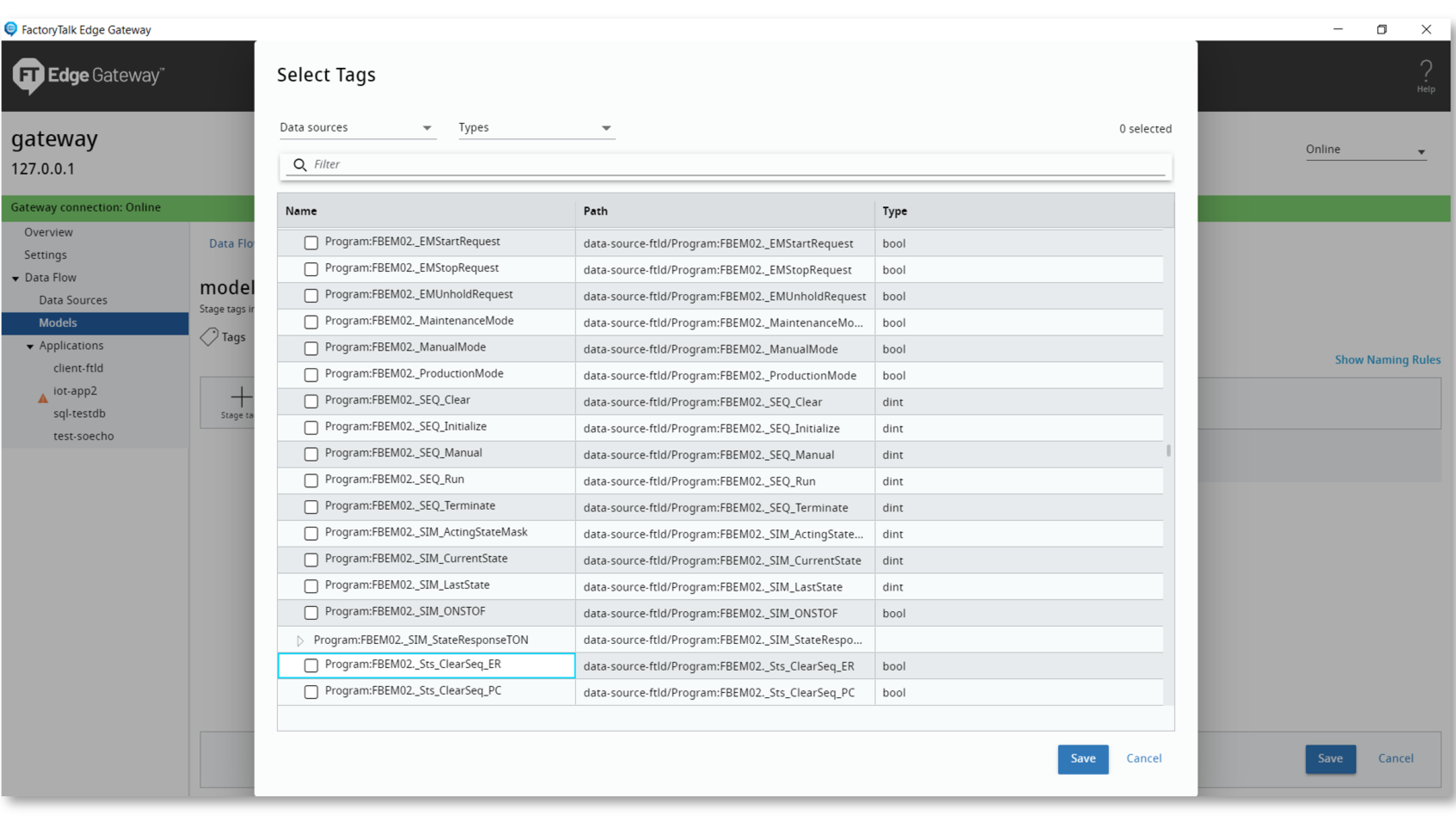
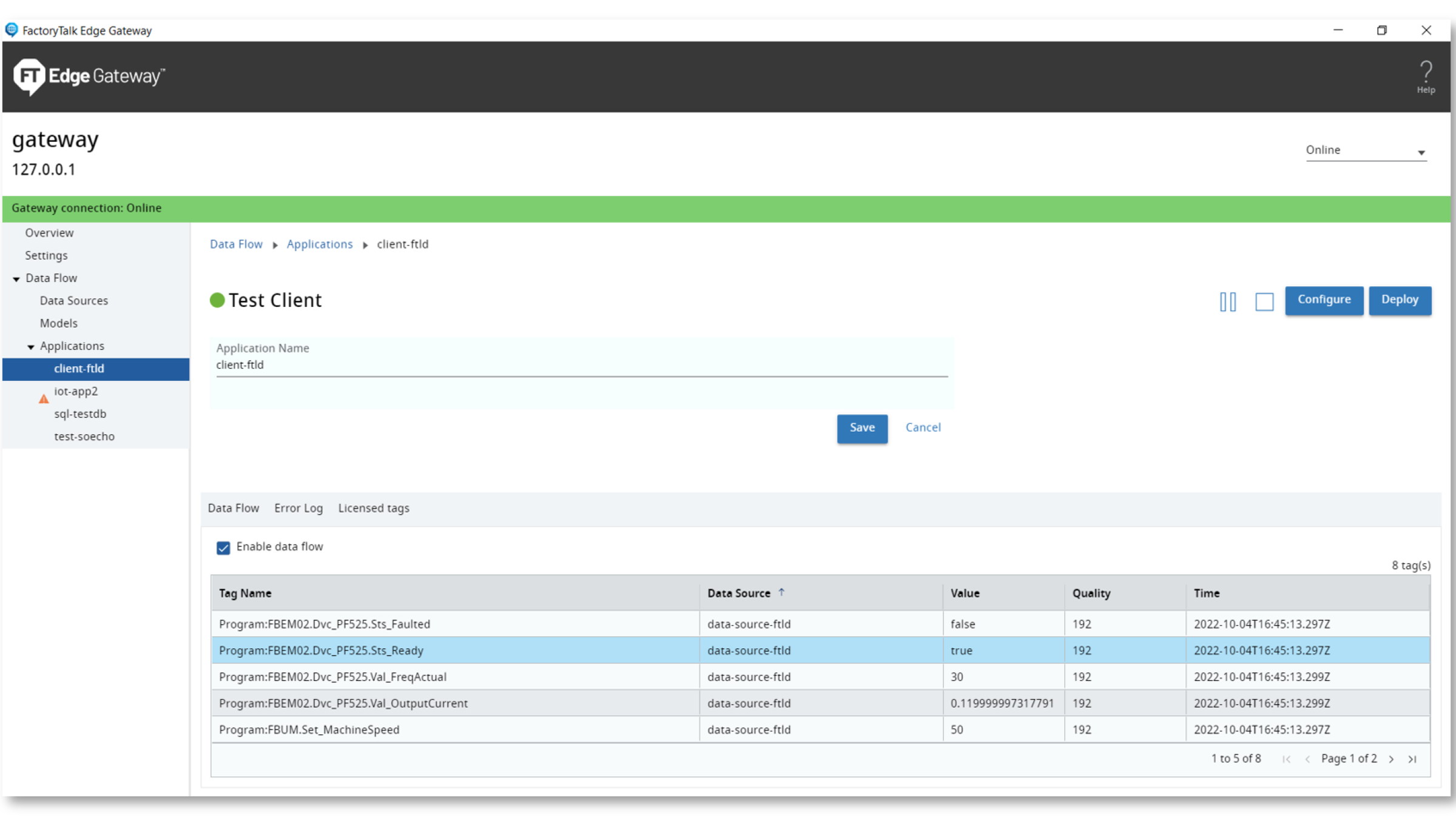
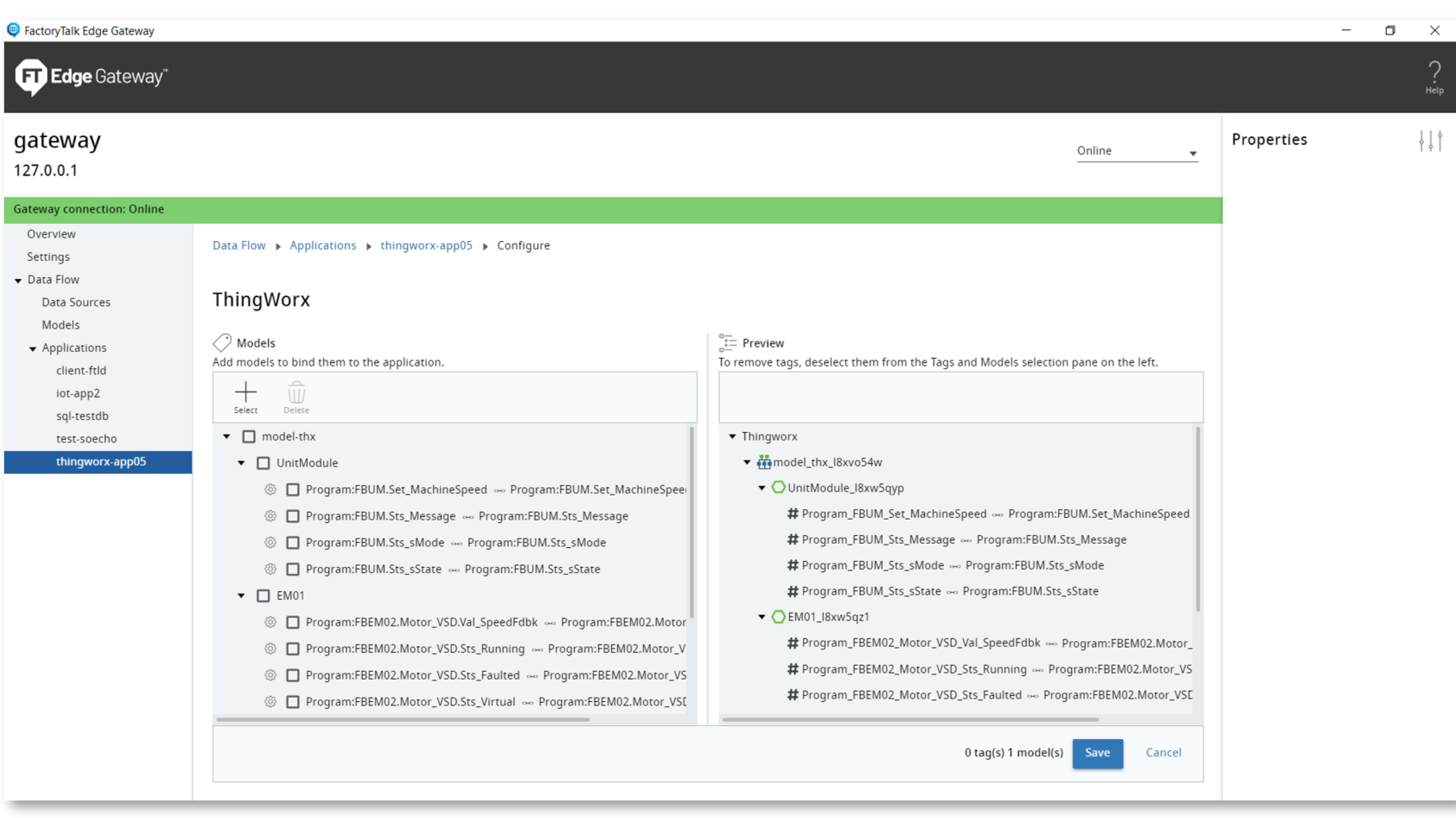
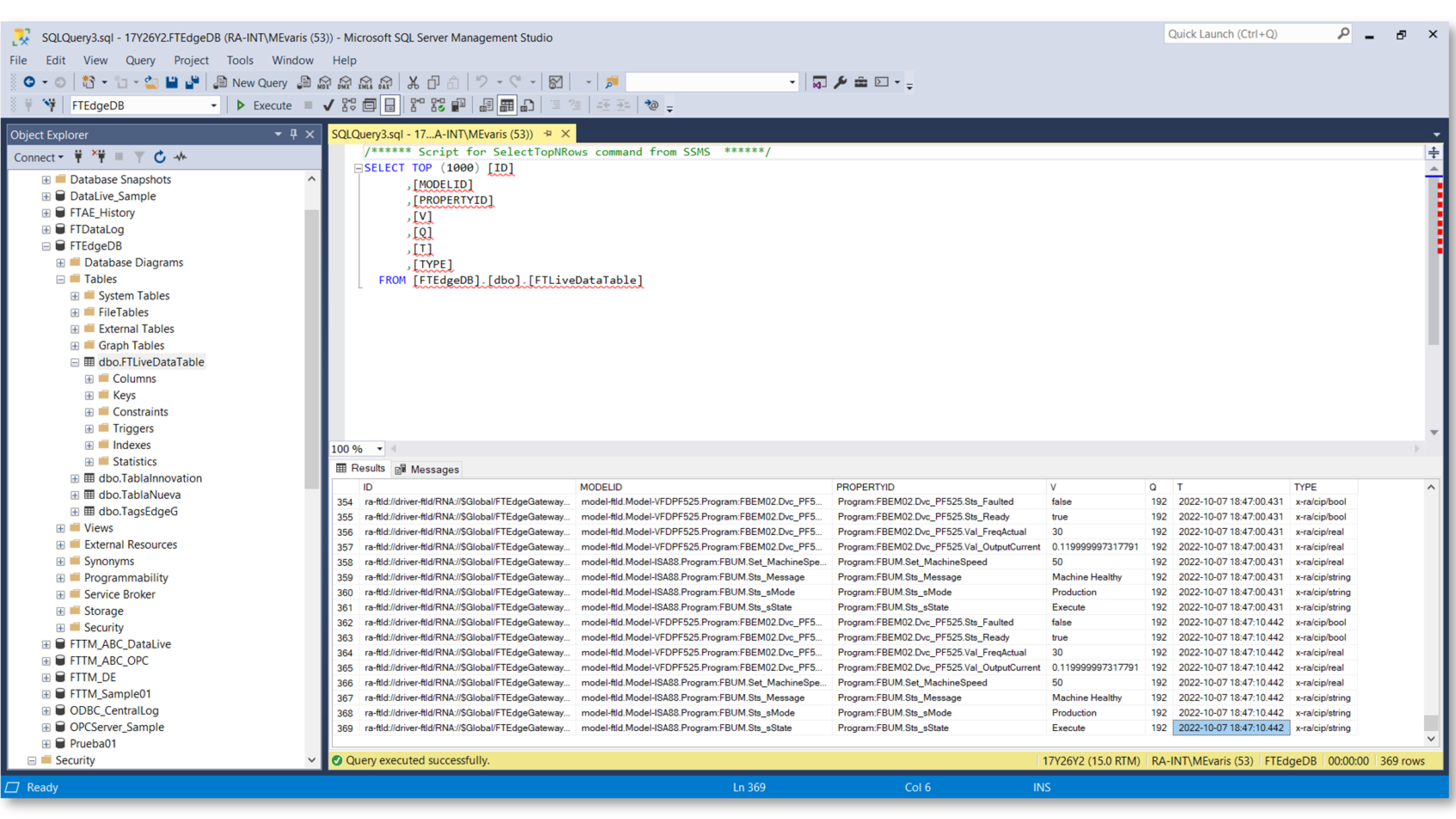
Test the application

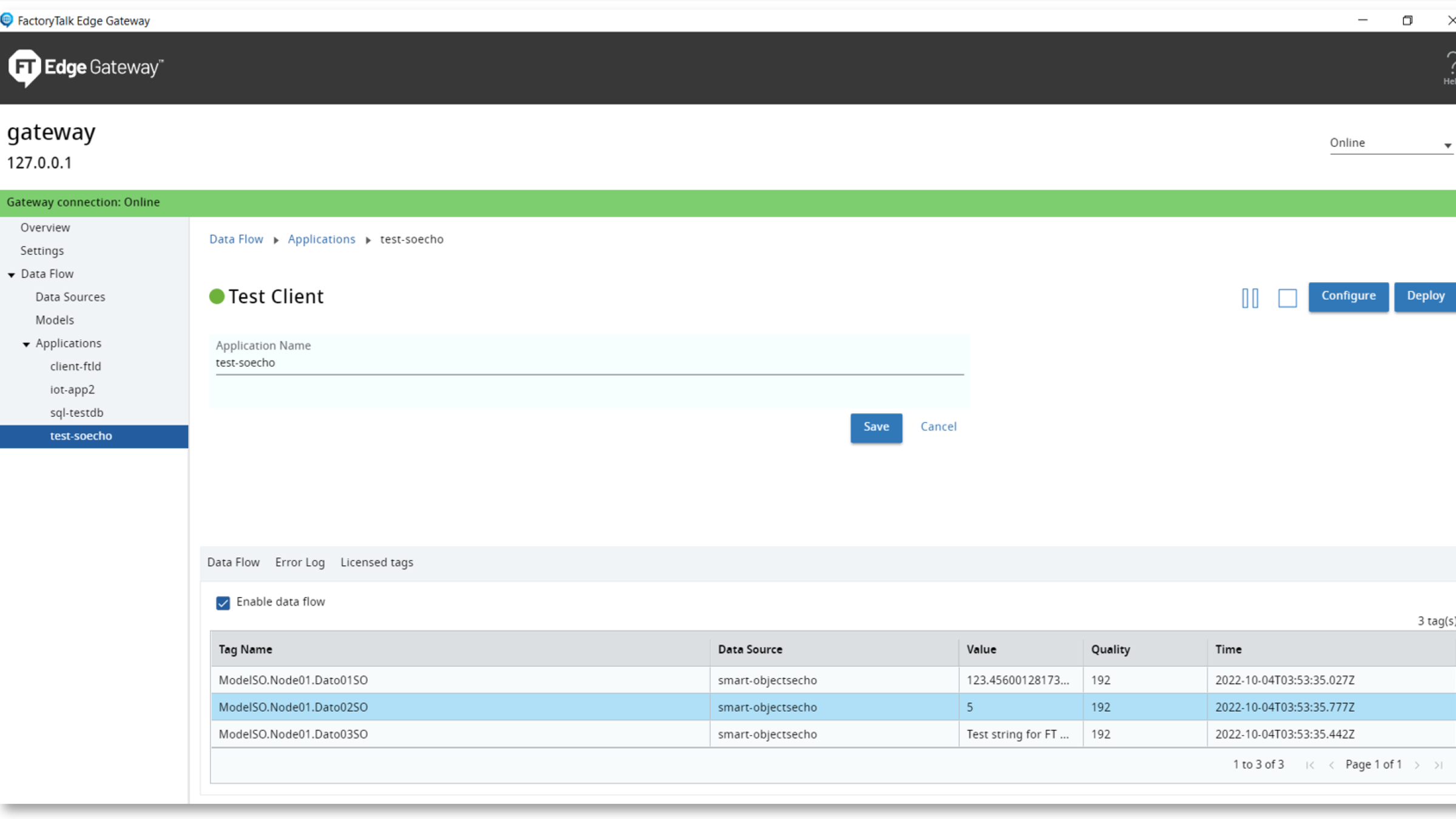
1. Test Client. The Test Client application displays live data streaming into the gateway when Enable Data Flow is selected.

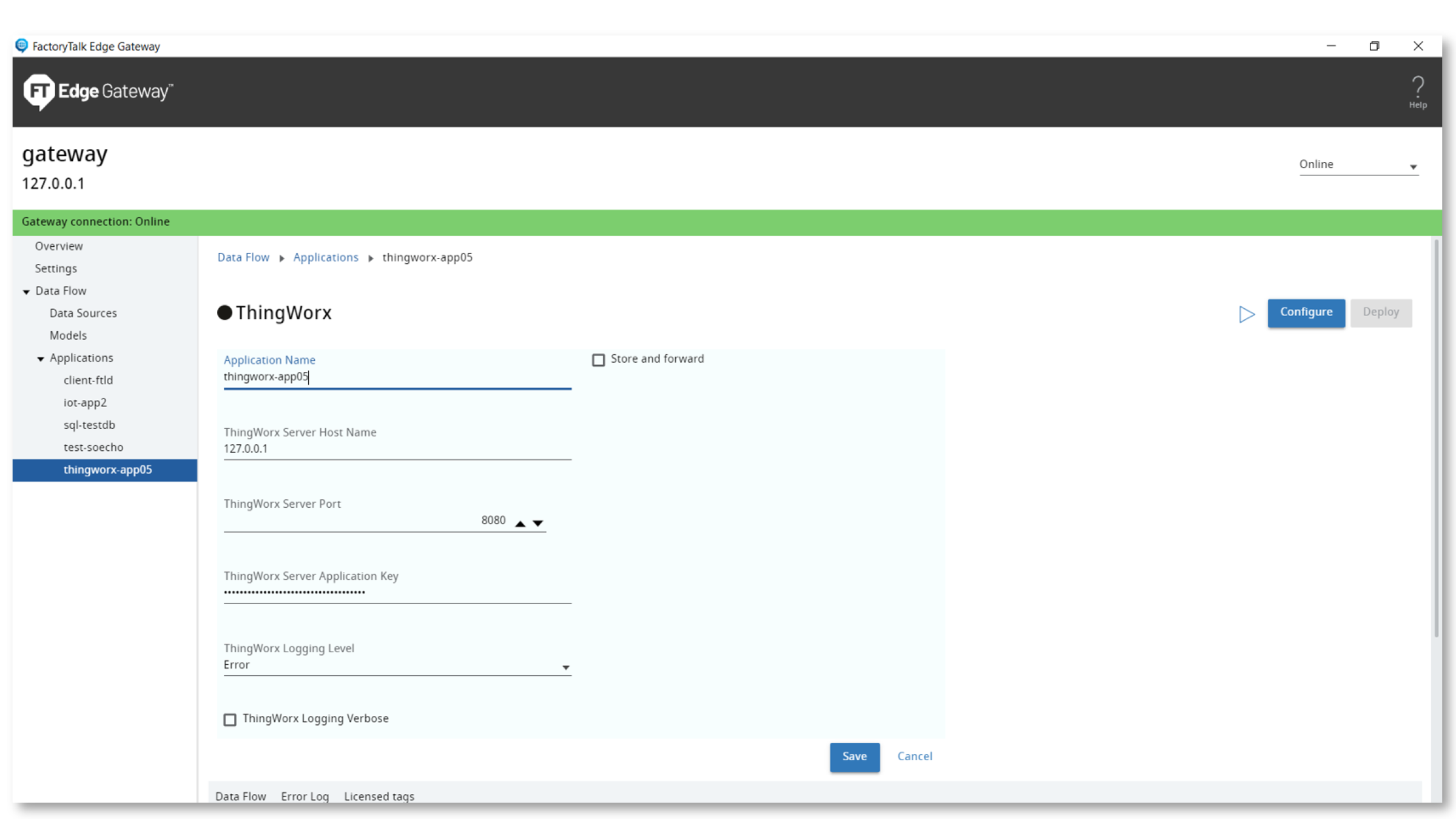
2. ThingWorx. Collect information from Rockwell Automation and third-party sources and send it to a ThingWorx Foundation server.

3. SQL Server. Provides a method to collect information from Rockwell Automation and third-party sources.

4. Azure IoT Hub.

  • Step 4 - screenshot

    Step 4 - Image 1

  • Step 4 - screenshot

    Step 4 - Image 2

  • Step 4 - screenshot

    Step 4 - Image 3

  • Step 4 - screenshot

    Step 4 - Image 4

Step 4 - screenshot
Step 4 - screenshot
Step 4 - screenshot

Step 4 - Image 3

Step 4 - screenshot
AHIC White Logo
Subscribe!

Receive new app releases and other updates from the Innovation Center directly in your inbox.

I want to subscribe.
  1. Chevron LeftChevron Left Rockwell Automation Home
  2. Chevron LeftChevron Left Sup...
  3. Chevron LeftChevron Left Pro...
  4. Chevron LeftChevron Left Downloads
  5. Chevron LeftChevron Left Innovation Center
  6. Chevron LeftChevron Left Solutions for enabling IT/OT convergence

Please update your cookie preferences to continue.
This feature requires cookies to enhance your experience. Please update your preferences to allow for these cookies:
  • Social Media Cookies
  • Functional Cookies
  • Performance Cookies
  • Marketing Cookies
  • All Cookies
You can update your preferences at any time. For more information please see our {0} Privacy Policy
CloseClose