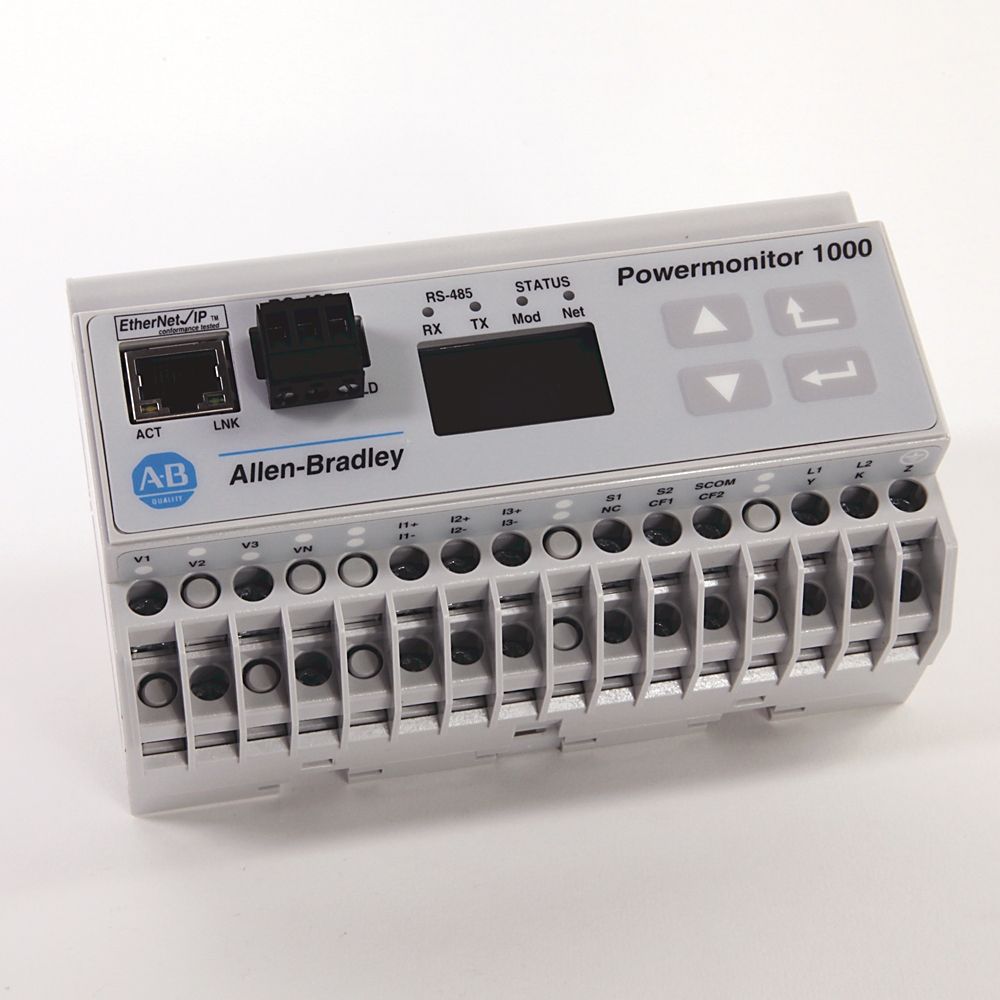
PowerMonitor 1000, Energy Monitor, ENet
PowerMonitor 1000, Energy Monitor, ENet
| Unique Product Identifier |
1408-EM3A-ENT
|
|---|---|
| UPC |
662074663545
|
| Estimated Lead Time |
5 days
|
| Standard Warranty Duration |
1 year See details |
| Country of Origin |
Mexico
|
| Accuracy |
1.00%
|
|---|---|
| Accuracy |
Voltage sense inputs: ±0.5% @ 25°C, 50/60 Hz, unity Power Factor, line-neutral rms : 347V nom / 15…399V
|
| CIP energy object |
True
|
| Communications |
EtherNet/IP
|
| Configurable via webpage |
True
|
| Configuration lock wiring terminals |
Wire together to help prevent configuration changes
|
| Control power and ground wiring terminals |
120…240V AC, 50…60 Hz
|
| Current sensing wiring terminals |
Nominal input current 5 A, Use current transformers (CTs) to connect to power system
|
| DIN rail clips |
Top and bottom clips for mounting unit on DIN rail
|
| Display (integrated LCD) |
True
|
| Ethernet network port - standard RJ45 jack with status indicators |
Ethernet network port hardware is included on all models. the port functions only on units ordered with or upgraded to the Ethernet network. the following protocols and functions are supported. Ethernet/IP Modbus TCP HTML webpage for configuration and data access lnk indicator solid green: IP link established OFF : no link established act indicator flashing yellow: data present on Ethernet port OFF : no data activity present
|
| Frequency Rating |
40-75Hz
|
| Interface |
Webpage
|
| KYZ-output wiring terminals |
DPDT solid-state relay for signaling use - not present on BC3 model
|
| LCD |
Unit configuration data display - not present on BC3 model
|
| LCD interface buttons |
Unit configuration data display navigation not present on BC3 model
|
| Mac ID label |
Aa:bb:cc:dd:ee:ff, used when assigning an IP address using DHCP, X, X, X
|
| Metering Voltage |
600VLL AC
|
| Module and network status indicators |
Module indicator GREEN: normal ops Alternating RED/GREEN: performing self-test RED (solid or blinking): initial power-up or failed self-test. network indicator GREEN: Ethernet connection established Blinking GREEN: Ethernet port looking for a connection RED: duplicate IP address detected.
|
| Output |
2 Digital Relays
|
| Serial port - three-pin RS-485 connector |
All models include RS-485 serial communication that supports the following protocols and functions. DF1 half-duplex slave, DF1 full-duplex, Modbus RTU slave, Configuration by using terminal emulation software, DH-485.
|
| Serial port status indicators |
Tx indicator flashes yellow when data is being transmitted Rx indicator flashes yellow when data is being received
|
| Status inputs |
Contact closure (internal 24V DC)(except BC3)
|
| Status-input wiring terminals Restore factory defaults wiring terminals (BC3) |
Two internally-powered inputs (TS3, EM3), S2 can be used for demand period synchronization (TS3, EM3), FD1 and FD2 can be used to restore factory default configuration (BC3).
|
| Voltage sensing wiring terminals |
Direct connect up to 600V AC three-phase line-to-line, Maximum nominal line-to-ground voltage 347V, Use potential transformers (PTs) for higher voltages.
|
| Digital accuracy |
Class1
|
|---|---|
| Digital output |
True
|
| KYZ output |
80mA @ 240V AC / 300V DC (except BC3)
|
| Alarms |
True
|
|---|
| Ampere meter |
True
|
|---|---|
| Blind power meter |
True
|
| Description |
PowerMonitor 1000 energy, demand, and PowerMonitor with serial network communication
|
| Effective power measurement device |
True
|
| Frequency meter |
True
|
| Pulse counter |
True
|
| Voltmeter |
True
|
| Energy management meter w/Ethernet |
True
|
|---|
| Control power |
85…264V AC, 47…63 Hz 125…250V DC 4VA maximum
|
|---|---|
| Current sense inputs: I1, I2, I3 |
Starting current : 5 mA
|
| Voltage sense inputs: V1, V2, V3, max |
Input current : 2 mA
|
| Voltage sense inputs: V1, V2, V3, min |
Input impedance : 5 MΩ
|
| Apparent power (kVA) |
True
|
|---|---|
| Apparent power consumption (kVAh) |
True
|
| Apparent power demand (kVA) |
True
|
| Current |
True
|
| Current unbalance |
True
|
| Demand power factor |
True
|
| Frequency |
Hz: Yes
|
| Projected kVA demand |
True
|
| Projected kVAR demand |
True
|
| Projected kW demand |
True
|
| Reactive power (kVAR) |
True
|
| Reactive power consumption (kVARh) |
True
|
| Reactive power demand (kVAR) |
True
|
| Real power (kW) |
True
|
| Real power consumption (kWh) |
True
|
| Real power demand (kW) |
True
|
| True power factor |
True
|
| Voltage |
True
|
| Voltage unbalance |
True
|
| Alarm log |
True
|
|---|---|
| Energy log |
True
|
| Load factor log |
True
|
| Minimum/maximum log |
True
|
| Time of use log |
True
|
| Unit status log |
True
|
| Dielectric withstand |
UL61010, EN61010 pollution degree 2
|
|---|---|
| Humidity |
5...95% noncondensing
|
| Operating temperature |
-10 to 60 °C
|
| Shock |
Operating : 30 G peak each axis
|
| Storage temperature |
-40 to 85 °C
|
| Terminal blocks |
0.34…2.5 mm² (22 AWG), 75 °C (167 °F) min copper wire only recommended torque 0.8 N.m (7 in-lb)
|
| Vibration |
2.0 G @ 10…500 Hz
|
| Drawings | |
|---|---|
| 3D STP (STEP) Model | Download (ZIP) |
| Dimension Drawing (PDF) | Download (PDF) |
| 2D Drawing (PDF) | Download (PDF) |
| Product Drawing | Drawing (DXF) |
| Product Drawing | Drawing (DXF) |
| Drawings |
|---|
| 3D STP (STEP) Model Download (ZIP) |
| Dimension Drawing (PDF) Download (PDF) |
| 2D Drawing (PDF) Download (PDF) |
| Product Drawing Drawing (DXF) |
| Product Drawing Drawing (DXF) |
Click the Download CAD button below to view all file formats available for download.
| General | Publication |
|---|---|
| Product Profile | -- |
| Product Cutsheet | -- |
| User Manual | Publication |
|---|---|
| 1408-um002_-en-p | 1408-UM002 |

This product was certified with the above certifications as of 2026-09-13. Products sold before or after this date might carry different certifications. Please review the product label to check for the certifications your specific product carries.
Looking for certification documents?
Explore certifications for this product and more in our comprehensive Literature Library.
| EU Importer Address |
Rockwell Automation N.V |
|---|---|
| EU Authorized Representative Address |
Rockwell Automation N.V |
| Technotes |
|---|
Overview
| Unique Product Identifier |
1408-EM3A-ENT
|
|---|---|
| UPC |
662074663545
|
| Estimated Lead Time |
5 days
|
| Standard Warranty Duration |
1 year See details |
| Country of Origin |
Mexico
|
Electrical & Connectivity
| Accuracy |
1.00%
|
|---|---|
| Accuracy |
Voltage sense inputs: ±0.5% @ 25°C, 50/60 Hz, unity Power Factor, line-neutral rms : 347V nom / 15…399V
|
| CIP energy object |
True
|
| Communications |
EtherNet/IP
|
| Configurable via webpage |
True
|
| Configuration lock wiring terminals |
Wire together to help prevent configuration changes
|
| Control power and ground wiring terminals |
120…240V AC, 50…60 Hz
|
| Current sensing wiring terminals |
Nominal input current 5 A, Use current transformers (CTs) to connect to power system
|
| DIN rail clips |
Top and bottom clips for mounting unit on DIN rail
|
| Display (integrated LCD) |
True
|
| Ethernet network port - standard RJ45 jack with status indicators |
Ethernet network port hardware is included on all models. the port functions only on units ordered with or upgraded to the Ethernet network. the following protocols and functions are supported. Ethernet/IP Modbus TCP HTML webpage for configuration and data access lnk indicator solid green: IP link established OFF : no link established act indicator flashing yellow: data present on Ethernet port OFF : no data activity present
|
| Frequency Rating |
40-75Hz
|
| Interface |
Webpage
|
| KYZ-output wiring terminals |
DPDT solid-state relay for signaling use - not present on BC3 model
|
| LCD |
Unit configuration data display - not present on BC3 model
|
| LCD interface buttons |
Unit configuration data display navigation not present on BC3 model
|
| Mac ID label |
Aa:bb:cc:dd:ee:ff, used when assigning an IP address using DHCP, X, X, X
|
| Metering Voltage |
600VLL AC
|
| Module and network status indicators |
Module indicator GREEN: normal ops Alternating RED/GREEN: performing self-test RED (solid or blinking): initial power-up or failed self-test. network indicator GREEN: Ethernet connection established Blinking GREEN: Ethernet port looking for a connection RED: duplicate IP address detected.
|
| Output |
2 Digital Relays
|
| Serial port - three-pin RS-485 connector |
All models include RS-485 serial communication that supports the following protocols and functions. DF1 half-duplex slave, DF1 full-duplex, Modbus RTU slave, Configuration by using terminal emulation software, DH-485.
|
| Serial port status indicators |
Tx indicator flashes yellow when data is being transmitted Rx indicator flashes yellow when data is being received
|
| Status inputs |
Contact closure (internal 24V DC)(except BC3)
|
| Status-input wiring terminals Restore factory defaults wiring terminals (BC3) |
Two internally-powered inputs (TS3, EM3), S2 can be used for demand period synchronization (TS3, EM3), FD1 and FD2 can be used to restore factory default configuration (BC3).
|
| Voltage sensing wiring terminals |
Direct connect up to 600V AC three-phase line-to-line, Maximum nominal line-to-ground voltage 347V, Use potential transformers (PTs) for higher voltages.
|
| Digital accuracy |
Class1
|
|---|---|
| Digital output |
True
|
| KYZ output |
80mA @ 240V AC / 300V DC (except BC3)
|
| Alarms |
True
|
|---|
| Ampere meter |
True
|
|---|---|
| Blind power meter |
True
|
| Description |
PowerMonitor 1000 energy, demand, and PowerMonitor with serial network communication
|
| Effective power measurement device |
True
|
| Frequency meter |
True
|
| Pulse counter |
True
|
| Voltmeter |
True
|
| Energy management meter w/Ethernet |
True
|
|---|
Technical Specifications
| Control power |
85…264V AC, 47…63 Hz 125…250V DC 4VA maximum
|
|---|---|
| Current sense inputs: I1, I2, I3 |
Starting current : 5 mA
|
| Voltage sense inputs: V1, V2, V3, max |
Input current : 2 mA
|
| Voltage sense inputs: V1, V2, V3, min |
Input impedance : 5 MΩ
|
| Apparent power (kVA) |
True
|
|---|---|
| Apparent power consumption (kVAh) |
True
|
| Apparent power demand (kVA) |
True
|
| Current |
True
|
| Current unbalance |
True
|
| Demand power factor |
True
|
| Frequency |
Hz: Yes
|
| Projected kVA demand |
True
|
| Projected kVAR demand |
True
|
| Projected kW demand |
True
|
| Reactive power (kVAR) |
True
|
| Reactive power consumption (kVARh) |
True
|
| Reactive power demand (kVAR) |
True
|
| Real power (kW) |
True
|
| Real power consumption (kWh) |
True
|
| Real power demand (kW) |
True
|
| True power factor |
True
|
| Voltage |
True
|
| Voltage unbalance |
True
|
| Alarm log |
True
|
|---|---|
| Energy log |
True
|
| Load factor log |
True
|
| Minimum/maximum log |
True
|
| Time of use log |
True
|
| Unit status log |
True
|
Compliance & Environment
| Dielectric withstand |
UL61010, EN61010 pollution degree 2
|
|---|---|
| Humidity |
5...95% noncondensing
|
| Operating temperature |
-10 to 60 °C
|
| Shock |
Operating : 30 G peak each axis
|
| Storage temperature |
-40 to 85 °C
|
| Terminal blocks |
0.34…2.5 mm² (22 AWG), 75 °C (167 °F) min copper wire only recommended torque 0.8 N.m (7 in-lb)
|
| Vibration |
2.0 G @ 10…500 Hz
|
Drawings
| Drawings | |
|---|---|
| 3D STP (STEP) Model | Download (ZIP) |
| Dimension Drawing (PDF) | Download (PDF) |
| 2D Drawing (PDF) | Download (PDF) |
| Product Drawing | Drawing (DXF) |
| Product Drawing | Drawing (DXF) |
| Drawings |
|---|
| 3D STP (STEP) Model Download (ZIP) |
| Dimension Drawing (PDF) Download (PDF) |
| 2D Drawing (PDF) Download (PDF) |
| Product Drawing Drawing (DXF) |
| Product Drawing Drawing (DXF) |
Click the Download CAD button below to view all file formats available for download.
Documents
|
Product Profile
General
-- |
|
Product Cutsheet
General
-- |
|
1408-um002_-en-p
User Manual
1408-UM002 |
| General | Publication |
|---|---|
| Product Profile | -- |
| Product Cutsheet | -- |
| User Manual | Publication |
| 1408-um002_-en-p | 1408-UM002 |
Downloads
Certifications
This product was certified with the above certifications as of 2026-09-13. Products sold before or after this date might carry different certifications. Please review the product label to check for the certifications your specific product carries.
Looking for certification documents?
Explore certifications for this product and more in our comprehensive Literature Library.
| EU Importer Address |
Rockwell Automation N.V |
|---|---|
| EU Authorized Representative Address |
Rockwell Automation N.V |
Accessories
Technotes
| Technotes |
|---|