
Use Network Address Translation (NAT) with CIP Safety Devices
Network Address Translation (NAT) translates one IP address to another IP address via a NAT-configured router or switch. The router or switch translates the source and destination addresses within data packets as traffic passes between subnets.
This service is useful if you must reuse IP addresses throughout a network. For example, NAT makes it possible for devices to be segmented into multiple identical private subnets while maintaining unique identities on the public subnet, such as for multiple identical machines or lines.
This section only applies to safety users where the controller and the devices it talks to are on separate sides of the NAT-configured router or switch.
With
CIP Safety™
, the IP address of the device is part of the unique node reference that is part of the protocol. The device compares the IP address portion of the unique node reference in CIP Safety™
packets to its own IP address, and rejects any packets where they do not match. The IP address in the unique node reference must be the NAT'ed IP address. The controller uses the translated address, but the CIP Safety™
protocol requires the actual address of the device. If you use NAT to communicate with a
CIP Safety™
device, follow these steps to set the IP address.- In the IP Address field, enter the IP address for the controller. This is usually the IP address on the public network when using NAT.
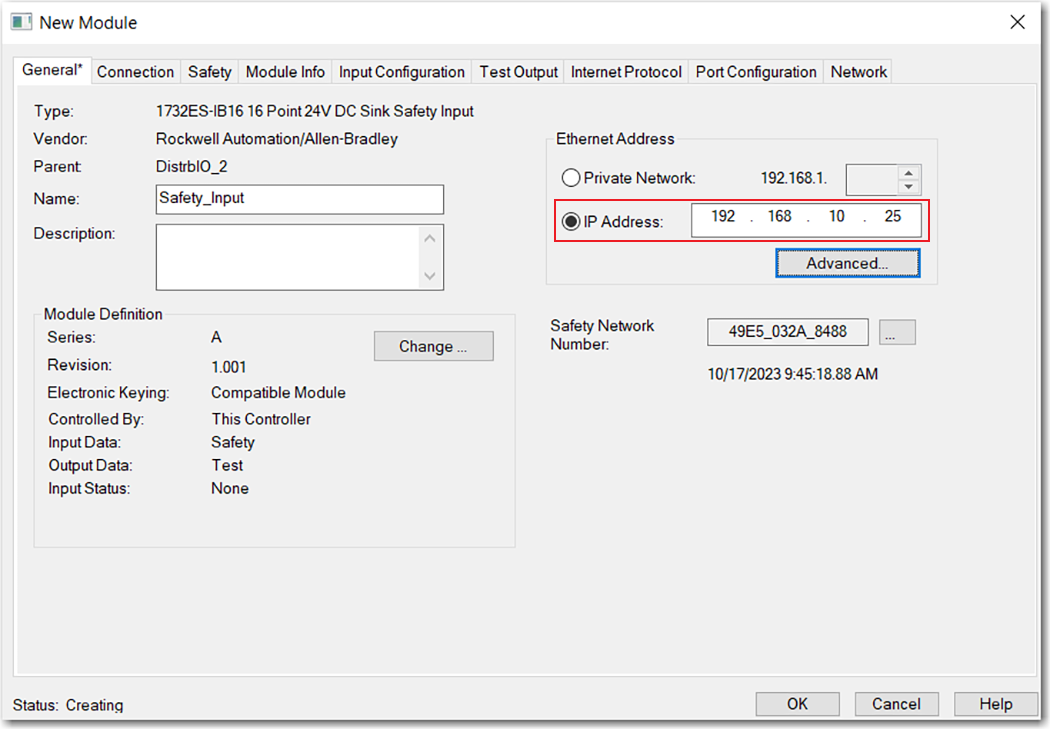
- Click Advanced to open the Advanced Ethernet Settings dialog box.

- Select the checkbox to indicate that this device and the controller communicate through NAT devices.
- Enter the actual device address.TIP:If you configured the IP address using the rotary switches, this is the address, you set on the device. Alternately, the actual device address is the same address that is shown on the Internet Protocol tab.
- Click OK.
Provide Feedback