
Sine (SIN)
The SIN instruction takes the sine of the Source value (in radians) and stores the result
in the Destination. The SIN operator or function computes the sine of Source and returns the
floating point result. The resulting value is always greater than or equal to -1 and less
than or equal to 1.
Available Languages
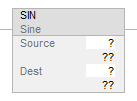
Ladder Diagram
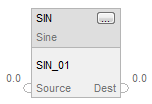
Function Block Diagram
Function Block Diagram supports these elements:
FBD Block
FBD Function

Structured Text
This instruction is not available in structured text.
TIP:
Use SIN as an operator in an expression to compute the same result. Refer to
Structured Text Syntax for more information on the syntax of
expressions and assignments within structured text.
Operands
IMPORTANT:
Unexpected operation may occur if:
- Output tag operands are overwritten.
- Members of a structure operand are overwritten.
- Except when specified, structure operands are shared by multiple instructions.
There are data conversion rules for mixing numeric data types within an instruction. See
Data Conversions.
Ladder Diagram
Operand | Data Type | Format | Description |
Source | SINT INT DINT LINT USINT UINT UDINT ULINT REAL LREAL | Immediate tag | Value to convert to sine. |
Destination | REAL LREAL | tag | Tag to store the result of the instruction. |
Function Block Diagram
FBD Block
Operand | Type | Format | Description |
SIN tag | FBD_MATH_ADVANCED | tag | SIN structure |
FBD_MATH_ADVANCED Structure
Input Parameter | Data Type | Description |
EnableIn | BOOL | Enable input. If false, the instruction does not execute and outputs are not
updated. Default is true. |
Source | REAL | Input to the trigonometric instruction. |
Output Parameter | Data Type | Description |
EnableOut | BOOL | Indicates if the instruction executed without fault when it was enabled. |
Dest | REAL | Result of the instruction. |
FBD Function
Operand | Data Type | Description |
Source | SINT INT DINT LINT USINT UINT UDINT ULINT REAL LREAL | Value to convert to sine. |
Output Operand (Right Pin) | Data Type | Description |
Dest | REAL LREAL | Result of the function. |
See FBD Functions.
Operator Aspects
The SIN operator can be used in various expressions. Similarly, the SIN function is invoked
in Structured Text statements. Both applications of SIN return a floating point result
containing the sine of the Source. Depending on the context, this value may then be type
converted if appropriate.
Affects Math Status Flags
Conditional
See Math Status Flags.
Major/Minor Faults
None specific to this instruction. See Index Through Arrays for array-indexing faults.
Execution
Ladder Diagram
Condition/State | Action Taken |
Prescan | N/A. |
Rung-condition-in is false | Set Rung-condition-out to Rung-condition-in. |
Rung-condition-in is true | Set Rung-condition-out to Rung-condition-in. Dest = sine value of the Source. |
Postscan | N/A |
Function Block
Condition/State | Action Taken |
Prescan | N/A |
EnableIn is false | Set EnableOut to EnableIn. |
EnableIn is true | Dest = sine value of the Source. If overflow occurs Clear EnableOut to false. else Set EnableOut to true. |
Instruction first run | N/A |
Instruction first scan | N/A |
Postscan | N/A |
FBD Function
Condition/State | Action Taken |
Prescan | N/A |
Normal Scan | Dest = sine value of the Source. |
Instruction first run | N/A |
Instruction first scan | N/A |
Postscan | N/A |
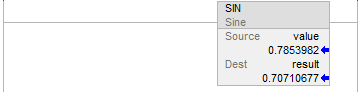
Example
Ladder Diagram
Function Block Diagram
FBD Block
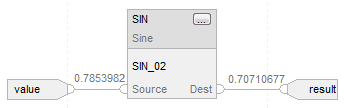
FBD Function

Structured Text
REAL_dest := SIN(REAL_src);
Provide Feedback