
Reset (RES)
The RES instruction resets a TIMER, COUNTER, or CONTROL structure.
Available Languages
Ladder Diagram

Function Block
This instruction is not available in function block.
Structured Text
This instruction is not available in structured text.
Operands
IMPORTANT:
Unexpected operation may occur if:
- Output tag operands are overwritten.
- Members of a structure operand are overwritten.
- Except when specified, structure operands are shared by multiple instructions.
Ladder Diagram
Operand | Data Type | Format | Description |
Structure | TIMER TIMER_T CONTROL COUNTER | Tag | Structure to reset |
Description
When true, the RES instruction clears these elements:
When using a RES instruction for a: | The instruction clears: |
TIMER | .ACC value to 0 control status bits to false |
TIMER_T | .ACC value to 0 control status bits to false |
COUNTER | .ACC value to 0 control status bits to false |
CONTROL | .POS value to 0 control status bits to false |
Affects Math Status Flags
No
Major/Minor Faults
None specific to this instruction. See Index through arrays for array-indexing faults.
Execution
Ladder Diagram
Condition/State | Action Taken |
Prescan | N/A |
Rung-condition-in is false | Set Rung-condition-out to Rung-condition-in. |
Rung-condition-in is true | Set Rung-condition-out to Rung-condition-in. Reset the specified structure. |
Postscan | N/A |
Example
Ladder Diagram
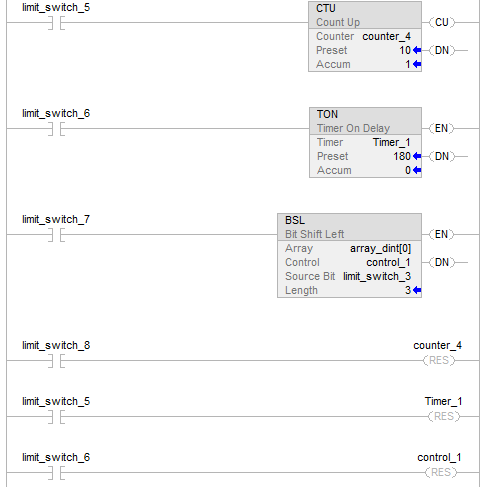
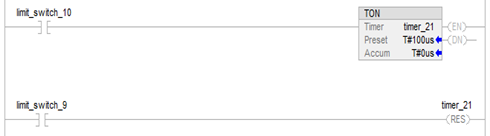
Reset Example
In the preceding example:
when limit_switch_8 is enabled, reset counter_4
when limit_switch_5 is enabled, reset Timer_1
when limit_switch_6 is enabled, reset control_1
when limit_switch_9 is enabled, reset timer_21
Provide Feedback