
Determine Controller Memory Information
This information is not applicable to the
Compact GuardLogix 5380, CompactLogix 5380,
CompactLogix 5390, ControlLogix 5580, GuardLogix 5580, and
ControlLogix 5590 controllers
. In these controllers, the memory used attributes are not supported or accessible.The memory of the controller is divided into I/O memory and expansion memory. This table
shows how the controller uses each type of memory:
This | Uses memory from |
|---|---|
I/O tags | I/O memory |
produced tags | |
consumed tags | |
communication via MSG instructions | |
communication with workstations | |
tags other than I/O, produced, or consumed tags | expansion memory |
logic routines | |
communication with polled (OPC/DDE) tags that use FactoryTalk
Linx . | I/O memory and expansion memory |
Note that the controller returns values in the number of 32-bit words. To see a value in
bytes, simply multiply by 4.Use this procedure to get the following information about the
controller's memory:
- available (free) I/O and expansion memory
- total I/O and expansion memory
- largest contiguous block of I/O and expansion memory
Get Memory Information From the Controller
To get memory information from the controller, execute a Message (MSG) instruction that is
configured as follows:
From the Message Properties dialog - Configuration tab:
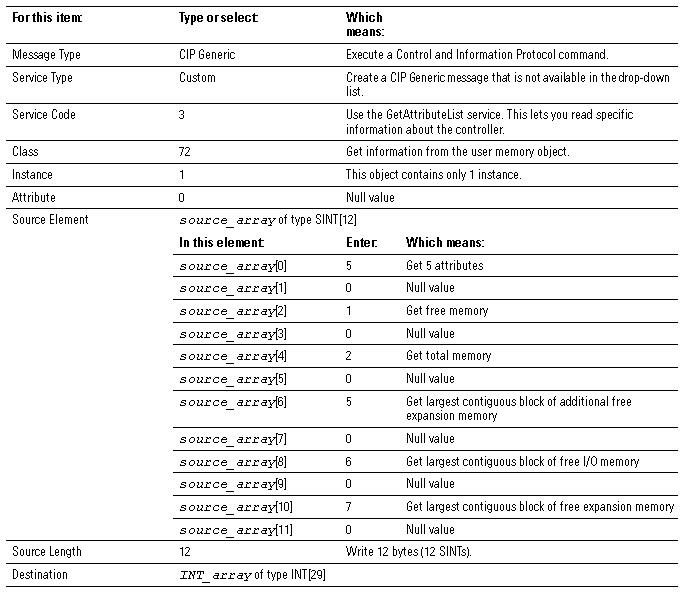
From the Message Properties dialog - Communication tab:

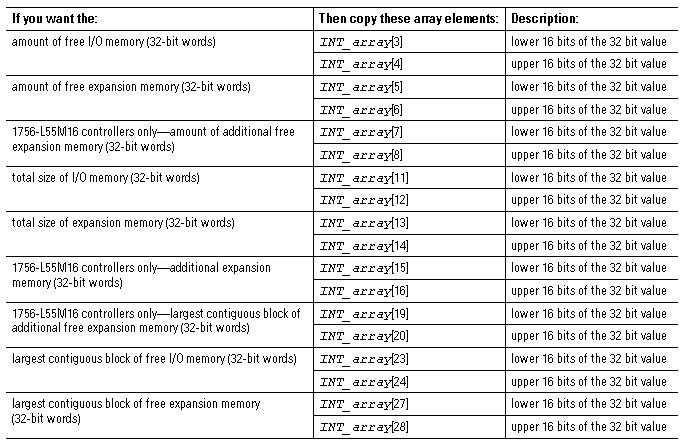
Choose the Memory Information You Want
The MSG instruction returns the following information to INT_array (the destination tag of
the MSG instruction).
IMPORTANT:
For a 1756-L55M16
controller, the MSG instruction returns two values for each expansion memory category. To
determine the free or total expansion memory of a 1756-L55M16 controller, add both values
for the category.
Convert INTs to a DINT
The MSG instruction returns each memory value as two separate INTs.
- The first INT represents the lower 16 bits of the value.
- The second INT represents the upper 16 bits of the value.
To convert the separate INTs into one usable value, use a Copy (COP) instruction, where:
In this operand: | Specify: | Which means: |
|---|---|---|
Source | first INT of the 2 element pair (lower 16 bits) | Start with the lower 16 bits |
Destination | DINT tag in which to store the 32-bit value | Copy the value to the DINT tag |
Length | 1 | Copy 1 times the number of bytes in the Destination data type. In this case, the
instruction copies 4 bytes (32 bits), which combines the lower and upper 16 bits
into one 32-bit value. |
Provide Feedback