
Add (ADD)
When enabled, the ADD instruction and the operator '+' adds Source A to Source B.
Available Languages
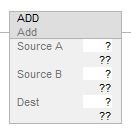
Ladder Diagram
Function Block Diagram
Function Block Diagram supports these elements:
FBD Block
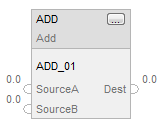
FBD Function

Structured Text
This instruction is not available in structured text.
TIP:
Use the operator '+' in an expression to compute the same result. Refer to
Structured Text Syntax for more information on the syntax of
expressions and assignments within structured text.
Operands
IMPORTANT:
Unexpected operation may occur if:
- Output tag operands are overwritten.
- Members of a structure operand are overwritten.
- Except when specified, structure operands are shared by multiple instructions.
There are data conversion rules for mixing numeric data types within an instruction. See Data Conversions.
Ladder Diagram
Operand | Data Type | Format | Description |
|---|---|---|---|
SourceA | SINT INT DINT LINT USINT UINT UDINT ULINT REAL LREAL LTIME* TIME* TIME32* LDT* DT* | immediate tag | Value to add to Source B |
SourceB | SINT INT DINT LINT USINT UINT UDINT ULINT REAL LREAL LTIME* TIME* TIME32* LDT* DT* | immediate tag | Value to add to Source A |
Dest | SINT INT DINT LINT USINT UINT UDINT ULINT REAL LREAL LTIME* TIME* TIME32* LDT* DT* | tag | Tag to store result of the instruction |
TIP:
*Keep these considerations in mind when using relative time (LTIME, TIME32,
TIME) and absolute time (LDT, DT) data types in ADD instructions:
- If both Source A and Source B are relative time, the Dest must be relative time.
- If Source A is relative time and Source B is absolute time or vice versa, the Dest must be absolute time.
- In ADD instructions, Source A and Source B cannot both be absolute time.
See Time and date data types for a complete description of Relative
Time (LTIME, TIME, and TIME32) and Absolute Time (LDT and DT) data types.
Function Block Diagram
FBD Block
Operand | Data Type | Format | Description |
|---|---|---|---|
ADD | FBD_MATH | tag | ADD structure |
FBD_MATH Structure
Input Members | Data Type | Description |
|---|---|---|
EnableIn | BOOL | Enable input. If false, the instruction does not execute and outputs are not updated.
Default is true. |
SourceA | REAL | Value to add to SourceB. |
SourceB | REAL | Value to add to SourceA. |
Output Members | Data Type | Description |
|---|---|---|
EnableOut | BOOL | Indicates if the instruction executed without fault when it was enabled. |
Dest | REAL | Result of the instruction. |
FBD Function
Input Operands (Left Pins) | Data Type | Description |
|---|---|---|
SourceA (top) | SINT USINT INT UINT DINT UDINT LINT ULINT REAL LREAL TIME TIME32 LTIME DT LDT | Value to add to SourceB. |
SourceB (bottom) | SINT USINT INT UINT DINT UDINT LINT ULINT REAL LREAL TIME TIME32 LTIME DT LDT | Value to add to SourceA. |
Output Operand
(Right Pin) | Data Type | Description |
|---|---|---|
Dest | DINT UDINT LINT ULINT REAL LREAL TIME TIME32 LTIME DT LDT | Result of the function. |
See .
Affects Math Status Flags
Conditional
See Math Status Flags.
Major/Minor Faults
None specific to this instruction. See Index Through Arrays for array-indexing faults.
Execution
Ladder Diagram
Condition/State | Action Taken |
|---|---|
Prescan | N/A |
Rung-condition-in is false | Set Rung-condition-out to Rung-condition-in |
Rung-condition-in is true | Set Rung-condition-out to Rung-condition-in Dest = Source A + Source B |
Postscan | N/A |
Function Block Diagram
Condition/State | Action Taken |
|---|---|
Prescan | N/A |
EnableIn is false | Set EnableOut to EnableIn |
EnableIn is true | Dest = SourceA + SourceB If overflow occurs Clear EnableOut to false else Set EnableOut to true |
Instruction first run | N/A |
Instruction first scan | N/A |
Postscan | N/A |
Example
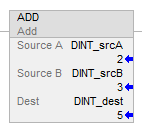
Ladder Diagram
Function Block Diagram
FBD Block
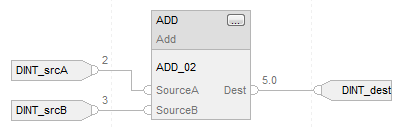
FBD Function

Structured Text
DINT_dest := DINT_srcA + DINT_srcB;
Provide Feedback