
REAL to String (RTOS)
The REAL to String (RTOS) instruction produces the ASCII representation of a REAL
value.
Available Languages
Ladder Diagram
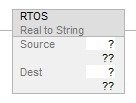
Function Block
This instruction is not available in function block.
Structured Text
RTOS(Source,Dest);
Operands
Ladder Diagram and Structured Text
Operand | Type | Format | Description | Notes |
|---|---|---|---|---|
Source | REAL | Tag | The tag that contains the REAL value | |
Destination | String type | Tag | The tag to store the ASCII value | String types are:
|
See Structured Text Syntax for
more information on the syntax of expressions.
Description
The RTOS instruction converts the Source to a string of ASCII characters and places the result in the Destination.
Affects Math Status Flags
No
Major/Minor Faults
Type | Code | Cause | Recovery Method |
|---|---|---|---|
4 | 51 | The LEN value of the string tag is greater than the DATA size of the string
tag. |
|
4 | 52 | The output string is larger than the destination | Create a new string type that is large enough for the output string. Use the new
string type as the data type for the destination. |
See Common Attributes for operand-related faults.
Execution
Ladder Diagram
Condition/State | Action Taken |
|---|---|
Prescan | N/A |
Rung-condition-in is false | N/A |
Rung-condition-in is true | The instruction executes. |
Postscan | N/A |
Structured Text
Condition | Action |
|---|---|
Prescan | See Prescan in the preceding Ladder Diagram table |
Normal execution | See rung-condition-in is true in the preceding Ladder Diagram table. |
Postscan | See Postscan in the preceding Ladder Diagram table |
Examples
When send_data is set, the RTOS instruction converts the value in data_1 to a string of ASCII characters and places the result in data_1_ascii. Subsequent rungs insert or concatenate data_1_ascii with other strings to produce a complete message for a display terminal.
Ladder Diagram

Structured Text
IF send_data THEN
RTOS(data_1,data_1_ascii);
send_data:= 0;
END_IF;
Provide Feedback