
color animation - Fill Styles
Use the
Fill Style
option to control the look of the fill color.Use this fill style | To |
|---|---|
Solid | Change the colors, and they will have a solid look to them. |
Gradient | Change the colors, and they will have a gradient look to them. If you select Gradient as the Fill Style, the Fill color box changes to gradient. Click it to bring up the gradient fill dialog box to configure the gradient fill. |
Original | Prevent the colors of the object to be changed from what was originally imported. |
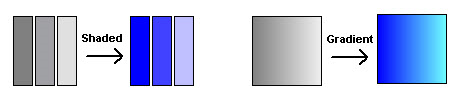
Shaded | Use a tight dot pattern to soften or give a shaded appearance. The Shaded fill style takes effect only on the group object that is composed of individual objects with dark to light colors, such as the Symbol Factory objects. |
The following example shows the effects of Shaded and Gradient fill styles.
Provide Feedback