
Optix Runtime with Base Token Package (S)
The following example shows a system architecture that uses a panel PC and two
controllers.
System Architecture - Base Package S
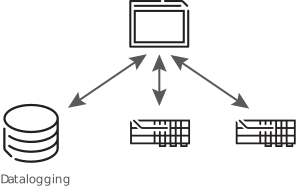
The example architecture has the following components.
- Single HMI runtime with a touch screen and typical HMI functionality
- Communicates with aRockwell Automation®controller and a third-party controller
- Logs data to an internal database
- Requires event logging, alarming, and recipe
The following table shows example runtime sizing for a package that includes the application
components.
Selection | Base Token Value | Extended Token Value | |
|---|---|---|---|
Clients | |||
Native HMI client | 1 | - | |
Features | |||
Alarms | 1 | - | |
Recipe | 1 | - | |
Runtime retentivity | 1 | - | |
Event logger | 1 | - | |
Data logger | 1 | - | |
Embedded database | 0 | - | |
Controller Connections | |||
Rockwell Automation®
EtherNet/IP™ - 1 connection | 1 | - | |
Third-party drivers - 1 connection | 1 | - | |
Total: | 8 | 0 | |
Base token package (S), which includes eight base tokens, is recommended for this example.
There is no need for an extended package. Use the Device Sizing tool to select the best deployment
option for your application.
For this configuration, you can select one of the following deployment options.
- Optix Runtime base token package (S) + consider bundling with ASEM 6300 Industrial Computers
- OptixPanel™Standard
Provide Feedback