
FactoryTalk Optix architecture
Describes the
FactoryTalk® Optix™
components and their roles in the
system.Overview
FactoryTalk Optix system overview

The
FactoryTalk® Optix™
system includes:- FactoryTalk Hub
- Online service platform to access Rockwell Automation cloud-based SaaS solutions for creating organizations and managing assets.Entitlements and organizations are set up throughFactoryTalk®Hub™. An organization is a collection of users and services (includingFactoryTalk® Optix™) that can be accessed and managed usingFactoryTalk®Hub™.Cloud-based SaaS solutions are included inFactoryTalk®Hub™as tiles. New users accessingFactoryTalk®Hub™receive a 90-day trial forFactoryTalk® Optix™Studio Pro.
- FactoryTalk Optix Studio
- Locally installed design editor available at no cost.FactoryTalk® Optix™Studio provides tools for designing HMIs without requiring activation or entitlement.TIP:FactoryTalk® Optix™Studio is also referred to asFactoryTalk® Optix™Studio Standard.TIP: See FactoryTalk Optix Studio setup to installFactoryTalk® Optix™Studio.
- FactoryTalk Optix Studio with a Pro entitlement
- Cloud-enabled design editor that runs in a web browser or as a locally installed application.FactoryTalk® Optix™Studio Pro requires a subscription based on user entitlement.The Pro entitlement activates the web-browser-based editor and provides features such as cloud-based code repository integration, version control, remote deployment, and multi-user collaboration.TIP: See FactoryTalk Optix Studio Pro entitlement to installFactoryTalk® Optix™Studio with a Pro entitlement.IMPORTANT:FactoryTalk® Optix™Studio Pro andFactoryTalk® Optix™Runtime Tools require entitlements allocated to an organization.FactoryTalk® Optix™Studio Pro entitlements are assigned to organization users, whileFactoryTalk® Optix™Runtime Tools entitlements are assigned to devices where they are installed.
- FactoryTalk Optix Application
- Includes two components:
- Project: Represents the design and configuration of the application.
- Runtime: The environment where the application runs.
FactoryTalk® Optix™Studio enables application creation by combining the project with the appropriate Runtime, which depends on the target device and operating system. - FactoryTalk Optix Runtime Tools
- Install the Runtime Tools package on the target device for entitlement management and application deployment. The package includes:
- Application Update Service: Background service allowingFactoryTalk® Optix™Studio to connect to the target device and deploy applications.
- Entitlement Manager: Application managingFactoryTalk® Optix™entitlements.
IMPORTANT:Runtime Tools are embedded in OptixPanels™ and Embedded Edge Computes (EEC).Download, install, and activate Runtime Tools for Windows and Linux devices.TIP: See Runtime Sizing for more information.Runtime tools architecture diagram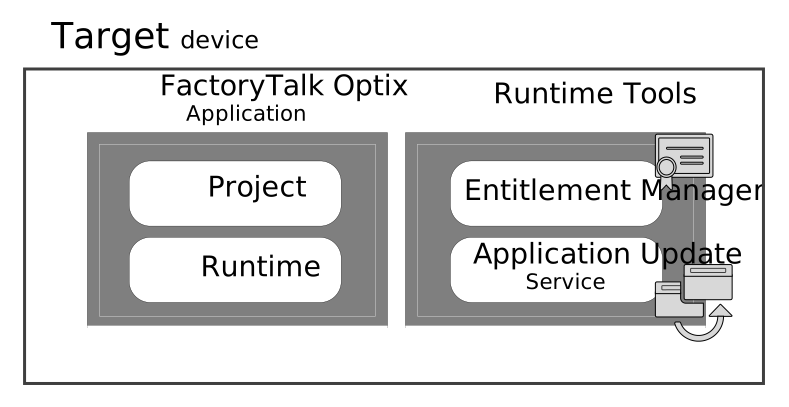
FactoryTalk Optix
architecture
system components
cloud-based solutions
runtime tools
Provide Feedback