
Assigning formula values
For this recipe, you defer the actual amounts of the materials and enable automatic binding.
- SelectMBR_ADD:1, and then click theValue Entrybutton. TheParameter Value Entry/Report Limit Entrydialog box opens.
- For AMOUNT, selectDeferfrom theOriginlist, and then selectCOCOA_AMTfrom theValuelist.
- For MATERIAL, selectCOCOAfrom theValuelist, and enableDisplay.
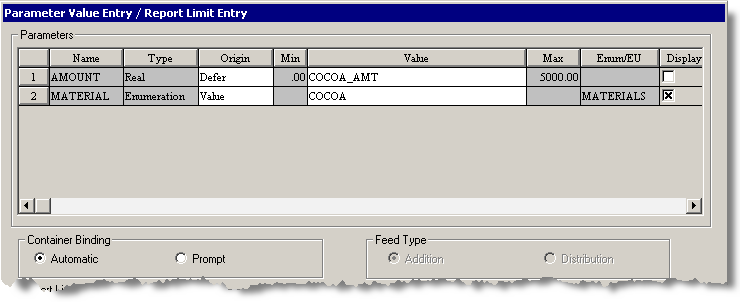 Container Bindingis set toAutomatic, which is the default. You set theFeed TypetoAdditionin the Equipment Editor.
 - ClickOK. The SFC is updated to show COCOA MATERIALS for MBR_ADD:1.
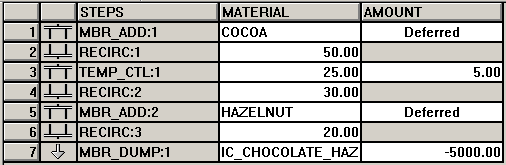
- Enter formula parameters for the remaining steps as indicated in this table. Use the default values for all other entries.StepParameterOriginValueDisplayRECIRC:1RECIRC_RATEValue50YesTEMP_CTL:1HOLD_TIMEValue5NoTEMP_SPValue25YesRECIRC:2RECIRC_RATEValue30YesMBR_ADD:2AMOUNTDeferHAZELNUT_AMTNoMATERIALValueHAZELNUTYesRECIRC:3RECIRC_RATEValue20YesMBR_DUMP:1AMOUNTValue-5000YesMATERIALValueIC_CHOCOLATE_HAZELNUTNo
- From theViewmenu, selectTable. Your finished operation should be similar to this.
- From theViewmenu, selectSFC.
- Save the operation.
Provide Feedback