
Airgap Lifecycle Transfer
Lifecycle information, retrieved from
Product Compatibility and Download Center
(PCDC), provides Rockwell Automation hardware device lifecycle status and
firmware information. This information can be used to develop hardware device migration
plans, or to find devices that require firmware updates.
If your
FactoryTalk® AssetCentre
server cannot access
the internet to retrieve lifecycle information from the PCDC, use the Airgap
Lifecycle Transfer
tool included in a FactoryTalk AssetCentre web client,
together with the standalone FactoryTalk AssetCentre Lifecycle Information
Transfer Utility
, to keep your device information up-to-date. - TheAirgap Lifecycle Transfertool can be used to export the device list using a passphrase and import the updated device list back. Make sure that the FactoryTalk AssetCentre web client used to export the device list or import the lifecycle information belong to the same the FactoryTalk AssetCentre server.
- The standaloneFactoryTalk AssetCentre Lifecycle Information Transfer Utilitycan be used to enrich the imported device list with lifecycle information retrieved from the PCDC and export the updated device list using a passphrase. To connect to the PCDC, an internet access is required, so you must install this tool on a computer with internet access.
Workflow for updating device lifecycle information across an air gap
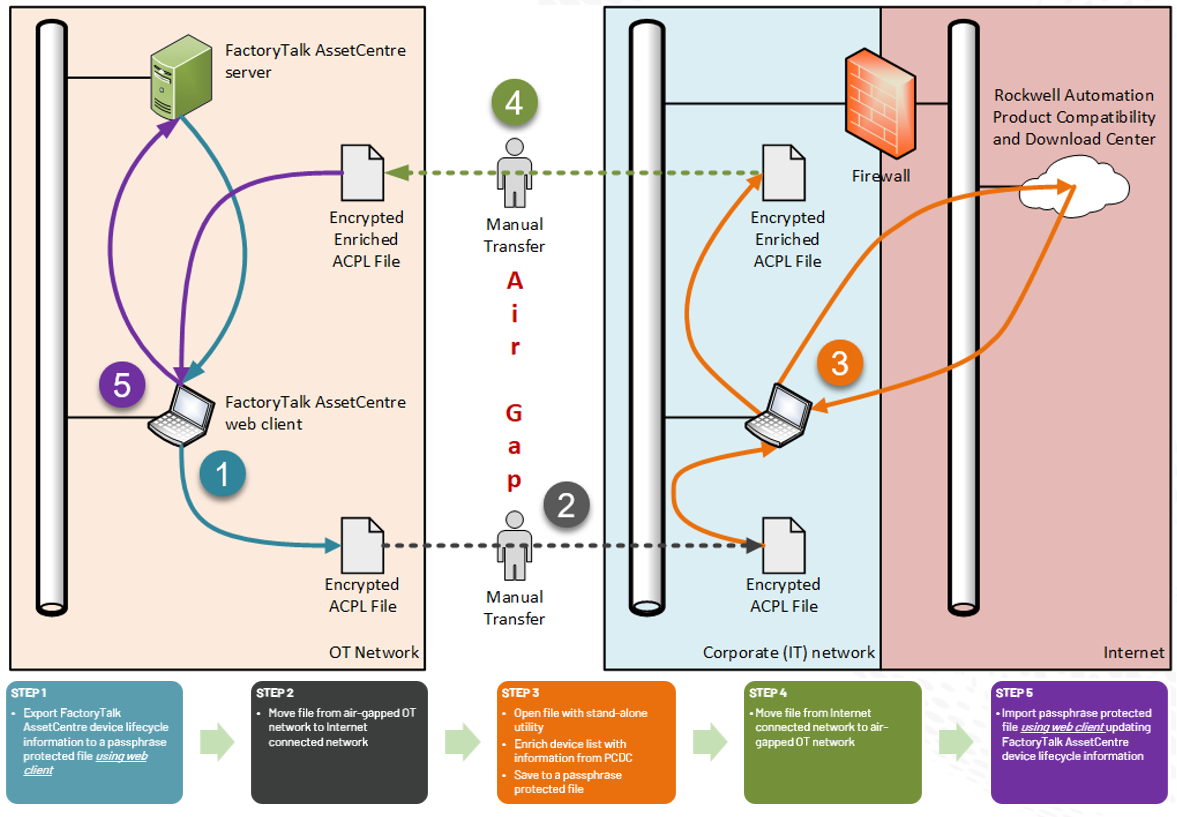
Follow these steps:
Provide Feedback