

Loading
Innovation Center LOGO
Recent ActivityRecent Activity

Heat Balance Using Steam Table

The desired management of the amount of thermal energy in the plant, every day, becomes more relevant in the operation, given that it impacts on the variable operating costs, as well as the carbon footprint. - [Implementation time: 60 Minutes]
Innovation Center Home Page
Futuristic radiation power plant generating clean energy, glowing reactor core visible through protective shielding, high-tech sustainable technology , alternative energy, eco-friendly
Innovation Center LOGO
  • Overview
  • Installation Guide
  • Downloads
  • Contact us
  • I want to subscribe.
Innovation Center Home Page
 

The desired management of the amount of thermal energy in the plant, every day, becomes more relevant in the operation, given that it impacts on the variable operating costs, as well as the carbon footprint of the product and the company. For this reason, any type of industry, such as CPG, chemical, Oil and Gas, Pharmaceuticals, among others, has become a key KPI in production, which is why companies are interested in knowing the specific amount of energy that their raw materials use at the right time, providing this information to the person. appropriate, to make appropriate decisions.

The application presented has the calculation of the material balance for three types of energy sources, named as follows:

  • LP, Low Pressure,
  • MP, Medium Pressure,
  • HP, High Pressure,

And each of them is evaluated against a flow of:
1000 Kg/h, 5000 Kg/h and 10,000 Kg/h, to have an instantaneous energy balance.




What is this for?

The application of configuring an energy balance for specific operating conditions, covering low pressure, medium pressure and high pressure regions, which are described above. Studio5000 is used, the PlantPAx version 4.1 libraries for the Vapor libraries, the FTLogix Echo, for configuration and simulation, in the amounts of energy and flows, so the user can modify the variables mentioned below, in order to explore its configuration in more detail:

  • Temperature Variation
  • Pressure Variation
  • Amount of Energy in real time
  • Region of thermodynamics where T and P are located, with respect to their Tsat and Psat the water vapor


General characteristics

The configuration of an energy balance in low, medium and high pressure conditions, which offers the following characteristics:

  • Adjustable steam flow reference.
  • Use of the Steam tables in Low, Medium and High pressure.


Advantages

Shows the integration of tools from the PlantPAx process libraries in the configuration of process equipment.

  • Demonstrates the use of Studio 5000 in dynamic modeling of energy balance calculations.
  • Allows you to relate the Studio 5000 with simulation tools such as the FTLogix Echo.
  • Speeds up configuration time for low, medium, and high pressure energy balances using steam libraries.
  • Exhibits scalability and repeatability to adapt to various industrial environments.
  • Allow agile and precise modifications according to changing needs.
  • Optimize performance in terms of efficiency and productivity.


AHIC Download ICON VF.png

Downloads

Please note: You will need to agree to the Terms & Conditions for each download.

Downloadable file ›
Legal Disclaimer Acceptance. ROCKWELL AUTOMATION WILL PROVIDE ACCESS TO ROCKWELL PRODUCTS (BEST PRACTICES, APPLICATIONS AND KNOWLEDGE) ON THE CONDITION THAT YOU ACCEPT AND COMPLY WITH THE FOLLOWING TERMS AND CONDITIONS. YOU ACCEPT AND AGREE TO BE BOUND BY THE TERMS OF THIS AGREEMENT BY DOWNLOADING, INSTALLING, COPYING, OR OTHERWISE USING PRODUCTS. IF YOU ARE ACCEPTING THESE TERMS ON BEHALF OF ANOTHER PERSON, COMPANY, OR OTHER LEGAL ENTITY, YOU REPRESENT AND WARRANT THAT YOU HAVE FULL AUTHORITY TO BIND THAT PERSON, COMPANY, OR LEGAL ENTITY TO THESE TERMS. IF YOU DO NOT AGREE TO THESE TERMS, DO NOT DOWNLOAD, INSTALL, COPY, ACCESS, OR USE THE PRODUCTS, SOFTWARE AND/OR CLOUD SERVICES. 1. Rockwell Automation retains full ownership and title to all Products and related documentation. No rights or licenses are granted other than those set forth in this Agreement. Company grants to Rockwell Automation a non-exclusive, worldwide, royalty-free, perpetual, non-revocable license to use any feedback Company provides regarding the Products, even if Company has designated the feedback as confidential. Rockwell Automation will be entitled to use the feedback without restriction or compensation to Company. 2. Company may not lease sub-lease, assign, license, sub-license or otherwise transfer any of the Products without the prior written consent of Rockwell Automation. Company may not assign or otherwise transfer access rights to the Products without the prior written consent of Rockwell Automation. Any reverse assembly, reverse engineering, decompilation, and creation of derivative works based on the Products by Company is prohibited. 3. Company acknowledges that Products provided under this Agreement are Rockwell Automation’s Confidential Information and are covered by effective or pending copyrights, patents, trademarks and/or trade secrets of Rockwell Automation, and Company agrees to maintain confidentiality by not disclosing Products or documentation to any third party without the prior written consent of Rockwell Automation and to protect the confidentiality of the Products as it would Company’s own confidential information. Company agrees that its obligation of confidentiality under this paragraph shall survive expiration or termination of this Agreement. 4. Company agrees that Products provided under this Agreement are prototypes and examples and its application and results may vary depending on each customer and project conditions. Rockwell Automation do not warranty the same results. This Agreement shall in no way be construed as a commitment by Rockwell Automation at any time to manufacture and/or offer Products for sale. There is no explicit or implicit service level agreement associated with using the Products. Rockwell Automation does not warrant that the functions contained in the Products will meet Company’s requirements. Company agrees to use all Products only in accordance with the instructions and only for the intended usages identified in the documentation. 5. EXCLUSION OF WARRANTIES AND LIMITATION OF LIABILITY. THE PRODUCTS ARE PROVIDED "AS IS". ROCKWELL AUTOMATION DISCLAIMS ANY AND ALL WARRANTIES, EXPRESS, IMPLIED OR STATUTORY, INCLUDING WITHOUT LIMITATION ANY WARRANTIES OF MERCHANTABILITY OR FITNESS FOR A PARTICULAR PURPOSE. ROCKWELL AUTOMATION EXPLICITLY DISCLAIMS ALL WARRANTIES OF NON- INFRINGEMENT AND EXPRESSLY DOES NOT WARRANT THAT THE PRODUCTS, IN WHOLE OR IN PART, WILL BE ERROR FREE OR FREE FROM SECURITY VULNERABILITIES. IN NO EVENT SHALL ROCKWELL AUTOMATION BE LIABLE FOR (i) LOST PROFITS, LOST SAVINGS, DOWNTIME, SPECIAL, INDIRECT OR CONSEQUENTIAL DAMAGES OF ANY KIND, OR (ii) ANY PERSONAL INJURY, PROPERTY DAMAGE OR ENVIRONMENTAL DAMAGE ARISING OUT OF OR IN CONNECTION WITH THIS AGREEMENT, WHETHER IN AN ACTION IN CONTRACT, STRICT LIABILITY OR IN TORT INCLUDING NEGLIGENCE. 6. COMPANY AGREES TO INDEMNIFY AND HOLD ROCKWELL AUTOMATION HARMLESS FROM ALL COSTS, AWARDS, DAMAGES, EXPENSES AND FEES (INCLUDING ATTORNEYS FEES) RESULTING FROM OR RELATED TO ANY THIRD-PARTY CLAIMS (INCLUDING EMPLOYEES AND AGENTS OF COMPANY) AGAINST ROCKWELL AUTOMATION, ITS DISTRIBUTORS, AGENTS, OFFICERS, DIRECTORS OR EMPLOYEES FOR PERSONAL INJURY (INCLUDING DEATH), PROPERTY DAMAGE OR ENVIRONMENTAL DAMAGE RELATED TO OR RESULTING FROM THE USE OF THE PRODUCTS. 7. In the event a Product is exported, Company agrees to comply with all applicable United States Export Control Law and Regulations, and the applicable export control laws of other countries. This Agreement shall be governed by the laws of the state of Wisconsin. This Agreement is the complete and exclusive Agreement between Rockwell Automation and the Company, and supersedes all prior agreements, whether written or oral, relating to the Products.
AHIC NEED HELP ICON VF.png

Need Help?

If you need help with an application or have feedback from the Innovation Center, please contact us.


Is this useful to me?

Benefits - The user of the configuration will be able to find a ready-made configuration of an energy balance, with the capacity for dynamic modeling of its operation, and manipulate both the fluids and the amount of total energy of Low, Medium and High Pressure vapor.


How can I make it work?

  • Hardware
    • ControlLogix
    • CompactLogix
  • Software
    • Studio5000 (V35)
    • FT Logix Echo
    • PlantPAx Libraries 5.2
    • PlantPAx Libraries 4.2 (Steam Table)
  • Background knowledge 
    • Knoowledge of Studio 5000.
    • FTLogixEcho.
    • PlantPAX Process Libraries.
    • Thermodynamics.

Links of Interest (internal or external)

  • https://compatibility.rockwellautomation.com/Pages/MultiProductDownload.aspx?Keyword=Free&crumb=112
  • PlantPAx Display and Library Guidelines
  • Rockwell Automation Library of Steam Table Instructions Version 4.0


AHIC STEP ICON.png

Implementation Guide

 
  1. Step 1
  2. Step 2
  3. Step 3
  4. Step 4
  5. Step 5
  6. Step 6
  7. Step 7
  8. Step 8
  9. Step 9
  10. Step 10
  11. Step 11
  12. Step 12
  13. Step 13
  14. Step 14
  15. Step 15
Open All Close All
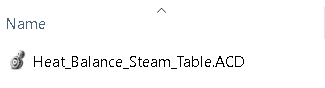
Step 1


Setting selection.

heat-balance-using-steam-table_Image1_Studio_5000_ACD.png

heat-balance-using-steam-table_Image1_Studio_5000_ACD

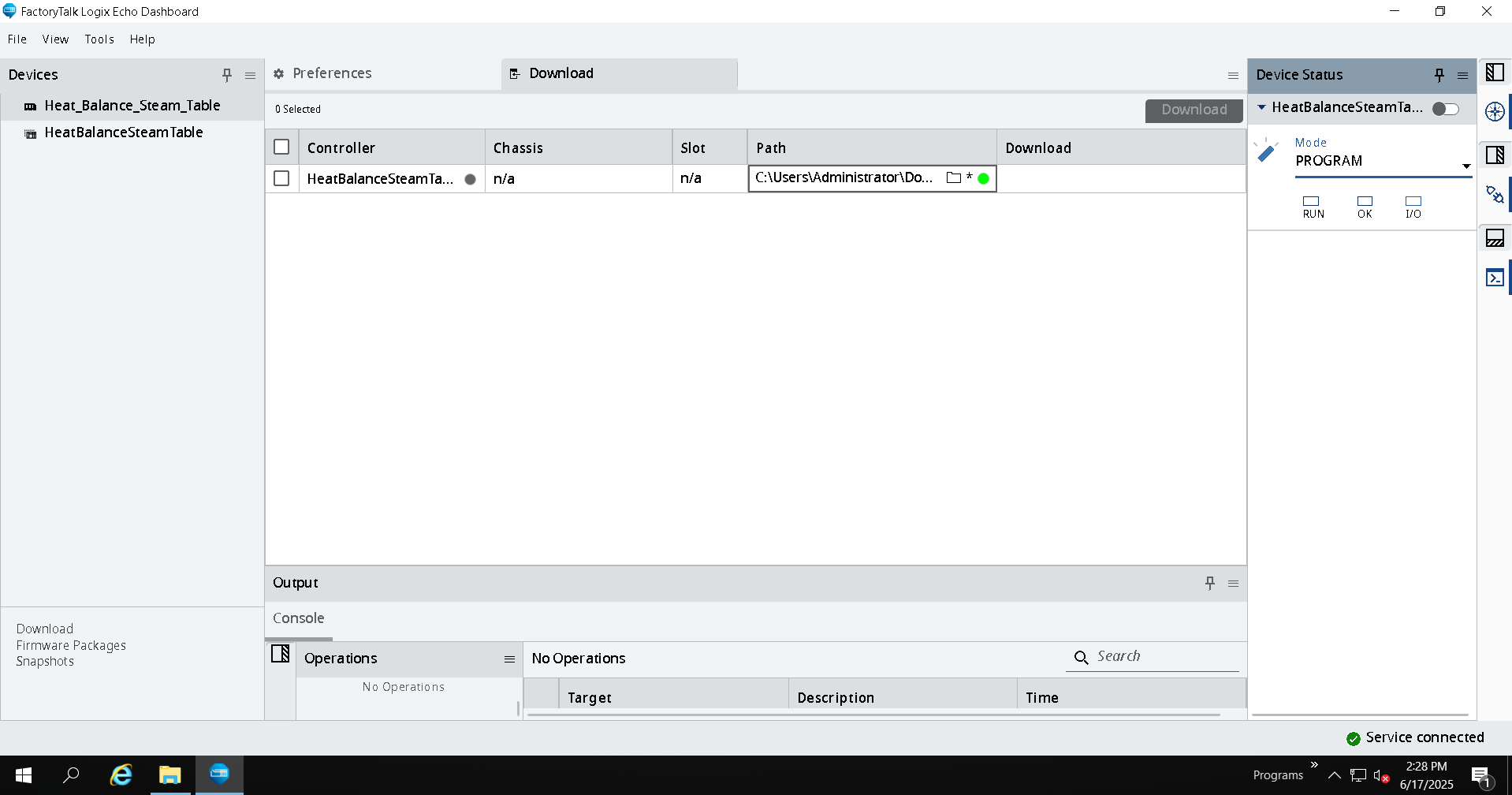
Step 2


FTLogixEcho Configuration.

heat-balance-using-steam-table_Image2_FTLogixEcho_Connection.png

heat-balance-using-steam-table_Image2_FTLogixEcho_Connection

Step 3


Initial parameter settings.

 
heat-balance-using-steam-table_Add_On_Instruction.png

heat-balance-using-steam-table_Add_On_Instruction

 
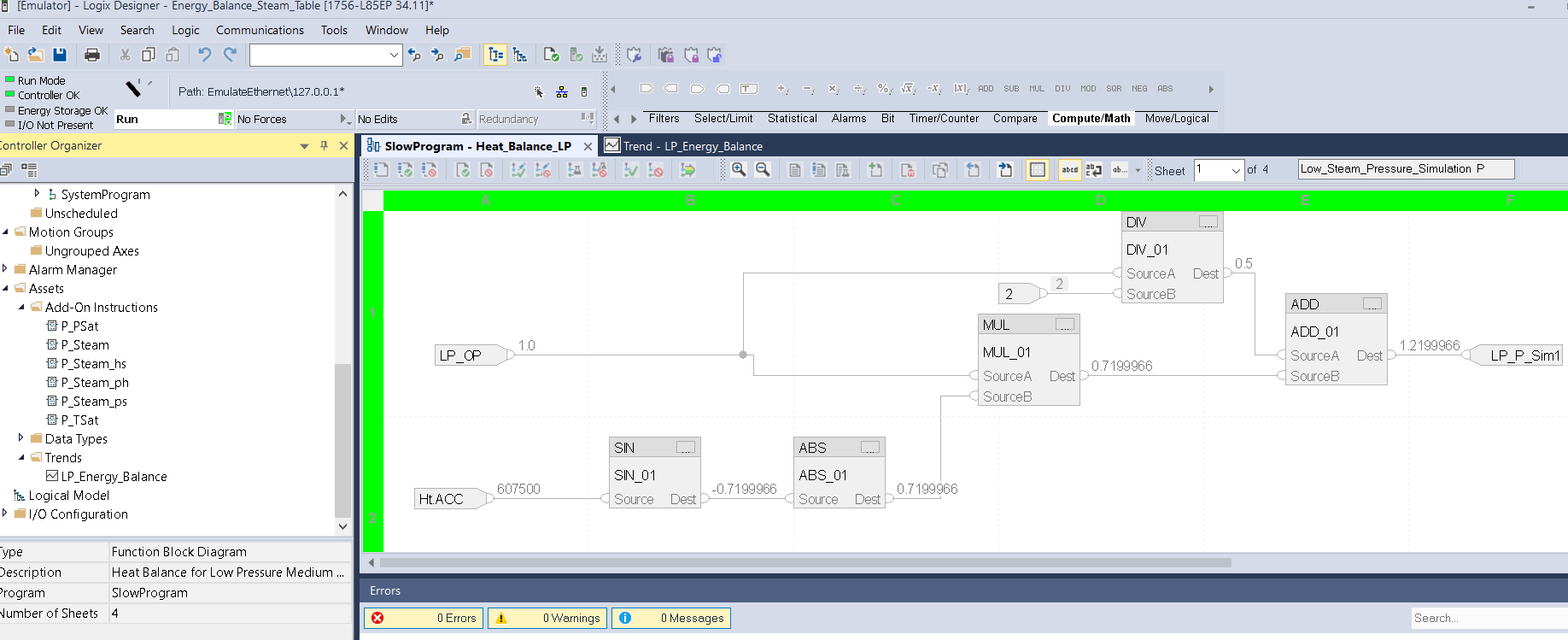
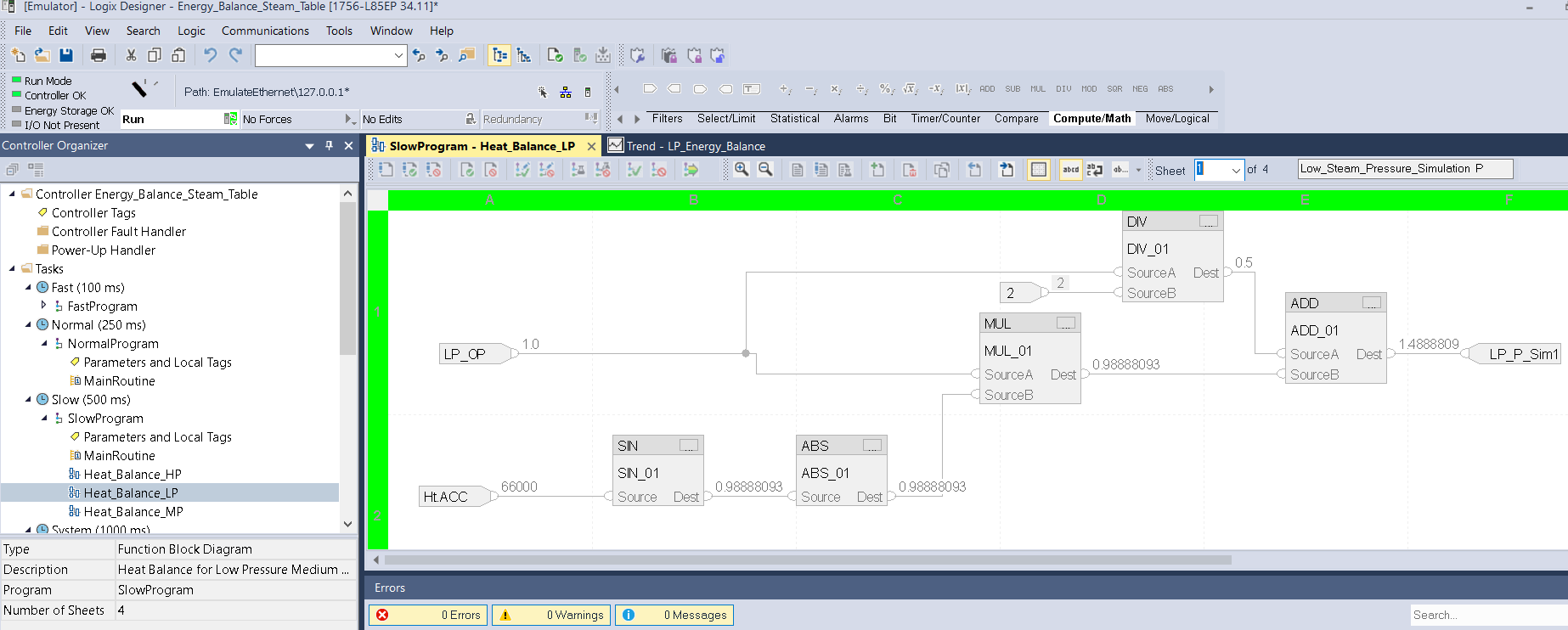
Step 4


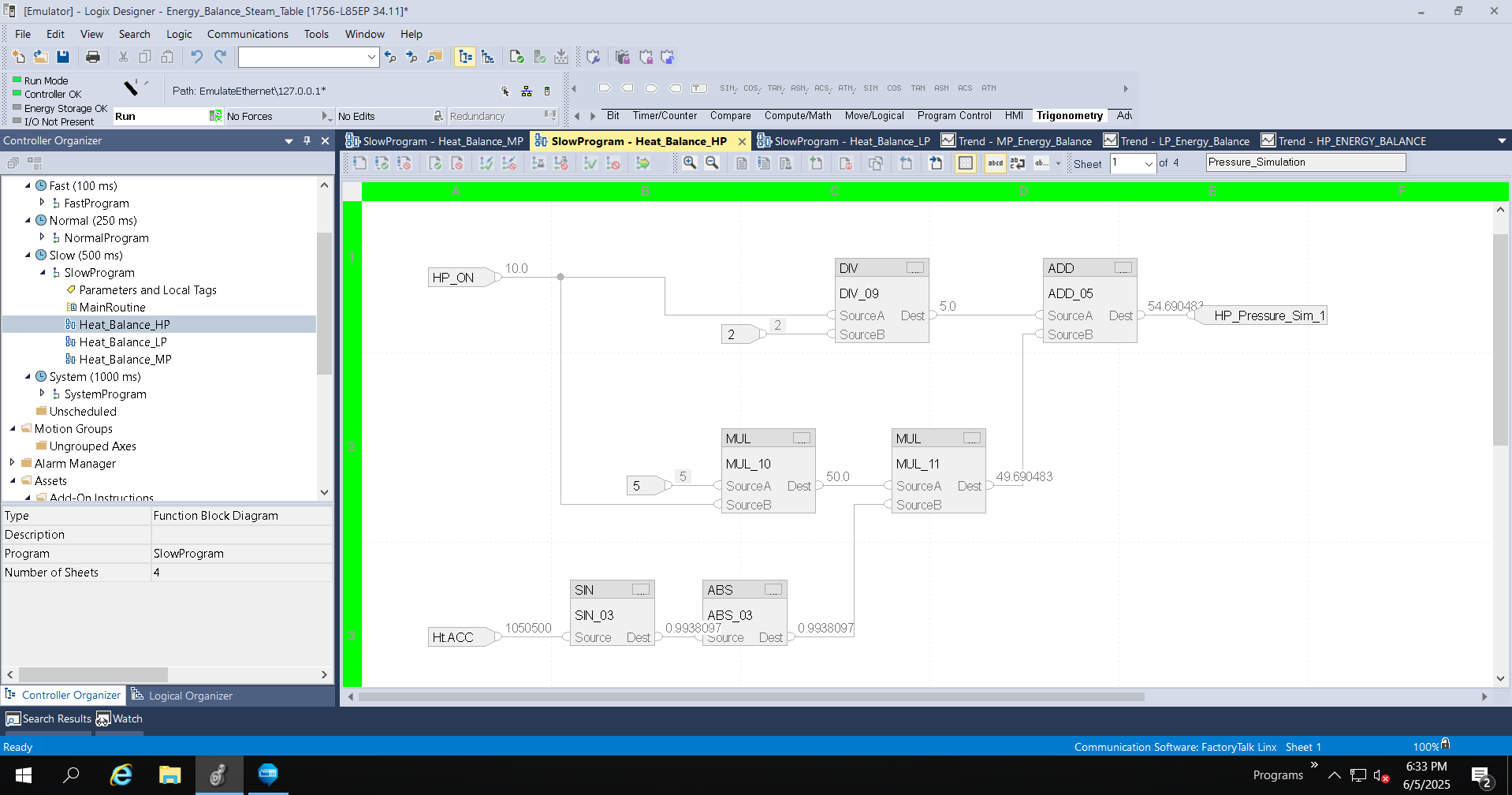
Pressure Transmitter Simulation Setup.


heat-balance-using-steam-table_Image3_Studio5000_LP_Page_1_Pressure_Simulation.png

heat-balance-using-steam-table_Image3_Studio5000_LP_Page_1_Pressure_Simulation

Step 5


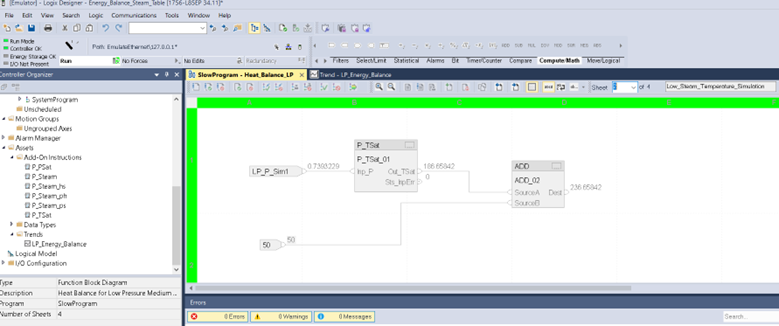
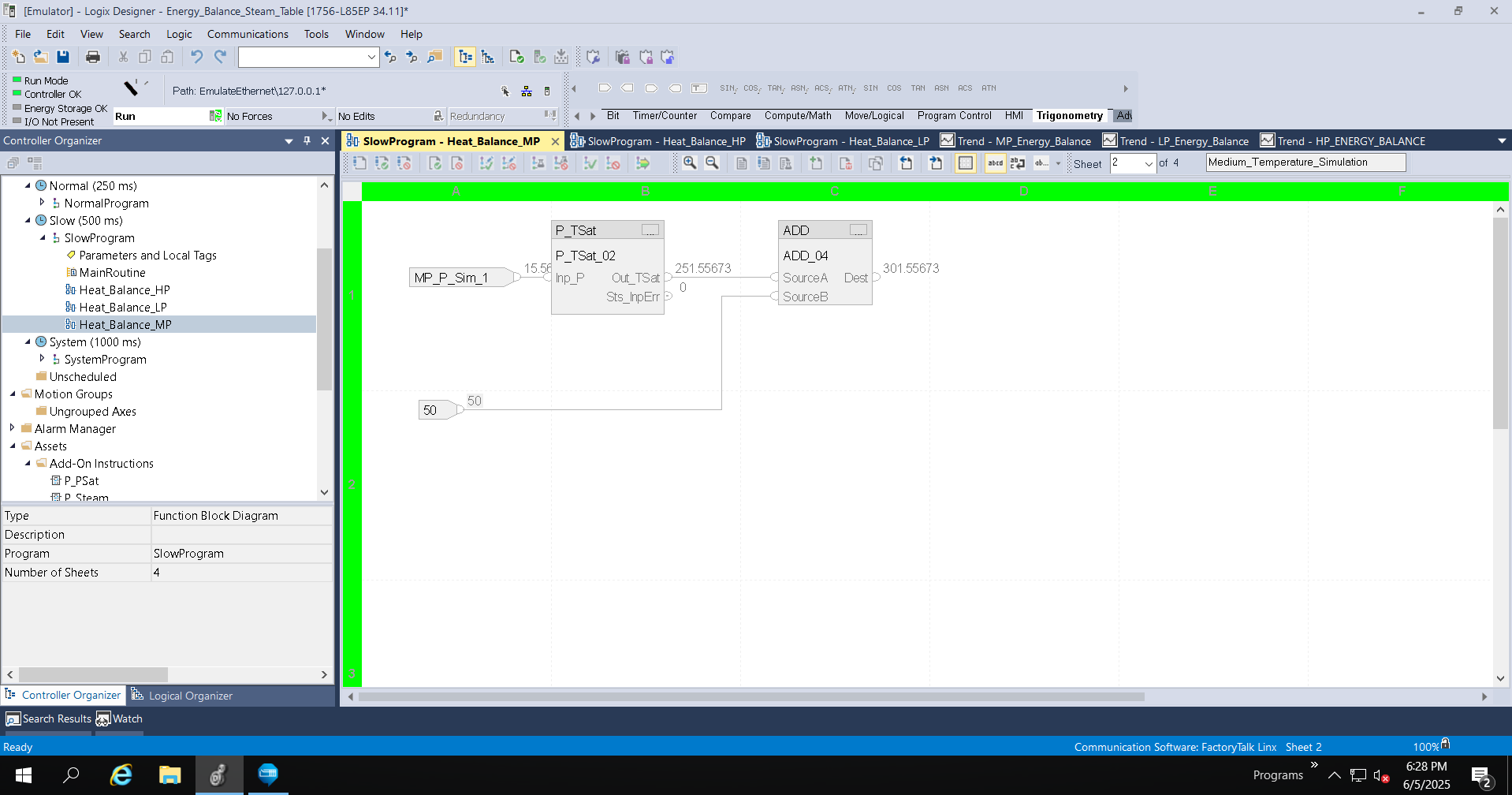
Temperature transmitter simulation setup.

 
heat-balance-using-steam-table_Studio5000_LP_Page_2_Temperature_Simulation

heat-balance-using-steam-table_Studio5000_LP_Page_2_Temperature_Simulation

Step 6


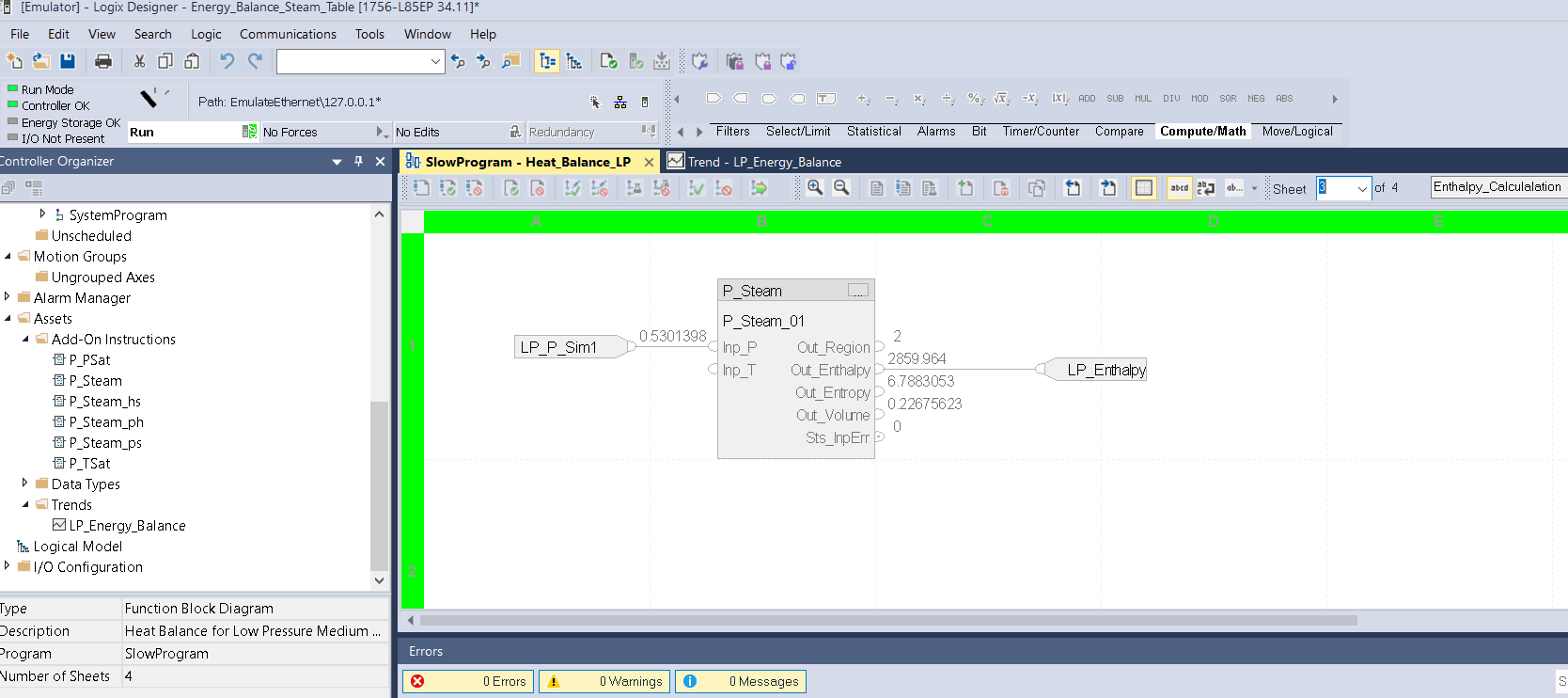
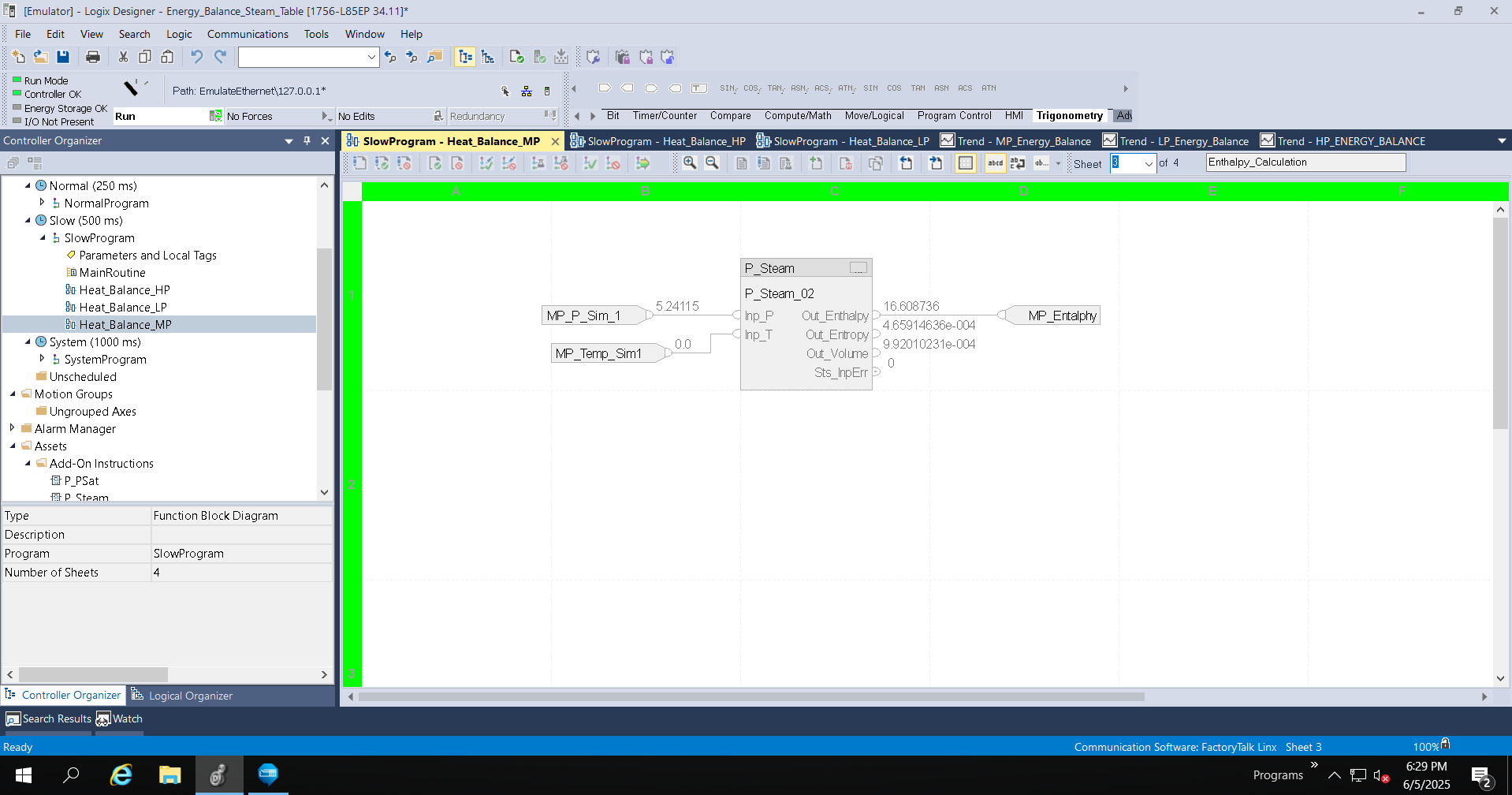
Enthalpy Calculation.


heat-balance-using-steam-table_Image5_Studio5000_LP_Page_3_Entalphy_Calculation.png

heat-balance-using-steam-table_Image5_Studio5000_LP_Page_3_Entalphy_Calculation

Step 7


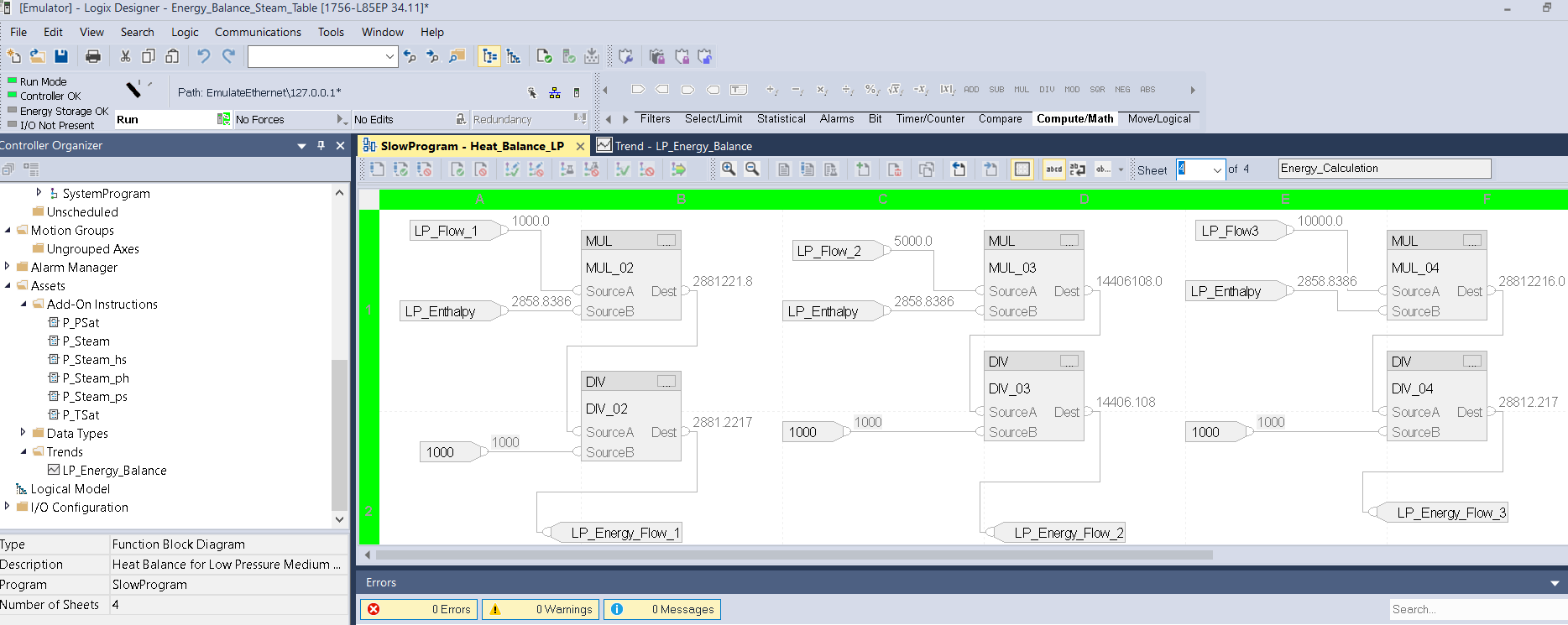
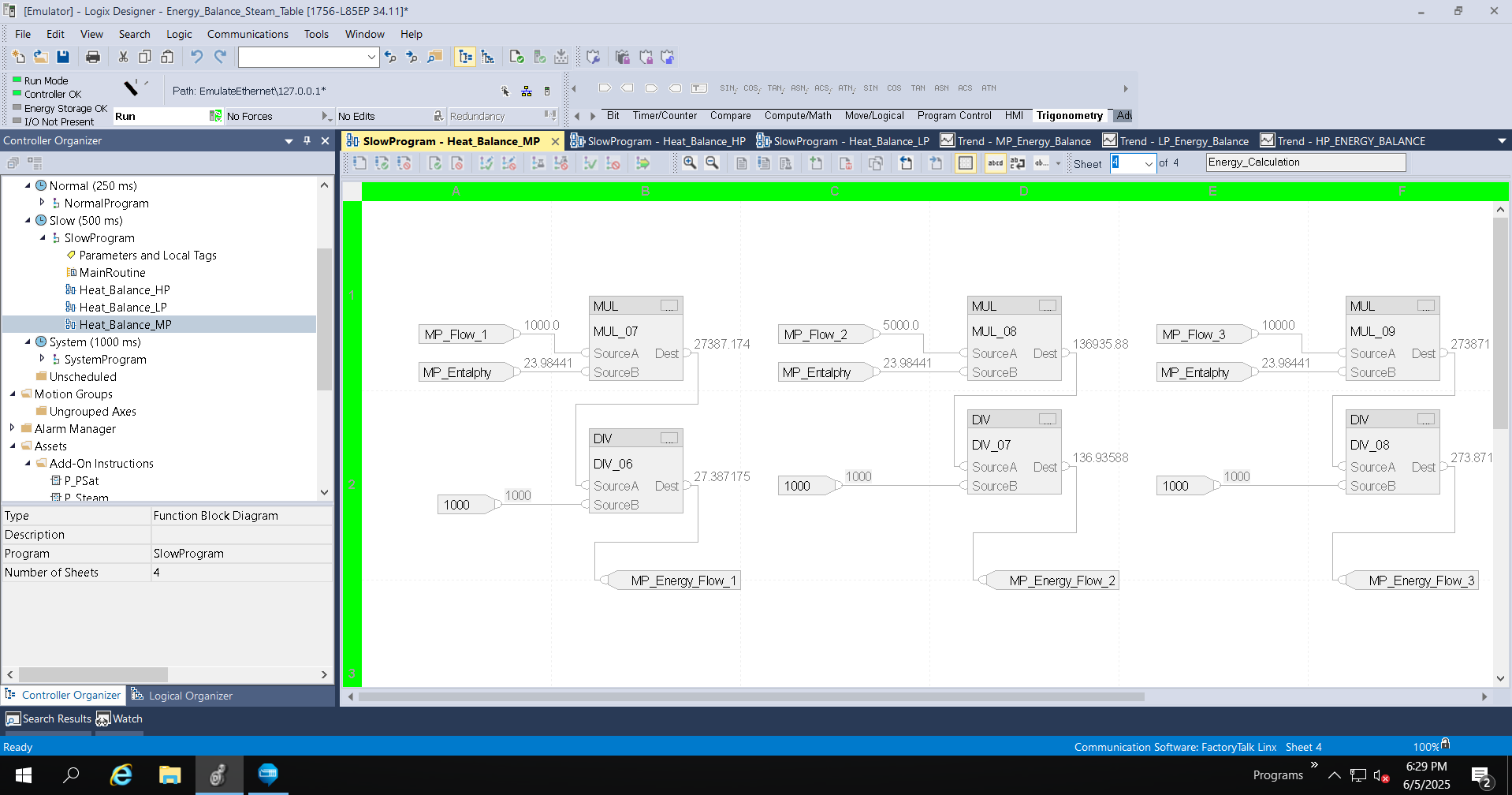
Calculation of the Quantity of Energy.

heat-balance-using-steam-table_Image5_Studio5000_LP_Page_4_Energy_Calculation.png

heat-balance-using-steam-table_Image5_Studio5000_LP_Page_4_Energy_Calculation

Step 8


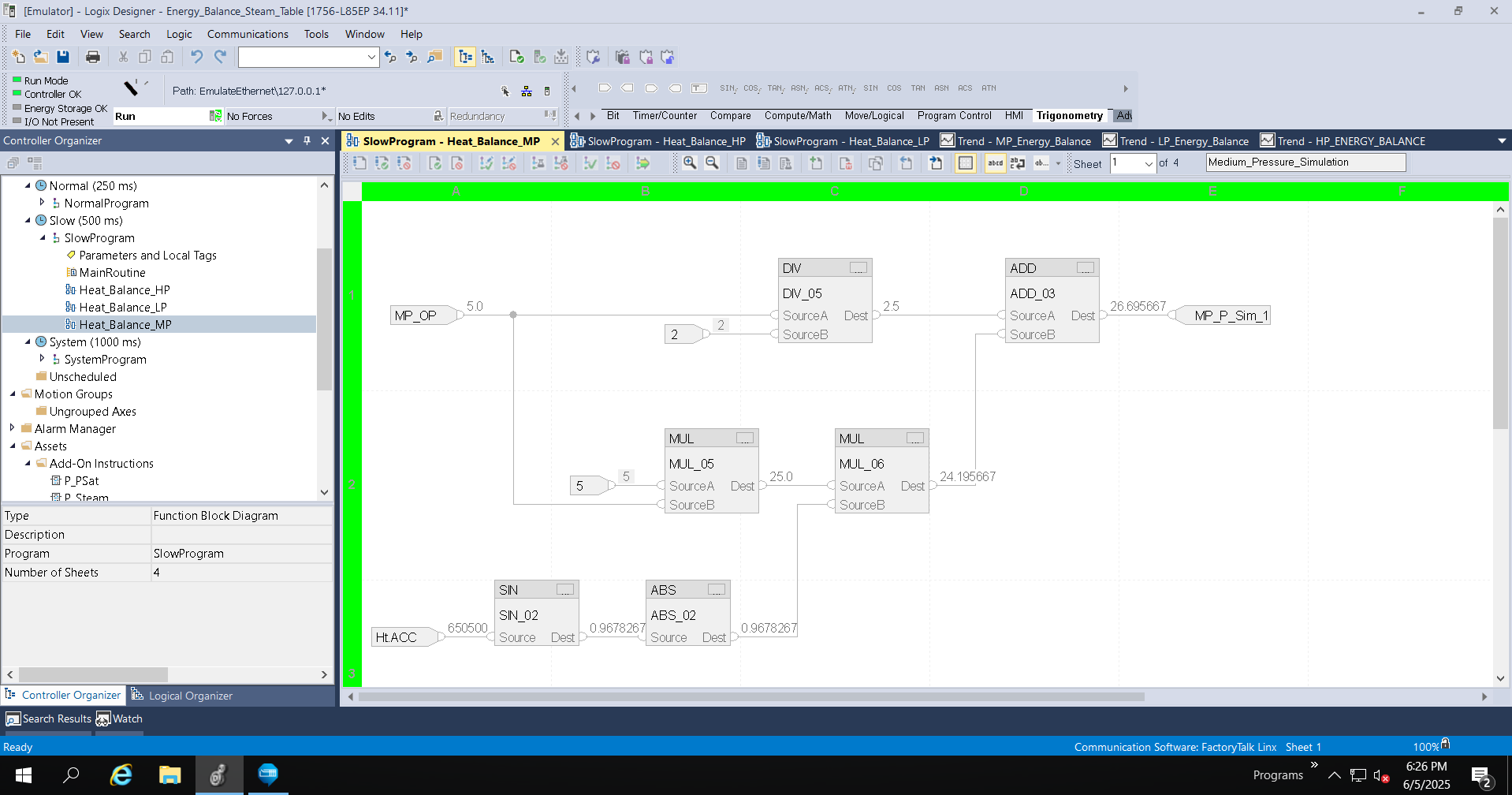
Pressure Transmitter Simulation Setup.

heat-balance-using-steam-table_Studio5000_MP_Page_1_Pressure_Simulation.png

heat-balance-using-steam-table_Studio5000_MP_Page_1_Pressure_Simulation

Step 9


Temperature transmitter simulation setup.

heat-balance-using-steam-table_Studio5000_MP_Page_2_Temperature_Simulation.png

heat-balance-using-steam-table_Studio5000_MP_Page_2_Temperature_Simulation

Step 10


Enthalpy Calculation.

 
heat-balance-using-steam-table_Studio5000_MP_Page_3_Entalphy_Calculation.png

heat-balance-using-steam-table_Studio5000_MP_Page_3_Entalphy_Calculation

 
Step 11


Calculation of the Quantity of Energy.

 
heat-balance-using-steam-table_Studio5000_MP_Page_4_Energy_Calculation.png

heat-balance-using-steam-table_Studio5000_MP_Page_4_Energy_Calculation

 
Step 12


Pressure Transmitter Simulation Setup.

 
heat-balance-using-steam-table_Studio5000_HP_Page_1_Pressure_Simulation.png

heat-balance-using-steam-table_Studio5000_HP_Page_1_Pressure_Simulation

 
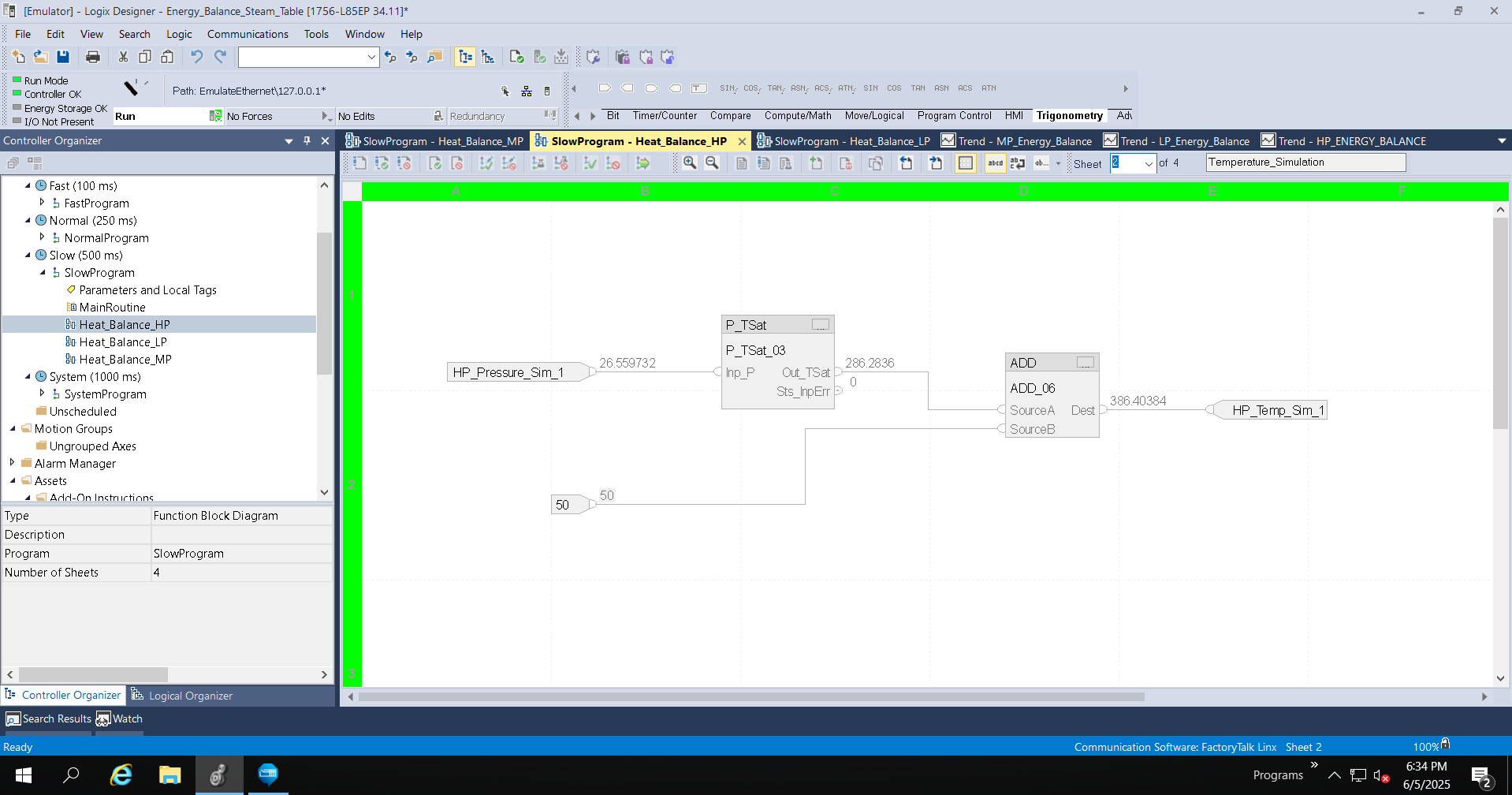
Step 13


Temperature transmitter simulation setup.

 
heat-balance-using-steam-table_Studio5000_HP_Page_1_Temperature_Simulation.png

heat-balance-using-steam-table_Studio5000_HP_Page_1_Temperature_Simulation

 
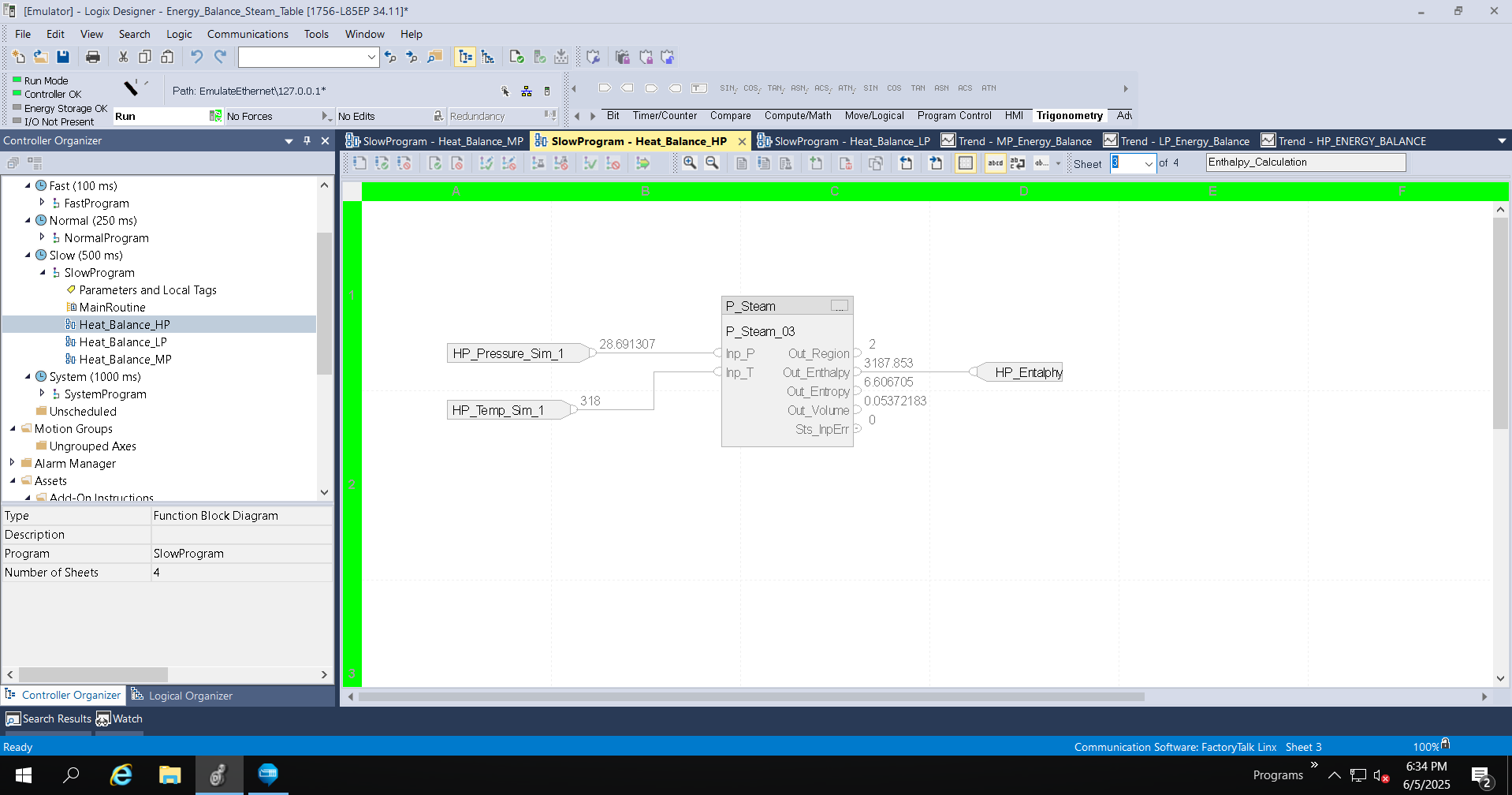
Step 14


Enthalpy Calculation..

 
heat-balance-using-steam-table_Studio5000_HP_Page_3_Entalphy_Calculation.png

heat-balance-using-steam-table_Studio5000_HP_Page_3_Entalphy_Calculation

 
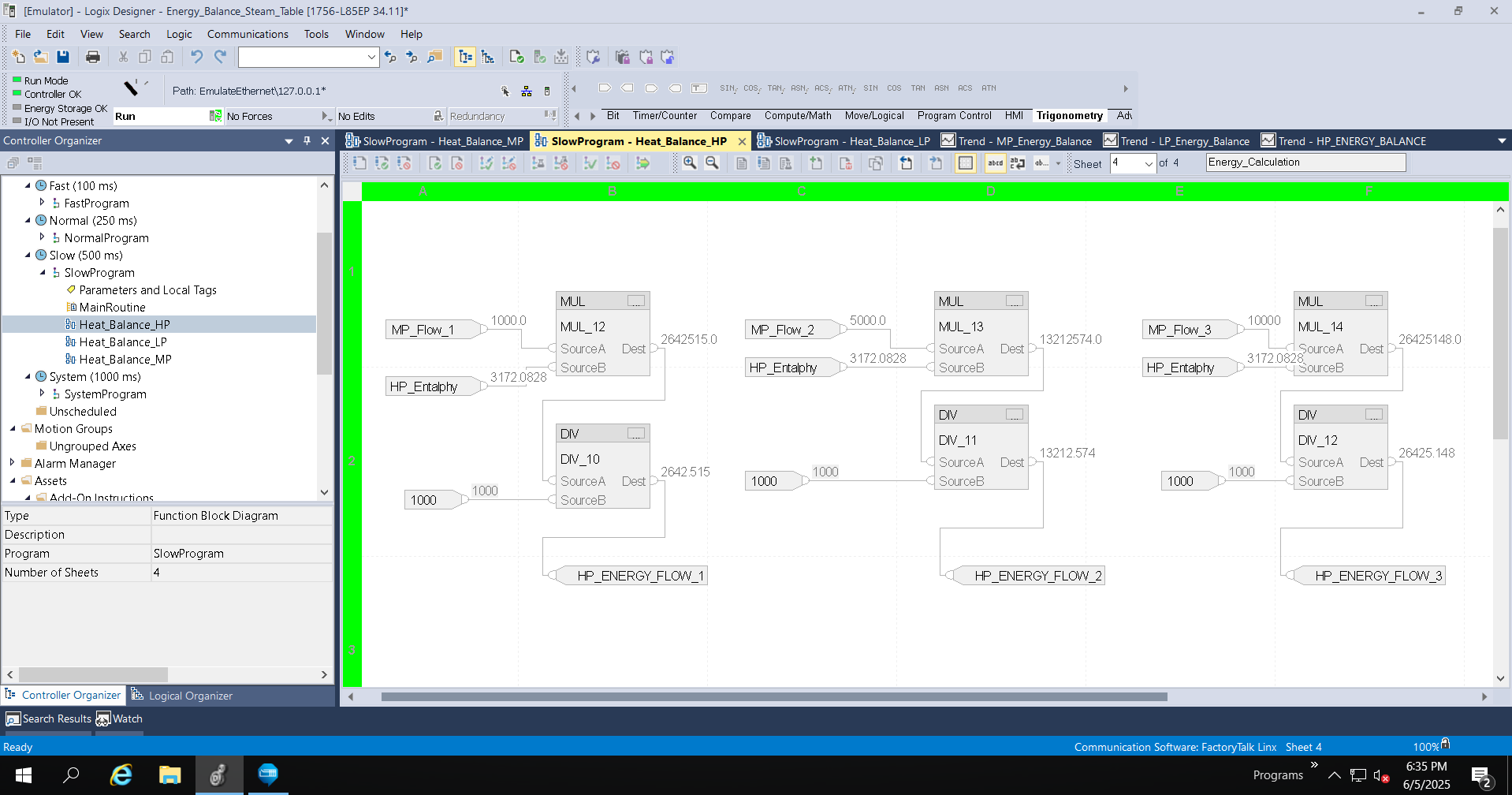
Step 15


Calculation of the Quantity of Energy.

 
heat-balance-using-steam-table_Studio5000_HP_Page_4_Energy_Calculation.png

heat-balance-using-steam-table_Studio5000_HP_Page_4_Energy_Calculation


heat-balance-using-steam-table_Image1_Studio_5000_ACD.png

heat-balance-using-steam-table_Image1_Studio_5000_ACD

heat-balance-using-steam-table_Image2_FTLogixEcho_Connection.png

heat-balance-using-steam-table_Image2_FTLogixEcho_Connection

heat-balance-using-steam-table_Add_On_Instruction.png

heat-balance-using-steam-table_Add_On_Instruction

heat-balance-using-steam-table_Image3_Studio5000_LP_Page_1_Pressure_Simulation.png

heat-balance-using-steam-table_Image3_Studio5000_LP_Page_1_Pressure_Simulation

heat-balance-using-steam-table_Studio5000_LP_Page_2_Temperature_Simulation

heat-balance-using-steam-table_Studio5000_LP_Page_2_Temperature_Simulation

heat-balance-using-steam-table_Image5_Studio5000_LP_Page_3_Entalphy_Calculation.png

heat-balance-using-steam-table_Image5_Studio5000_LP_Page_3_Entalphy_Calculation

heat-balance-using-steam-table_Image5_Studio5000_LP_Page_4_Energy_Calculation.png

heat-balance-using-steam-table_Image5_Studio5000_LP_Page_4_Energy_Calculation

heat-balance-using-steam-table_Studio5000_MP_Page_1_Pressure_Simulation.png

heat-balance-using-steam-table_Studio5000_MP_Page_1_Pressure_Simulation

heat-balance-using-steam-table_Studio5000_MP_Page_2_Temperature_Simulation.png

heat-balance-using-steam-table_Studio5000_MP_Page_2_Temperature_Simulation

energy-monitor-using-optix_Step 9.png

heat-balance-using-steam-table_Studio5000_MP_Page_3_Entalphy_Calculation

heat-balance-using-steam-table_Studio5000_MP_Page_4_Energy_Calculation.png

heat-balance-using-steam-table_Studio5000_MP_Page_4_Energy_Calculation

heat-balance-using-steam-table_Studio5000_HP_Page_1_Pressure_Simulation.png

heat-balance-using-steam-table_Studio5000_HP_Page_1_Pressure_Simulation

heat-balance-using-steam-table_Studio5000_HP_Page_1_Temperature_Simulation.png

heat-balance-using-steam-table_Studio5000_HP_Page_1_Temperature_Simulation

heat-balance-using-steam-table_Studio5000_HP_Page_3_Entalphy_Calculation.png

heat-balance-using-steam-table_Studio5000_HP_Page_3_Entalphy_Calculation

heat-balance-using-steam-table_Studio5000_HP_Page_4_Energy_Calculation.png

heat-balance-using-steam-table_Studio5000_HP_Page_4_Energy_Calculation


Heat Balance Using Steam Table

Version 1.2 - June 2026


AHIC White Logo
Subscribe!

Receive new app releases and other updates from the Innovation Center directly in your inbox.

I want to subscribe.
 
  1. Chevron LeftChevron Left Rockwell Automation Home
  2. Chevron LeftChevron Left Sup...
  3. Chevron LeftChevron Left Pro...
  4. Chevron LeftChevron Left Downloads
  5. Chevron LeftChevron Left Innovation Center
  6. Chevron LeftChevron Left Heat Balance Using Steam Table
Please update your cookie preferences to continue.
This feature requires cookies to enhance your experience. Please update your preferences to allow for these cookies:
  • Social Media Cookies
  • Functional Cookies
  • Performance Cookies
  • Marketing Cookies
  • All Cookies
You can update your preferences at any time. For more information please see our {0} Privacy Policy
CloseClose