
Elevation view components
Elevation
view is a digital representation of the physical
Motor Control Center hardware.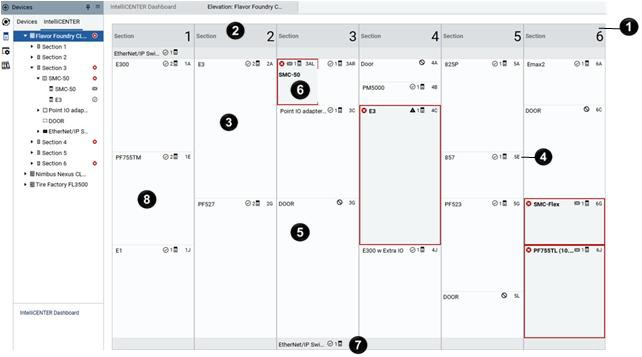
Item | Description | |
|---|---|---|
 | Lineup | Custom grouping of MCC hardware comprised of devices, units and
buckets, and sections and /columns |
 | Section | vertically stacked grouping of units within a Motor Control
Center |
 | Unit | Box that electrically and physically plugs into the Motor Control
Center that contains devices that have been installed and wired in
manufacturing. For units in error, a warning code appears with a
number returned from certain devices that indicates the reason for
the device fault. For unit warning code definitions, refer to device
user manual. |
 | Unit location | Number and letter that indicates the physical location within the
Motor Control Center. The Number indicates section/column counting
from left to right and the letter indicates the vertical position
within the section/column. |
 | Door | A door unit represents empty space within an MCC that is covered
by a door. A door can be replaced with a unit only dataset. |
 | Dual Unit | A unit that is internally divided into a left and right section.
The unit shares a single door. The unit and door can only be moved
together. The dual unit is only available in the CenterLine
2100. |
 | Wireway | Horizontal empty space at the top and bottom of every section or
column of a Motor Control Center. Use a wireway to run wires or an
Ethernet switch. |
 | Device | Components within a unit or bucket. If a unit contains more than
one device, the primary device details appear on the unit.
Double-click a unit to open the primary device profile. |
TIP:
For Motor Control Center product families use
different names for the components, both names appear in the
Item
column.Provide Feedback