
String Concatenate (CONCAT)
The CONCAT instruction adds ASCII characters to the end of a string.
The CONCAT instruction combines the characters in Source A with the characters in Source B and places the result in the Destination.
The characters from Source A are first, followed by the characters from Source B.
Unless Source A and the Destination are the same tag, Source A remains unchanged.
Available Languages
Ladder Diagram
_v1.png/_jcr_content/renditions/original)
FactoryTalk Design Studio
DSL - Ladder Diagram and
Structured TextCONCAT(SourceA,SourceB,Dest);
Operands
There are data conversion rules for mixed data types within an instruction. See Data Conversion.
Ladder Diagram
Operand | Type | Format | Description | Notes |
|---|---|---|---|---|
Source A | String | Tag | Tag that contains the initial characters | String types are:
|
Source B | String | Tag | Tag that contains the end characters | |
Destination | String | Tag | Tag to store the result |
See Structured Text syntax Structured Text Syntax for more
information on the syntax of expressions within structured text.
Affects Math Status Flags
No
Major/Minor Faults
A minor fault will occur if: | Fault Type | Fault Code |
|---|---|---|
The LEN value of the string tag is greater than the DATA size of the string tag. | 4 | 51 |
The sum length of Source A and Source B is greater than the DATA size of the string tag. | 4 | 51 |
See Index through arrays for array-indexing faults.
Execution
Ladder Diagram
Condition | Action Taken |
|---|---|
Prescan | N/A |
Rung-condition-in is false (Ladder Diagram only) | N/A |
Rung-condition-in is true | The instruction executes. |
Postscan | N/A |
Concat String flow chart


Example
Ladder Diagram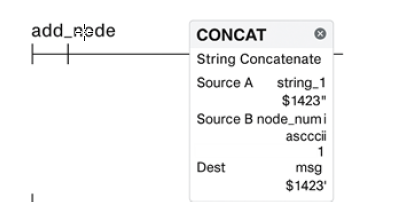
Structured
Text
CONCAT(string_1,string_2,msg);
Provide Feedback