
Size In Elements (SIZE)
The SIZE instruction finds the number of elements (size) in the designated dimension of the
Source array or string operand and places the result in the Size operand. The instruction
finds the size of one dimension of an array.
The instruction operates on:
- Arrays
- Arrays in a structure
- Arrays that are part of a larger array
- String tags
Available Languages
Ladder Diagram
_v1.png/_jcr_content/renditions/original)
FactoryTalk Design Studio
DSL - Ladder DiagramSIZE(Source, Dimtovary, Size);
Structured Text
SIZE(Source, Dimtovary, Size);
Operands
IMPORTANT:
Unexpected operation may occur if:
- Output tag operands are overwritten.
- Members of a structure operand are overwritten.
- Except when specified, structure operands are shared by multiple instructions.
There are data conversion rules for mixing numeric data types within an instruction. See Data conversions.
Ladder Diagram
Operand | Data Type | Format | Description |
|---|---|---|---|
Source | SINT INT DINT REAL structure String type | Array tag | First element of the array on which the instruction is to operate Tags that are not array are not accepted during verification |
Dimension to Vary | DINT | immediate
(0, 1, 2) | Dimension to use:
|
Size | SINT INT DINT REAL | tag | Tag to store the number of elements in the specified dimension of the array |
See Structured Text syntax for more information on the syntax of
expressions within structured text.
Affects Math Status Flags
No
Major/Minor Faults
None specific to this instruction. See Index through arrays for array-indexing faults.
Execution
Ladder Diagram
Condition/State | Action Taken |
|---|---|
Prescan | N/A |
Rung-condition-in is false | Set Rung-condition-out to Rung-condition-in. |
Rung-condition-in is true | Set Rung-condition-out to Rung-condition-in. The instruction executes. |
Postscan | N/A |
Structured Text
Condition/State | Action Taken |
|---|---|
Prescan | N/A |
Normal execution | Set Rung-condition-out to Rung-condition-in. The instruction executes. |
Postscan | N/A |
Examples
Example 1
Find the number of elements in dimension 0 (first dimension) of array_a. Store the size in array_a_size. In this example, dimension 0 of array_a has 10 elements.
Ladder Diagram
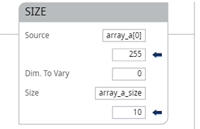
Structured Text
SIZE(array_a,0,array_a_size);
Example 2
Find the number of elements in the DATA member of string_1, which is a string. Stores the
size in string_1_size.
In this example, the DATA member of string_1 has 82 elements. The string uses the default
STRING data type. Since each element holds one character, string_1 can contain up to 82
characters.
Ladder Diagram
Structured Text
SIZE(string_1.DATA[0],0,string_1_size);
Example 3
String_a is an array of string structures. The SIZE instruction finds the number of
elements in the DATA member of the string structure and stores the size in data_size_a.
In this example, the DATA member has 24 elements. The string structure has a user-specified
length of 24.
Ladder Diagram
Structured Text
SIZE(string_a[0].DATA[0],0,data_size_a);
Provide Feedback