
Overtravel Detection
The overtravel detection feature uses a positive and negative limit to prevent the axis
from moving beyond the intended travel range.
When overtravel is triggered, the axis performs a hard stop. When positive overtravel is
triggered, move commands in a positive direction are rejected. When negative overtravel
is triggered, move commands in a negative direction are rejected.
Use Local Input as Overtravel Limit Switch
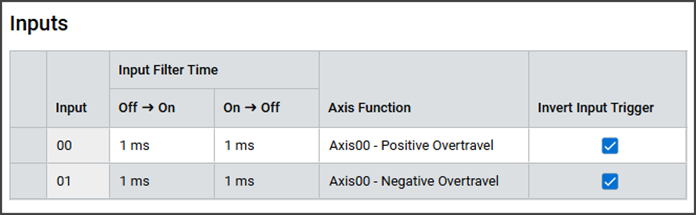
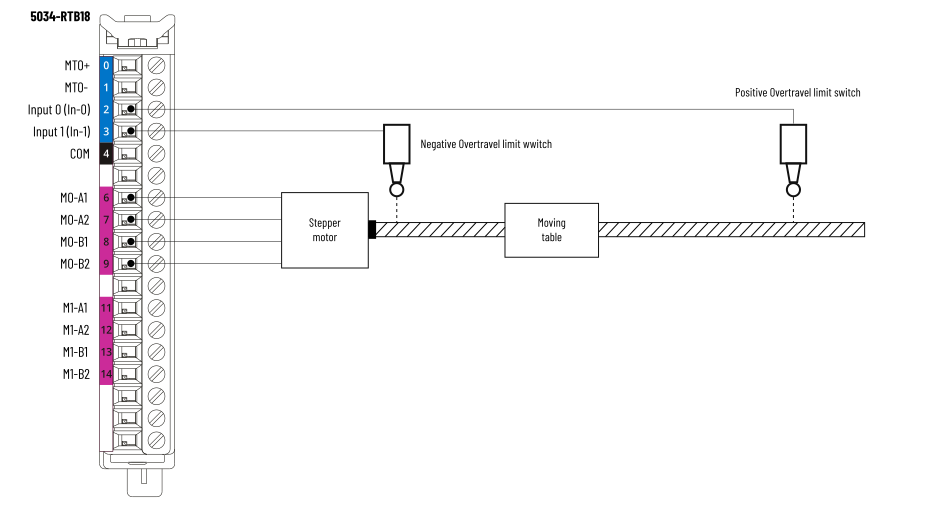
You can configure the stepper module's digital input points as the axis' overtravel
limit switches in the Inputs view. If the input is active low, you can invert the
trigger by selecting the Invert Input Trigger checkbox.
Configure Inputs as Overtravel Limits Example
Overtravel Limits Wiring Example
Use External Inputs as Overtravel Limit Switch
You can also use digital input points from another module (for example, 5034-IB16) to
connect the Positive Overtravel limit switch and Negative Overtravel limit switch.
In this scenario, the result of the digital input is used to set the
O.Axisxx.PositiveOvertravel and O.Axisxx.NegativeOvertravel tags.
O.Axisxx.PositiveOvertravel and O.Axisxx.NegativeOvertravel cannot be inverted and
always trigger on a rising edge.
The following example shows two input points (Pt01 and Pt02) of the 5034-IB16 module
in slot 3 are used as the Positive Overtravel limit switch and Negative Overtravel
limit switch respectively. The 5034-STEPD module is in slot 2.
Overtravel Limits Ladder Diagram Example

If the limit switch is normally closed, you must use the ladder instruction XIO
(Examine Off) instead of XIC (Examine On).
Provide Feedback