
Lay Out the PointMax I/O System
The PointMax I/O architecture provides a wide range of input and output modules to
span many applications, such as machine, hybrid, and process control. The
architecture uses Producer/Consumer technology that allows input information and
output status to be shared among multiple Logix 5000®
controllers.
PointMax I/O modules are used as the local or remote I/O for CompactLogix 5390*
controller, and the remote I/O for CompactLogix 5380, CompactLogix 5480,
ControlLogix 5590, and ControlLogix 5580 controllers, using Studio 5000 Logix
Designer application version 36 or later (*requires version 39 or later).
A PointMax I/O system consists of one EtherNet/IP adapter and supports up to 32 I/O
modules. The adapter can supply power to a maximum of 16 I/O modules. A 5034-EXP or
5034-EXPXT expansion power is required when using more than 16 I/O modules. The I/O
modules are mounted on an MB and require an RTB to connect field-side wiring. You
must purchase an MB and an RTB individually for each I/O module.
PointMax I/O Mounting Guidelines
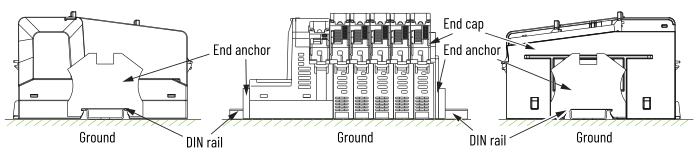
The PointMax I/O system is mounted onto a zinc-plated chromate-passivated steel DIN
rail such as the Allen-Bradley 199-DR1; 46277-4; EN 60715 – 35 x 7.5 mm (1.38 x 0.30
in.). Secure the DIN rail to the mounting surface approximately every 200 mm (7.8
in.) and use DIN rail end anchors (Allen-Bradley 1492-EAJ35 or 1492-EAHJ35) at both
ends of your system to meet the stated vibration specifications or shock
environments.
PointMax I/O System Mounting Guidelines
Provide Feedback