
Install the EtherNet/IP Adapter
ATTENTION:
This product is grounded through the DIN rail to chassis ground. Use zinc-plated chromate-passivated steel DIN rail to assure proper grounding. The use of other DIN rail materials (for example, aluminum or plastic) that can corrode, oxidize, or are poor conductors, can result in improper or intermittent grounding. Secure DIN rail to mounting surface approximately every 200 mm (7.8 in.) and use end-anchors appropriately. Be sure to ground the DIN rail properly. See the Industrial Automation Wiring and Grounding Guidelines, Rockwell Automation publication 1770-4.1, for more information.
WARNING:
When you insert or remove the module while backplane power is on, an electric arc can occur. This could cause an explosion in hazardous location installations.
Be sure that power is removed or the area is nonhazardous before proceeding. Repeated electric arcing causes excessive wear to contacts on both the module and its mating connector. Worn contacts may create electrical resistance that can affect module operation.
To install the EtherNet/IP adapter on the DIN rail, do the following:
- Position the adapter so that the back of it faces the DIN rail.
- Press the adapter against the DIN rail until it clicks. The DIN rail latch locks the adapter to the DIN rail.

- Slide the end cap away from the DIN rail to remove it, exposing the backplane and power interconnections.
 ATTENTION:Do not discard the end cap. Use this end cap to cover the exposed interconnections on the adapter or the last mounting base on the DIN rail. Failure to do so could result in equipment damage or injury from electric shock.
EtherNet/IP Adapter
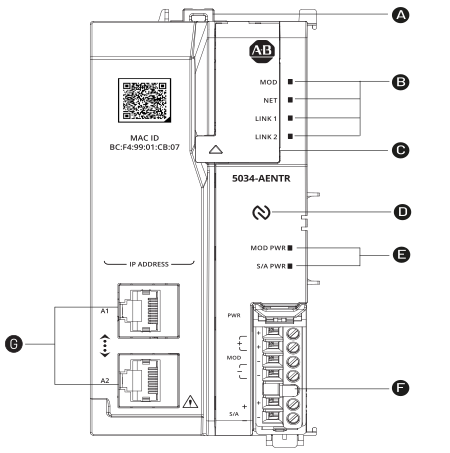
Description | Description | ||
|---|---|---|---|
 | DIN rail latch |  | Status indicators |
 | Status indicators |  | RTB |
 | Network address switches |  | Ethernet network RJ45 connectors |
 | NFC logo | ||
Provide Feedback