
Protected mode
PanelView™ 5000 supports a
Protected Mode
of operation that is designed
to safeguard a running system from accidental or unauthorized changes after
commissioning.When the terminal is in Protected Mode, it continues normal
operation—displaying screens, exchanging data with the controller, and
supporting the running process—but
configuration and service‑level changes
are restricted
. Functions that could disrupt operation, such as
modifying device configuration, changing network or port settings, updating
firmware, resetting the device, or altering security policy, are disabled or
made read‑only while the mode is active.For PanelView 5000, Protected
Mode is
enabled and disabled through a dedicated configuration setting on the
HMI
. The terminal provides a configuration screen that includes the
“Allow Downloads and Firmware Updates”
checkbox. 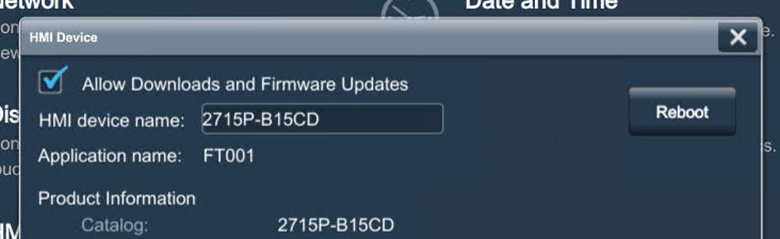
When this option is
cleared
, remote operations that could alter
the device—such as firmware updates, application downloads, and other
configuration changes—are blocked, placing the device into a protected, run‑time
state. When the option is enabled
, authorized users may perform those
operations during commissioning or maintenance.In accordance with CIP
protocol requirements,
remote access to disruptive parameters is
prevented
while the device is protected, ensuring that CIP messages
cannot be used to modify configuration or operational settings that could affect
availability or safety during run‑time operation.While Protected Mode is
active, the following actions are restricted:
- Device configuration changes, including network, port, and policy settings
- Firmware and application download or update operations
- Reset and reinitialization functions
All user authentication, authorization, and security policies configured
during commissioning remain enforced, but
no unprotected or unintended
changes are permitted
while the device is operating in this mode.Provide Feedback