
Use the input and output tags to read the Historian ME status
With the Module Profile you can view the current status of your Historian ME module directly in Logix Designer. The status is presented with input and output tags. Each tag corresponds with a specific functionality of FactoryTalk Historian ME.
TIP:
The bits referenced in this section are indexed from right to left, with the least significant bit indexed as
a0
, and the adjoining bits indexed as a1
, a2
, etc.The
Fault
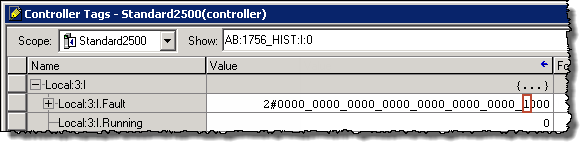
tag may indicate the following activities of the module:- The module has entered safe mode.The safe mode is indicated with the least significant bit (a0) in theFaultword set to1.
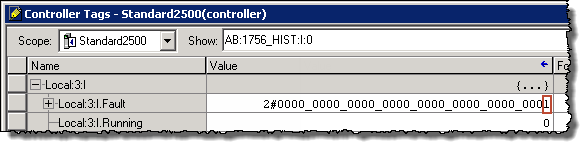
- There is at least one bad point on the module.The bad points are indicated with thea1bit in theFaultword set to1.
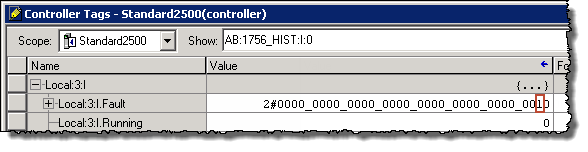 This reflects the information available on theHometab of FactoryTalk Historian ME module page underPoint Statistics.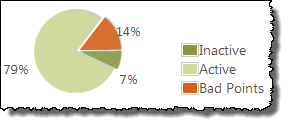
- The time synchronization with the NTP server does not work correctly.The time synchronization error is indicated with thea2bit in theFaultword set to1.
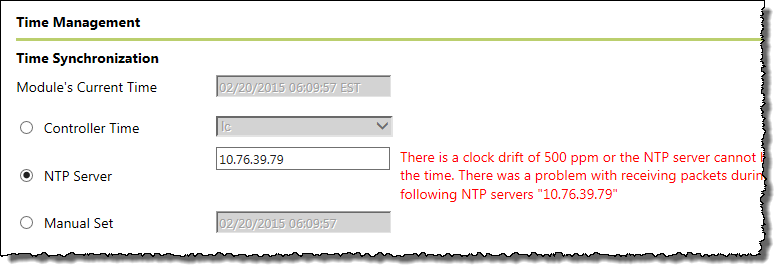
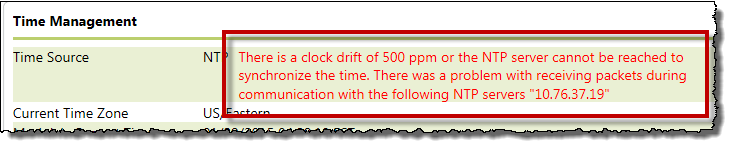
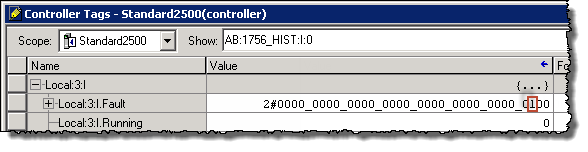 The update of the time synchronization status in the tag value may be delayed by several minutes after the actual status change.The indication of the NTP time synchronization status is correlated with the following message:There is a clock drift of 500 ppm or the NTP server cannot be reached to synchronize the time.The message appears on theTime Managementpage in the following locations in the Historian module web interface:
- On theAdvancedtab in the Historian web client.
- On theHardwaretab in the Web Diagnostics client.
- At least one required PI process and/or FactoryTalk Historian ME-specific process is not running.This is indicated with thea3bit in theFaultword set to1.
Provide Feedback