
Time management
The
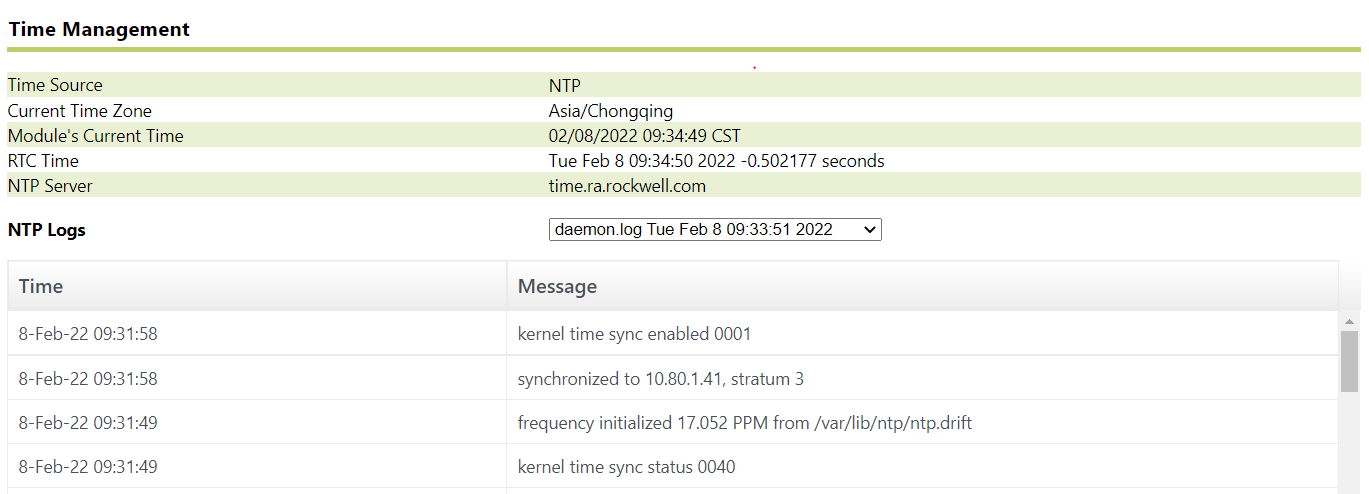
Time Management
page displays the following information:Item | Description |
|---|---|
Time Source | The source of the module's current time. Note: For details on time source options, see Manage time. |
Current Time Zone | The current time zone for the module. |
Module's Current Time | The current date and time of the module. |
RTC Time | The current time of the Real Time Clock (RTC). |
Last Update Time | The date and time the module time was last updated. |
Controller Path | The path to the Controller system from an external time source. |
Update Rate | How often the time is updated from an external time source. |
NTP Server | (Appears only if the time source is an NTP server). The IP address of the NTP server from an external time source. |
NTP Logs | If your module is synchronized to an NTP, FactoryTalk Historian SE, or PI server, NTP log files will appear in this section. If you want to view an NTP log, select it from the NTP Logs list. |
If the time synchronization with an NTP server (including a FactoryTalk Historian SE or PI server) is not successful, you may see the following error messages on this page:
sendto("IP") (fd=-1): Bad file descriptor (fd=-1) ("IP" is the NTP server's IP address).
frequency error xxx PPM exceeds tolerance 500 PPM ( "xxx" is the PPM value that is larger than 500).
No reply; clock not set. (The time was not synchronized successfully).
When any of these error messages are logged, check to make sure that the NTP server is running properly, and then reboot the ME module to synchronize with the NTP server again.
Provide Feedback