
Use output tags to start and stop the data collection
To stop the data collection
- In the Controller Organizer, under the folder of the controller to which you have downloaded the project, double-clickController Tags.The list of tags appears.
- Expand input tags (Local: <Slot number> I) and output tags (Local: <Slot number > O).
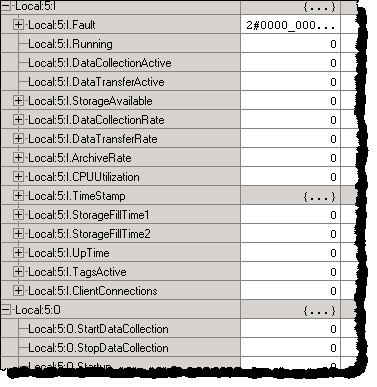 For details on input tags and their values, see Use the input and output tags to read the Historian ME status.
 - Under output tags, next to theStopDataCollectiontag, change its value from0to1, and then press Enter.The following actions take place:
- The value of theDataCollectionActiveinput tag changes from1to0.
- The value of theTagsActiveinput tag changes from its current value to0, because the scanning of all the points is stopped.
To start the data collection
- Under output tags, next to theStartDataCollectiontag, change its value from0to1, and then press Enter.The following actions take place:
- The value of theDataCollectionActiveinput tag changes from0to1.
- The value of theTagsActiveinput tag changes from0to its current value.
- The values of theDataCollectionRate,DataTransferRate, andArchiveRateinput tags are updated, provided that these services are configured on your module.
You can write Ladder logic programs to monitor these statistics and programmatically start and stop the data collection and/or stop and start batches depending on the status of the module.
To reset the output tags back to
0
, write the Ladder logic or manually set them to 0
.Provide Feedback