Loading
Innovation Center LOGO
Recent ActivityRecent Activity

Rotary Knife

Library to calculate the electronic cam profile for a rotary knife. - [Implementation time: 30 minutos]
Innovation Center Home Page
Una fila de dispositivos electrónicos conectados por cables
Innovation Center LOGO
  • Overview
  • Installation Guide
  • Downloads
  • Contact us
  • I want to subscribe.
Innovation Center Home Page


What is this for?

This application serves as an example of how to use the raM_Tec_RotaryKnife library.

This AOI calculates four cam profiles for the rotary knife:

  • Connection cam for acceleration from a stationary position. Typically from the initial axis position after homing or when there is no product/bag in production.
  • Cyclic cam for continuous motion: one cut per product length.
  • Disconnection cam for deceleration when stopping the knife without stopping the master axis.
  • Dwell cam to keep the slave axis stopped for one product length.

When to Use: When a rotary knife cam profile is required for an axis.

When NOT to use: Not applicable (NA).


Functional Description


The cam calculation instruction generates profiles to synchronize the knife speed with the conveyor while they are in contact.


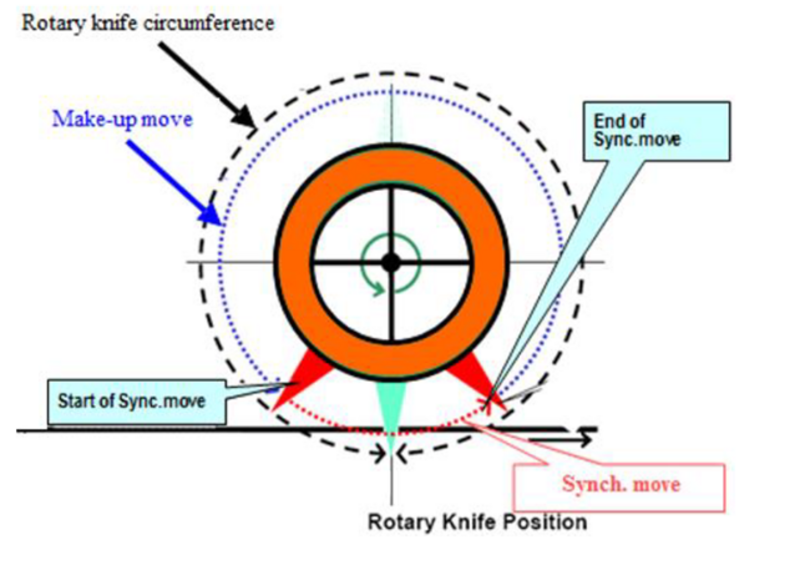
During the cyclic operation of a rotary knife, there is a synchronized portion and a compensation portion (see image below). The synchronized portion ensures that the knife and conveyor speeds are equal, while the compensation motion allows cut lengths to be shorter or longer than the circumference of the knife roll by accelerating or decelerating. 


AHIC Download ICON VF.png

Downloads

Please note: You will need to agree to the Terms & Conditions for each download.

Downloadable file ›
Legal Disclaimer Acceptance. ROCKWELL AUTOMATION WILL PROVIDE ACCESS TO ROCKWELL PRODUCTS (BEST PRACTICES, APPLICATIONS AND KNOWLEDGE) ON THE CONDITION THAT YOU ACCEPT AND COMPLY WITH THE FOLLOWING TERMS AND CONDITIONS. YOU ACCEPT AND AGREE TO BE BOUND BY THE TERMS OF THIS AGREEMENT BY DOWNLOADING, INSTALLING, COPYING, OR OTHERWISE USING PRODUCTS. IF YOU ARE ACCEPTING THESE TERMS ON BEHALF OF ANOTHER PERSON, COMPANY, OR OTHER LEGAL ENTITY, YOU REPRESENT AND WARRANT THAT YOU HAVE FULL AUTHORITY TO BIND THAT PERSON, COMPANY, OR LEGAL ENTITY TO THESE TERMS. IF YOU DO NOT AGREE TO THESE TERMS, DO NOT DOWNLOAD, INSTALL, COPY, ACCESS, OR USE THE PRODUCTS, SOFTWARE AND/OR CLOUD SERVICES. 1. Rockwell Automation retains full ownership and title to all Products and related documentation. No rights or licenses are granted other than those set forth in this Agreement. Company grants to Rockwell Automation a non-exclusive, worldwide, royalty-free, perpetual, non-revocable license to use any feedback Company provides regarding the Products, even if Company has designated the feedback as confidential. Rockwell Automation will be entitled to use the feedback without restriction or compensation to Company. 2. Company may not lease sub-lease, assign, license, sub-license or otherwise transfer any of the Products without the prior written consent of Rockwell Automation. Company may not assign or otherwise transfer access rights to the Products without the prior written consent of Rockwell Automation. Any reverse assembly, reverse engineering, decompilation, and creation of derivative works based on the Products by Company is prohibited. 3. Company acknowledges that Products provided under this Agreement are Rockwell Automation’s Confidential Information and are covered by effective or pending copyrights, patents, trademarks and/or trade secrets of Rockwell Automation, and Company agrees to maintain confidentiality by not disclosing Products or documentation to any third party without the prior written consent of Rockwell Automation and to protect the confidentiality of the Products as it would Company’s own confidential information. Company agrees that its obligation of confidentiality under this paragraph shall survive expiration or termination of this Agreement. 4. Company agrees that Products provided under this Agreement are prototypes and examples and its application and results may vary depending on each customer and project conditions. Rockwell Automation do not warranty the same results. This Agreement shall in no way be construed as a commitment by Rockwell Automation at any time to manufacture and/or offer Products for sale. There is no explicit or implicit service level agreement associated with using the Products. Rockwell Automation does not warrant that the functions contained in the Products will meet Company’s requirements. Company agrees to use all Products only in accordance with the instructions and only for the intended usages identified in the documentation. 5. EXCLUSION OF WARRANTIES AND LIMITATION OF LIABILITY. THE PRODUCTS ARE PROVIDED "AS IS". ROCKWELL AUTOMATION DISCLAIMS ANY AND ALL WARRANTIES, EXPRESS, IMPLIED OR STATUTORY, INCLUDING WITHOUT LIMITATION ANY WARRANTIES OF MERCHANTABILITY OR FITNESS FOR A PARTICULAR PURPOSE. ROCKWELL AUTOMATION EXPLICITLY DISCLAIMS ALL WARRANTIES OF NON- INFRINGEMENT AND EXPRESSLY DOES NOT WARRANT THAT THE PRODUCTS, IN WHOLE OR IN PART, WILL BE ERROR FREE OR FREE FROM SECURITY VULNERABILITIES. IN NO EVENT SHALL ROCKWELL AUTOMATION BE LIABLE FOR (i) LOST PROFITS, LOST SAVINGS, DOWNTIME, SPECIAL, INDIRECT OR CONSEQUENTIAL DAMAGES OF ANY KIND, OR (ii) ANY PERSONAL INJURY, PROPERTY DAMAGE OR ENVIRONMENTAL DAMAGE ARISING OUT OF OR IN CONNECTION WITH THIS AGREEMENT, WHETHER IN AN ACTION IN CONTRACT, STRICT LIABILITY OR IN TORT INCLUDING NEGLIGENCE. 6. COMPANY AGREES TO INDEMNIFY AND HOLD ROCKWELL AUTOMATION HARMLESS FROM ALL COSTS, AWARDS, DAMAGES, EXPENSES AND FEES (INCLUDING ATTORNEYS FEES) RESULTING FROM OR RELATED TO ANY THIRD-PARTY CLAIMS (INCLUDING EMPLOYEES AND AGENTS OF COMPANY) AGAINST ROCKWELL AUTOMATION, ITS DISTRIBUTORS, AGENTS, OFFICERS, DIRECTORS OR EMPLOYEES FOR PERSONAL INJURY (INCLUDING DEATH), PROPERTY DAMAGE OR ENVIRONMENTAL DAMAGE RELATED TO OR RESULTING FROM THE USE OF THE PRODUCTS. 7. In the event a Product is exported, Company agrees to comply with all applicable United States Export Control Law and Regulations, and the applicable export control laws of other countries. This Agreement shall be governed by the laws of the state of Wisconsin. This Agreement is the complete and exclusive Agreement between Rockwell Automation and the Company, and supersedes all prior agreements, whether written or oral, relating to the Products.
 
AHIC NEED HELP ICON VF.png

Need Help?

If you need help with an application or have feedback from the Innovation Center, please contact us.


Compensation Motion or Adjustment Motion:Motion of the knife where there is no contact between the knife and the conveyor (non-synchronized speeds).

  • There are two possible interpolation profiles for the compensation motion:
    • The interpolation priority is minimum energy usage and maximum speed; this may result in a non-continuous acceleration profile, even though the velocity and position profiles are continuous.
    • The interpolation priority is motion smoothness (continuous position, velocity, and acceleration profiles); this may result in a higher maximum speed and may cause the knife to reverse direction for parameters that would not reverse when the maximum-speed/minimum-energy mode is selected.


Synchronized Motion:Motion of the knife where the knife and the conveyor are in contact (synchronized speeds).

  • There are two possible profiles for synchronized motion:
    • Linear Profile: Calculates the angular velocity of the knife to match the linear speed of the conveyor.
    • Arcsine Compensation: Calculates the linear component of the angular velocity at each synchronization point to maintain exactly the same linear speed between the knife and the conveyor.
rotary-knife_rotary-knife-position.png

Figura 1. Rotary Knife Position

 
The Rotary Knife instruction generates four Cam Profiles (CAM) based on user-configurable inputs.
  • Connection Cam: Use this cam profile when the master is in motion and the knife is stopped. The connection profile accelerates the knife from zero velocity to the synchronization speed, with a defined distance between the master and the slave, minimizing mechanical stress. The connection cam starts at the initial knife position and ends at the beginning of the synchronization distance. The distance of the connection cam plus the distance of the disconnection cam results in a complete cycle (cyclic cam distance). This applies to both master and slave distances.
  • Cyclic Cam: Use this cam profile as the continuous knife cycle (one product). It contains synchronized motion (defined by Set_CutAngle in degrees) and compensation motion (defined by Set_ProductLength and Set_KnivesNumb).


  • Disconnection Cam: Use this cam profile when it is necessary to command the knife to stop while the master continues moving. The disconnection profile decelerates the knife to zero velocity with a defined distance between the master and the slave, minimizing mechanical stress. The disconnection cam contains the synchronization profile and the motion profile from synchronization speed down to zero, considering the defined distance between the master and the slave. The distance of the connection cam plus the distance of the disconnection cam results in a complete cycle (cyclic cam distance). This applies to both master and slave distances.
  • Dwell Cam: Use this cam profile to keep the slave axis stopped for a master distance (Set_ProductLength).
rotary-knife_rotary-knife.png
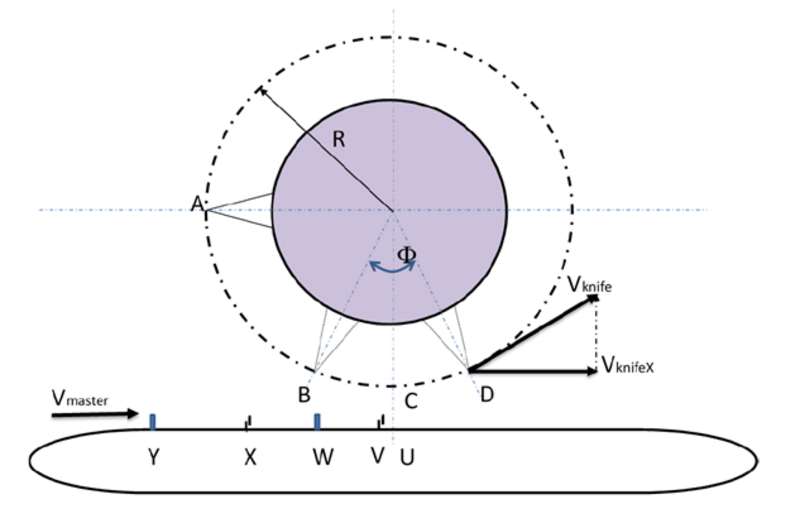
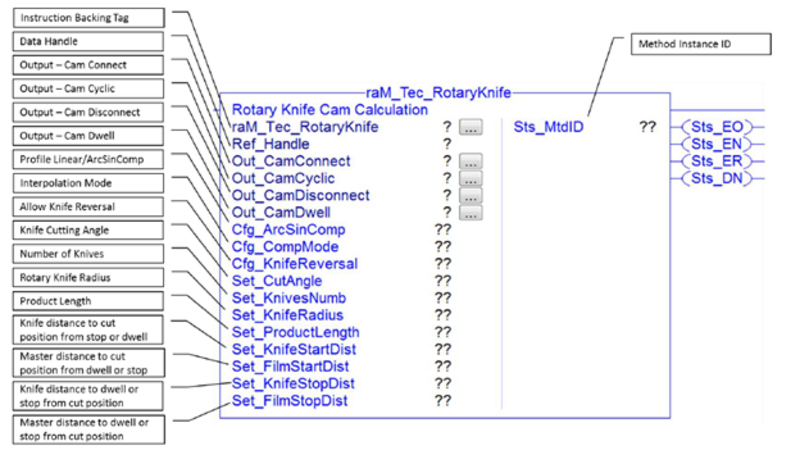
  • Set_CutAngle - Cutting angle at which the master and slave move synchronously; the value is in degrees (as the entire slave must also be scaled in degrees). This value defines the distance the master must travel (X to V).
  • Set_KnivesNumb - Number of knives. The number of knives defines the full cycle distance (for example, 1 knife = 360 degrees, 2 knives = 180 degrees, 3 knives = 120 degrees, etc.).
  • Set_KnifeRadius - Knife radius. The radius units must match the master units (therefore, if master distances are in mm, it must be defined in mm; if in inches, the diameter must be in inches).
  • Set_ProductLength - Master distance between two cuts (Y to W), defined in master units.
  • Set_KnifeStartDist - Distance (A to C, in degrees) from the slave’s initial position to the first cut (i.e., after homing or dwell). The distance is defined up to the cutting position, which remains constant and independent of changes in the cutting angle (half of the cutting distance is automatically subtracted within the AOI when calculating the connection cam, since this cam does not include the synchronization motion, distance from A to B).
  • Set_FilmStartDist - Master distance (U to W in master units) for the connection cam. This is the material distance to the next cutting position when starting after homing or exiting dwell (typically half the product length).
  • Set_KnifeStopDist - Slave distance from the cutting position back to the initial position (C to A; the cam itself corresponds to a longer half synchronization to reach the initial position, since it contains the entire synchronization profile).
  • Set_FilmStopDist - Master distance for the disconnection cam from the cutting position back to the initial position (i.e., half the product length).
  • Cfg_ArcSinComp - Defines the velocity profile of the synchronized motion. If set to 0, the velocity profile is linear and the velocity Vmaster matches the velocity Vknife. If set to 1, the velocity Vmaster matches the projection of Vknife in the direction of Vmaster (VknifeX), for more precise synchronization.
  • Cfg_CompMode - Defines the interpolation of the compensation motion.
    • If set to 0 (default), the interpolation prioritizes minimum energy usage and maximum speed; this may result in a non-continuous acceleration profile (while velocity and position profiles remain continuous).
    • If set to 1, the interpolation prioritizes smooth motion (continuous position, velocity, and acceleration profiles); this may result in higher maximum speed and may cause the knife to reverse direction under conditions where it would not reverse in mode 0.
  • Cfg_KnifeReversal - Enables error checking for a cam to detect if the calculated cam profile includes a segment where the knife reverses direction (this may occur with improper combinations of input parameters, such as high cutting speed with long product length). When this error check is enabled and the error bit is active, the cam profiles will not be calculated.
rotary-knife_aoi-rotary-knife.png


How can I make it work?

Requirements: products, tools, prior knowledge.

Hardware

  • CompactLogix 5380
  • Kit Kinetix 5500

Software

  • Studio 5000 - Version 35


Relevant links (internal or external)

  • Download the libraries on the following link https://compatibility.rockwellautomation.com/Pages/MultiProductFindDownloads.aspx?crumb=112&mode=3&refSoft=1&versions=56336


AHIC STEP ICON.png

Implementation Guide

 
  1. Step 1
  2. Step 2
  3. Step 3
  4. Step 4
  5. Step 5
  6. Step 6
Open All Close All
Step 1
 

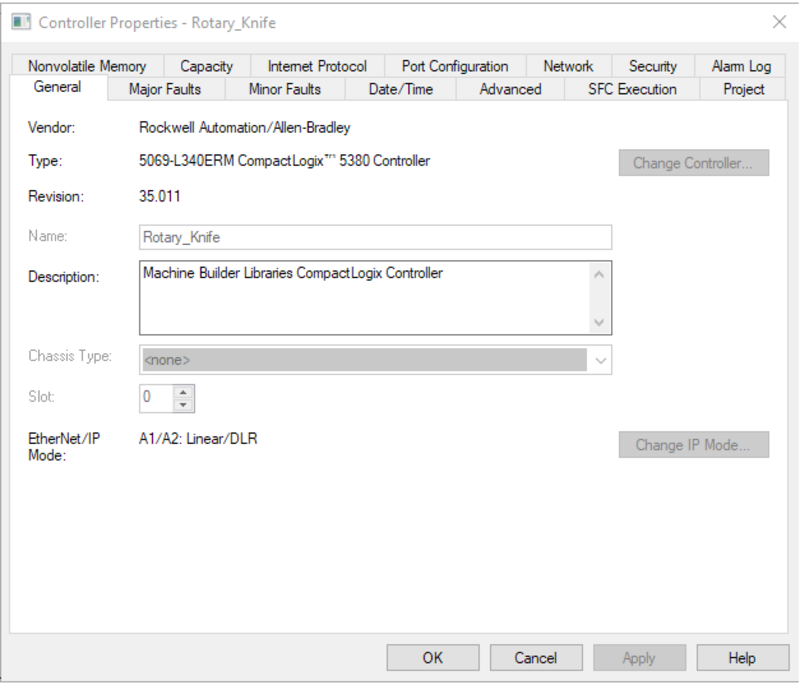
Open the Rotary Knife .ACD file and, in the controller properties, change the controller to match the available hardware.

rotary-knife_Step1.png

rotary-knife_Step1.png

 
Step 2
 

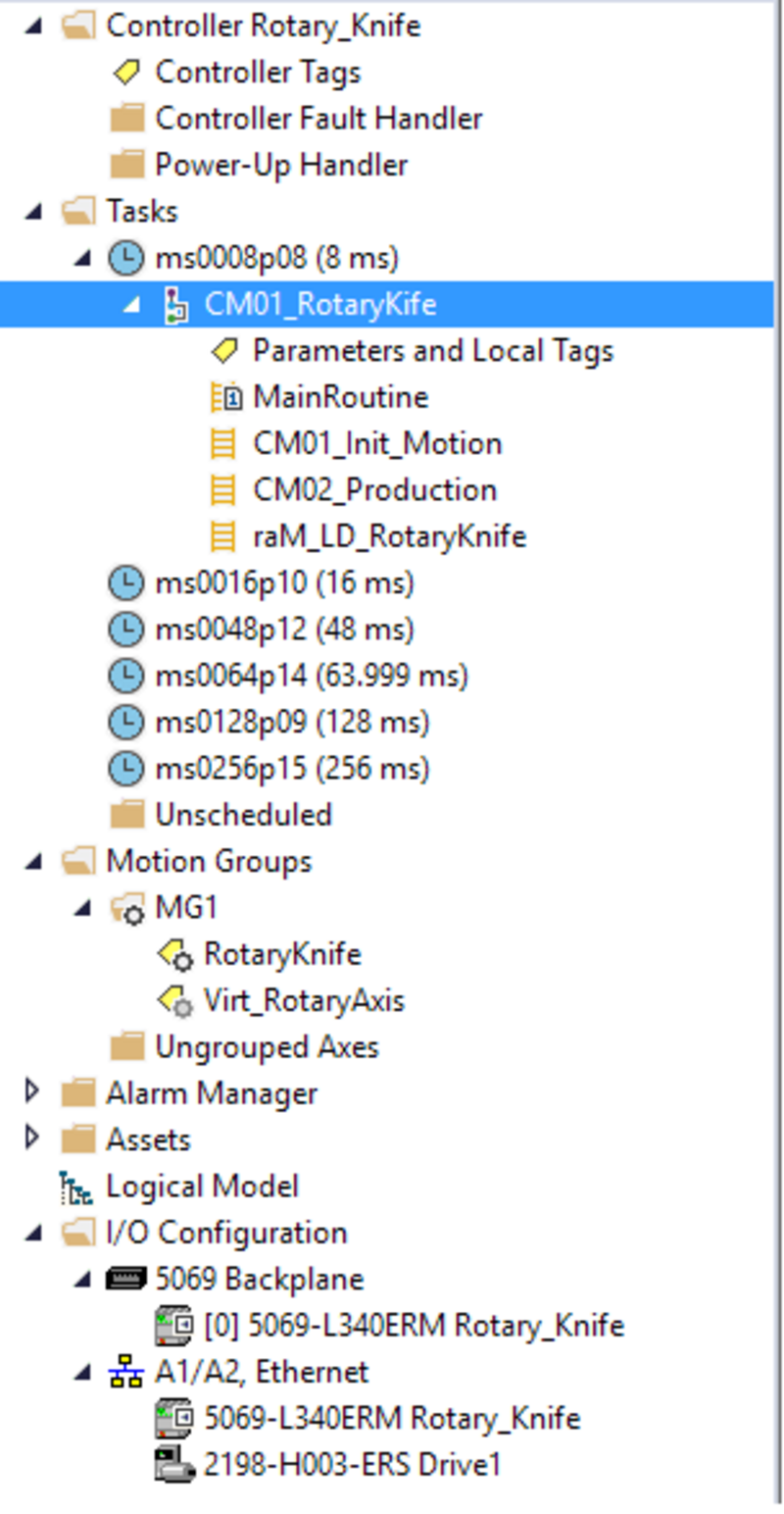
Modify the drive and the servo motor according to what is connected.

 
rotary-knife_Step2.png

rotary-knife_Step2.png

Step 3
 

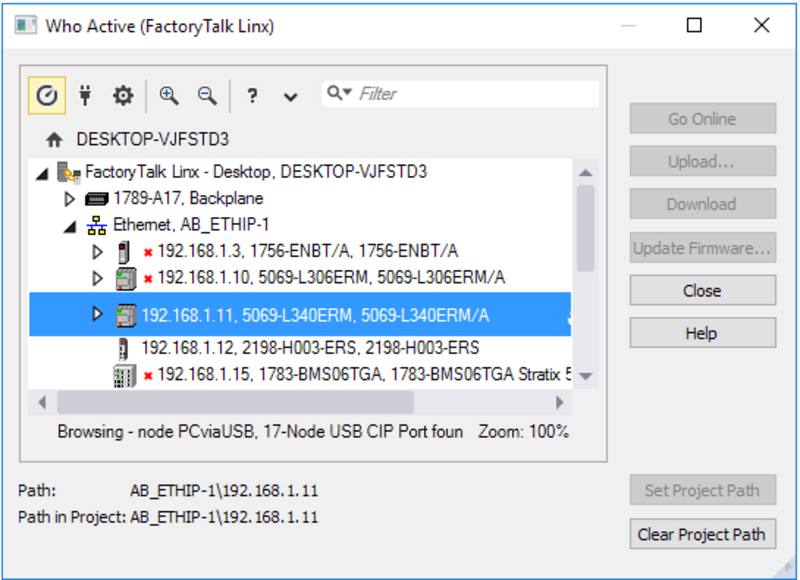
Download the program to the controller and go online with it.

rotary-knife_Step3.png

rotary-knife_Step3.png

Step 4
 

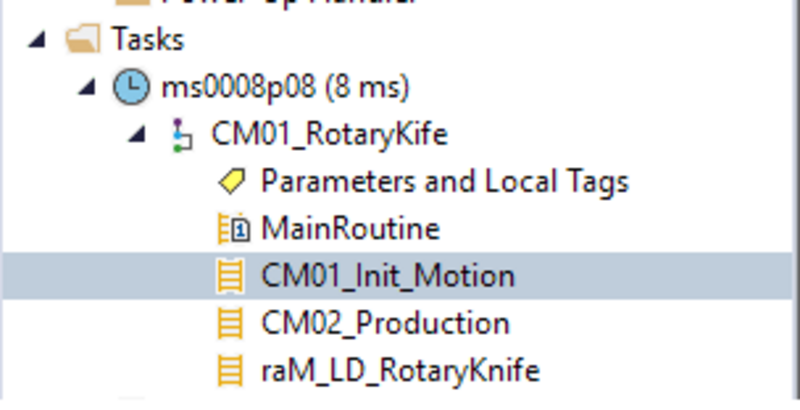
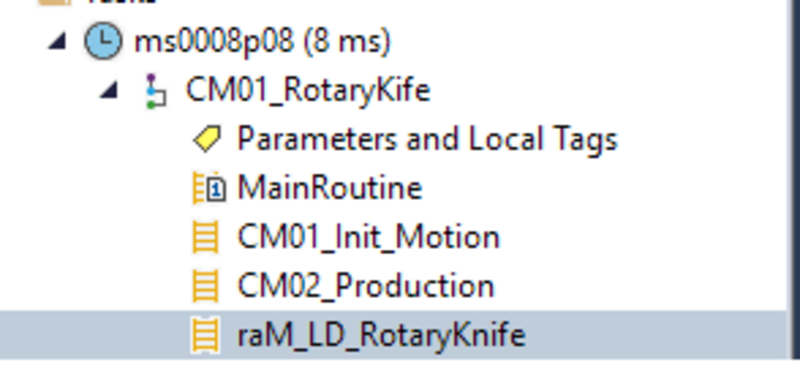
4.1 - Enter the routine indicated in the image above:

 
rotary-knife_Step4-1.png

rotary-knife_Step4-1.png

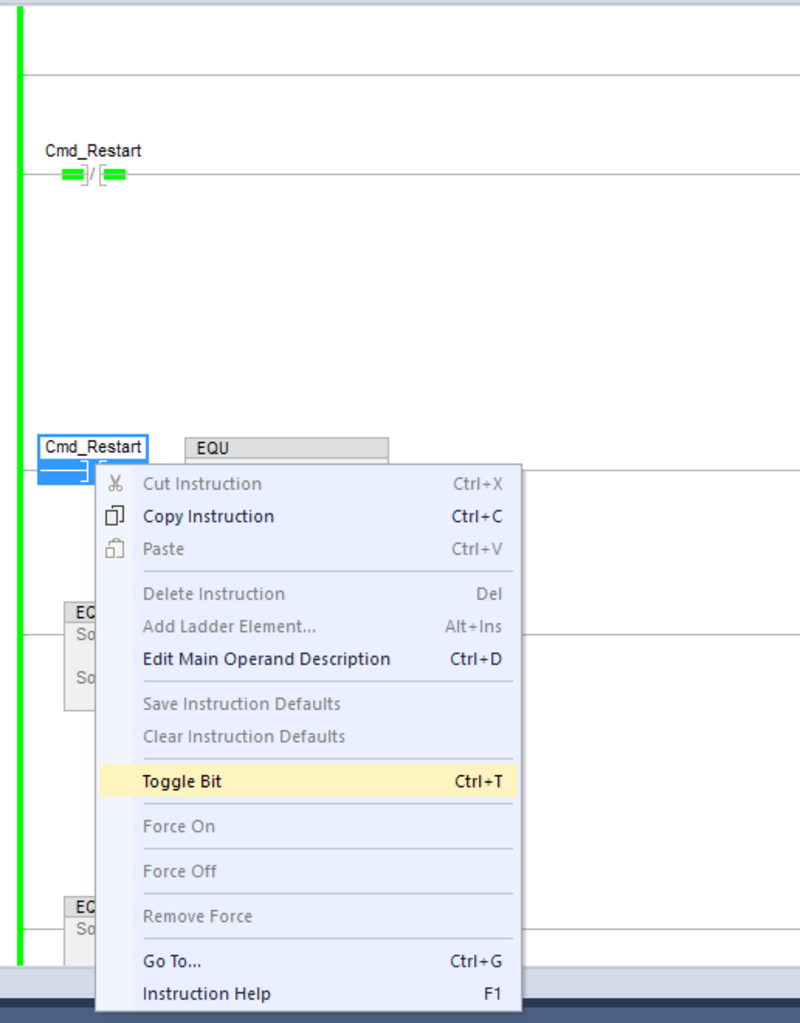
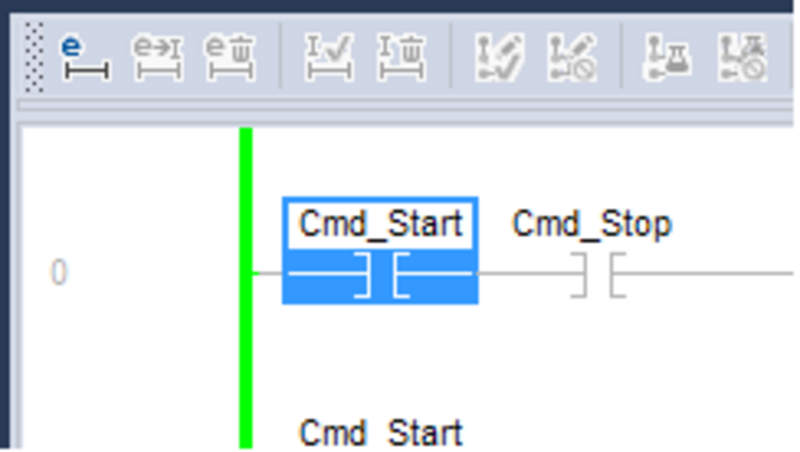
4.2 - In the Cmd_Reset contact, right-click and select Toggle Bit. With this instruction, you will initialize the servo motor, reset faults, and execute the Home routine.

rotary-knife_Step4-2.png

rotary-knife_Step4-2.png

Step 5
 

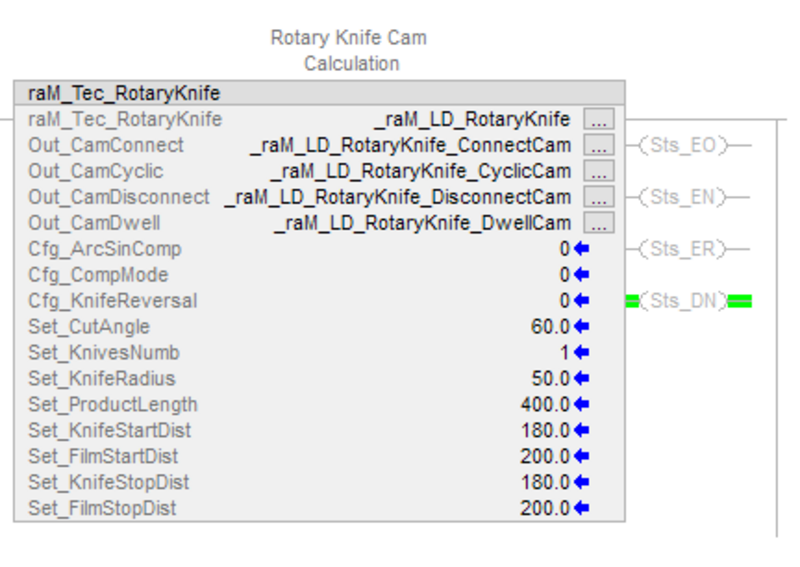
5.1 - Now go to the Ram_LD_RotaryKnife routine and configure the AOI according to your requirements.

rotary-knife_Step5-1.png

rotary-knife_Step5-1.png


This is an example of how to configure a cam for a rotary knife in the Add-On Instruction (AOI). 

5.2 - After homing, the knife is positioned 180 degrees away from the cutting position, and the film position is 200 units away from the first cut.

  • There is only one knife in the jaws.
  • The knife radius in the jaws is 50 mm.
  • After homing, the knife position is 180 degrees from the cutting position.
  • After homing, the film position is at the center of the product.
  • The cutting angle is 60 degrees.
  • The product length is 400 mm.
  • When the knife stops, it is intended to stop exactly at the same position as after homing (so that it can start using the connection cam when there is no product/bag in operation).
rotary-knife_Step5-2.png

rotary-knife_Step5-2.png

Step 6
 

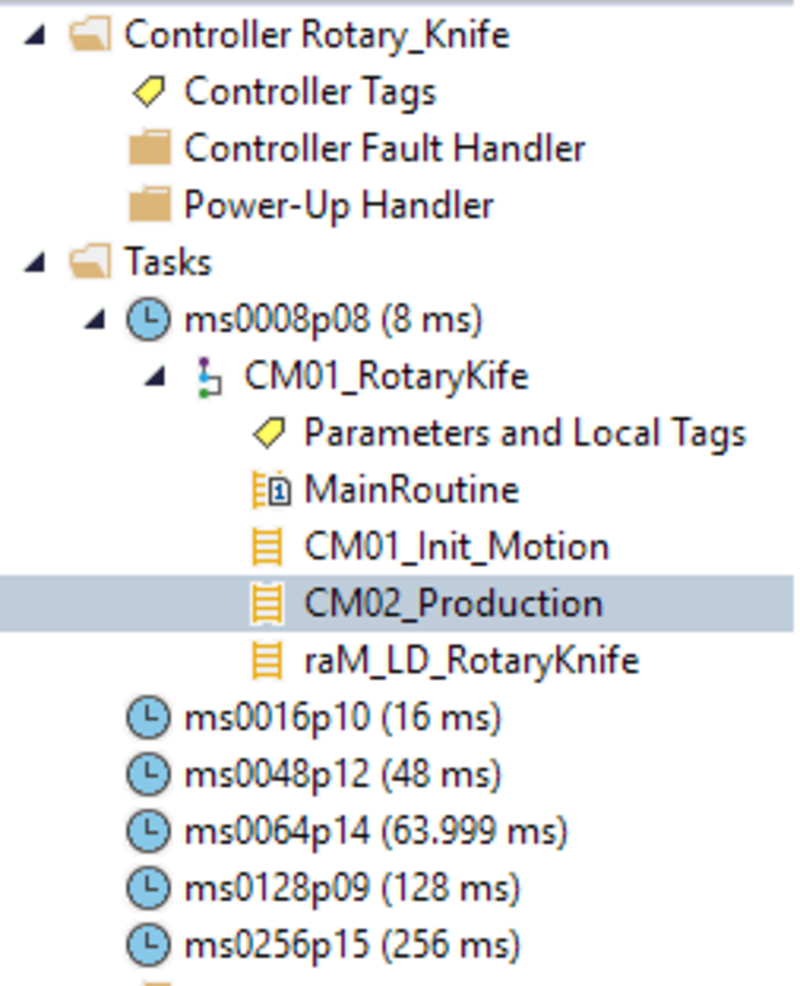
6.1 - Now go to the CM02_Production routine.

 
rotary-knife_Step6-1.png

rotary-knife_Step6-1.png


6.2 - In this routine, you can start and stop the servo motor using the Toggle Bit function explained in step 4.

The servo motor will start using the profile defined in the previous step.

rotary-knife_Step6-2.png

rotary-knife_Step6-2.png


rotary-knife_Step1.png

rotary-knife_Step1.png

rotary-knife_Step2.png

rotary-knife_Step2.png

rotary-knife_Step3.png

rotary-knife_Step3.png

rotary-knife_Step4-1.png

rotary-knife_Step4-1.png

rotary-knife_Step4-2.png

rotary-knife_Step4-2.png

rotary-knife_Step5-1.png

rotary-knife_Step5-1.png

rotary-knife_Step5-2.png

rotary-knife_Step5-2.png

rotary-knife_Step6-1.png

rotary-knife_Step6-1.png

rotary-knife_Step6-2.png

rotary-knife_Step6-2.png


Rotary Knife

Version 1.1 - May 2026


AHIC White Logo
Subscribe!

Receive new app releases and other updates from the Innovation Center directly in your inbox.

I want to subscribe.
 
  1. Chevron LeftChevron Left Rockwell Automation Home
  2. Chevron LeftChevron Left Sup...
  3. Chevron LeftChevron Left Pro...
  4. Chevron LeftChevron Left Downloads
  5. Chevron LeftChevron Left Innovation Center
  6. Chevron LeftChevron Left Rotary Knife
Please update your cookie preferences to continue.
This feature requires cookies to enhance your experience. Please update your preferences to allow for these cookies:
  • Social Media Cookies
  • Functional Cookies
  • Performance Cookies
  • Marketing Cookies
  • All Cookies
You can update your preferences at any time. For more information please see our {0} Privacy Policy
CloseClose