
Loading
Innovation Center LOGO

Implement AUDIT TRAIL 21CFR in FACTORYTALK OPTIX
The step-by-step process for implementing 21CFR using FactoryTalk Optix is defined. - [Implementation time: 60 minutes]
Innovation Center Home Page
Digital Audit Trail: Ensuring Compliance and Transparency in Modern Systems
On This Page:
  • What is this for?
  • Installation guide
Innovation Center Home
 

What is it for?

21 CFR Part 11 is a regulation issued by the U.S. Food and Drug Administration (FDA) in 1997. It establishes the criteria under which electronic signatures and records are accepted as legal equivalents to handwritten signatures and paper records in the life sciences industry (pharmaceutical, biotechnology, medical device, etc.).


Its objective is to ensure that computer systems used in manufacturing, quality control, and regulatory documentation meet standards of:

  • Authenticity
  • Integrity
  • Confidentiality
  • Non-repudiation (a signature cannot be rejected as non-genuine)

Implementing 21 CFR is useful because it:

  • Replaces paper: Reduces storage, printing, and physical handling costs.
  • Streamlines processes: Enables legally valid digital workflows.
  • Efficient auditing: Facilitates tracking of actions and changes in electronic records.
  • Regulatory compliance: This is mandatory for companies operating under the FDA.

General Features

  • Closed vs. open systems: Define controls based on who manages access.
  • Electronic records: Text, graphics, audio, data, etc., in digital format.
  • Electronic signatures: Legal equivalents of handwritten signatures.
  • Automated audits: Records of who modified what, when, and what.
  • Access controls: User authentication and role-based permissions.

Advantages:

  • Complete traceability: Every action is logged with a username and timestamp.
  • Security: Access controls, encryption, and password policies.
  • Efficiency: Digital approval workflows with electronic signatures.
  • Flexibility: Configurable according to each company's specific needs.

Limitations/Disadvantages

  • Implementation complexity: Requires detailed security configuration and auditing.
  • Initial costs: Investment in compatible software and training.
  • Maintenance: Updates, backups, and user management.
  • Rigidity: Changes must follow validated procedures.
 

Downloads

Please note: You will need to agree to the Terms & Conditions for each download.

Download files ›
Legal Disclaimer Acceptance. ROCKWELL AUTOMATION WILL PROVIDE ACCESS TO ROCKWELL PRODUCTS (BEST PRACTICES, APPLICATIONS AND KNOWLEDGE) ON THE CONDITION THAT YOU ACCEPT AND COMPLY WITH THE FOLLOWING TERMS AND CONDITIONS. YOU ACCEPT AND AGREE TO BE BOUND BY THE TERMS OF THIS AGREEMENT BY DOWNLOADING, INSTALLING, COPYING, OR OTHERWISE USING PRODUCTS. IF YOU ARE ACCEPTING THESE TERMS ON BEHALF OF ANOTHER PERSON, COMPANY, OR OTHER LEGAL ENTITY, YOU REPRESENT AND WARRANT THAT YOU HAVE FULL AUTHORITY TO BIND THAT PERSON, COMPANY, OR LEGAL ENTITY TO THESE TERMS. IF YOU DO NOT AGREE TO THESE TERMS, DO NOT DOWNLOAD, INSTALL, COPY, ACCESS, OR USE THE PRODUCTS, SOFTWARE AND/OR CLOUD SERVICES. 1. Rockwell Automation retains full ownership and title to all Products and related documentation. No rights or licenses are granted other than those set forth in this Agreement. Company grants to Rockwell Automation a non-exclusive, worldwide, royalty-free, perpetual, non-revocable license to use any feedback Company provides regarding the Products, even if Company has designated the feedback as confidential. Rockwell Automation will be entitled to use the feedback without restriction or compensation to Company. 2. Company may not lease sub-lease, assign, license, sub-license or otherwise transfer any of the Products without the prior written consent of Rockwell Automation. Company may not assign or otherwise transfer access rights to the Products without the prior written consent of Rockwell Automation. Any reverse assembly, reverse engineering, decompilation, and creation of derivative works based on the Products by Company is prohibited. 3. Company acknowledges that Products provided under this Agreement are Rockwell Automation’s Confidential Information and are covered by effective or pending copyrights, patents, trademarks and/or trade secrets of Rockwell Automation, and Company agrees to maintain confidentiality by not disclosing Products or documentation to any third party without the prior written consent of Rockwell Automation and to protect the confidentiality of the Products as it would Company’s own confidential information. Company agrees that its obligation of confidentiality under this paragraph shall survive expiration or termination of this Agreement. 4. Company agrees that Products provided under this Agreement are prototypes and examples and its application and results may vary depending on each customer and project conditions. Rockwell Automation do not warranty the same results. This Agreement shall in no way be construed as a commitment by Rockwell Automation at any time to manufacture and/or offer Products for sale. There is no explicit or implicit service level agreement associated with using the Products. Rockwell Automation does not warrant that the functions contained in the Products will meet Company’s requirements. Company agrees to use all Products only in accordance with the instructions and only for the intended usages identified in the documentation. 5. EXCLUSION OF WARRANTIES AND LIMITATION OF LIABILITY. THE PRODUCTS ARE PROVIDED "AS IS". ROCKWELL AUTOMATION DISCLAIMS ANY AND ALL WARRANTIES, EXPRESS, IMPLIED OR STATUTORY, INCLUDING WITHOUT LIMITATION ANY WARRANTIES OF MERCHANTABILITY OR FITNESS FOR A PARTICULAR PURPOSE. ROCKWELL AUTOMATION EXPLICITLY DISCLAIMS ALL WARRANTIES OF NON- INFRINGEMENT AND EXPRESSLY DOES NOT WARRANT THAT THE PRODUCTS, IN WHOLE OR IN PART, WILL BE ERROR FREE OR FREE FROM SECURITY VULNERABILITIES. IN NO EVENT SHALL ROCKWELL AUTOMATION BE LIABLE FOR (i) LOST PROFITS, LOST SAVINGS, DOWNTIME, SPECIAL, INDIRECT OR CONSEQUENTIAL DAMAGES OF ANY KIND, OR (ii) ANY PERSONAL INJURY, PROPERTY DAMAGE OR ENVIRONMENTAL DAMAGE ARISING OUT OF OR IN CONNECTION WITH THIS AGREEMENT, WHETHER IN AN ACTION IN CONTRACT, STRICT LIABILITY OR IN TORT INCLUDING NEGLIGENCE. 6. COMPANY AGREES TO INDEMNIFY AND HOLD ROCKWELL AUTOMATION HARMLESS FROM ALL COSTS, AWARDS, DAMAGES, EXPENSES AND FEES (INCLUDING ATTORNEYS FEES) RESULTING FROM OR RELATED TO ANY THIRD-PARTY CLAIMS (INCLUDING EMPLOYEES AND AGENTS OF COMPANY) AGAINST ROCKWELL AUTOMATION, ITS DISTRIBUTORS, AGENTS, OFFICERS, DIRECTORS OR EMPLOYEES FOR PERSONAL INJURY (INCLUDING DEATH), PROPERTY DAMAGE OR ENVIRONMENTAL DAMAGE RELATED TO OR RESULTING FROM THE USE OF THE PRODUCTS. 7. In the event a Product is exported, Company agrees to comply with all applicable United States Export Control Law and Regulations, and the applicable export control laws of other countries. This Agreement shall be governed by the laws of the state of Wisconsin. This Agreement is the complete and exclusive Agreement between Rockwell Automation and the Company, and supersedes all prior agreements, whether written or oral, relating to the Products.

Need Help?

If you need help with an application or have feedback from the Innovation Center, please contact us.


Is this useful for me?

This code is defined for applications where you need to implement 21CFR.


Application areas: Food, Manufacturing, Beverage


How can I make it work?

  • Hardware: Personal computer
  • Software: FT Optix
  • Knowledge: Knowledge of programming and configuration in FT Optix and application of the 21CFR standard.


Installation guide 

To implement, please follow the steps below.


  • Workflow step by step icon

    Step 01


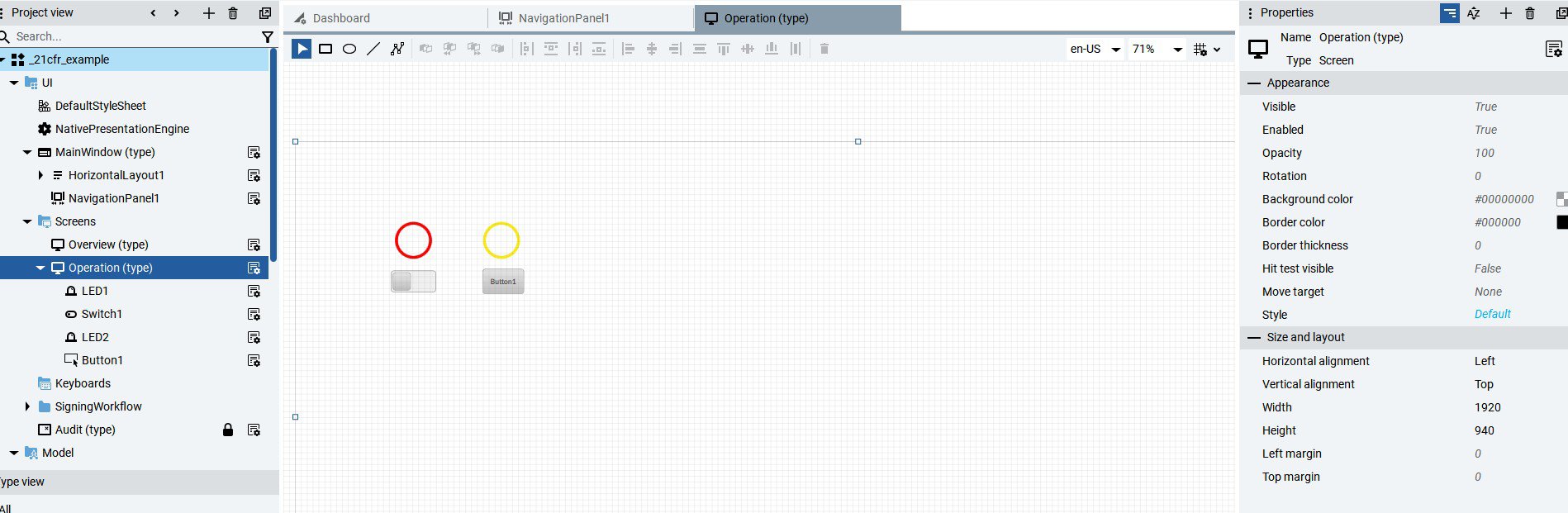
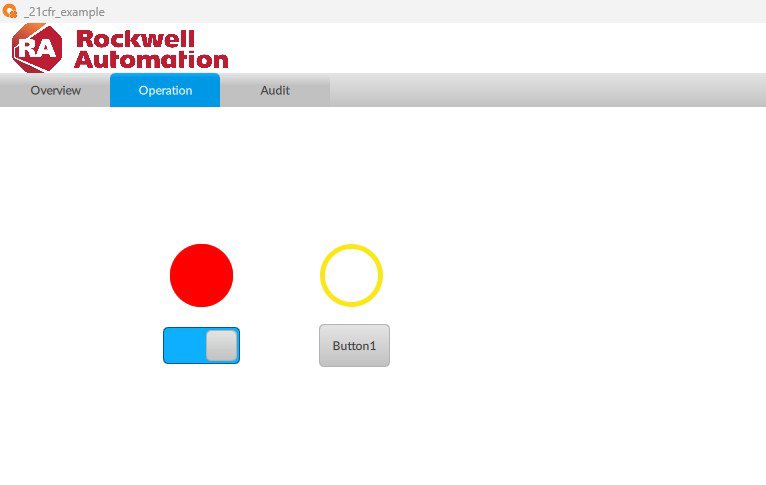
    Create the screen, buttons, and controls to which the electronic signature will be applied.

     
    implement-audit-trail-21cfr-in-factorytalk-optix_Image1_1.jpg

    Image 1.1. Creating objects

    implement-audit-trail-21cfr-in-factorytalk-optix_Image1_2.jpg

    Image 1.2. Creating objects (runtime)

     
  • Workflow step by step icon

    Step 02


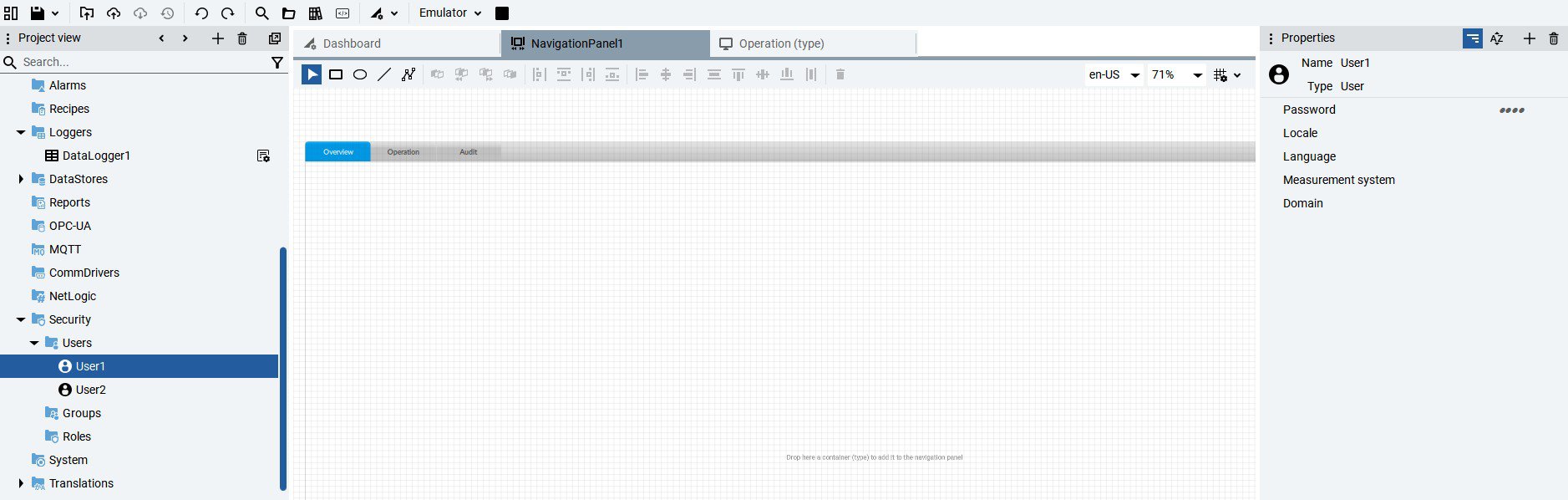
    Create the necessary users for the application from the Security tab and assign a password in the Properties section.

     
    implement-audit-trail-21cfr-in-factorytalk-optix_Image2.jpg

    Image 2. Creating users

  • Workflow step by step icon

    Step 03


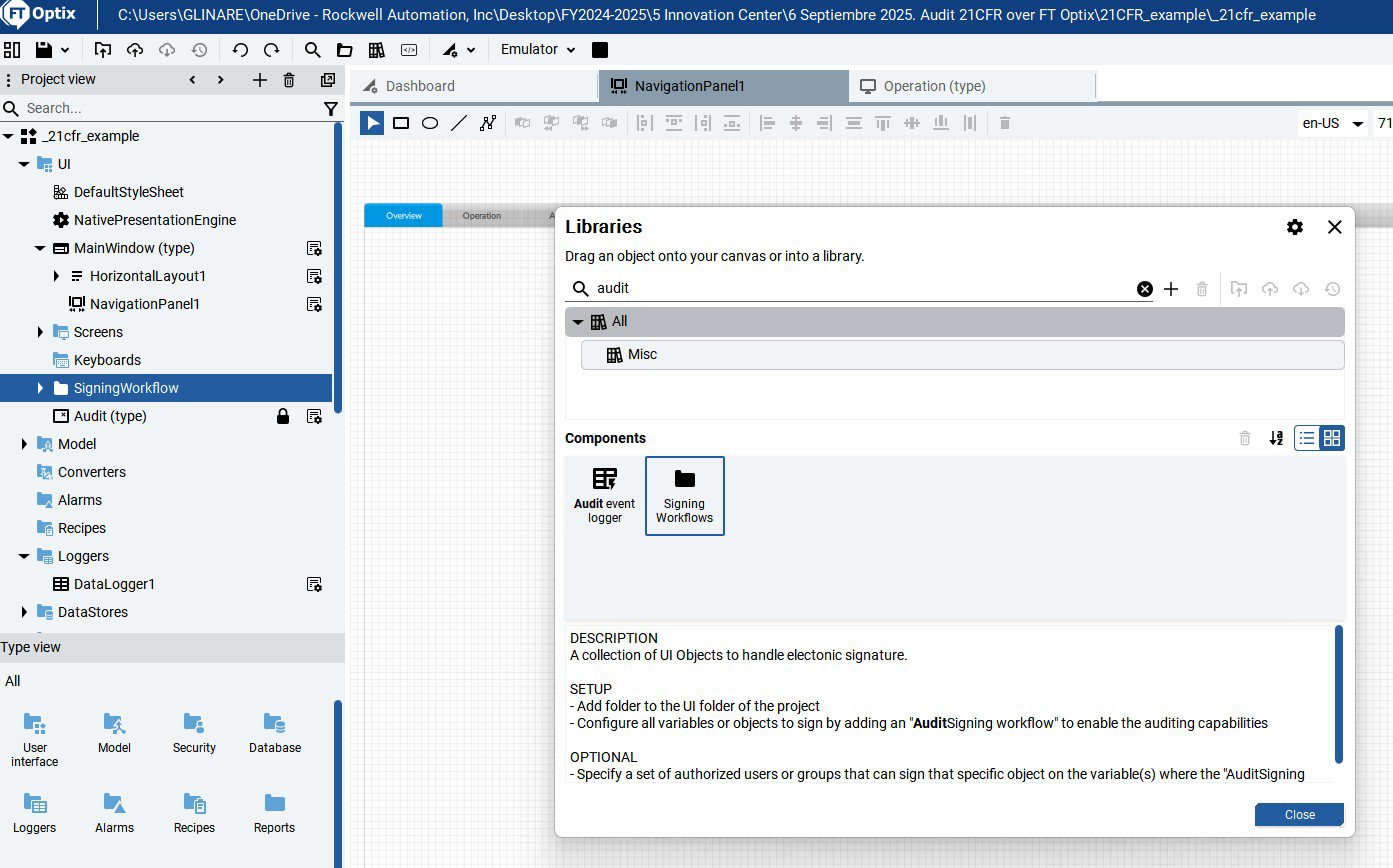
    From the object library, add the Signing Workflows object by dragging it from the library to the UI.

     
    implement-audit-trail-21cfr-in-factorytalk-optix_Image3.jpg

    Image 3. Signing Workflows object

     
  • Workflow step by step icon

    Step 04


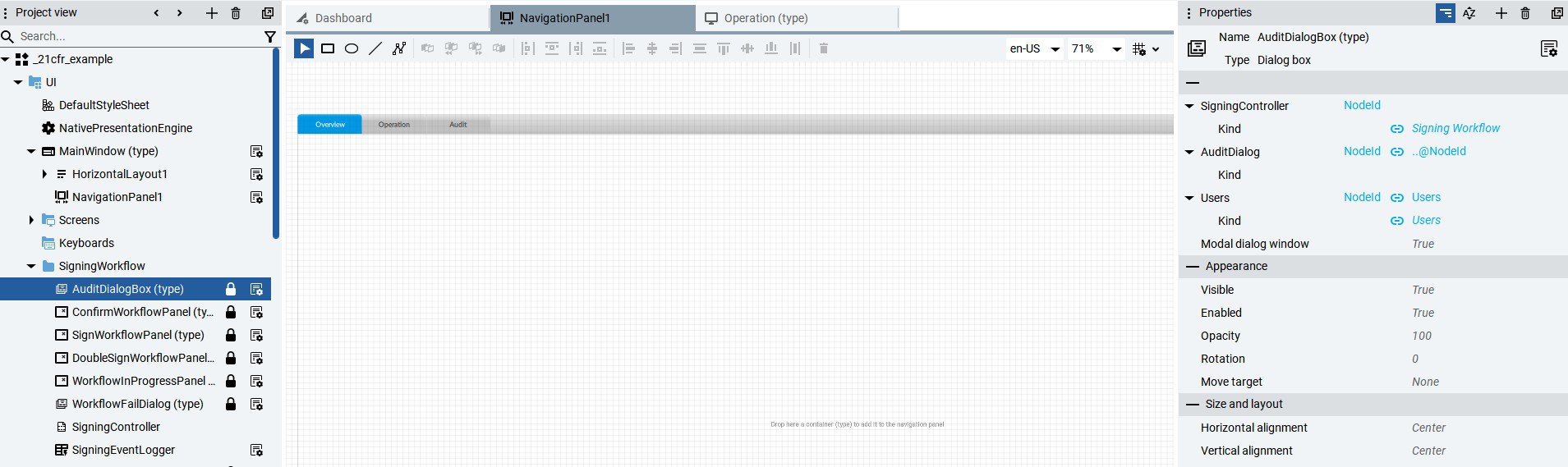
    Configure the AuditDialogBox object properties and assign users.

    implement-audit-trail-21cfr-in-factorytalk-optix_Image4.jpg

    Image 4. Configure AuditDialogBox properties

  • Workflow step by step icon

    Step 05


    Assign the Audit Signature property and the users who can change the object's condition to the variables of the objects that need to be audited.

    implement-audit-trail-21cfr-in-factorytalk-optix_Image5.jpg

    Image 5. Configuring the Audit property in variables.

  • Workflow step by step icon

    Step 06


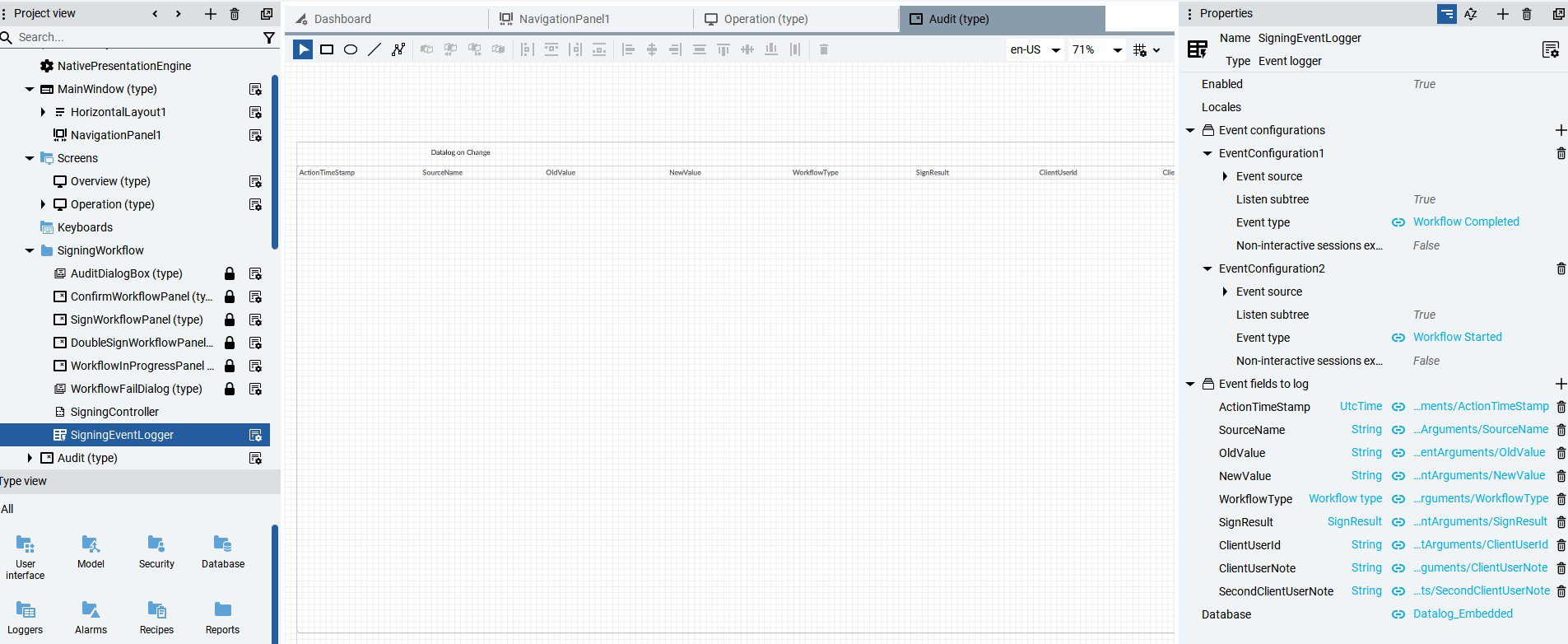
    Create an Audit database, for example, embedded, from the DataStores option.


    Then, in the Database field of the Signing Workflows object, assign the name of the previously created database in the SigningEventLogger property.

    implement-audit-trail-21cfr-in-factorytalk-optix_Image6.jpg

    Image 6. Definition and assignment of the Audit database.

  • Workflow step by step icon

    Step 07


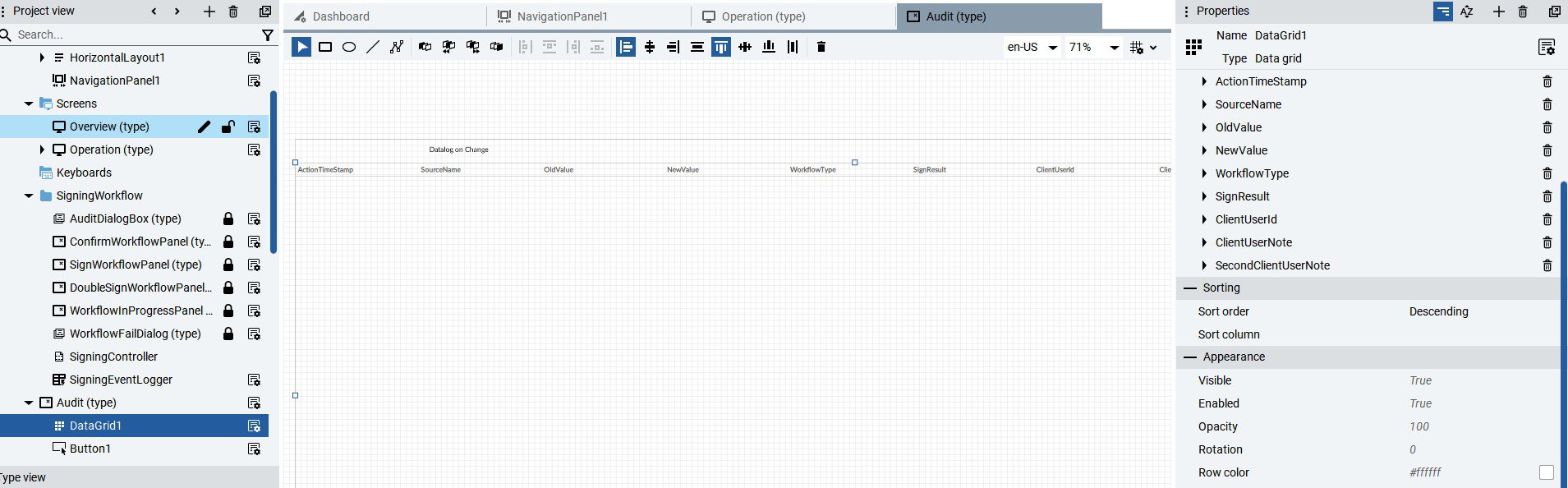
    Generate a new screen called Audit and assign the Datagrid object found in the User Interface → Data Controls → Data Grid.


    Once adjusted to the screen resolution, grab the SigningEventLogger property of the Signing Workflows object by dragging it to the Data Grid. From the Datagrid properties, change the setting to Descendant.

    implement-audit-trail-21cfr-in-factorytalk-optix_Image7.jpg

    Image 7. Configure the Audit datalog.

  • Workflow step by step icon

    Step 08


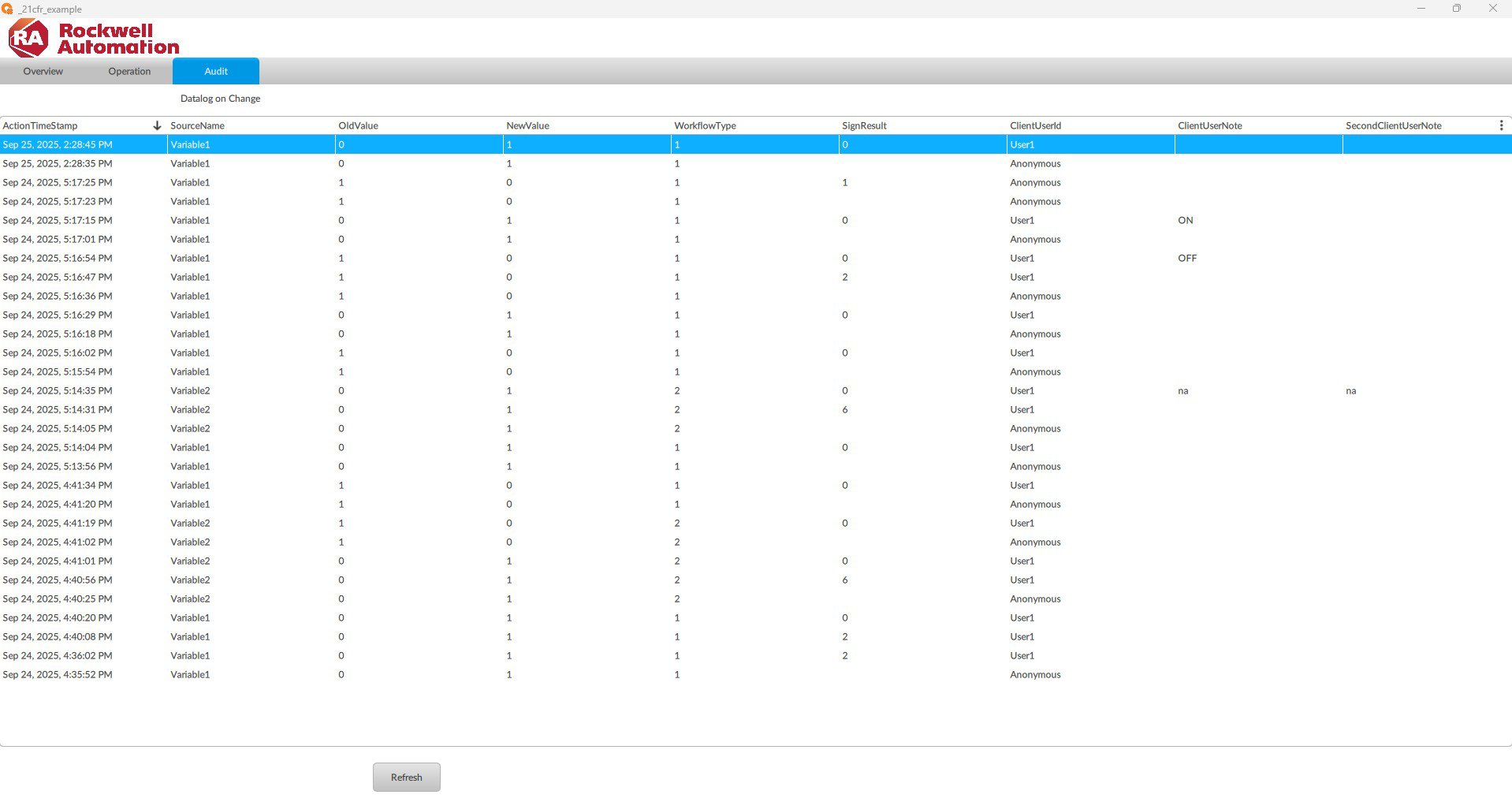
    The log of changes to the defined variables and objects is displayed in the Audit tab.

    implement-audit-trail-21cfr-in-factorytalk-optix_Image8.jpg

    Image 8. Audit log of variables.

implement-audit-trail-21cfr-in-factorytalk-optix_Image1_1.jpg

Image 1.1. Creating objects

implement-audit-trail-21cfr-in-factorytalk-optix_Image1_2.jpg

Image 1.2. Creating objects (runtime)

implement-audit-trail-21cfr-in-factorytalk-optix_Image2.jpg

Image 2. Creating users

implement-audit-trail-21cfr-in-factorytalk-optix_Image3.jpg

Image 3. Signing Workflows object

implement-audit-trail-21cfr-in-factorytalk-optix_Image4.jpg

Image 4. Configure AuditDialogBox properties

implement-audit-trail-21cfr-in-factorytalk-optix_Image5.jpg

Image 5. Configuring the Audit property in variables.

implement-audit-trail-21cfr-in-factorytalk-optix_Image6.jpg

Image 6. Definition and assignment of the Audit database.

implement-audit-trail-21cfr-in-factorytalk-optix_Image7.jpg

Image 7. Configure the Audit datalog.

implement-audit-trail-21cfr-in-factorytalk-optix_Image8.jpg

Image 8. Audit log of variables.


AHIC Color Logo
 

Implement AUDIT TRAIL 21CFR in FT Optix

Version 1.0 - September 2025

Have a general inquiry?

Rockwell Automation and our partners offer exceptional industry knowledge to help design, implement, and support your automation investment.

Contact Rockwell Automation
  1. Chevron LeftChevron Left Rockwell Automation Home
  2. Chevron LeftChevron Left Sup...
  3. Chevron LeftChevron Left Pro...
  4. Chevron LeftChevron Left Downloads
  5. Chevron LeftChevron Left Innovation Center
  6. Chevron LeftChevron Left Implement AUDIT TRAIL 21CFR in FACTORYTALK OPTIX

Please update your cookie preferences to continue.
This feature requires cookies to enhance your experience. Please update your preferences to allow for these cookies:
  • Social Media Cookies
  • Functional Cookies
  • Performance Cookies
  • Marketing Cookies
  • All Cookies
You can update your preferences at any time. For more information please see our {0} Privacy Policy
CloseClose