
Configuration - Port Configuration View
Use the Port Configuration view to view and configure port properties. The settings define how data is sent and received between the port and the attached device. The values are only displayed when the gateway is online.
Gateway Port Configuration View
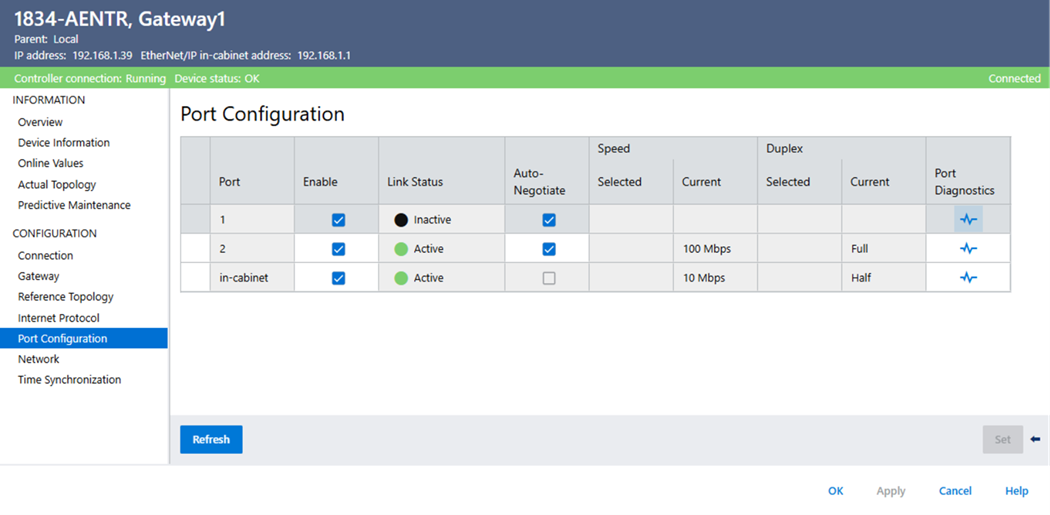
Parameters | Description |
|---|---|
Auto-Negotiate | Enables Auto-Negotiate to enable the device to negotiate the port’s speed and duplex automatically. |
Selected speed | Displays the port’s selected speed if Auto-Negotiate is unchecked. Select the port’s speed. Valid speeds are:
|
Current speed | Displays the port’s current speed. |
Selected duplex | Displays the port’s selected duplex if Auto-Negotiate is unchecked. Select the port’s duplex. Valid duplexes are:
|
Current duplex | Displays the port’s current duplex. |
Port diagnostics | Opens the Port Diagnostic dialog. |
Reset device | After modifying the port’s Auto-Negotiate state, Selected Speed, or Selected Duplex configuration values, a reset device message displays if the device must be reset before the modifications take effect. |
Retry communication | Retry communication appears shaded when communication with the device has failed. Select Retry communication to attempt to restart communication with the device. |
Set | Select to commit your modifications. |
Provide Feedback