
Organization Entitlements
Organization entitlements add authorization to use different applications in your
organization. Organization entitlements are purchased through the commerce software portal.
The
Organization Entitlements
screen table shows applications and corresponding
entitlements. For specific information about an entitlement for an application, see the
documentation for that application.See Purchase an Entitlement
for information on how to purchase entitlements. To use an application, you must allocate
purchased entitlements to the desired organization. Only the owner or administrators of the
organization can allocate organization entitlements. See Allocate Entitlements for information
on allocating entitlements.
NOTE:
Purchased organization entitlements appear
in the FactoryTalk Hub Entitlements page within 1-2 hours.
Once purchased they must be
allocated
to an organization. However, if you have overlapping times on platform
entitlements
you have the option to decide if you want to replace the current
organization entitlement now or in the future. This lets you set the effective date of the
new organization entitlement after the current entitlement expires so that you can upgrade
your license automatically. While the new organization entitlement is waiting to be
activated it is marked as pending.After allocating an organization entitlement, its status is either Active or Pending. The
Pending status applies to Platform and Additive entitlements and indicates that the
entitlement is not yet effective but will be effective in the future. When the effective date
arrives, its status changes to Active. Entitlements with Pending status can be manually
deallocated to be allocated somewhere else.
Trial Organization Entitlements allow you to try FactoryTalk Hub applications before
purchasing them. Contact a Rockwell Automation representative to receive trial
entitlements.
The organization entitlements are assigned to a specific organization and can be used only in
this organization. You can also have entitlements assigned directly to them and use them
across multiple organizations, see My Entitlements.
When you select
Organization Entitlements
from the FactoryTalk Hub
Menu, the Entitlements tab opens. The top table shows organization entitlements which are
available for allocation. The bottom table shows Entitlements allocated to the current
organization. If you need to purchase organization entitlements, a button is provided to
purchase them. To continue using the service, you must renew your subscription before the organization
entitlement expires.
Column | Description |
|---|---|
Entitlement | Name of the purchased organization entitlement. A blue dot before the name
denotes a new organization entitlement. Select the down arrow in the cell for
details about the organization entitlement, including the entitlement type and the
organization it is assigned to. |
Contract Number | Record of purchase of the organization entitlement. |
Quantity | For most organization entitlements this number is 1. |
Effective Date | The date the organization entitlement is purchased and becomes active. |
Expiry Date | This date is the end date for the purchased organization entitlements. This
date is calculated based on the Effective date. A one-year organization entitlement
expires one year after the effective date whether or not it has been allocated. The
purchased organization entitlement is valid until this day. If you purchase a new
organization entitlement for the same application before the current organization
entitlement expires, the new one does not go into effect until the previous one
expires. |
Status | In the available for allocation part of the page the
Allocate button enables you to assign the organization
entitlement to the application for which it was purchased. When any organization
entitlement is allocated, it is moved to the Entitlements allocated to
<organization> section of the page. |
Organization Entitlements
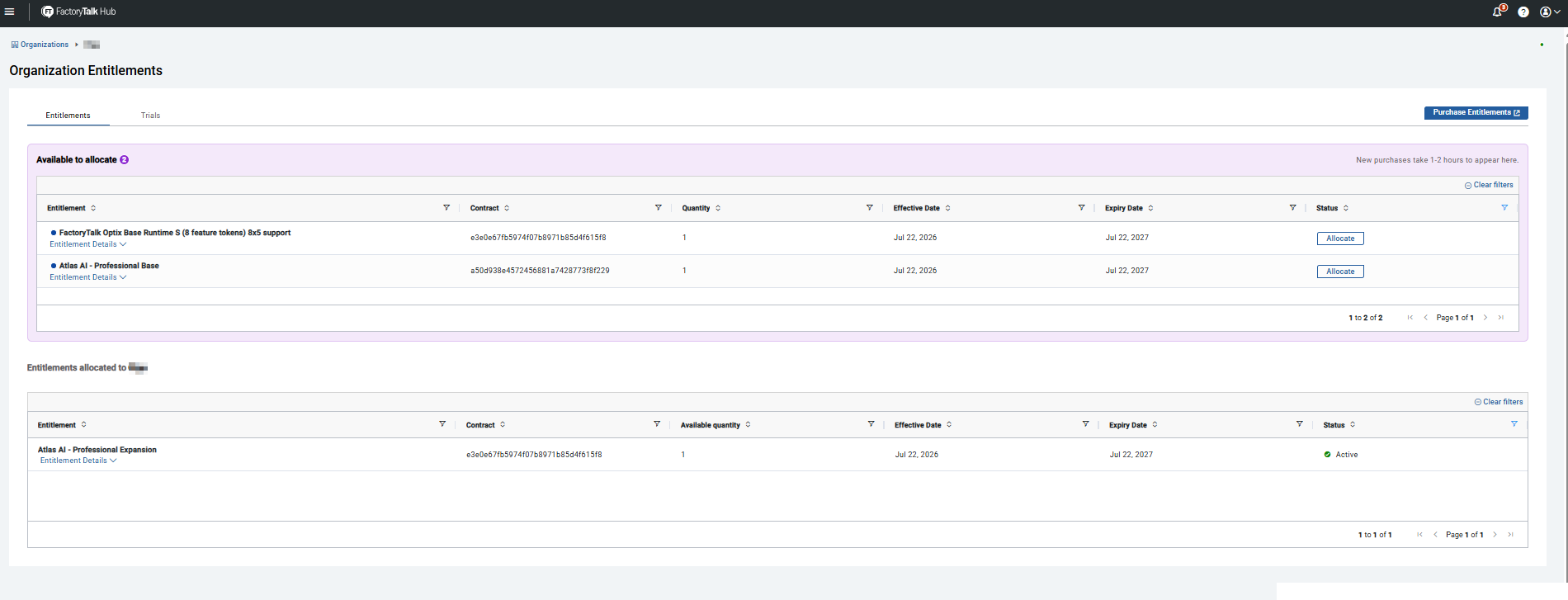
Each organization entitlement for a service provided is tied to a contract number and has a
defined effective date and expiry date.
The
Application Entitlements
table describes the types of organization entitlements
available or required for FactoryTalk Hub applications:
Application | Entitlement Required | Notes |
|---|---|---|
Advisor | No | Once logged in, Advisor provides information on Rockwell Automation
products. |
FactoryTalk Analytics VisionAI | Yes | See FactoryTalk Analytics VisionAI documentation for details |
FactoryTalk DataMosaix | Yes | |
FactoryTalk Design Studio | Yes | See FactoryTalk Design Studio documentation for details |
FactoryTalk Energy Manager | Yes | |
FactoryTalk Motion Analyzer | No | |
FactoryTalk Remote Access | Yes | See FactoryTalk Remote Access documentation for details |
FactoryTalk Vault | No | FactoryTalk Vault is automatically entitled for operation. |
Fiix | No | |
Plex | No |
You cannot share organization entitlements between organizations - organization entitlements
can only be allocated to one organization. You can de-allocate pending organization
entitlements.
Organization entitlements can be Platform, Additive, or Add-on types.
- Platform Entitlements are set up so that only one of them from a given family can exist in an organization at a time. For example, FactoryTalk Remote Access has eight platform entitlements available and they are defined by the number of concurrent connections they allow. They can be purchased for 1, 2, 5, or 10 concurrent connections. If you want 7 concurrent connections you cannot add a 2 connection and a 5 connection entitlement, you would need the 10 connection entitlement to satisfy the requirement.
- Additive Entitlement can be mixed to achieve larger combinations. They can be purchased separately and added together at a later time. Additive Entitlements can be allocated without an underlying Platform Entitlement.
- Add-On Entitlements are a special type of additive entitlement that requires an existing platform entitlement. These entitlements can be added multiple times in the same organization as long as it has the prerequisite platform entitlement. In applications that support Add-On Entitlements you could have a 10 concurrent connections platform entitlement and need to expand beyond 10 connections, for example to 22 concurrent connections, you would then use the 10 concurrent connections platform entitlement and three +5 Add-On entitlements. To allocate an add-on entitlement you must first allocate a platform entitlement.
Provide Feedback