
Connect a Contactor to the Bus
- Place the communication interface module at the front of the 100-E contactor cover.
- Align the link bars into the slots of the 100-E contactor, then push the communication interface module toward the 100-E contactor.Align the Link Bars into the Slots of the Contactor
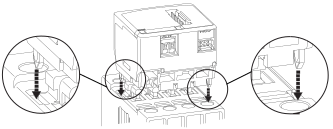
- Slide the communication interface module in parallel direction to the 100-E contactor front cover until the plunger comes into contact with the crossbar on the 100-E contactor.Make Contact with the Crossbar on the Contactor

Reseat the Communication Interface Module on a Contactor
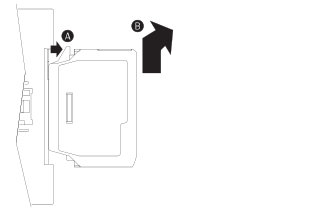
If the communication interface module must be reseated:
- Pull the plastic detent clip away from the front of the 100-E contactor
 and slide the communication interface
module upward and away
and slide the communication interface
module upward and away from the
100-E contactor.
from the
100-E contactor. - Repeat steps 1...3.
Reseat the Module on the Contactor
Adjust the Communication Interface Module: 104-E Reversing Contactors
The 104-E-INT-D and 104-E-INT-X modules can be adjusted to various sizes to accommodate the
100-E contactor.
To adjust, slightly flex apart the sides of the double-wide cover during adjustment.
Approximate dimensions are shown in millimeters (inches). Dimensions are not intended to be used for manufacturing purposes.
Adjust the Reversing Contactors

Item | Description |
|---|---|
| Size 1 and 2 |
 | Size 3 |
 | Size 3.5 |
Provide Feedback