
Windows Comparator
Four windows are available on the module. Each window can be used to detect when the
input data of the selected mode is within or outside of a configured window. You tie
windows to the encoder (HSC or SSI) and to as many as two module outputs.
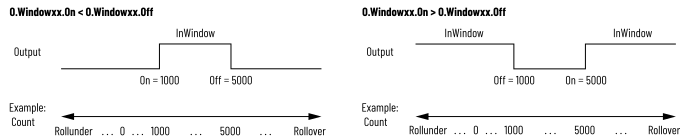
The following figure shows an example of how a window controls output behavior, using HSC
Count as the input data source for the window. For more information, see Controlled by Window. The windows
can operate in different modes.
Windows Behavior Example
You can configure windows to operate in the following modes for HSC:
- Count or scaled count
- Frequency, instantaneous, scaled, or average
- Acceleration, instantaneous, scaled, or average
- Pulse Width, instantaneous or average
You can configure windows to operate in the following modes for SSI:
- Data
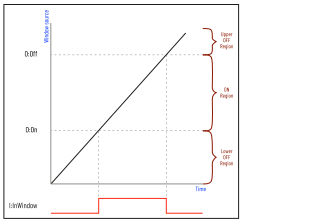
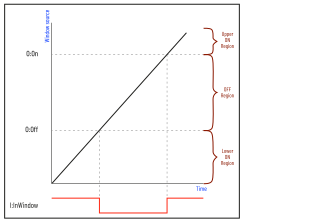
The following figures explain how to determine whether the window source is In Window or
Not in Window.
O.Windowxx.On < O.Windowxx.Off
O.Windowxx.On > O.Windowxx.Off
Provide Feedback