
Protect Access to Device Configuration and the Controller Project
To prevent accidental changes to critical security settings by unauthorized or untrained
users, follow these best practices:
- Restrict access to security settings—Limit access to the security configuration for the redundant controller, redundancy module, and secure communication module to authorized, trained personnel only.
- Use hardware-based protection—Enable Explicit Protect Mode by using hard Run mode on controllers and rotary switches on 1756-EN4TR modules.
- Secure workstations—Restrict access to any workstation runningFactoryTalk® Policy Manager, which is used to deploy security policies to the redundant chassis pair.
- Restrict physical access—Place the redundant chassis pair in locked cabinets or restricted-access locations to prevent unauthorized physical interaction.
In the
FactoryTalk® Administration Console
, you can protect access to the following:- TheFactoryTalk® Linxdevice configuration and webpages for 1756-RM3 and 1756-EN4TR modules in the redundant chassis pair
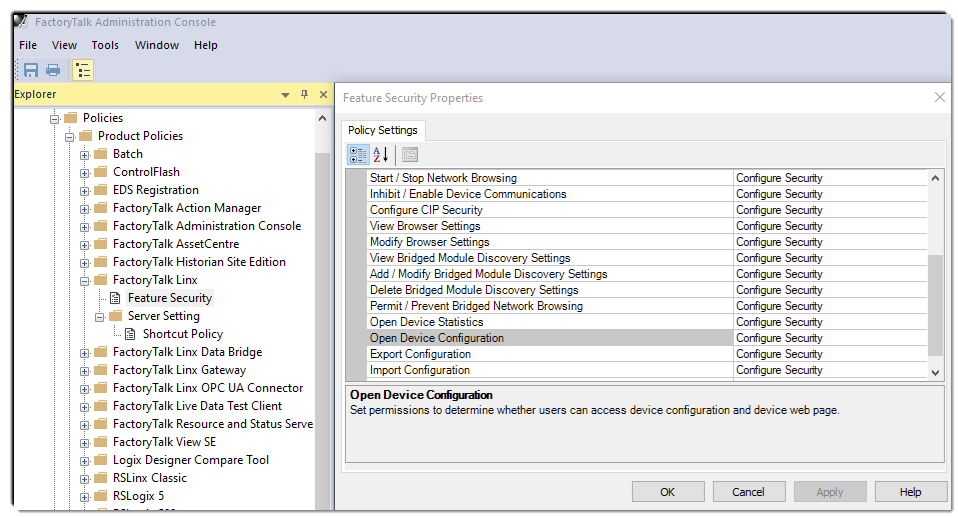
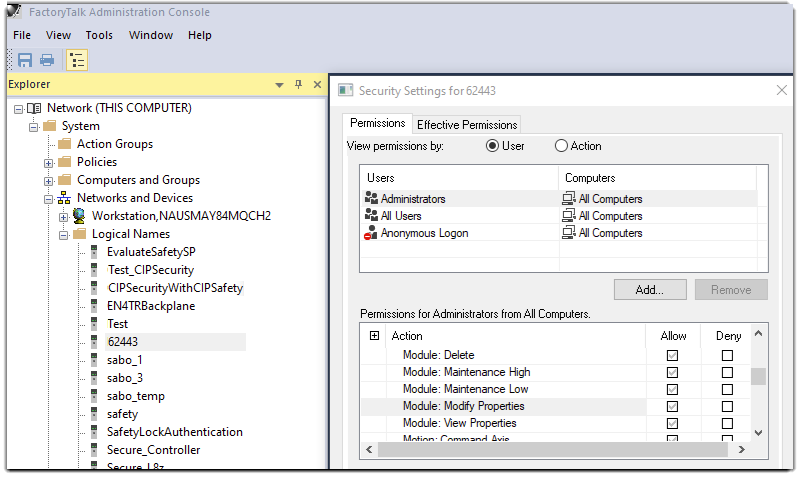
- Logix Designer project for the redundant controllerTo restrict access to the configuration interface for a 1756-EN4TR module in the Logix Designer application, define the access controls for 'Module: Modify Properties'.
For more information about how to protect access to device configuration and the
controller project, see the FactoryTalk Security Application Technique, publication
SECURE-AT002.
Provide Feedback