
Selecting another Material Server
You do not have to select a Material Server after installation. It is done automatically. However, in a case where the server becomes disabled or is removed from the system, you must select a different server, which you can do easily from the Editor.
- From theToolsmenu, selectSystem Configuration. TheSystem Configurationdialog opens.
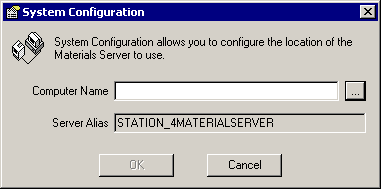
- Click theBrowsebutton. TheSelect Computerdialog opens.
- Select the new server from the list of computers.
- ClickOKto exitSystem Configuration.
Provide Feedback