
Configuring material priorities
The priorities of a material are used to select a container of material that you want to
use first; for example, a container that has the oldest material needs to be used before
newer materials. In the
Priorities
column, the default priority value
is 100
. The allowed values are 1 to 100, with 1 being the
lowest value, which is selected first. You can assign as many priorities per container as
needed. If the container with the value of 1
runs out of
material, the next priority for that container is used.The
Priorities
tab displays area model data, which is loaded into
the material database by a FactoryTalk Batch
Server during start up. If no
information is visible, then the database does not contain the area model data.- From theEdit Materialdialog, select thePrioritiestab. Existing containers assigned to the material display in ascending order by container name. You can sort the list by clicking the column header to display an up arrow (ascending) or down arrow (descending).
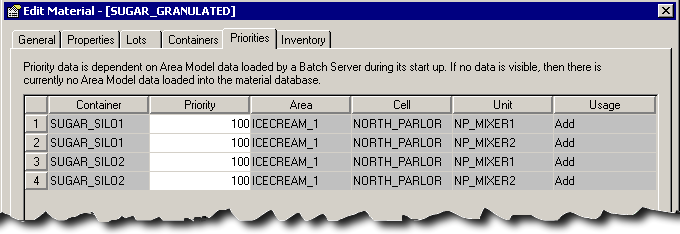
- In thePrioritybox, type a value from1to100.
- ClickApplyto save the changes, or clickOKto save the changes and close the dialog.
Provide Feedback