
Inhibit a Device
You cannot inhibit or uninhibit safety I/O devices
or producer controllers
from the module properties dialog under these conditions:
- The application program is safety-locked
- A safety signature exists
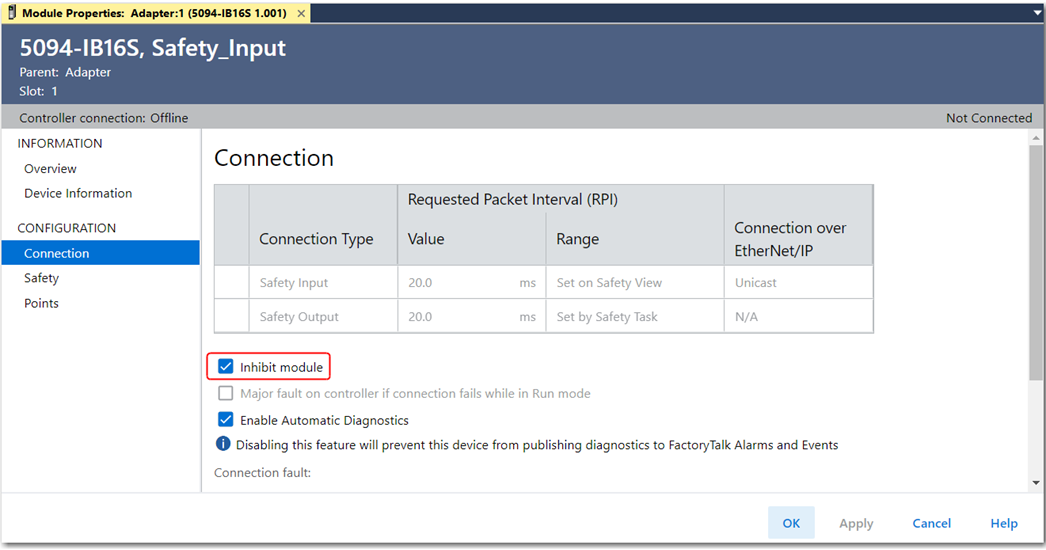
To inhibit a device, follow these steps.
- Select the device and then select Properties.
- In the navigation pane, select Connection.
- On the Connection view, select Inhibit Module and click Apply.The device is inhibited when the Inhibit Module checkbox is selected. If a communication device is inhibited, all downstream devices are also inhibited.
Regardless of safety signature or safety-locked status some I/O products allow the ability to programmatically inhibit and uninhibit with SSV from the standard task:
- Class Name: Module
- Attribute Name: Mode
- Source: Inhibit = 4; Uninhibit = 0
Provide Feedback