
Eventxx View

The Eventxx view, where 'xx' represents the index of an event definition, shows the configuration options available for that event. You cannot configure the parameters from this view, you must use the configuration tags.
Use this view to review the following tasks:
  • Whether the event is enabled.
  • Whether the event is latched.
  • Whether independent point triggers for the event is enabled.
  • Check the trigger condition for the event.
  • Check the participants and their State Transition behavior for the event.
Eventxx View Example
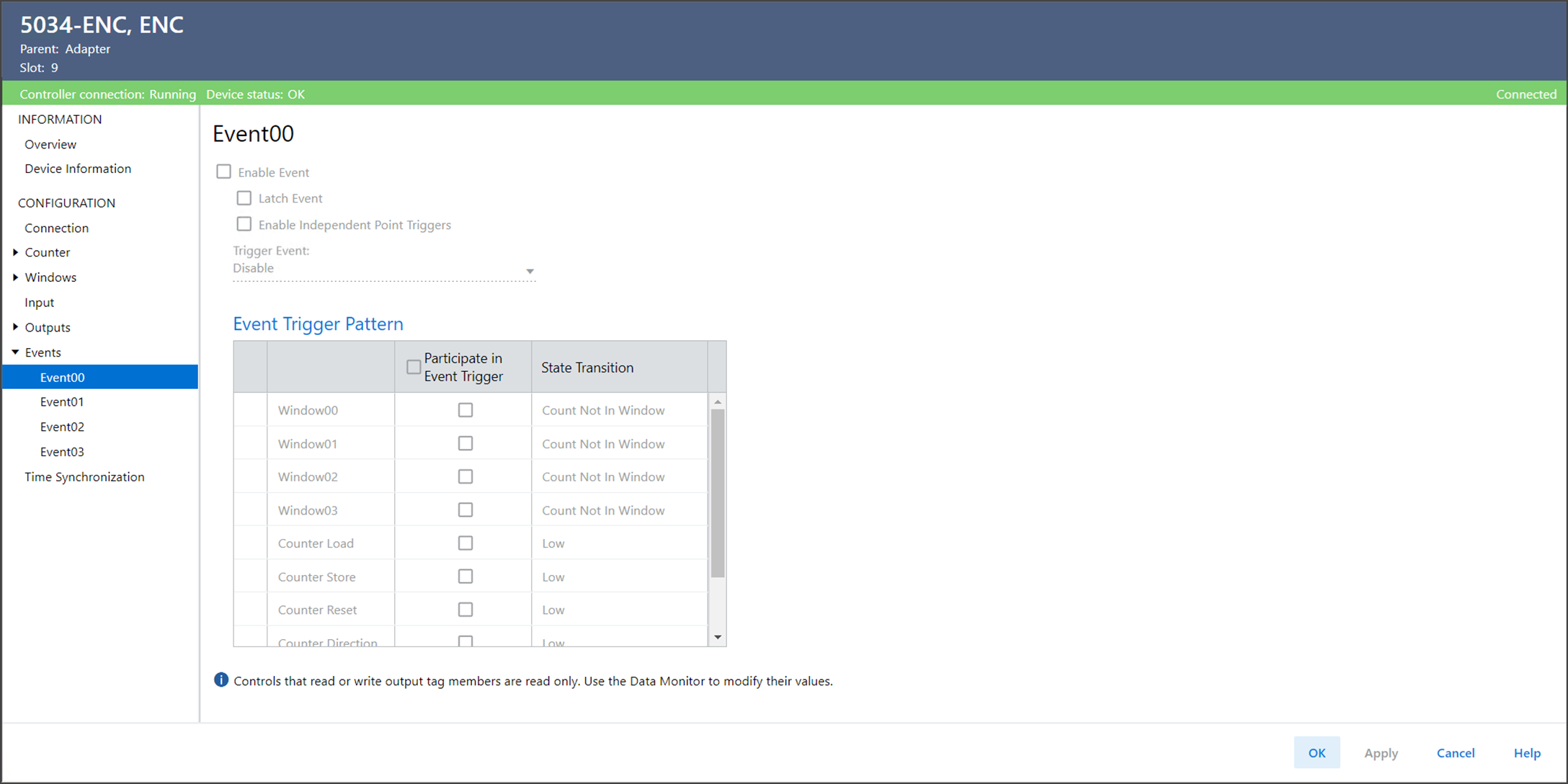
The Eventxx view includes these parameters.
Parameter
Description
Member Name
Value
Enable Event
Displays whether the corresponding event trigger is active. Events are triggered when conditions match the event definition.
EO.Eventxx.En
  • 0 = Event trigger definition is not active and events are not triggered when conditions match the definition
  • 1 = Event trigger definition is active and events are triggered when conditions match the definition
Latch Event
Displays whether an event is latched until it is acknowledged.
EO.Eventxx.LatchEvent
  • 0 = Event is not latched. New events overwrite old events.
  • 1 = Event is latched. Events are latched until acknowledged. New events are not reported until the current event is acknowledged. Up to four new events are stored in the memory buffer. When the memory buffer is full, additional events are lost.
Enable Independent Point Triggers
Displays whether each condition indicated in the Event trigger definition can initiate an event independently.
EO.Eventxx. IndependentConditionTriggerEn
  • 0 = Event is triggered when all participating conditions in the event trigger achieve their configured values
  • 1 = Event is triggered when any participating condition in the event trigger achieves their configured value
Trigger Event
Triggers an event each time a state change results in one of the following conditions:
  • Matching the event trigger definition
  • No longer matching the event trigger definition
  • EO.Eventxx.EventRisingEn
  • EO.Eventxx.EventFallingEn
Values (EventRisingEn, EventFallingEn) represent:
  • (0, 0): Event trigger is disabled.
  • (1, 0): Event triggers on transitions to match the configured pattern.
  • (0, 1): Event triggers on transitions to not match the configured pattern.
  • (1, 1): Event triggers on transitions to either match or not match the configured pattern.
Event Trigger Pattern – Participate in Event Trigger
Displays whether the specified condition participates in the Event trigger definition for the event.
When Encoder Type is configured as HSC:
  • EO.Eventxx.InWindowxxSelect
  • EO.Eventxx.ResetSelect
  • EO.Eventxx.HoldSelect
  • EO.Eventxx.LoadSelect
  • EO.Eventxx.StoreSelect
  • EO.Eventxx.RolloverSelect
  • EO.Eventxx.RollunderSelect
  • EO.EventxxDirectionSelect
When Encoder Type is configured as SSI:
  • EO.Eventxx.InWindowxxSelect
  • EO.Eventxx.StoreSelect
  • EO.EventxxDirectionSelect
  • 0 = Condition does not participate in the Event trigger definition.
  • 1 = Condition participates in the Event trigger definition.
Event Trigger Pattern – State Transition
Displays the state of the condition to match after the transition.
When Encoder Type is configured as HSC:
  • EO.Eventxx.InWindowxxValue
  • EO.Eventxx.ResetValue
  • EO.Eventxx.HoldValue
  • EO.Eventxx.LoadValue
  • EO.Eventxx.StoreValue
  • EO.Eventxx.RolloverValue
  • EO.Eventxx.RollunderValue
  • EO.EventxxDirectionValue
When Encoder Type is configured as SSI:
  • EO.Eventxx.InWindowxxValue
  • EO.Eventxx.StoreValue
  • EO.EventxxDirectionValue
For InWindowxxValue:
  • 0 = Not in Window matches the event pattern
  • 1 = In Window matches the event pattern
For other event tags:
  • 0 = Value of 0 matches the event pattern
  • 1 = Value of 1 matches the event pattern
Provide Feedback
Have questions or feedback about this documentation? Please submit your feedback here.
Normal