
Stop
The Stop command instructs the axis to decelerate to a complete stop.
Tag Name | Data Type | Description |
|---|---|---|
Command Tags | ||
O.Axisxx.Command_Stop | BOOL | Indicates that the axis is to perform the Stop command. |
O.Axisxx.HardStop | BOOL | Determines whether the axis performs a hard stop (immediate) or a
smooth stop (controlled deceleration).
TIP:
When the axis is moving with a
heavy load and a hard Stop command is applied, the axis might move
additional steps before it becomes stationary. You might require to
perform a Home command again.
|
Status Tags | ||
I.Axisxx.CommandActive | BOOL | This tag is set when axis is decelerating and cleared when the axis
becomes stationary. |
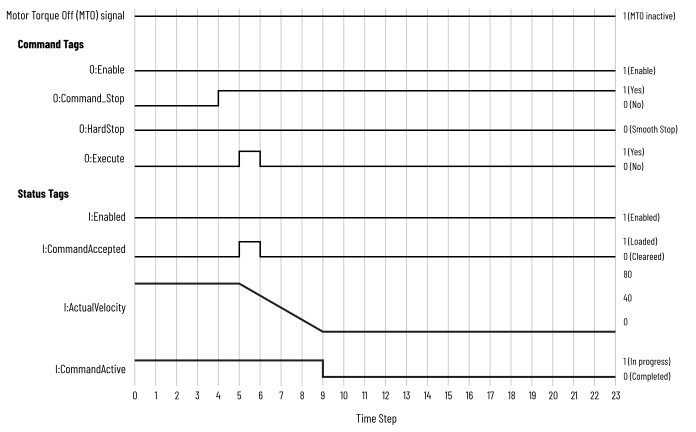
Smooth Stop
When the axis receives a smooth Stop command, it decelerates to zero speed at the
rate that is defined in the tags (C.Axisxx.JogAccel, C.Axisxx.HomeAccel,
O.Axisxx.Decel, and O.Axisxx.Accel) and then stops.
Smooth Stop Timing Diagram
Hard Stop
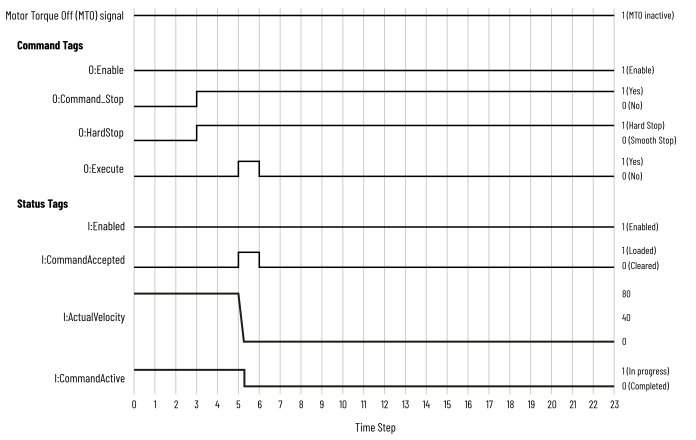
When the axis receives a hard Stop command, it stops immediately.
If the axis is moving with a heavy load when a hard Stop command is received, the
axis may move additional steps before it completely stops. The axis's
I.Axisxx.PositionValid tag is not cleared automatically. In this scenario, we
recommend that you perform the Home command again.
Hard Stop Timing Diagram
Provide Feedback