
Generic ASCII Data Exchange
The following illustrations show the different data exchanges using the serial
module.
Data Sent with the Serial Port
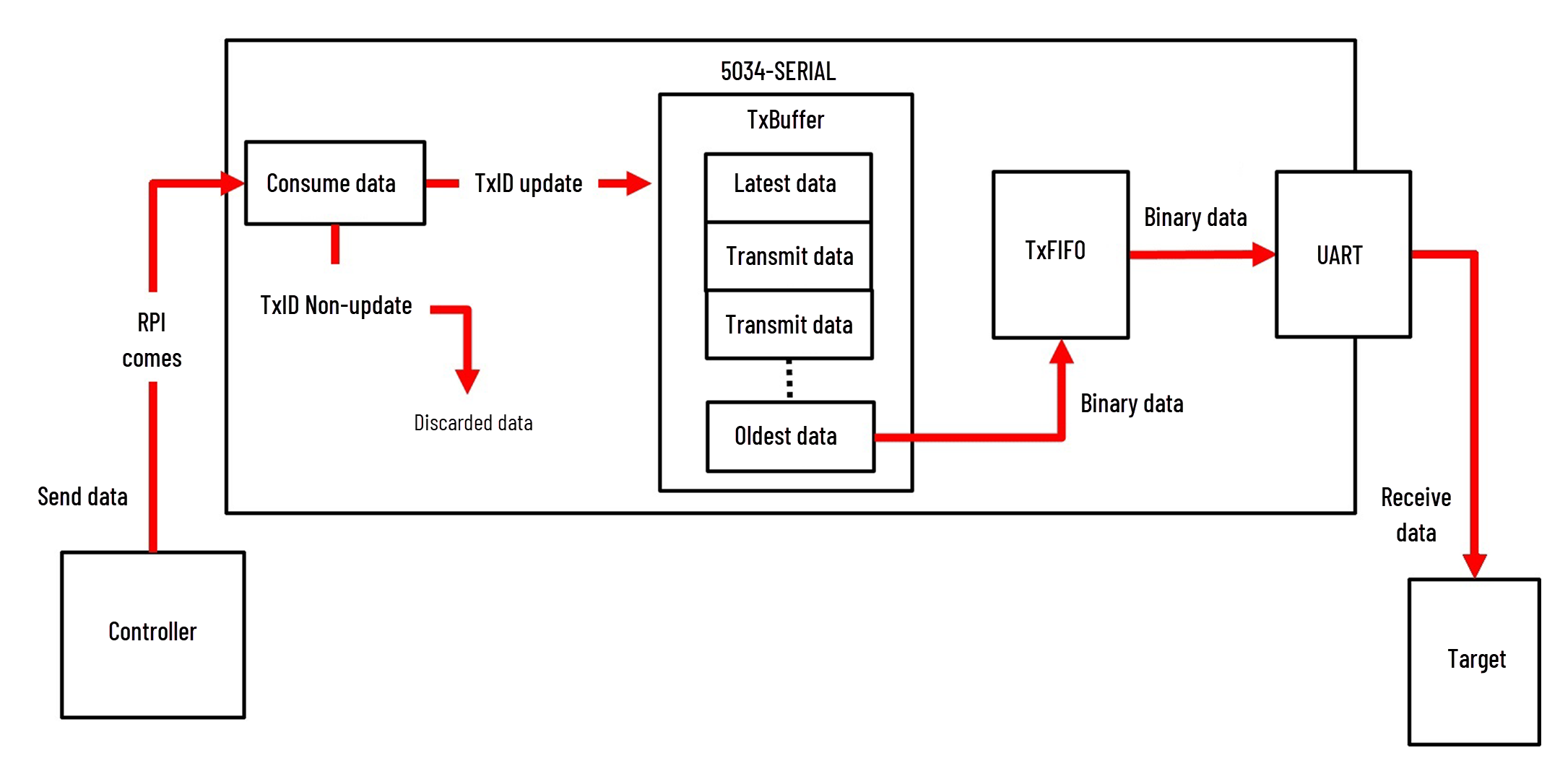
Data is sent out of the serial port using the following steps:
- The controller sends out the consumed packet with an incrementedTxID(consume tag).
- The serial module puts the packet into the TxBuffer (Transmit Buffer).
- The serial module takes the oldest data from the TxBuffer and sends it out to the target.
Data Sent Out to the Serial Port
Generic ASCII Transmit Methods
In Generic ASCII mode, you can define any kind of data to be transmitted to
communicate to serial devices. Some examples are barcode scanners, dial-up modems,
serial printers, temperature controllers, and so on.
To transmit the ASCII packet based on the number of characters, follow these
steps:
- Set the Termination Mode to Ignore End Delimiter.
- After copying the characters into theASCII.TxDataoutput tag array, write the number of characters into theASCII.TxDataLengthoutput tag, then increment theASCII.TxIDoutput tag.
To transmit the ASCII packet based on the Termination Delimiter characters, follow
these steps:
- Set the Termination Mode to Include or Exclude.TIP:Include mode transmits the packet with Termination Delimiter characters, and Exclude mode does not.
- After copying the characters into theASCII.TxDataoutput tag array, copy the two configured Termination Delimiter characters as the next two characters in the array, then increment theASCII.TxIDoutput tag. While doing this, keep theTxDataLengthoutput tag at 0.
Data Received from Serial Port in Immediate Mode
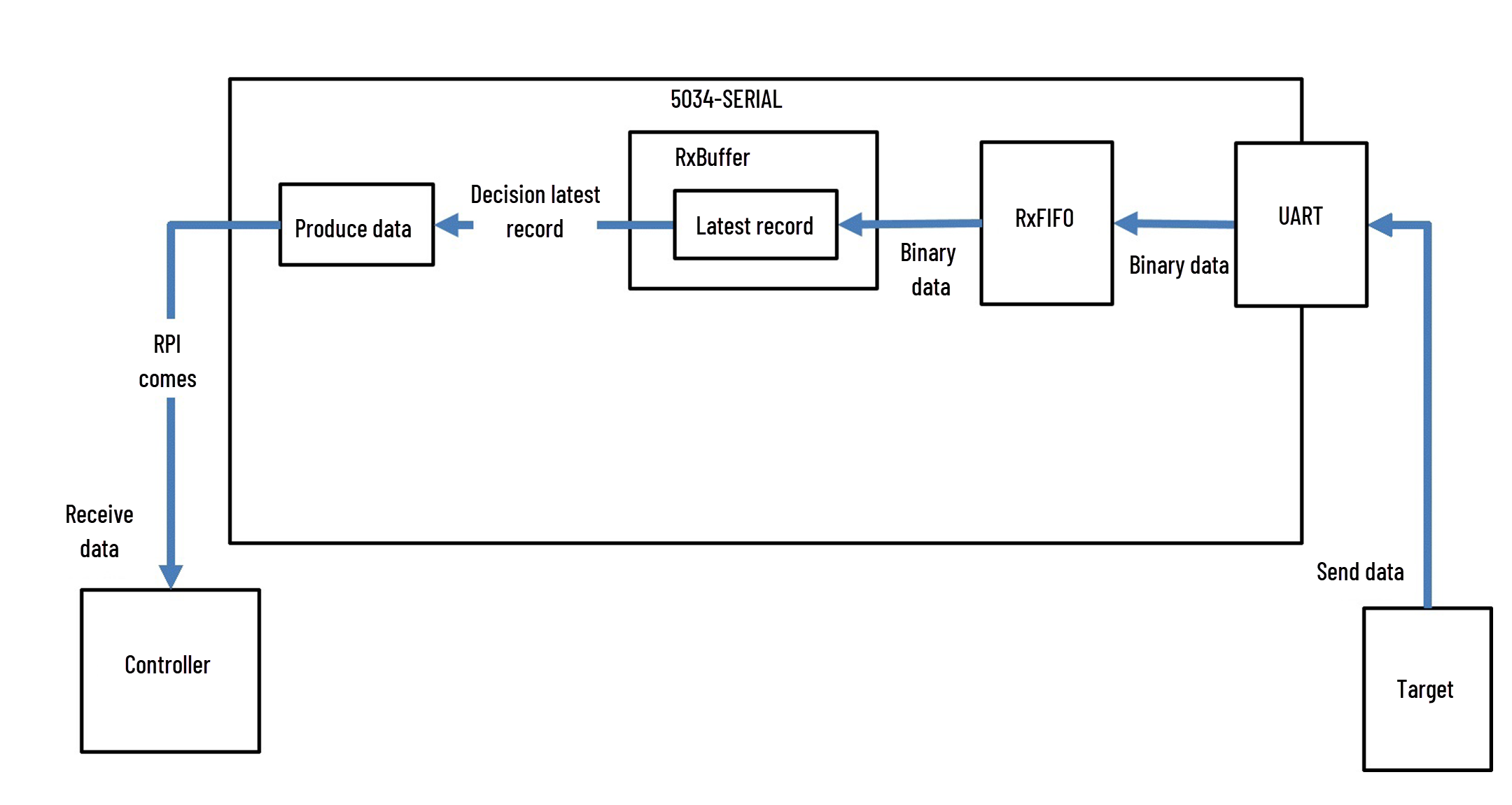
After the serial port receives data, it processes the data using the following
steps:
- The serial module receives the packet.
- If any of the following conditions occur, the serial module creates a record:
- Message Timeout timer expires.
- The number of received bytes equals the configured Read Buffer Size.
- Termination Delimiter bytes were received.
- The serial module copies the data into theASCII.RxDatainput tag, copies the number of characters that are received into theASCII.RxDataLengthinput tag, increments theASCII.RxIDinput tag and sends it to the controller.TIP: TheASCII.RxDataErrorinput tag is set if the data copied to theASCII.RxDatainput tag contains an error (that is, parity error or framing error).
Data Received from the Serial Port in Immediate Mode
Data Received from Serial Port in Master/Slave Handshake Mode
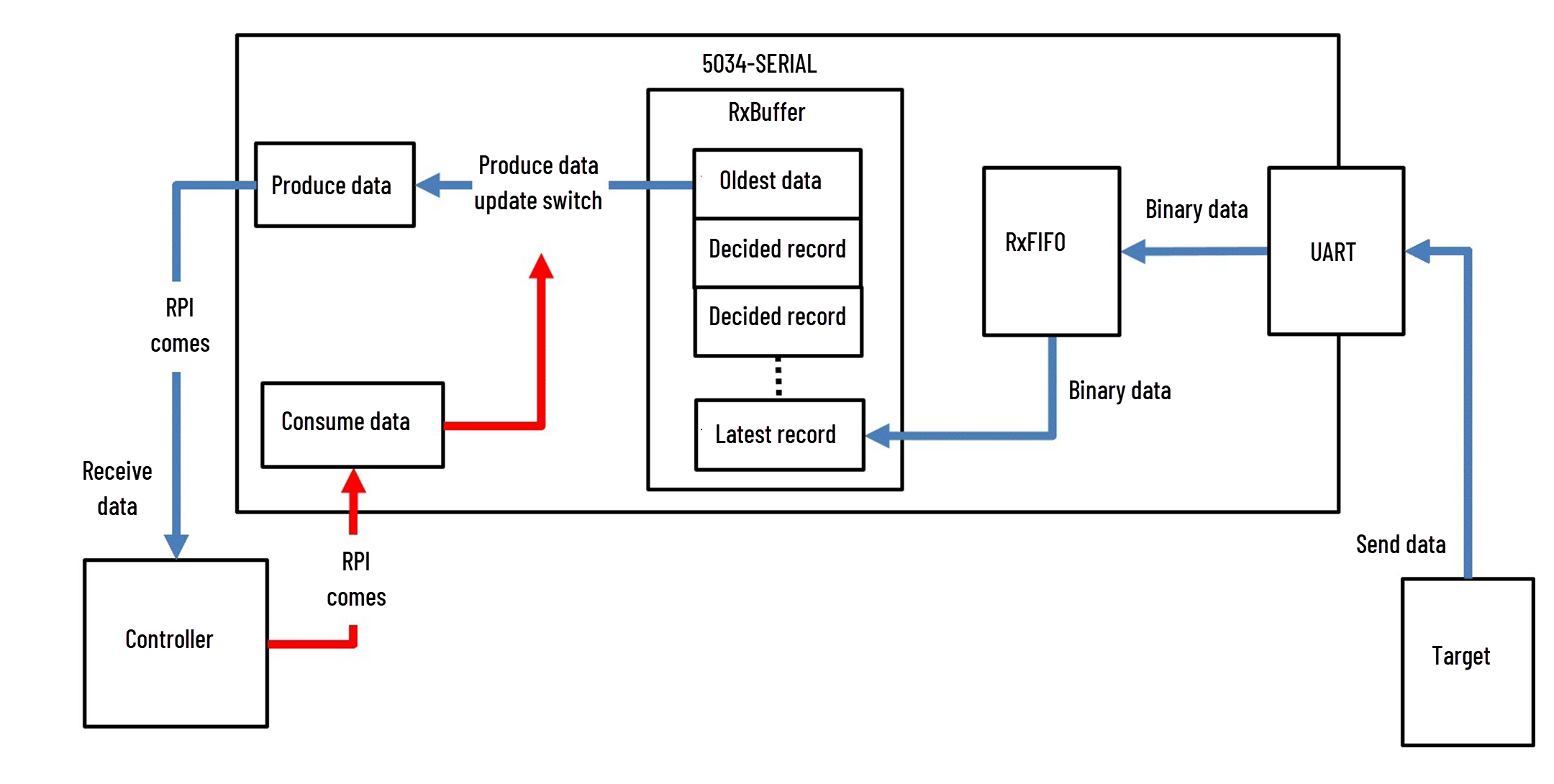
The serial port works in a handshake mode using the following steps:
- The serial module receives the packet.
- If any of the following conditions occur, the serial module creates a record:
- The Message Timeout timer expires
- The number of received bytes equals the configured Read Buffer Size
- Termination Delimiter bytes were received.
- The record is added into the RxBuffer (Receive Buffer).
- Once the RxID (Consume Tag) is incremented by the user logic, the serial module takes the oldest record from RxBuffer, copies the data into theASCII.RxDatainput tag, copies the number of characters received into theASCII.RxDataLengthinput tag, and sends it to the controller.
Data Received from Serial Port in Master/Slave Handshake Mode
IMPORTANT:
If Master/Slave Handshake is selected, dispose additional receiving data
from the serial port for saved data in the receiving buffer of the
firmware.
Generic ASCII Receive Methods
When receiving the ASCII packet based on the fixed number of characters:
- Set the Termination Mode to Ignore End Delimiter.
- Set the number of characters in bytes using the Read Buffer Size.
When receiving the ASCII packet based on a timeout since the last character was
received:
- Set the Termination Mode to Ignore End Delimiter.
- Set the Message Timeout to the desired timeout value in milliseconds.
When receiving the ASCII packet based on Termination Delimiters at the end of the
packet:
- Set the Termination Mode to Include or Exclude.If the Termination Mode is “Include”, then the termination bytes remain appended to the end of the data copied into theASCII.RxDatainput tag. If the Termination Mode is “Exclude”, then the termination bytes are stripped off.
Provide Feedback