
Configuration file backup and conversion
Prior to version 6.21.00, the configuration for
FactoryTalk Linx Gateway
was stored in an XML formatted text file. Starting with version 6.21.00, FactoryTalk Linx Gateway
changed its configuration to a database to improve system performance and security.It is recommended to make a backup of the
FactoryTalk Linx Gateway
configuration prior to installing a new version of software or when making any significant configuration changes. This is accomplished by saving a copy of the files and sub-folders at the following location: “C:\ProgramData\Rockwell\FactoryTalk Linx Gateway”.The installation of
FactoryTalk Linx Gateway
version 6.21.00 or newer can convert and move the settings from the earlier XML versions into the database, if the XML configuration file is located during the installation process. However, action must be taken prior to beginning the installation or the previous configuration will be lost.To permit the configuration from
FactoryTalk Linx Gateway
version 6.20.00 to be converted, select Keep configuration when uninstall
, prior to initiating the installation process of version 6.21.00 or newer.Keep configuration when uninstall
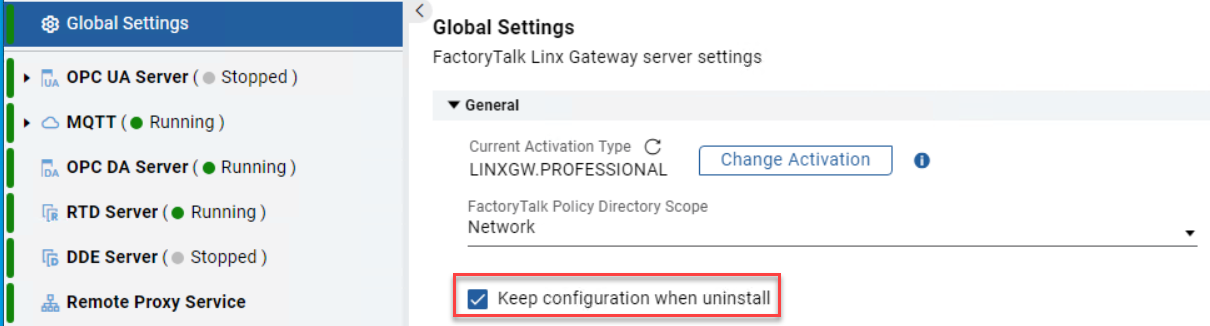
When upgrade
FactoryTalk Linx Gateway
beginning with version 6.21.00, user configuration file (xml or database file) will always be kept no matter if user selects Keep configuration when uninstall
or not. No additional actions are needed to backup or convert configuration file.To permit the configuration from
FactoryTalk Linx Gateway
versions 6.11.00 or earlier to be converted, perform the following steps prior to initiating the installation process of version 6.21.00 or newer.- Save a copy of the C:\ProgramData\Rockwell\FactoryTalk Linx Gateway\FTLinxGateway.xml file to a different location, prior to uninstalling or installing a new version.
- Manually uninstallFactoryTalk Linx Gatewayfrom the workstation.
- Create a folder in C:\ProgramData\Rockwell\FactoryTalk Linx Gateway
- Move the copied FTLinxGateway.xml file to the folder.
- Install FactoryTalk Linx Gateway version 6.21.00 or newer.TIP:The XML configuration file before version 6.00.00 is used to store application only. There is no need to convert to database file.
Provide Feedback