Loading
Innovation Center LOGO
Recent ActivityRecent Activity

Phase Correction in Cutting for Horizontal Balers

Learn how to develop a Horizontal Packaging application using a Rotary Knife with Registration Mark Correction. - [Implementation Time: 45 minutes]
Innovation Center Home Page
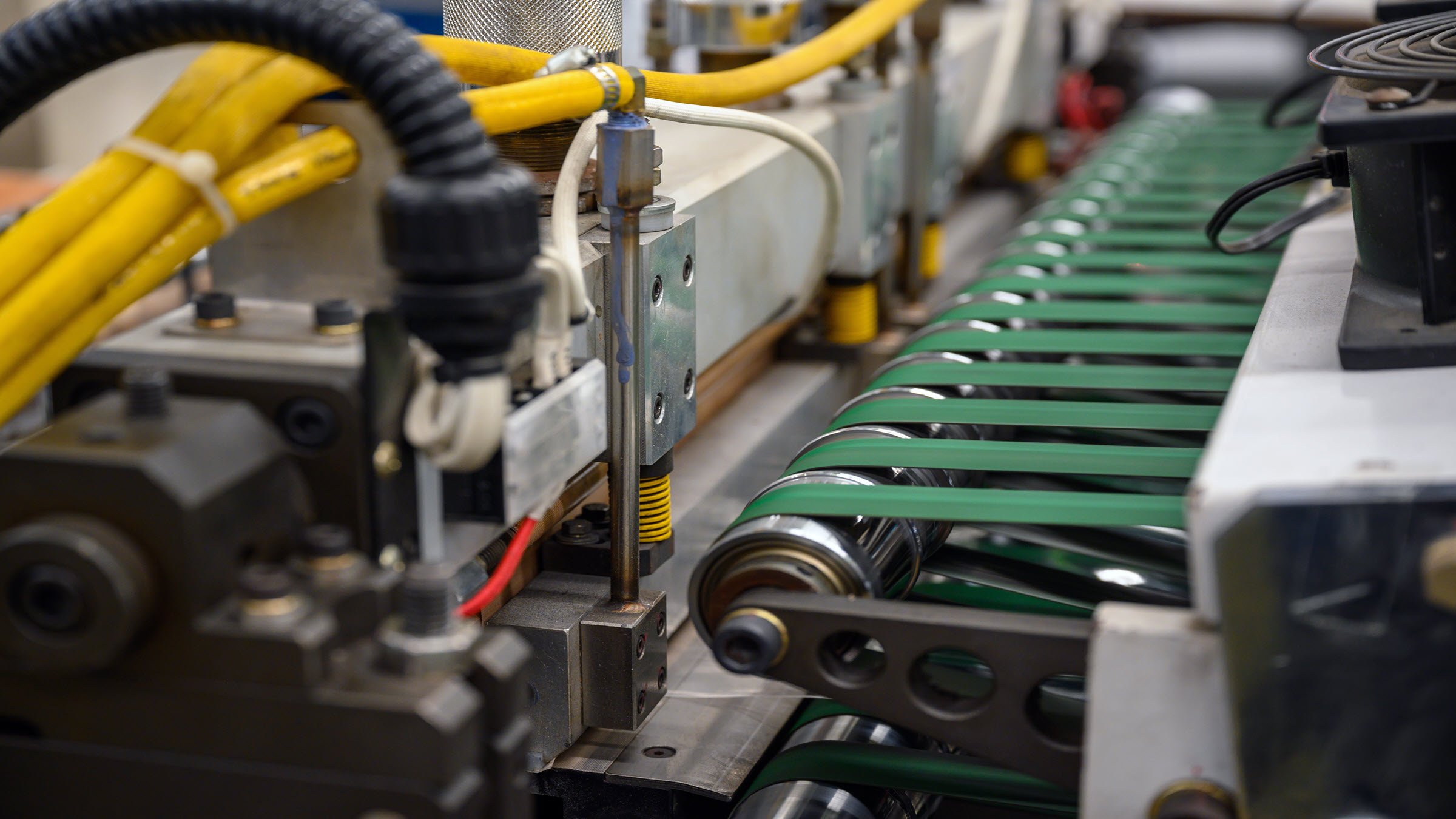
A machine on a conveyor belt performing phase correction tasks in horizontal baler cutting operations.
Innovation Center LOGO
  • Overview
  • Implementation Guide
  • Download
  • Contact us
  • Subscribe
Innovation Center Home Page


What does this application do?

This is a simplified application for phase correction in cutting horizontal balers machines using an electronic cam. This application can be especially useful on horizontal packaging machines or some other type of cutting-on-the-fly machines.


General Features

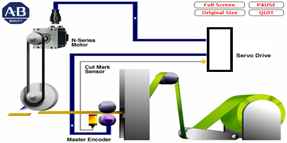
This application uses a virtual axis as a master so the correction movements between the axes InFeed and Knife become independent from each other.

 
phase-correction-in-cutting-horizontal-balers-machines_Imagen1

Advangages

  • Simplified code
  • Easy to implementación
  • Implementation time reduction
  • Cost reduction
  • Operation efficiency
  • Flexibitlity and scalability
AHIC Download ICON VF.png

Downloads

Please note: You will need to agree to the Terms & Conditions for each download.

Downloadable file ›
Legal Disclaimer Acceptance. ROCKWELL AUTOMATION WILL PROVIDE ACCESS TO ROCKWELL PRODUCTS (BEST PRACTICES, APPLICATIONS AND KNOWLEDGE) ON THE CONDITION THAT YOU ACCEPT AND COMPLY WITH THE FOLLOWING TERMS AND CONDITIONS. YOU ACCEPT AND AGREE TO BE BOUND BY THE TERMS OF THIS AGREEMENT BY DOWNLOADING, INSTALLING, COPYING, OR OTHERWISE USING PRODUCTS. IF YOU ARE ACCEPTING THESE TERMS ON BEHALF OF ANOTHER PERSON, COMPANY, OR OTHER LEGAL ENTITY, YOU REPRESENT AND WARRANT THAT YOU HAVE FULL AUTHORITY TO BIND THAT PERSON, COMPANY, OR LEGAL ENTITY TO THESE TERMS. IF YOU DO NOT AGREE TO THESE TERMS, DO NOT DOWNLOAD, INSTALL, COPY, ACCESS, OR USE THE PRODUCTS, SOFTWARE AND/OR CLOUD SERVICES. 1. Rockwell Automation retains full ownership and title to all Products and related documentation. No rights or licenses are granted other than those set forth in this Agreement. Company grants to Rockwell Automation a non-exclusive, worldwide, royalty-free, perpetual, non-revocable license to use any feedback Company provides regarding the Products, even if Company has designated the feedback as confidential. Rockwell Automation will be entitled to use the feedback without restriction or compensation to Company. 2. Company may not lease sub-lease, assign, license, sub-license or otherwise transfer any of the Products without the prior written consent of Rockwell Automation. Company may not assign or otherwise transfer access rights to the Products without the prior written consent of Rockwell Automation. Any reverse assembly, reverse engineering, decompilation, and creation of derivative works based on the Products by Company is prohibited. 3. Company acknowledges that Products provided under this Agreement are Rockwell Automation’s Confidential Information and are covered by effective or pending copyrights, patents, trademarks and/or trade secrets of Rockwell Automation, and Company agrees to maintain confidentiality by not disclosing Products or documentation to any third party without the prior written consent of Rockwell Automation and to protect the confidentiality of the Products as it would Company’s own confidential information. Company agrees that its obligation of confidentiality under this paragraph shall survive expiration or termination of this Agreement. 4. Company agrees that Products provided under this Agreement are prototypes and examples and its application and results may vary depending on each customer and project conditions. Rockwell Automation do not warranty the same results. This Agreement shall in no way be construed as a commitment by Rockwell Automation at any time to manufacture and/or offer Products for sale. There is no explicit or implicit service level agreement associated with using the Products. Rockwell Automation does not warrant that the functions contained in the Products will meet Company’s requirements. Company agrees to use all Products only in accordance with the instructions and only for the intended usages identified in the documentation. 5. EXCLUSION OF WARRANTIES AND LIMITATION OF LIABILITY. THE PRODUCTS ARE PROVIDED "AS IS". ROCKWELL AUTOMATION DISCLAIMS ANY AND ALL WARRANTIES, EXPRESS, IMPLIED OR STATUTORY, INCLUDING WITHOUT LIMITATION ANY WARRANTIES OF MERCHANTABILITY OR FITNESS FOR A PARTICULAR PURPOSE. ROCKWELL AUTOMATION EXPLICITLY DISCLAIMS ALL WARRANTIES OF NON- INFRINGEMENT AND EXPRESSLY DOES NOT WARRANT THAT THE PRODUCTS, IN WHOLE OR IN PART, WILL BE ERROR FREE OR FREE FROM SECURITY VULNERABILITIES. IN NO EVENT SHALL ROCKWELL AUTOMATION BE LIABLE FOR (i) LOST PROFITS, LOST SAVINGS, DOWNTIME, SPECIAL, INDIRECT OR CONSEQUENTIAL DAMAGES OF ANY KIND, OR (ii) ANY PERSONAL INJURY, PROPERTY DAMAGE OR ENVIRONMENTAL DAMAGE ARISING OUT OF OR IN CONNECTION WITH THIS AGREEMENT, WHETHER IN AN ACTION IN CONTRACT, STRICT LIABILITY OR IN TORT INCLUDING NEGLIGENCE. 6. COMPANY AGREES TO INDEMNIFY AND HOLD ROCKWELL AUTOMATION HARMLESS FROM ALL COSTS, AWARDS, DAMAGES, EXPENSES AND FEES (INCLUDING ATTORNEYS FEES) RESULTING FROM OR RELATED TO ANY THIRD-PARTY CLAIMS (INCLUDING EMPLOYEES AND AGENTS OF COMPANY) AGAINST ROCKWELL AUTOMATION, ITS DISTRIBUTORS, AGENTS, OFFICERS, DIRECTORS OR EMPLOYEES FOR PERSONAL INJURY (INCLUDING DEATH), PROPERTY DAMAGE OR ENVIRONMENTAL DAMAGE RELATED TO OR RESULTING FROM THE USE OF THE PRODUCTS. 7. In the event a Product is exported, Company agrees to comply with all applicable United States Export Control Law and Regulations, and the applicable export control laws of other countries. This Agreement shall be governed by the laws of the state of Wisconsin. This Agreement is the complete and exclusive Agreement between Rockwell Automation and the Company, and supersedes all prior agreements, whether written or oral, relating to the Products.
AHIC NEED HELP ICON VF.png


Need Help?

If you need help with an application or have feedback from the Innovation Center, please contact us.


Is this application relevant to me?

This application can be used in cutting-on-the-fly machines, horizontal packaging, or any other type of application where an electronic cam with position correction is required. The application can be used as a complement to some existing code libraries.


How can I make it work?

Requirements: products, tools, prior knowledge.

Hardware

  • Logix 5000 processor: ControlLogix and CompactLogix with Motion Control capabilities
  • CIP Motion ServoDrives: Kinetix 5300/5500/5700

Software

  • Studio 5000 – Logix Designer (V35.0→)

Prior Knowledge

  • Intermediate to advanced knowledge on Studio 5000 Logix Designer
  • Motion Control knowledge


AHIC STEP ICON.png

Implementation Guide

 
  1. Step 1
  2. Step 2
  3. Step 3
  4. Step 4
  5. Step 5
Open All Close All
Step 1


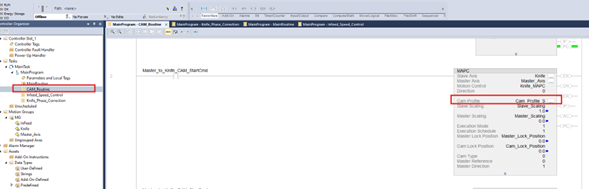
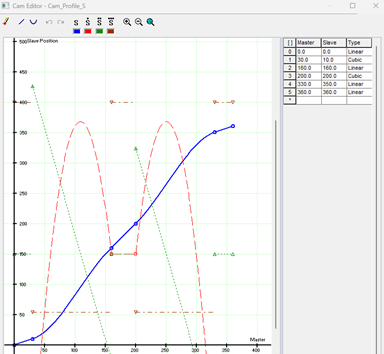
Generate the appropriate cam profile for the application. The following images show an example of a cam that performs a dwell moment as well as a linear velocity step in the middle of the curve. This is done within the “Cam Profile” of the MAPC instruction.
phase-correction-in-cutting-horizontal-balers-machines_Imagen2
phase-correction-in-cutting-horizontal-balers-machines_Imagen3
Step 2


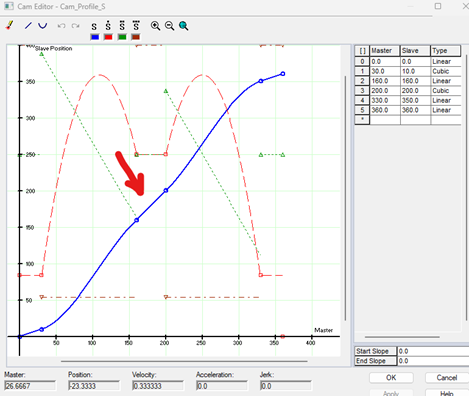
In the CAM profile, identify the point where the blade would be in contact with the material (see red arrow in the image). Typically the linear speed stage is where the cutting moment takes place.
phase-correction-in-cutting-horizontal-balers-machines_Imagen4
Step 3


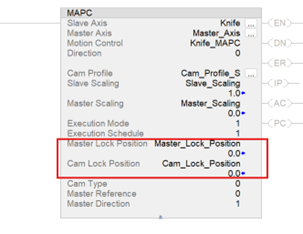
In the “MAPC” Electronic Cam instruction adjust the “Cam Position” parameter so that the cut-off point matches the appropriate cam curve response.
phase-correction-in-cutting-horizontal-balers-machines_Imagen5
Step 4


Once we have made the adjustments for both Master” and Cam Lock Positions, we can now set up the Knife Phase Correction routine.


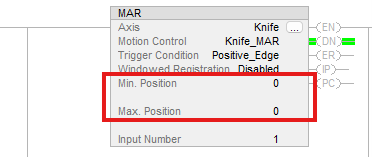
For this a “Motion Arm Registratio” instruction is used to record the knife position at the time of detection of the Registration Mark.


In this instruction the registration mark detection window can be adjusted if it is necessary to discriminate detections outside the appropriate position range.
 
phase-correction-in-cutting-horizontal-balers-machines_Imagen6
Step 5


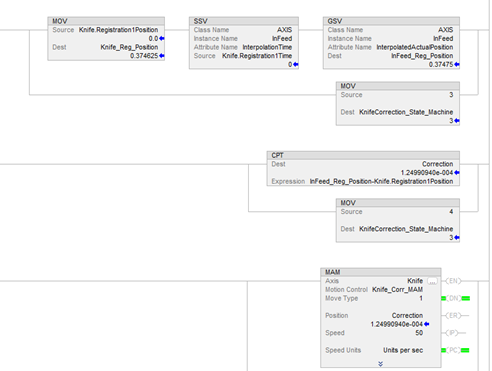
Continuing in the same routine “Knife_Phase_Correction”, we have the code to obtain the Correction Error through Set/Get System Value instructions; once this value is calculated, the correction is performed through an Incremental Movement.
 
phase-correction-in-cutting-horizontal-balers-machines_Imagen7


phase-correction-in-cutting-horizontal-balers-machines_Imagen1

phase-correction-in-cutting-horizontal-balers-machines_Imagen1

phase-correction-in-cutting-horizontal-balers-machines_Imagen2

phase-correction-in-cutting-horizontal-balers-machines_Imagen2

phase-correction-in-cutting-horizontal-balers-machines_Imagen3

phase-correction-in-cutting-horizontal-balers-machines_Imagen3

phase-correction-in-cutting-horizontal-balers-machines_Imagen4

phase-correction-in-cutting-horizontal-balers-machines_Imagen4

phase-correction-in-cutting-horizontal-balers-machines_Imagen5

phase-correction-in-cutting-horizontal-balers-machines_Imagen5

phase-correction-in-cutting-horizontal-balers-machines_Imagen6

phase-correction-in-cutting-horizontal-balers-machines_Imagen6

phase-correction-in-cutting-horizontal-balers-machines_Imagen7

phase-correction-in-cutting-horizontal-balers-machines_Imagen7


Phase Correction in Cutting for Horizontal Balers

Version 2.0 - September 2026


AHIC White Logo

Receive new applications and Innovation Center updates directly in your inbox.

Subscribe!
 
  1. Chevron LeftChevron Left Rockwell Automation Home
  2. Chevron LeftChevron Left Sup...
  3. Chevron LeftChevron Left Pro...
  4. Chevron LeftChevron Left Downloads
  5. Chevron LeftChevron Left Innovation Center
  6. Chevron LeftChevron Left Phase Correction in Cutting for Horizontal Balers
Please update your cookie preferences to continue.
This feature requires cookies to enhance your experience. Please update your preferences to allow for these cookies:
  • Social Media Cookies
  • Functional Cookies
  • Performance Cookies
  • Marketing Cookies
  • All Cookies
You can update your preferences at any time. For more information please see our {0} Privacy Policy
CloseClose