
Recipe schemas
Use a recipe schema to define a set of ingredients to create recipes.
A recipe is a collection of variables and fields selected from the subtree of a target node
associated with the Recipe schema. The following elements are associated with a recipe
schema:
TIP:
You can create multiple recipes based on a single recipe schema. It is useful for restoring previous recipe settings.
Recipe Schema Editor
Recipe schema editor interface
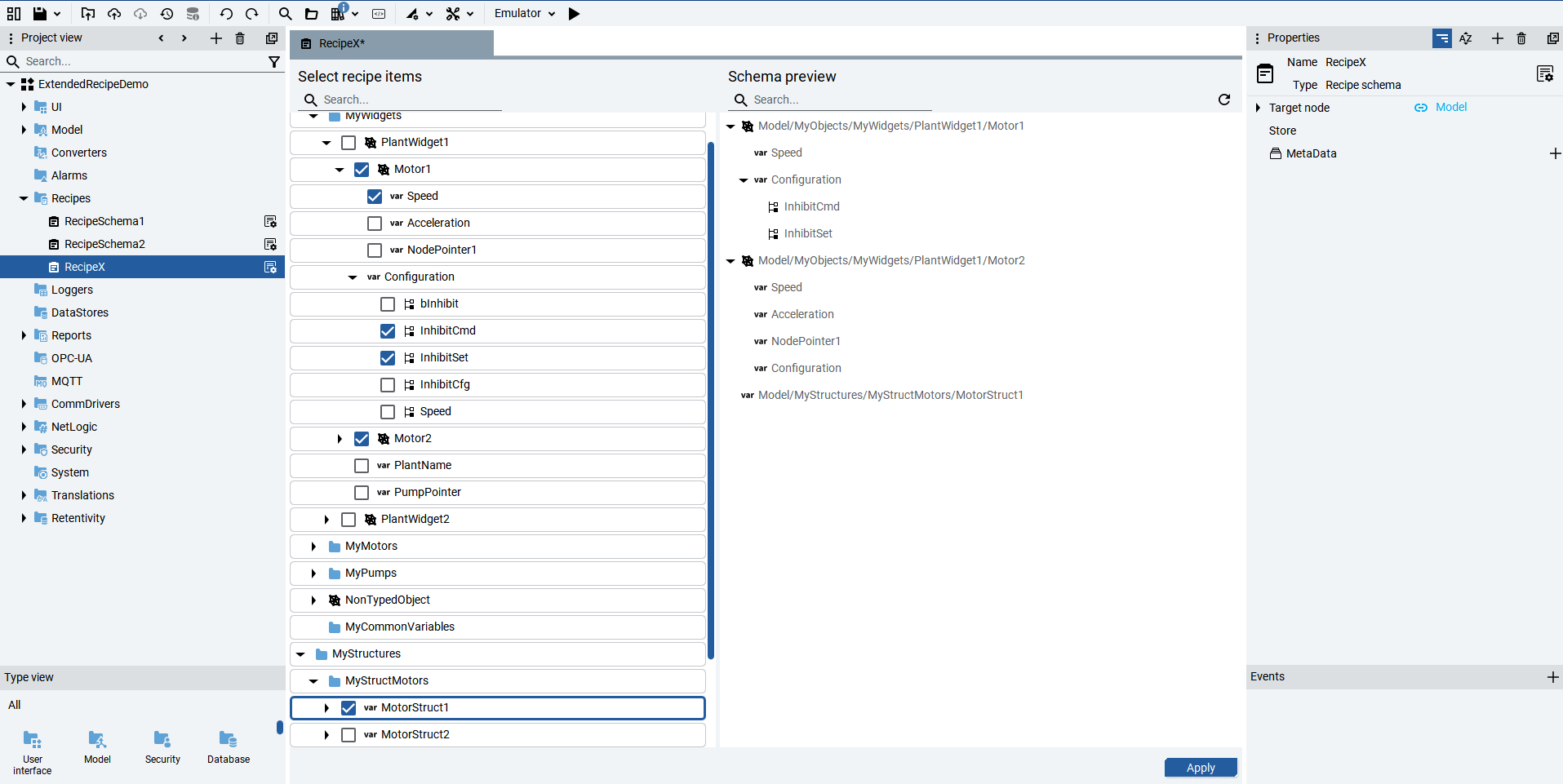
The
Configurator View
displays Items and DataItems in the target
node subtree that you want to add to, or remove from, the schema. In this view, you can
safely modify the intermediate representation of the recipe schema. Your changes are only
saved when you select Apply
.The
Schema preview
displays what the schema status will be when you
select Apply
. This is a read-only view of the schema, offering
real-time feedback during your every edit.You can resize the tab width of either view by dragging the central vertical separator.
The
Apply
button is located in the bottom right corner.Any variable can be considered by itself or as part of an object. Recipes can be
represented in the UI through the ListView object. For more information, seeListView.
Recipe schemas are based on three elements that define how recipes are structured and
applied:
- TargetNodeThe root node in the Information Model from which the recipe schema is built. It represents the subtree where Items and DataItems will be selected.
- ItemAn object or variable under the TargetNode that groups related parameters. Items can be user-defined objects (e.g., MotorType) or variables. They provide the hierarchical context for DataItems, enabling object-aware recipes.
- DataItemA specific parameter or field within an Item (e.g., Speed, Pressure of a Motor). DataItems can be simple variables or fields of structured types. Each DataItem is always associated with one Item, ensuring clear mapping between schema and runtime.
Example
Define a custom object type, for example
MotorType
, and then create
motor1
and motor2
objects. Then add a new
variable, Acceleration
, to the motor2 object, to receive the
following structure:- MotorType
- motor1 [MotorType]
- motor2 [MotorType]
- Acceleration
The recipe editor allows you to select
motor2
as the root object and
Acceleration
as a child variable or as a root variable.Provide Feedback