
Substitution Builder
When adding a substitution to a library object or editing an existing substitution from the
Substitution
tab the Substitution Builder
is restricted to just those settings that are applicable to the context of the substitution.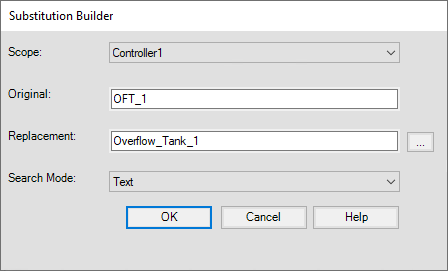
This table describes the fields available:
Name | Field Type | Description |
|---|---|---|
Scope | Dropdown menu | The scope for the substitution. Defaults to the current library object. |
Original | Text entry | The text string to replace. |
Replacement | Text entry | The replacement text. This can be entered manually or generated by an expression. Click the ellipsis (...) to open the Expression Builder. |
Search Mode | Dropdown menu | Defines the type of search conducted to perform the substitution.
|
Provide Feedback