
Roles and Permissions
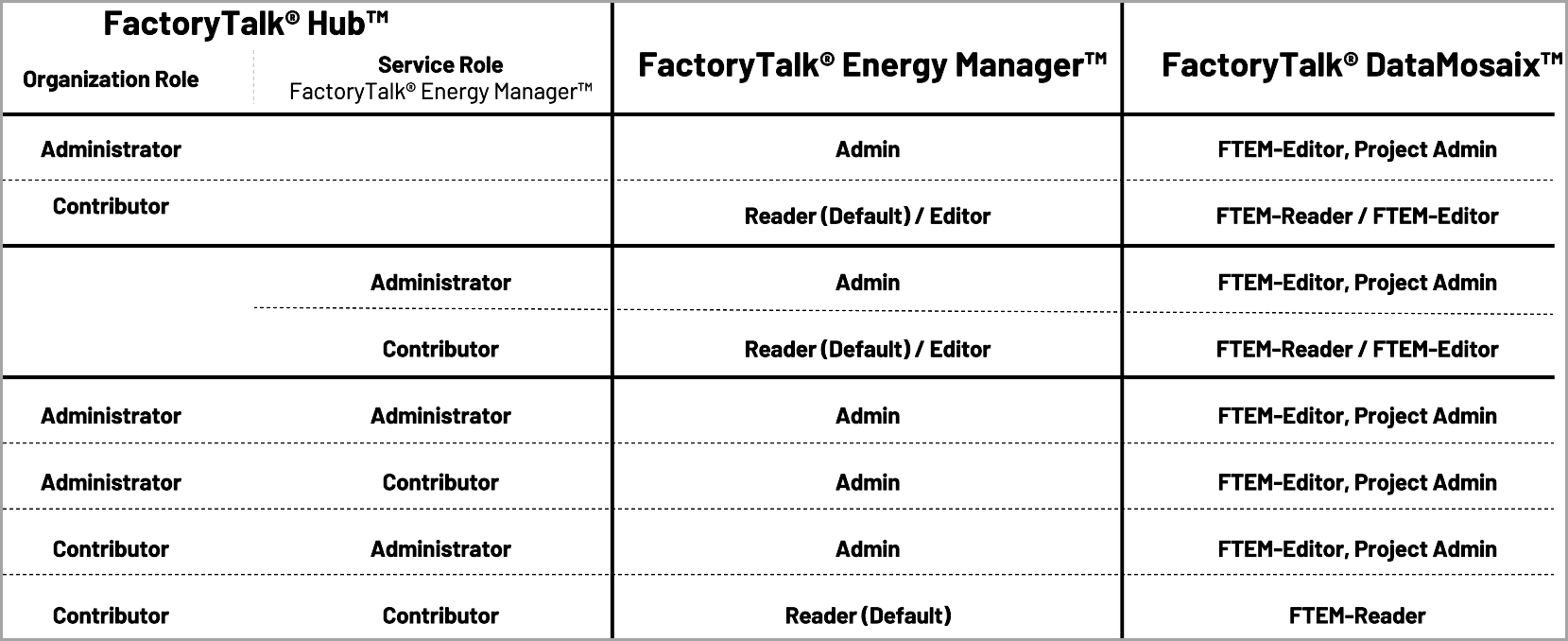
The following table illustrates how the
FactoryTalk Hub
roles, FactoryTalk Energy Manager
roles, and FactoryTalk DataMosaix
roles are mapped to each other, providing a clear understanding of user permissions across different applications:Roles
IMPORTANT:
Roles are automatically assigned in FactoryTalk DataMosaix and FactoryTalk Energy Manager based on the roles selected in FactoryTalk Hub.
FactoryTalk Energy Manager
has three predefined user roles for managing user access, each with different levels of permissions:- Admin:
- The role has full access to the entire application, includingUser Management.
- They can modify user roles for other users such as FTEM-Editor/FTEM-Reader, but not the other admin role.
- Admin role can be changed only inFactoryTalk Hub.
- Editor:
- The role has all the permissions of the Administrator except forUser Management.
- They can perform all operations within the application except for managing user permissions.
- Reader:
- The role has read-only access to the entire application (including export data/reports).
FactoryTalk Energy ManagerUser Management
The following table details the permissions available for each role (Reader, Editor, Administrator) in
FactoryTalk Energy Manager
. It describes the capabilities each user role has in the system:Functionality | Reader | Editor | Administrator |
|---|---|---|---|
View Dashboard | Yes | Yes | Yes |
Export CSV Data | Yes | Yes | Yes |
View Tag Mapping | Yes | Yes | Yes |
View Enterprise Configuration | Yes | Yes | Yes |
View Resource Type Configuration | Yes | Yes | Yes |
View Parameter Configuration | Yes | Yes | Yes |
View Rate Schedules Configuration | Yes | Yes | Yes |
View Emission Factory Configuration | Yes | Yes | Yes |
View Measurand Configuration | Yes | Yes | Yes |
View Notifications Configuration | Yes | Yes | Yes |
View Node Summary Details | Yes | Yes | Yes |
View Notifications | Yes | Yes | Yes |
View Reports Configuration | Yes | Yes | Yes |
Download Reports | Yes | Yes | Yes |
Edit Dashboard (hide or show widgets) | Yes | Yes | Yes |
Edit Enterprise Configuration | No | Yes | Yes |
Add/ Edit/Delete Resource Type Configuration | No | Yes | Yes |
Edit Parameter Configuration | No | Yes | Yes |
Add/Edit/Delete Rate Schedules Configuration | No | Yes | Yes |
Add/Edit/Delete Emissions Factor Configuration | No | Yes | Yes |
Edit Measurand Configuration | No | Yes | Yes |
Add/Edit/Delete Notifications Configuration | No | Yes | Yes |
Add/Edit/Delete Reports Configuration | No | Yes | Yes |
Add/Edit/Delete Meters | No | Yes | Yes |
Configure Energy Model (Add/Edit/Delete Nodes) | No | Yes | Yes |
Configure Data Link for Meters | No | Yes | Yes |
User Management | No | No | Yes |
Add/Edit/Delete Analytics Baseline models | No | Yes | Yes |
View Analytics Baseline calculator | Yes | Yes | Yes |
Create/Edit/Download M&V Projects | No | Yes | Yes |
View M&V Projects | Yes | Yes | Yes |
Provide Feedback