
Loading
Innovation Center LOGO
Recent ActivityRecent Activity

Machine Management and OEE Optimization with Optix and PackML

Learn how to develop an application for OEE monitoring and machine management using PackML and FactoryTalk Optix with the Compact Logix 5069-L3100ERMS2 controller. - [Implementation time: 45 Minutes]
Innovation Center Home Page
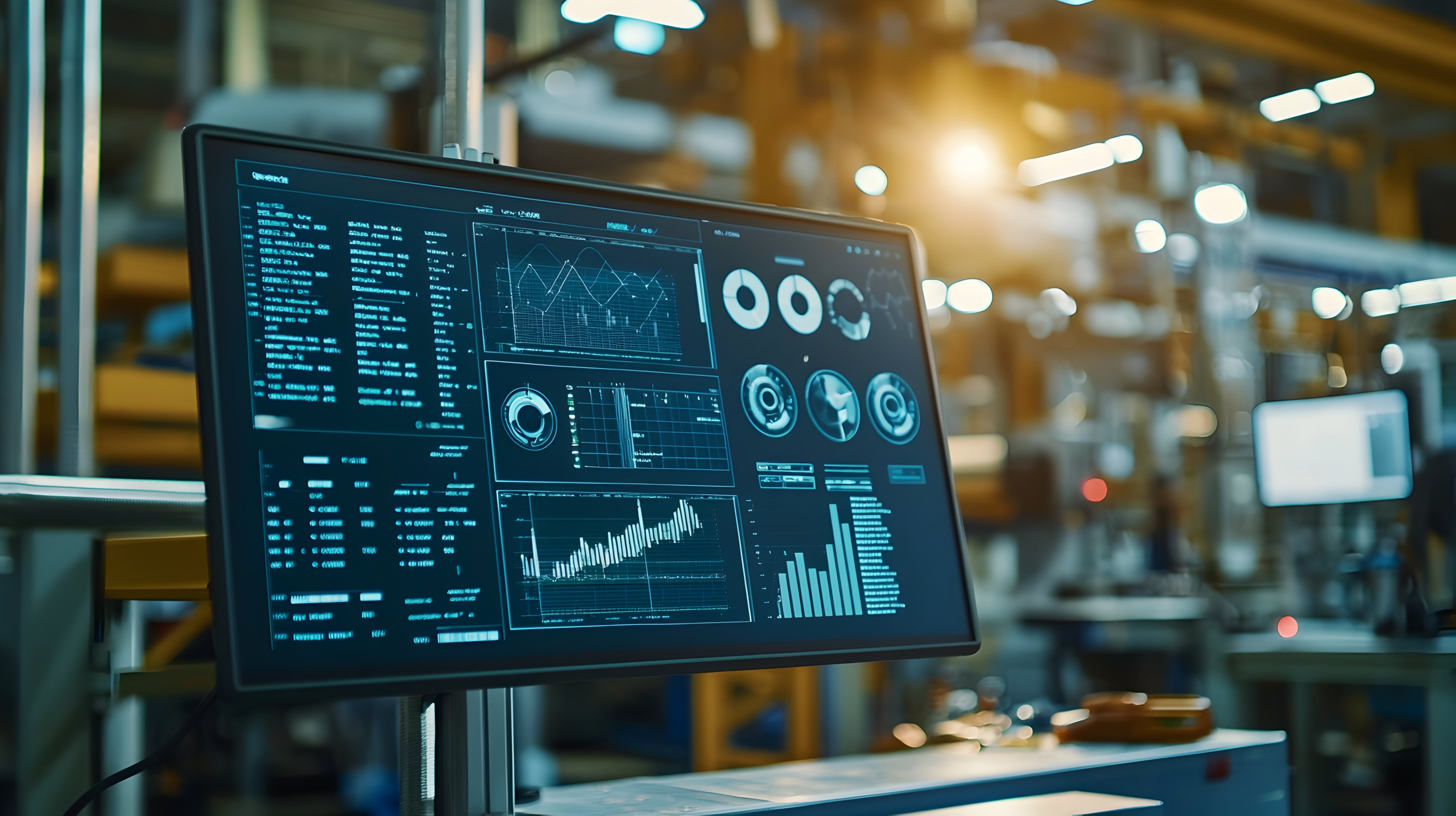
Digital dashboard displaying real-time control metrics and analytics for data-driven factory optimization and productivity improvement.
Innovation Center LOGO
  • Overview
  • Implementation Guide
  • Download
  • Contact us
  • Subscribe
Innovation Center Home Page


What does this application do?

The main purpose of the application developed in FactoryTalk Optix software is OEE monitoring and efficient management of industrial machines. The solution is supported by the standardization of PackML, an industry standard that facilitates the communication and operation of automated machines, regardless of their manufacturer. By integrating PackML standardization with the advanced visualization capabilities of Optix, a cutting-edge platform is provided to optimize operations in modern industrial plants.


Features FactoryTalk Optix stands out for its ability to connect to a wide variety of industrial devices and protocols such as OPC UA, Ethernet/IP, Profinet, Modbus, HTTPS, MQTT among others, allowing the integration and real-time monitoring of equipment from different manufacturers from a single IoT platform. In addition, Optix has the ability to create data logs and save that information in a SQL database. This allows historical alarm trends to be presented and PDF reports to be created as needed.

PackML, which defines 17 standardized operating states, ensures consistent machine behavior, facilitating integration into plants using PackML and ISA-TR88.00.02. In addition, the use of predefined Rockwell Automation libraries, such as those for machine safety, speeds up integration and reduces the engineering effort required.


 

Advantages

  • Standardization of states and modes of operation
  • Consistency in machine integration
  • Flexibility in connectivity
  • Impact on development time
  • OEE optimization and continuous improvement
  • Cost reduction
  • Operational efficiency
  • Flexibility and scalability
  • Improved data quality
  • Root cause analysis
  • Real-time monitoring


AHIC Download ICON VF.png

Downloads

Please note: You will need to agree to the Terms & Conditions for each download.

Downloadable file ›
Legal Disclaimer Acceptance. ROCKWELL AUTOMATION WILL PROVIDE ACCESS TO ROCKWELL PRODUCTS (BEST PRACTICES, APPLICATIONS AND KNOWLEDGE) ON THE CONDITION THAT YOU ACCEPT AND COMPLY WITH THE FOLLOWING TERMS AND CONDITIONS. YOU ACCEPT AND AGREE TO BE BOUND BY THE TERMS OF THIS AGREEMENT BY DOWNLOADING, INSTALLING, COPYING, OR OTHERWISE USING PRODUCTS. IF YOU ARE ACCEPTING THESE TERMS ON BEHALF OF ANOTHER PERSON, COMPANY, OR OTHER LEGAL ENTITY, YOU REPRESENT AND WARRANT THAT YOU HAVE FULL AUTHORITY TO BIND THAT PERSON, COMPANY, OR LEGAL ENTITY TO THESE TERMS. IF YOU DO NOT AGREE TO THESE TERMS, DO NOT DOWNLOAD, INSTALL, COPY, ACCESS, OR USE THE PRODUCTS, SOFTWARE AND/OR CLOUD SERVICES. 1. Rockwell Automation retains full ownership and title to all Products and related documentation. No rights or licenses are granted other than those set forth in this Agreement. Company grants to Rockwell Automation a non-exclusive, worldwide, royalty-free, perpetual, non-revocable license to use any feedback Company provides regarding the Products, even if Company has designated the feedback as confidential. Rockwell Automation will be entitled to use the feedback without restriction or compensation to Company. 2. Company may not lease sub-lease, assign, license, sub-license or otherwise transfer any of the Products without the prior written consent of Rockwell Automation. Company may not assign or otherwise transfer access rights to the Products without the prior written consent of Rockwell Automation. Any reverse assembly, reverse engineering, decompilation, and creation of derivative works based on the Products by Company is prohibited. 3. Company acknowledges that Products provided under this Agreement are Rockwell Automation’s Confidential Information and are covered by effective or pending copyrights, patents, trademarks and/or trade secrets of Rockwell Automation, and Company agrees to maintain confidentiality by not disclosing Products or documentation to any third party without the prior written consent of Rockwell Automation and to protect the confidentiality of the Products as it would Company’s own confidential information. Company agrees that its obligation of confidentiality under this paragraph shall survive expiration or termination of this Agreement. 4. Company agrees that Products provided under this Agreement are prototypes and examples and its application and results may vary depending on each customer and project conditions. Rockwell Automation do not warranty the same results. This Agreement shall in no way be construed as a commitment by Rockwell Automation at any time to manufacture and/or offer Products for sale. There is no explicit or implicit service level agreement associated with using the Products. Rockwell Automation does not warrant that the functions contained in the Products will meet Company’s requirements. Company agrees to use all Products only in accordance with the instructions and only for the intended usages identified in the documentation. 5. EXCLUSION OF WARRANTIES AND LIMITATION OF LIABILITY. THE PRODUCTS ARE PROVIDED "AS IS". ROCKWELL AUTOMATION DISCLAIMS ANY AND ALL WARRANTIES, EXPRESS, IMPLIED OR STATUTORY, INCLUDING WITHOUT LIMITATION ANY WARRANTIES OF MERCHANTABILITY OR FITNESS FOR A PARTICULAR PURPOSE. ROCKWELL AUTOMATION EXPLICITLY DISCLAIMS ALL WARRANTIES OF NON- INFRINGEMENT AND EXPRESSLY DOES NOT WARRANT THAT THE PRODUCTS, IN WHOLE OR IN PART, WILL BE ERROR FREE OR FREE FROM SECURITY VULNERABILITIES. IN NO EVENT SHALL ROCKWELL AUTOMATION BE LIABLE FOR (i) LOST PROFITS, LOST SAVINGS, DOWNTIME, SPECIAL, INDIRECT OR CONSEQUENTIAL DAMAGES OF ANY KIND, OR (ii) ANY PERSONAL INJURY, PROPERTY DAMAGE OR ENVIRONMENTAL DAMAGE ARISING OUT OF OR IN CONNECTION WITH THIS AGREEMENT, WHETHER IN AN ACTION IN CONTRACT, STRICT LIABILITY OR IN TORT INCLUDING NEGLIGENCE. 6. COMPANY AGREES TO INDEMNIFY AND HOLD ROCKWELL AUTOMATION HARMLESS FROM ALL COSTS, AWARDS, DAMAGES, EXPENSES AND FEES (INCLUDING ATTORNEYS FEES) RESULTING FROM OR RELATED TO ANY THIRD-PARTY CLAIMS (INCLUDING EMPLOYEES AND AGENTS OF COMPANY) AGAINST ROCKWELL AUTOMATION, ITS DISTRIBUTORS, AGENTS, OFFICERS, DIRECTORS OR EMPLOYEES FOR PERSONAL INJURY (INCLUDING DEATH), PROPERTY DAMAGE OR ENVIRONMENTAL DAMAGE RELATED TO OR RESULTING FROM THE USE OF THE PRODUCTS. 7. In the event a Product is exported, Company agrees to comply with all applicable United States Export Control Law and Regulations, and the applicable export control laws of other countries. This Agreement shall be governed by the laws of the state of Wisconsin. This Agreement is the complete and exclusive Agreement between Rockwell Automation and the Company, and supersedes all prior agreements, whether written or oral, relating to the Products.
 
AHIC NEED HELP ICON VF.png

Need Help?

If you need help with an application or have feedback from the Innovation Center, please contact us.


Is this application relevant to me?

Using PackML allows you to obtain detailed data on machine performance in real time. Metrics that affect OEE, such as availability, performance and quality, can be easily monitored and analyzed thanks to PackML’s standardized data structure and Optix’s visualization capabilities.

For OEMs, the use of PackML and ISA-TR88.00.02, together with the advanced capabilities of FactoryTalk Optix, represents a flexible and standard solution that can be offered to different customers. By creating adaptable and reusable solutions, OEMs can reduce development times, increase the robustness of their software, and deliver a consistent user experience.

In addition, standardization allows OEMs to focus on innovation rather than reinventing basic control solutions for each customer. This not only increases the value of their products, but also reduces training and support costs.

How can I make it work?

Requirements: products, tools, prior knowledge.


Software:

  • Compact Logix 5069-L3100ERMS2 (V36)

Software:

  • FactoryTalk Optix (V1.4.2.3)
  • Studio5000 (V36)

Prior Knowledge

  • Basic knowledge of the FactoryTalk Optix and Studio5000 development environment.


AHIC STEP ICON.png

Implementation Guide

 
  1. Step 1
  2. Step 2
  3. Step 3
  4. Step 4
  5. Step 5
  6. Step 6
  7. Step 7
Open All Close All
Step 1
 

Identify the applications and architecture to be used: Studio5000 and FactoryTalk Optix.

Step 2
 
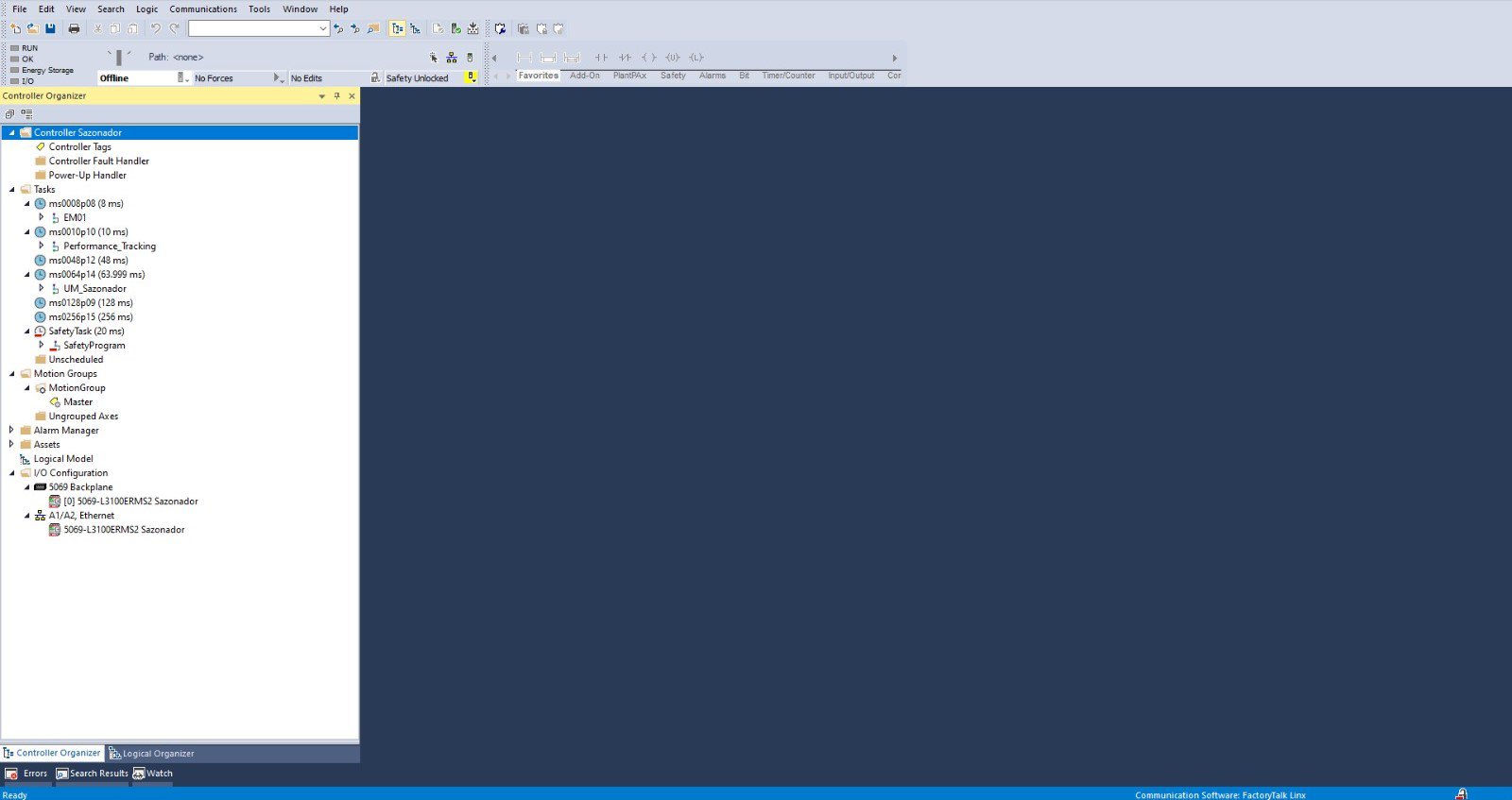
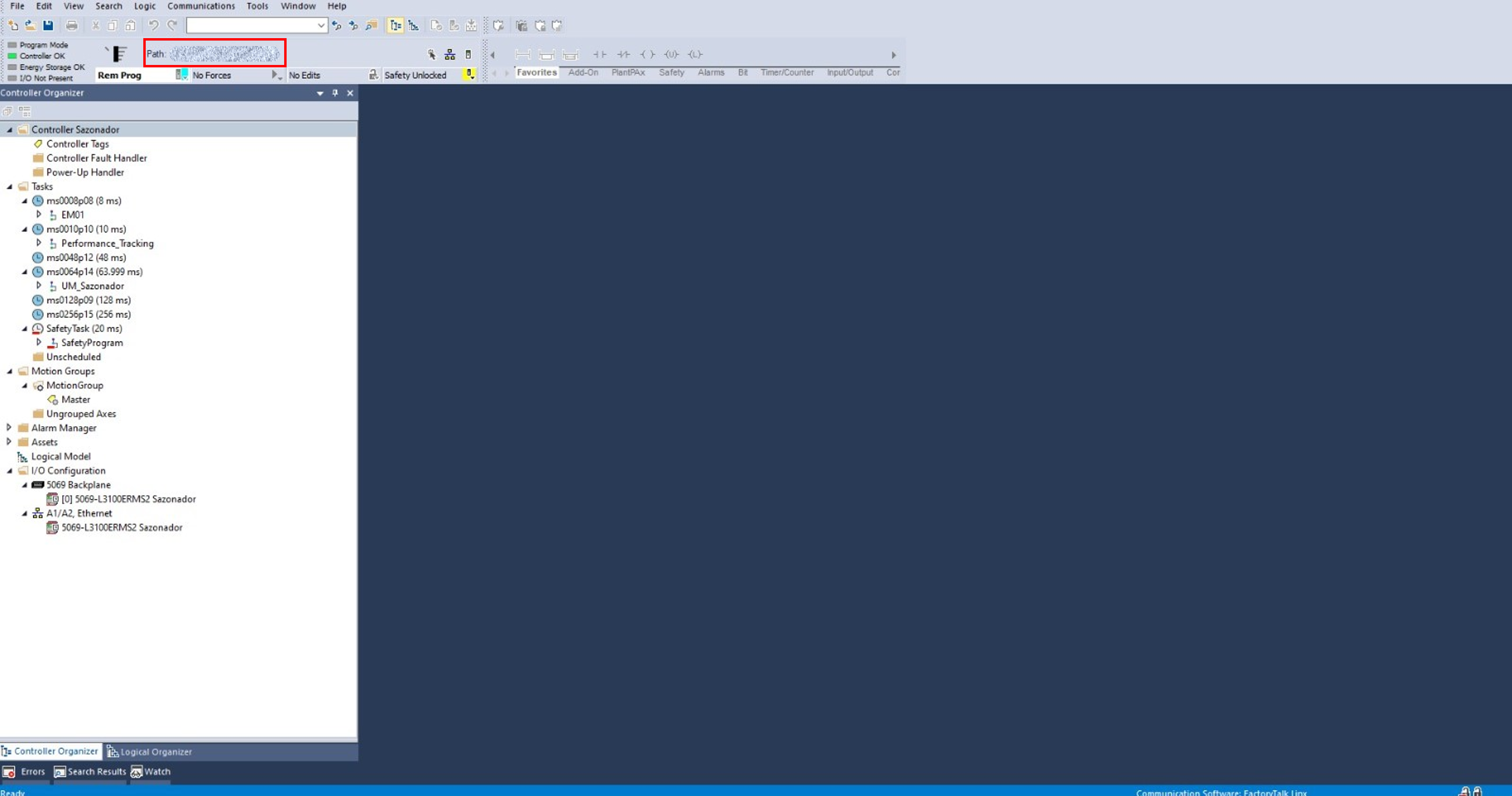
  • 2.1 - Open the Studio5000 application and run the OEE_SmartMachine.ACD project and configure the IP addresses to match those of the controller.

    machine-management-and-oee-optimization-with-optix-and-packml_Step2_1_1.jpeg
     

    Paso2-Imagen1

     
    machine-management-and-oee-optimization-with-optix-and-packml_Step2_1_2.png
     

    Paso2-Imagen2

     
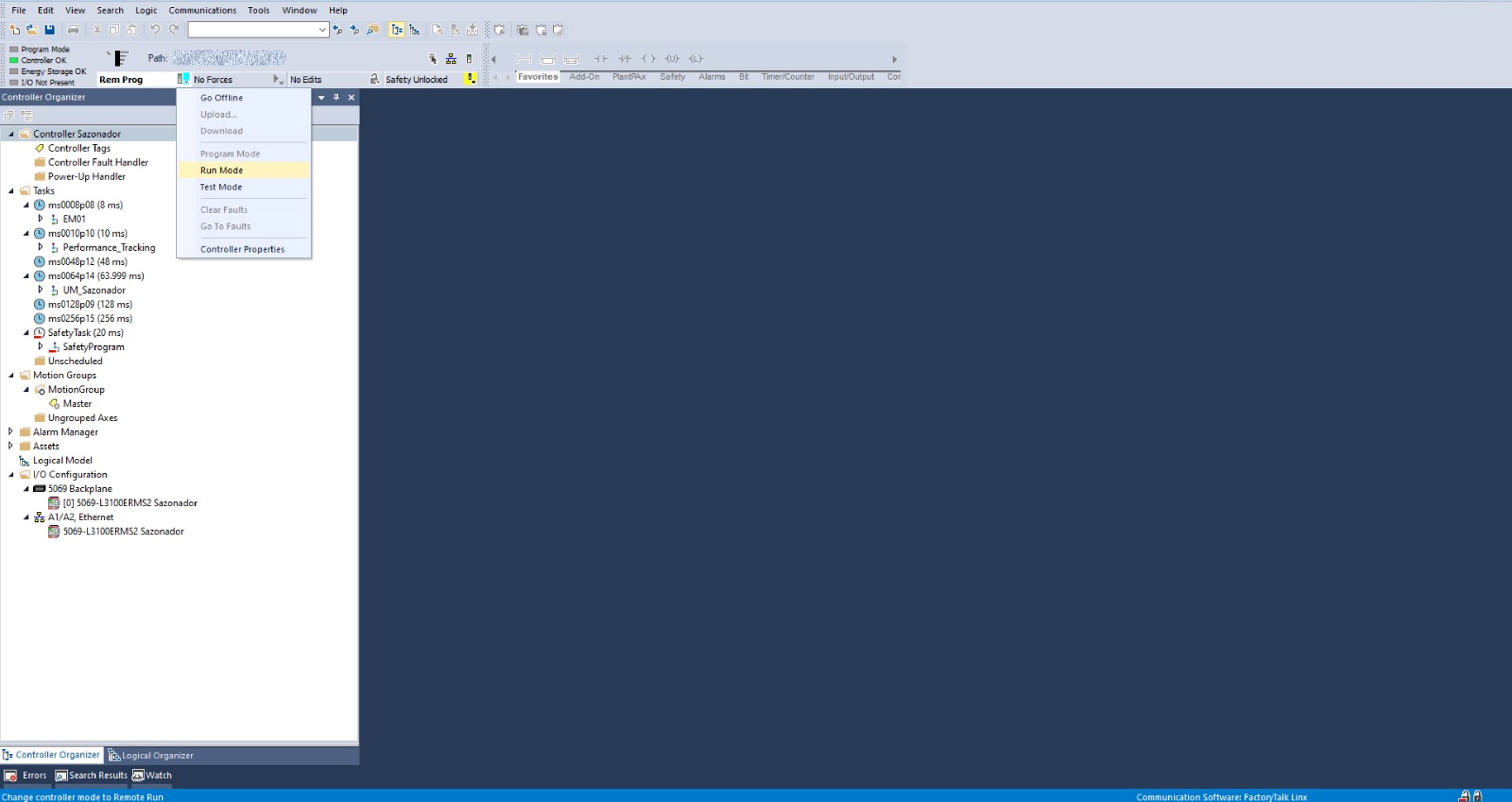
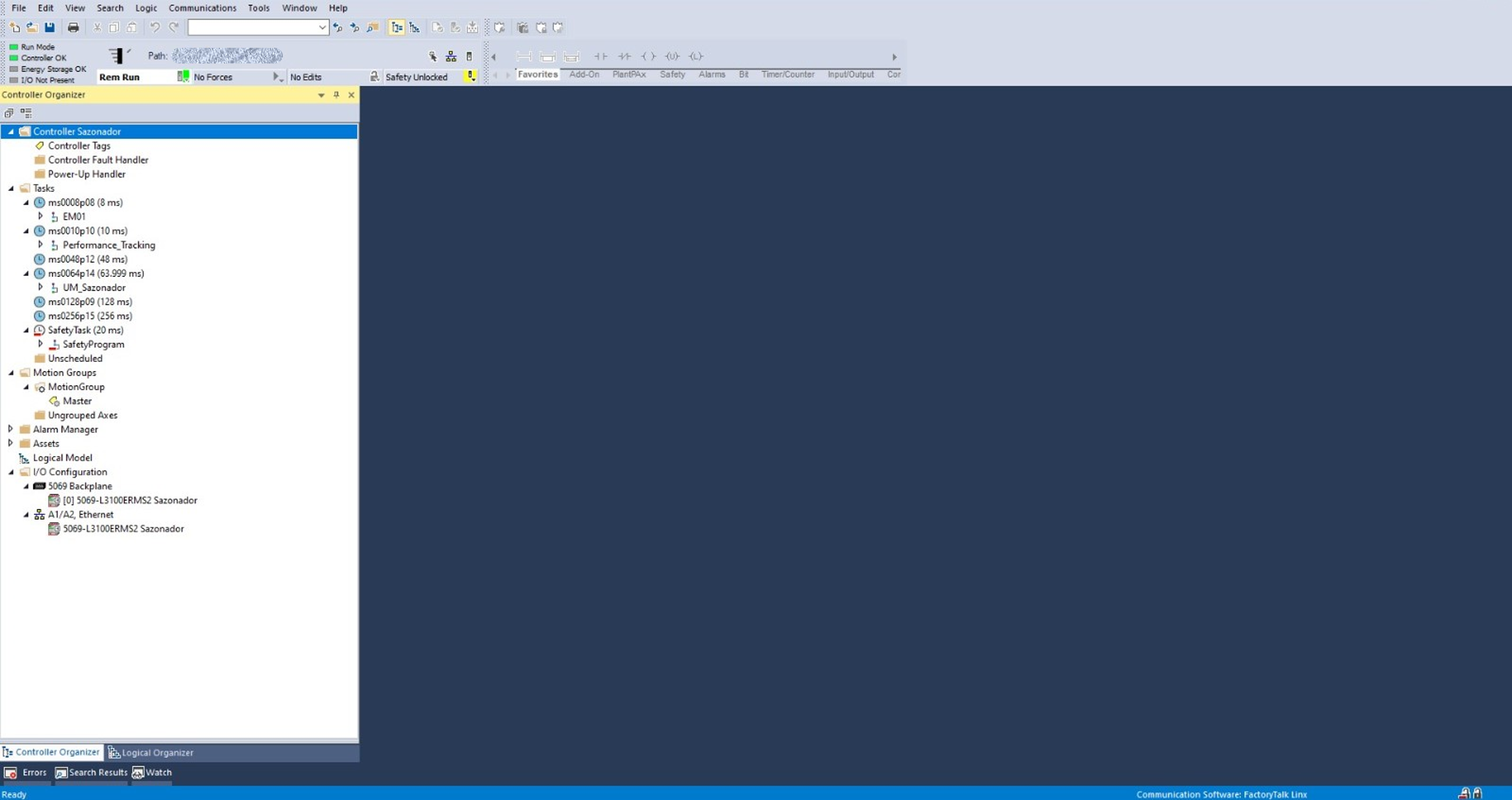
  • 2.2 - Configure the project in Run Mode.

    machine-management-and-oee-optimization-with-optix-and-packml_Step2_2_1.png
     

    Paso2-Imagen3

     
    machine-management-and-oee-optimization-with-optix-and-packml_Step2_2_2.png
     

    Paso2-Imagen4

     
Step 3
 
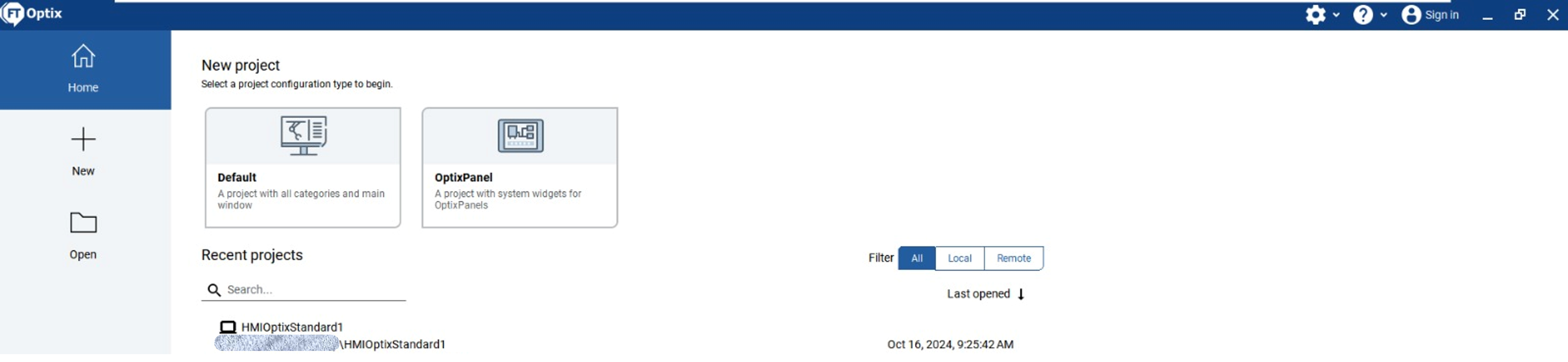
  • 3.1 - Open FactoryTalk Optix with the HMIOptixStandard1 file. 

    machine-management-and-oee-optimization-with-optix-and-packml_Step3_1.png

    Paso3-Imagen1

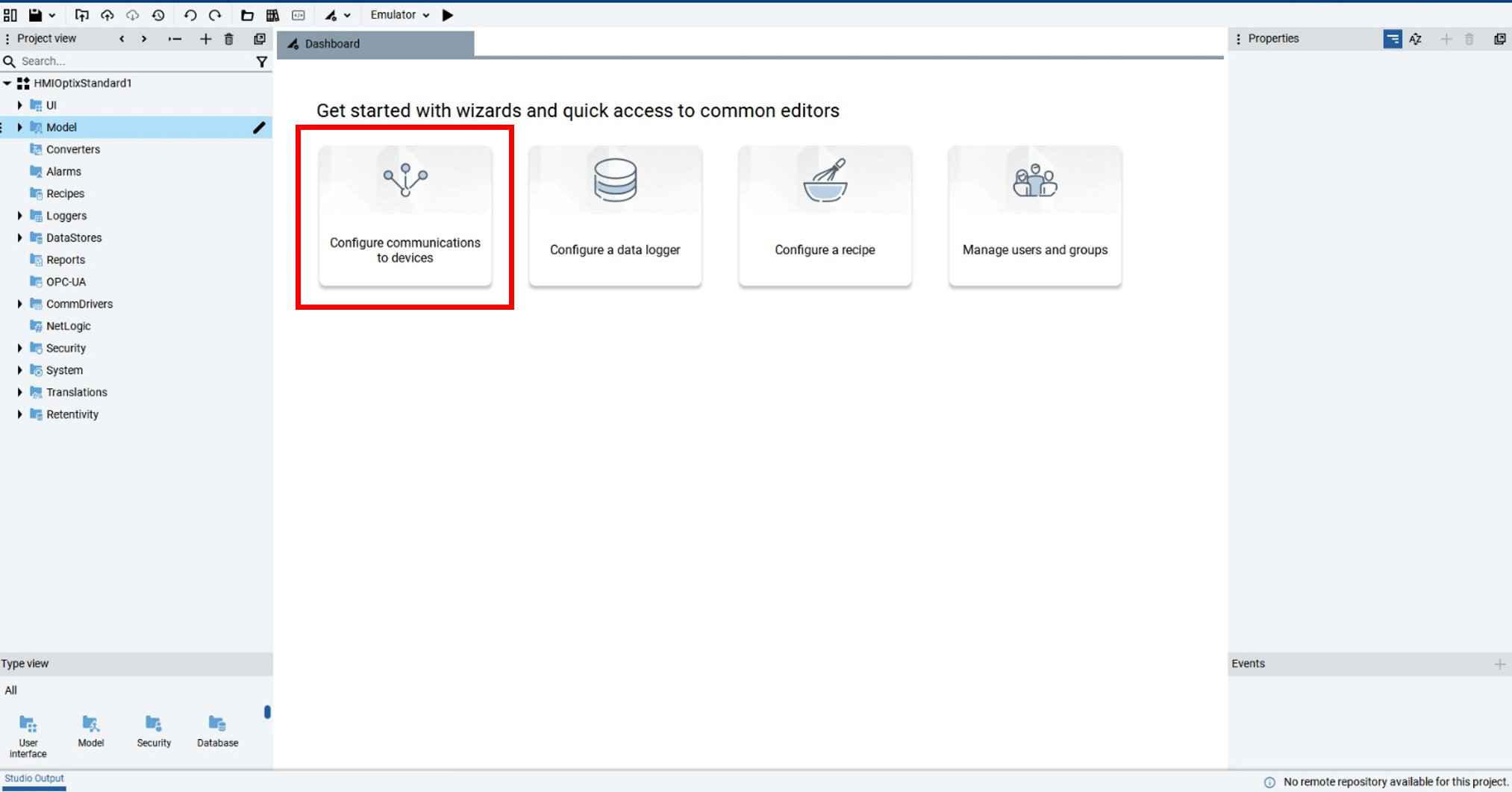
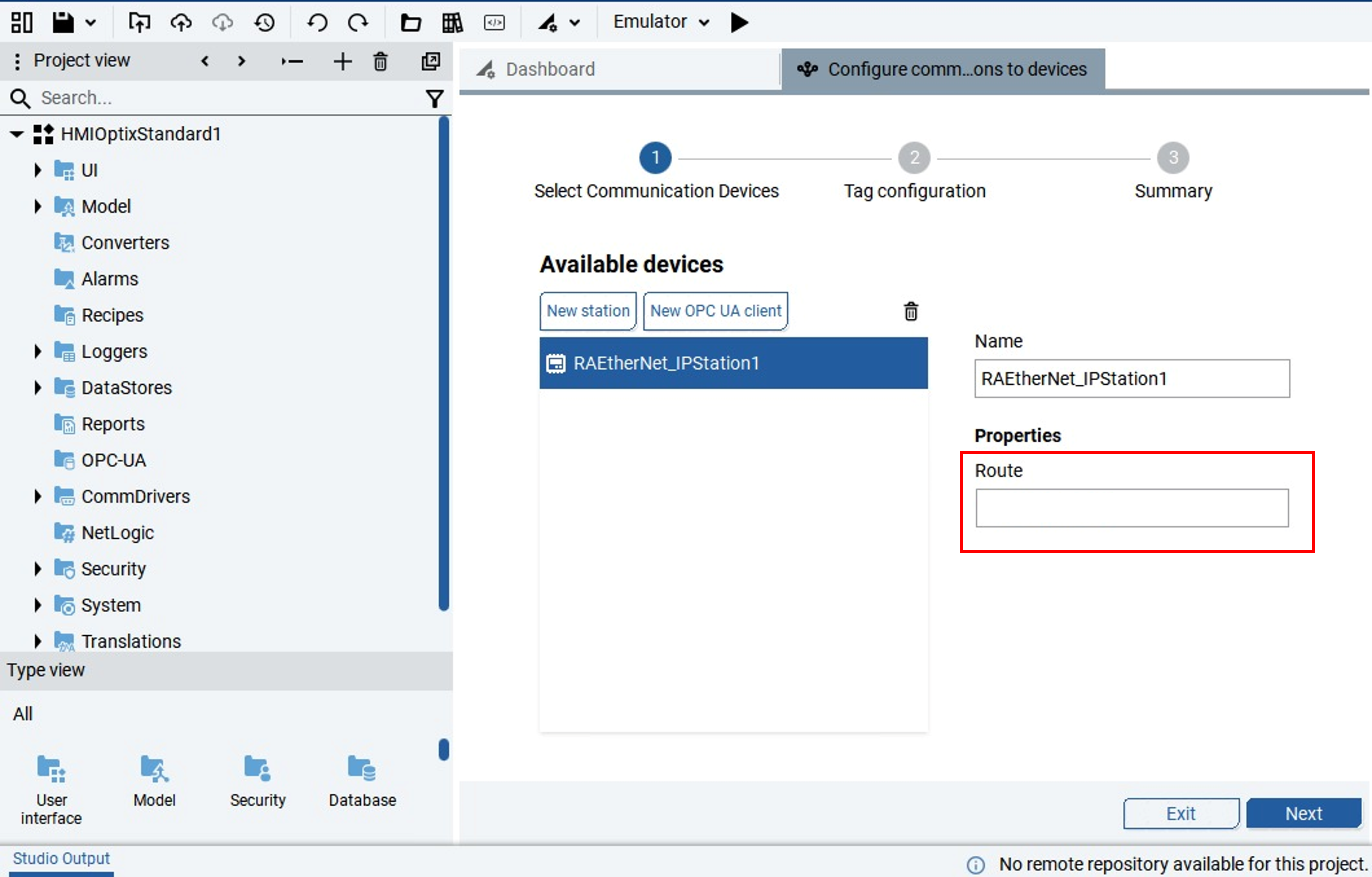
  • 3.2 - Configure communication with the device, entering the IP address of the project controller.

    machine-management-and-oee-optimization-with-optix-and-packml_Step3_2_1.png
     

    Paso3-Imagen2

    machine-management-and-oee-optimization-with-optix-and-packml_Step3_2_2.png
     

    Paso3-Imagen3

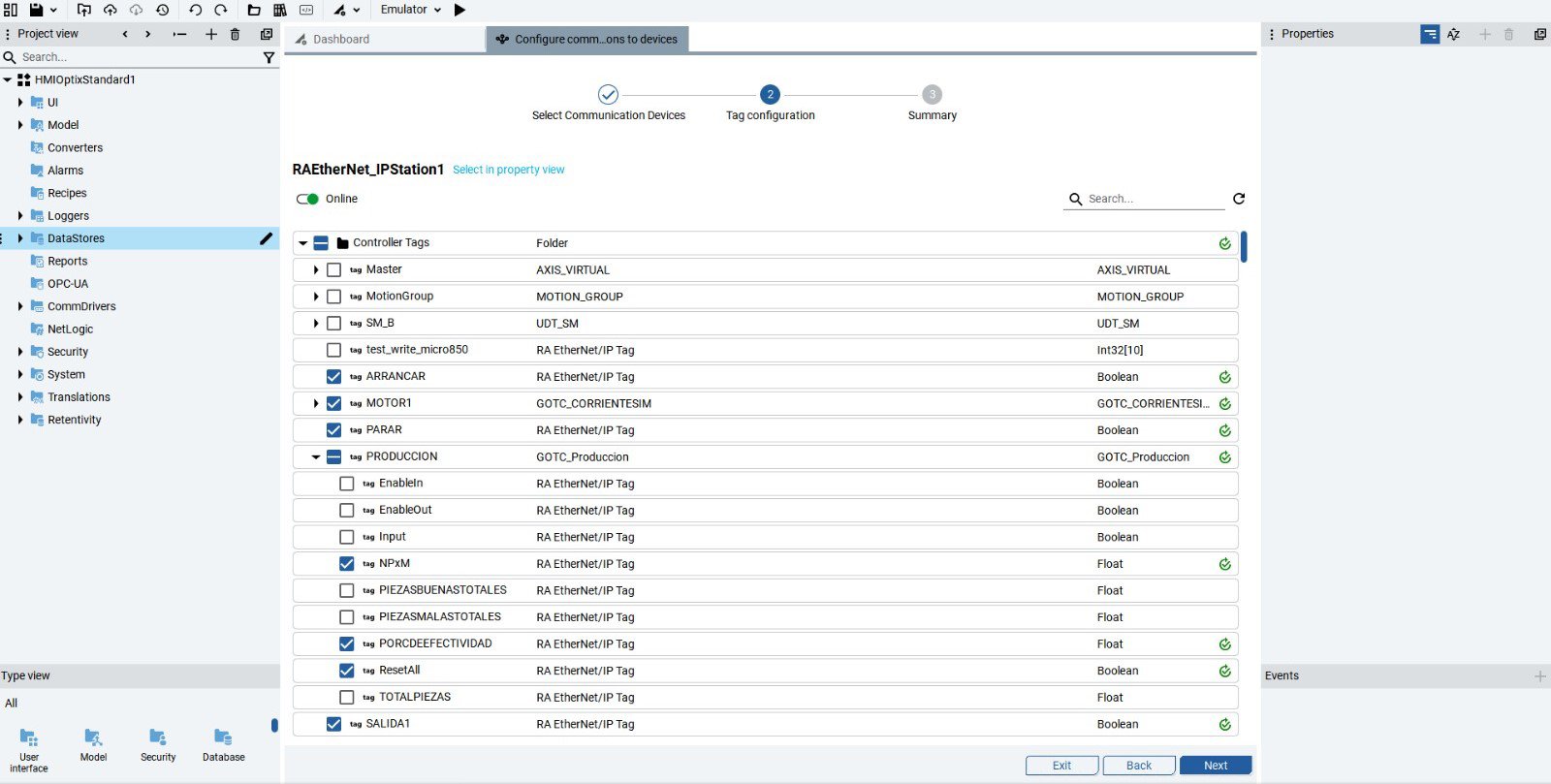
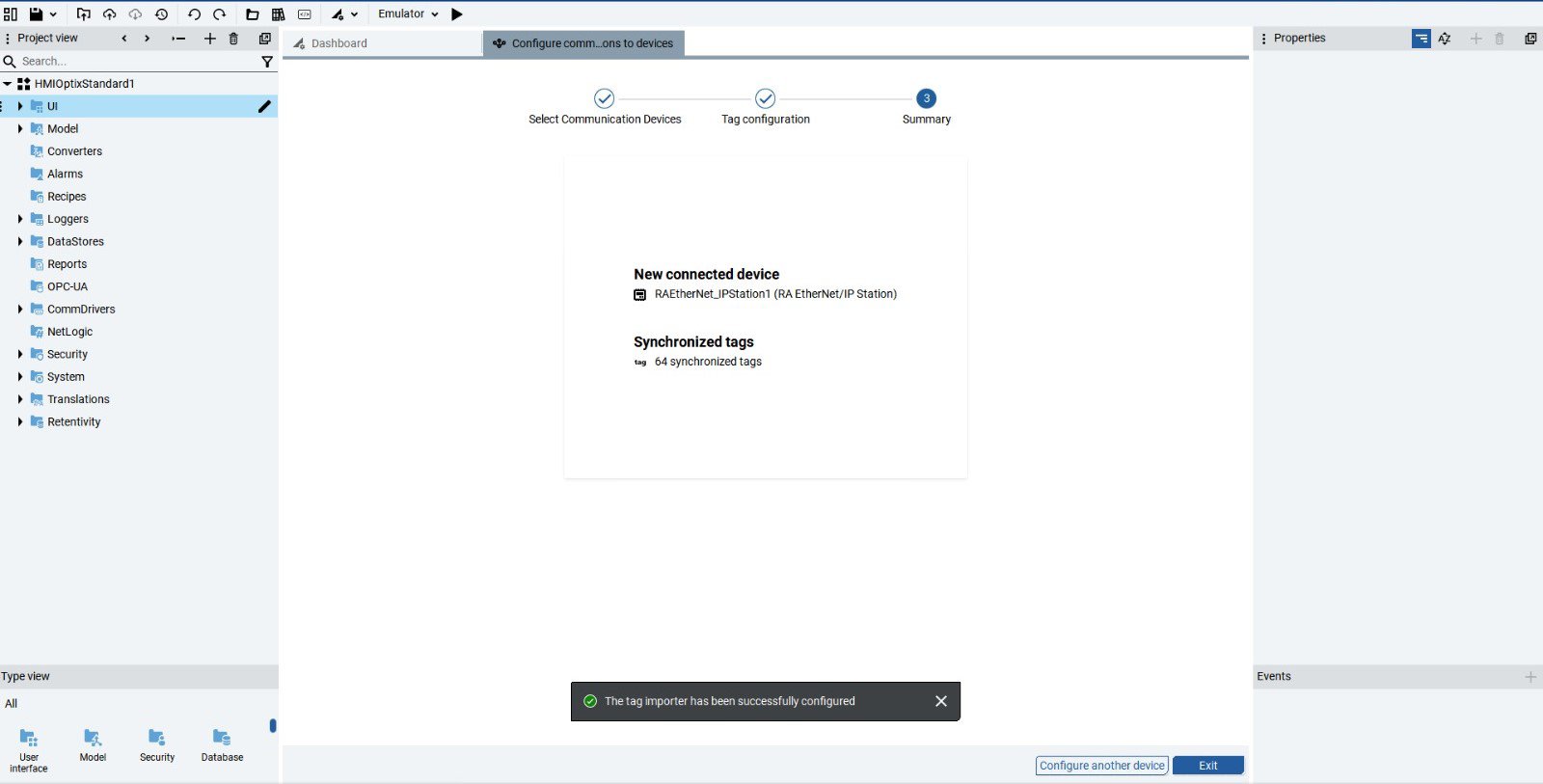
  • 3.3 - Configure the project tags and the application is now ready for use.

    machine-management-and-oee-optimization-with-optix-and-packml_Step3_3_1.jpeg
     

    Paso3-Imagen4

    machine-management-and-oee-optimization-with-optix-and-packml_Step3_3_2.jpeg
     

    Paso3-Imagen5

Step 4


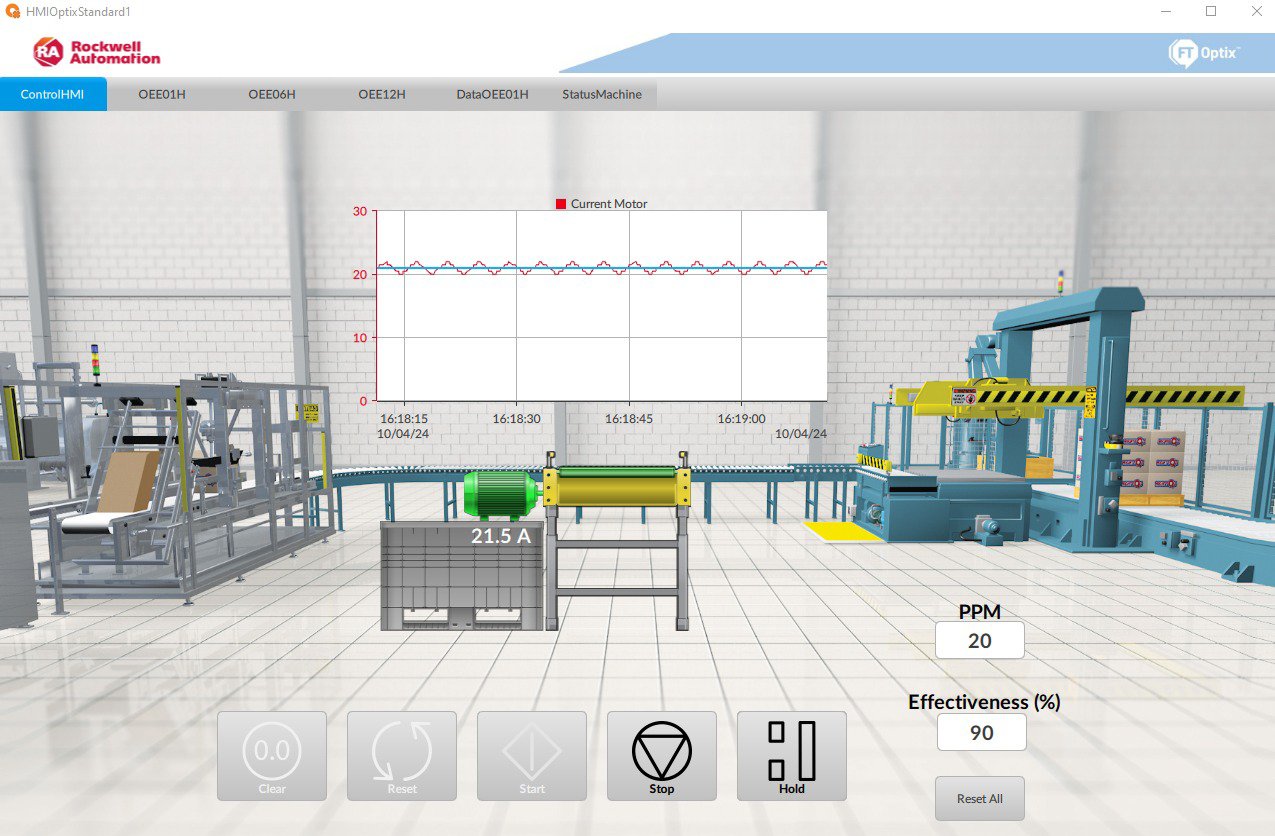
There is a main monitoring tab where the motor current can be observed. The control buttons follow the color and design standards defined by the ISA-101 standard which focuses on the design of human-machine interfaces for process automation systems. These controls ensure that the design is intuitive and consistent with best practices in the industry.


The interface shows the production of packages per minute, providing visual information on the performance of the system. It also shows the effectiveness, which indicates the percentage of good pieces in the packages produced.


machine-management-and-oee-optimization-with-optix-and-packml_Step4.jpeg

Paso4-Imagen1

Step 5
 

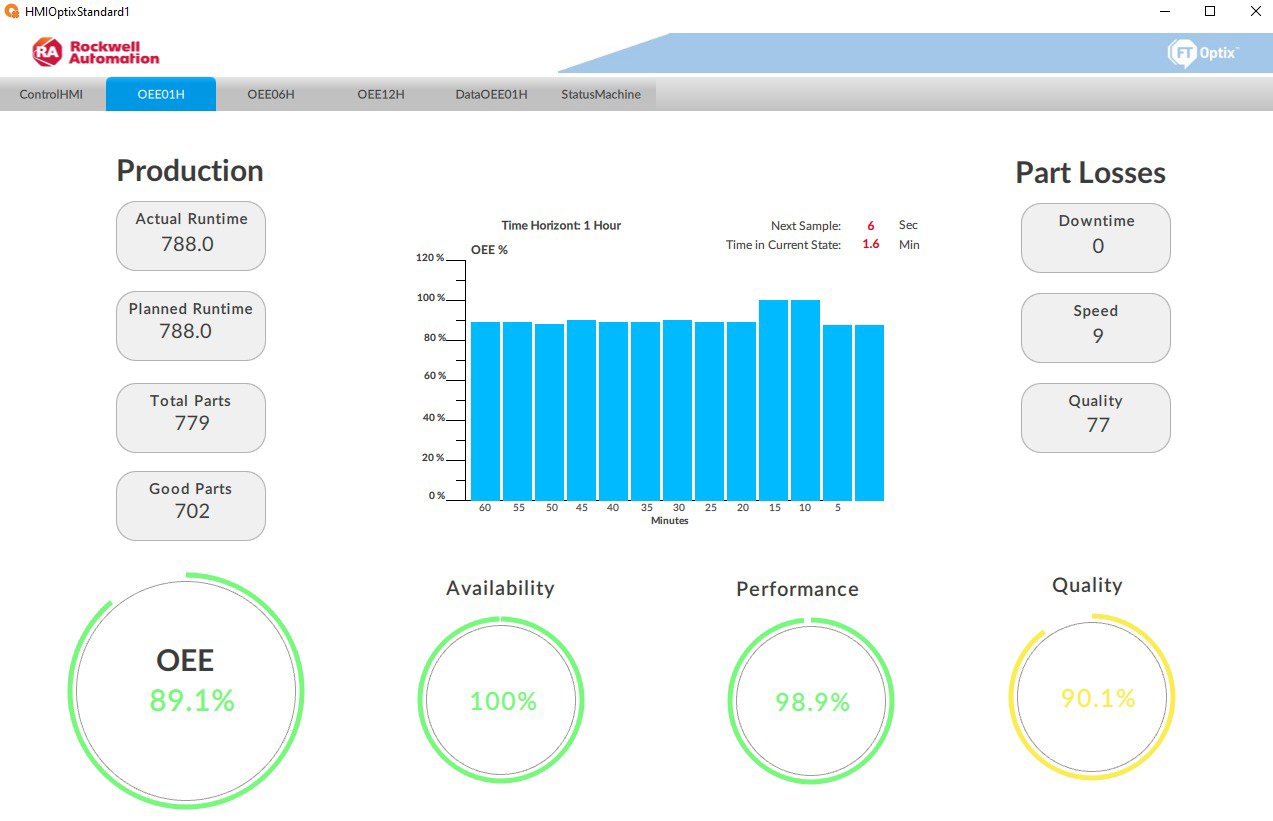
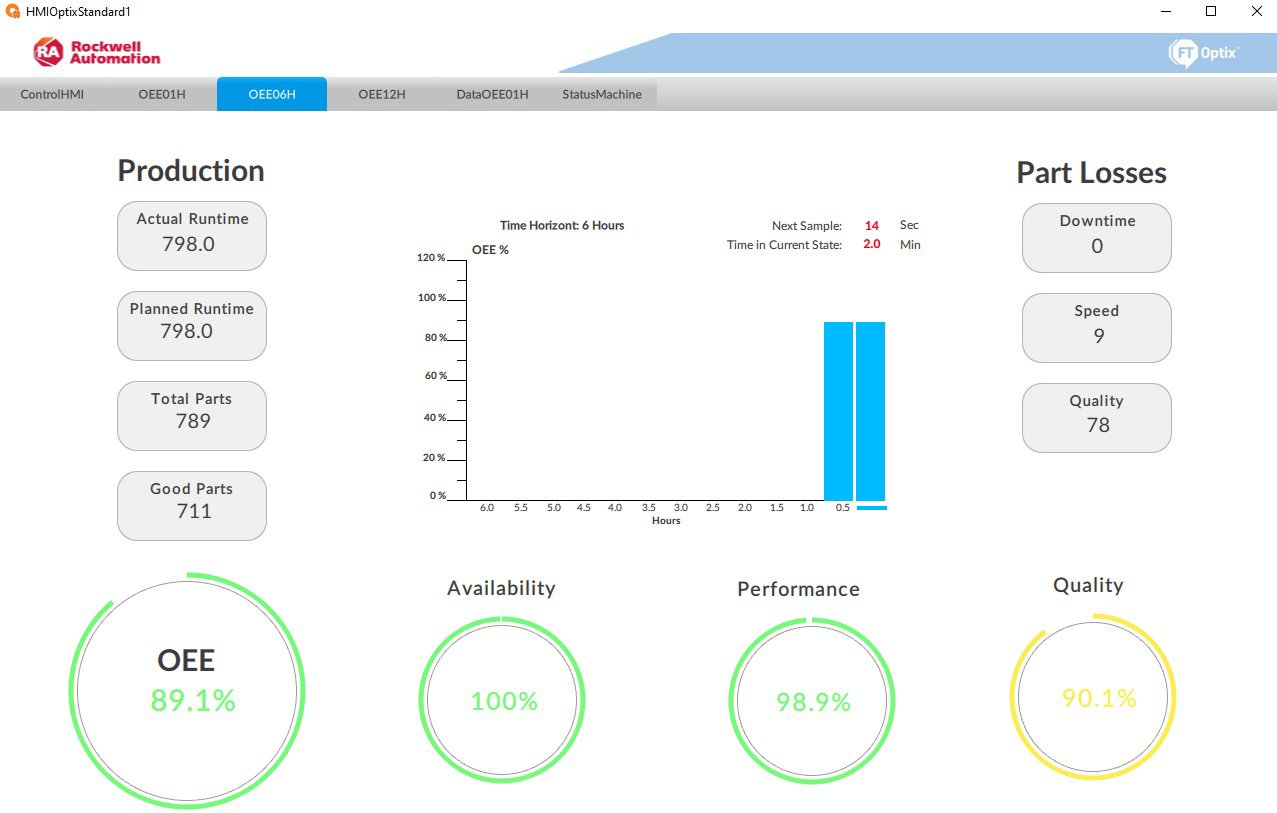
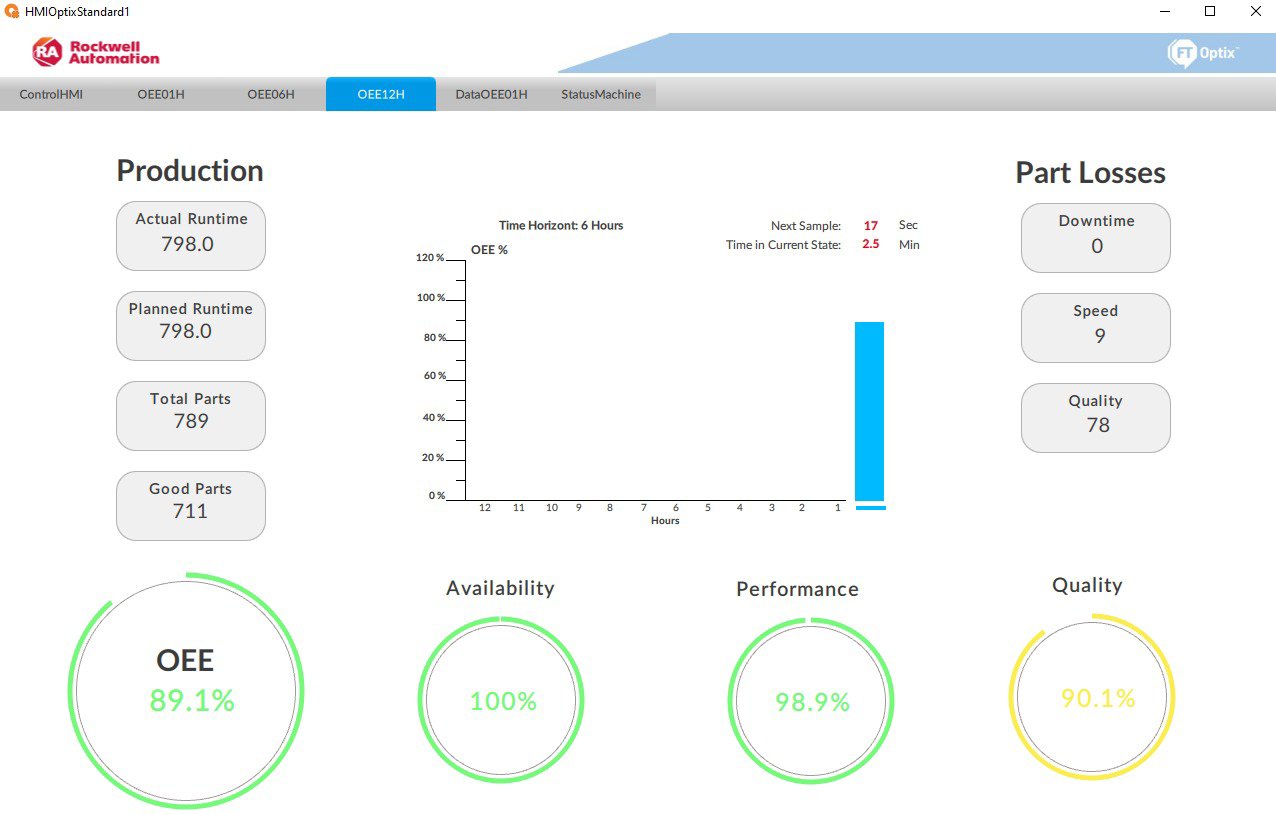
The following screens display the OEE KPIs in a visual and accessible manner, focusing on 1-hour, 6-hour, and 12-hour time periods. In these visualizations, OEE is broken down based on production and part loss. Additionally, a bar chart is used to see how OEE varies over specific time intervals.


  • In 1-hour, OEE is calculated and displayed every 5 minutes, giving process people the information they need to make quick and efficient decisions.
  • In 6-hour, information is updated every half-hour for a broader perspective.
  • In 12-hour, information can be viewed every hour.


This provides users with a detailed view of efficiency, quality, and availability, making it easier to identify opportunities for improvement and optimization in production.


  • machine-management-and-oee-optimization-with-optix-and-packml_Step5_1.jpeg

    Paso5-Imagen1

  • machine-management-and-oee-optimization-with-optix-and-packml_Step5_2.jpeg

    Paso5-Imagen2

     
  • machine-management-and-oee-optimization-with-optix-and-packml_Step5_3.jpeg

    Paso5-Imagen3

     
Step 6
 

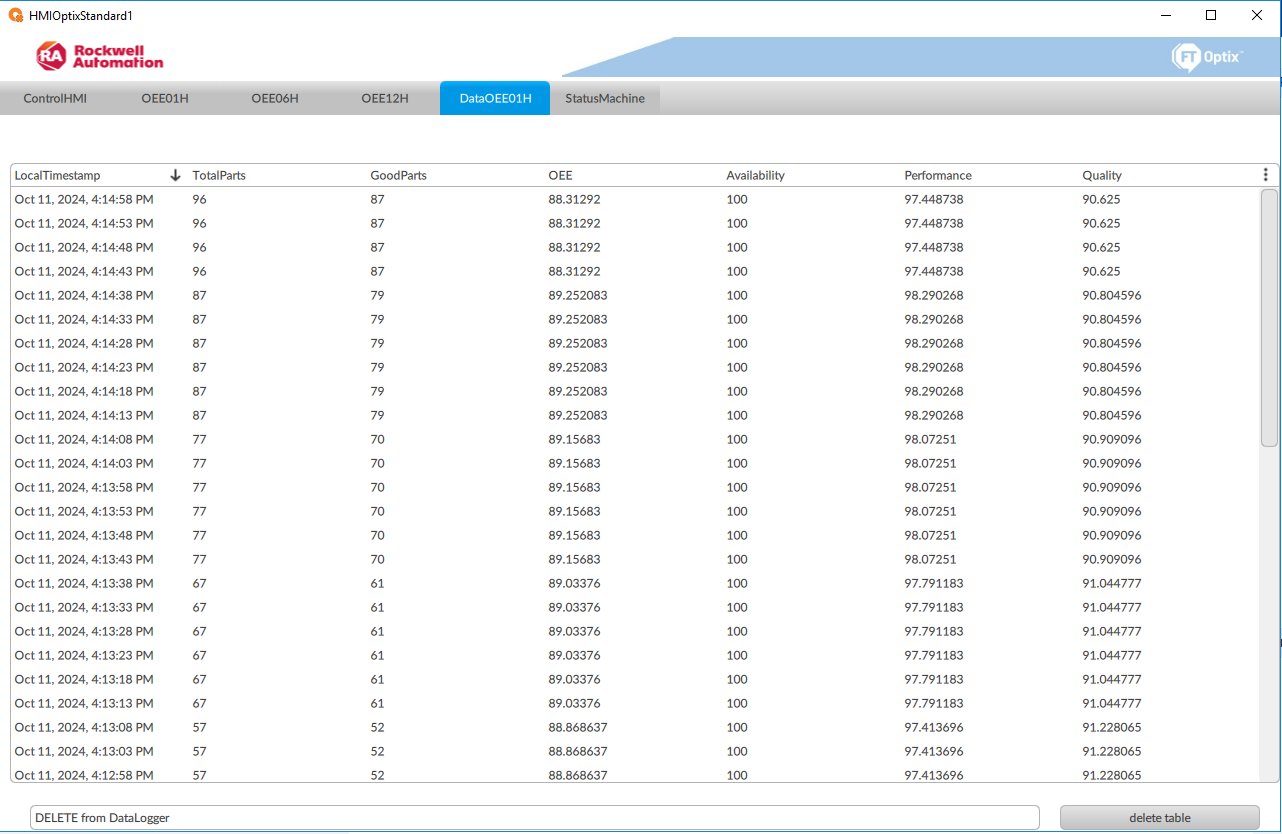
This screen performs a historical query of the data that is being stored in a SQL database. The data is queried from the database, where it is stored continuously every five seconds, allowing a detailed analysis of the machine's performance and behaviour in short time intervals. The screen interface includes a DataGrid, which allows the user to view all the stored information in a clear and organized manner.


machine-management-and-oee-optimization-with-optix-and-packml_Step6.PNG

Paso6-Imagen1

Step 7


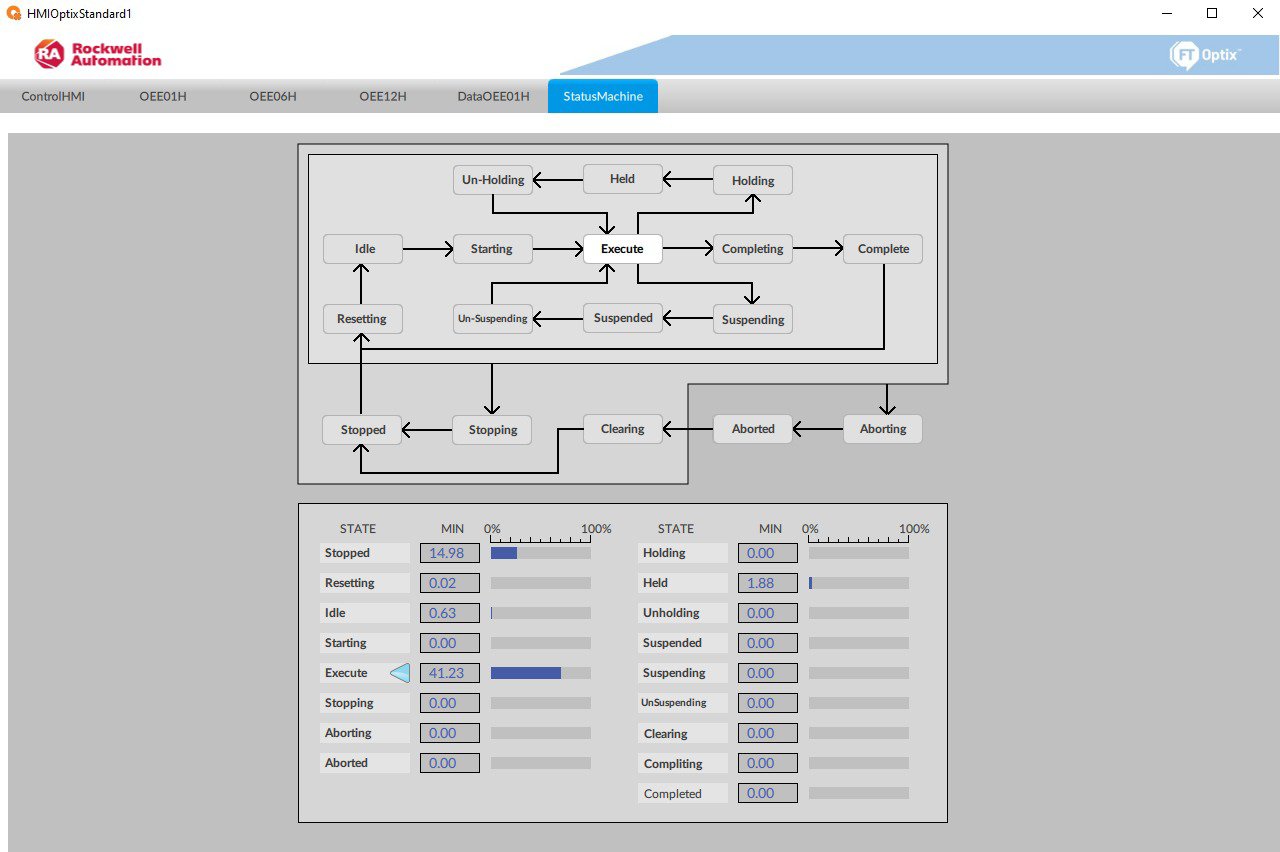
Finally, the 17 standardized operating states are displayed, showing information about the machine when it was stopped, such as how long it was stopped, its execution time, and more. This can be implemented through libraries predesigned by Rockwell Automation.


For example, there is the Machine Builder library from Rockwell Automation, which is a predesigned set of components and templates designed to simplify and accelerate the development of machine applications using Rockwell software platforms, such as Studio5000. It includes reusable code for common machine functions, such as motion control, safety, diagnostics, and more.


machine-management-and-oee-optimization-with-optix-and-packml_Step7.jpeg

Paso7-Imagen1


machine-management-and-oee-optimization-with-optix-and-packml_Step2_1_1.jpeg

Paso2-Imagen1

machine-management-and-oee-optimization-with-optix-and-packml_Step2_1_2.png

Paso2-Imagen2

machine-management-and-oee-optimization-with-optix-and-packml_Step2_2_1.png

Paso2-Imagen3

machine-management-and-oee-optimization-with-optix-and-packml_Step2_2_2.png

Paso2-Imagen4

machine-management-and-oee-optimization-with-optix-and-packml_Step3_1.png

Paso3-Imagen1

machine-management-and-oee-optimization-with-optix-and-packml_Step3_2_1.png

Paso3-Imagen2

machine-management-and-oee-optimization-with-optix-and-packml_Step3_2_2.png

Paso3-Imagen3

machine-management-and-oee-optimization-with-optix-and-packml_Step3_3_1.jpeg

Paso3-Imagen4

machine-management-and-oee-optimization-with-optix-and-packml_Step3_3_2.jpeg

Paso3-Imagen5

machine-management-and-oee-optimization-with-optix-and-packml_Step4.jpeg

Paso4-Imagen1

machine-management-and-oee-optimization-with-optix-and-packml_Step5_1.jpeg

Paso5-Imagen1

machine-management-and-oee-optimization-with-optix-and-packml_Step5_2.jpeg

Paso5-Imagen2

machine-management-and-oee-optimization-with-optix-and-packml_Step5_3.jpeg

Paso4-Imagen1

machine-management-and-oee-optimization-with-optix-and-packml_Step6.PNG

Paso6-Imagen1

machine-management-and-oee-optimization-with-optix-and-packml_Step7.jpeg

Paso7-Imagen1


Machine Management and OEE Optimization with Optix and PackML

Version 2.0 - August 2026

 
AHIC White Logo
Subscribe!

Receive new app releases and other updates from the Innovation Center directly in your inbox.

I want to subscribe.
 
  1. Chevron LeftChevron Left Rockwell Automation Home
  2. Chevron LeftChevron Left Sup...
  3. Chevron LeftChevron Left Pro...
  4. Chevron LeftChevron Left Downloads
  5. Chevron LeftChevron Left Innovation Center
  6. Chevron LeftChevron Left Machine Management and OEE Optimization with Optix and PackML
Please update your cookie preferences to continue.
This feature requires cookies to enhance your experience. Please update your preferences to allow for these cookies:
  • Social Media Cookies
  • Functional Cookies
  • Performance Cookies
  • Marketing Cookies
  • All Cookies
You can update your preferences at any time. For more information please see our {0} Privacy Policy
CloseClose