Loading
Innovation Center LOGO
Recent ActivityRecent Activity

Connect Automation with IT Systems using FT-Optix and REST API

Ready-to-use application demonstrating how to integrate machines and automation systems using FT-Optix with IT systems, microservices, and related solutions. - [Implementation Time: 60 minutes]
Innovation Center Home Page
connect-automation-with-it-systems-using-ft-optix-and-rest-api_ADO_473517308
Innovation Center LOGO
  • Overview
  • Implementation Guide
  • Download
  • Contact us
  • Subscribe
Innovation Center Home Page


What does this application do?

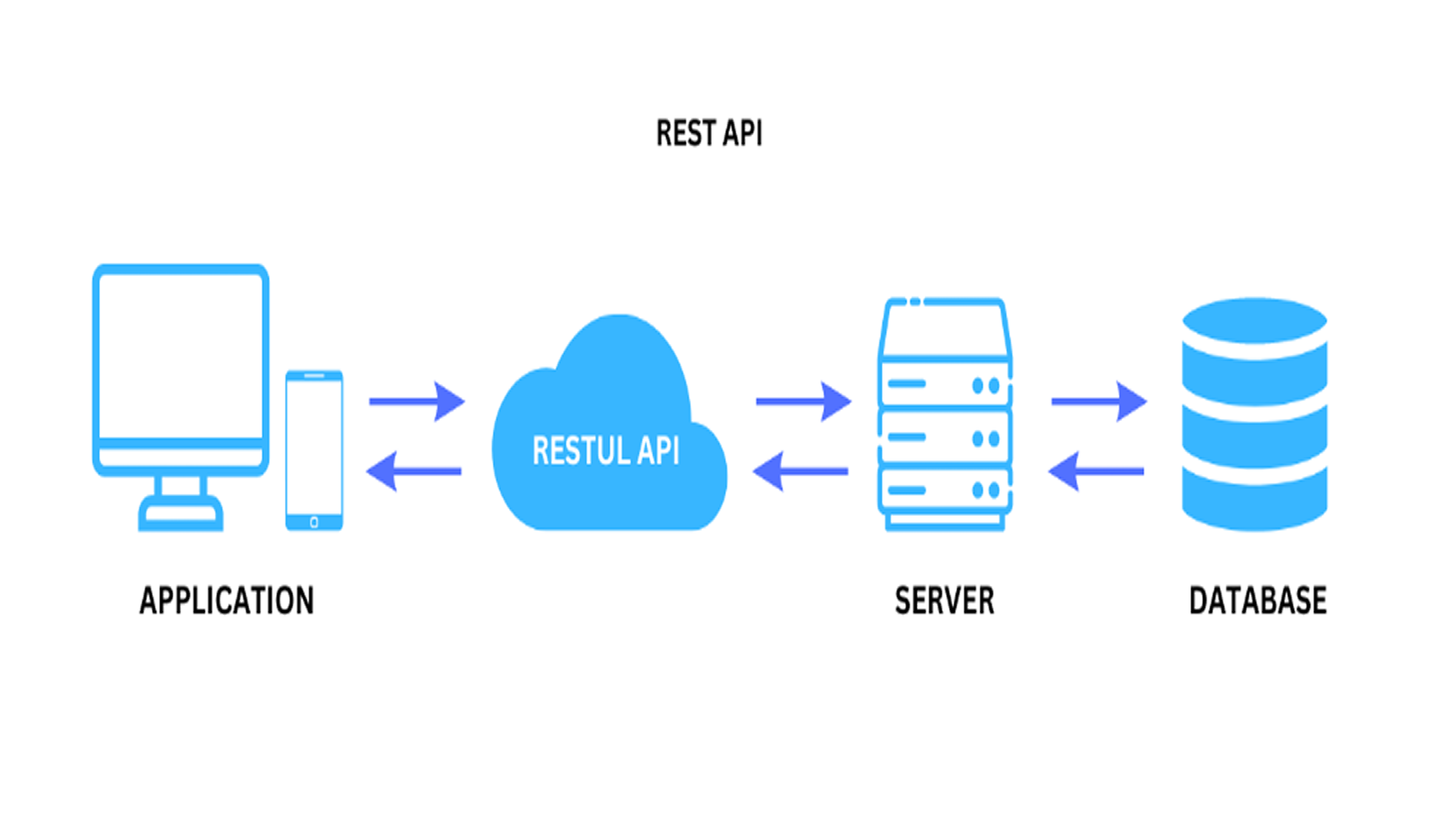
REST API (Representational State Transfer Application Programming Interface) is a style of architecture for building web services. It defines a set of principles for communication between systems using standard web protocols, such as HTTP, allowing a flexible integration and connection between different architectures and microservices, being a very widespread technology technology technology technology information and microservices information and microservices is a technology that is widely used in the information technology system.

API stands for Application Programming Interface. In the context of APIs, the word Application refers to any software with a distinct function. The interface can be thought of as a service contract between two applications. This contract defines how the two communicate using requests and responses. The documentation for their respective APIs contains information on how developers should structure these requests and responses.

In this application note we present how FT-Optix with RESTAPI, allows machine, process and end customer manufacturers to interact with IT, SAP, MES systems and specific software using REST technology. This demo shows how to execute the call to a remote RestAPI server and process the response to show an interactive 3D model of the returned object

 
connect-automation-with-it-systems-using-ft-optix-and-rest-api_Image1
AHIC Download ICON VF.png

Download

Please note: You will need to agree to the Terms & Conditions for each download.

Downloadable file ›
Legal Disclaimer Acceptance. ROCKWELL AUTOMATION WILL PROVIDE ACCESS TO ROCKWELL PRODUCTS (BEST PRACTICES, APPLICATIONS AND KNOWLEDGE) ON THE CONDITION THAT YOU ACCEPT AND COMPLY WITH THE FOLLOWING TERMS AND CONDITIONS. YOU ACCEPT AND AGREE TO BE BOUND BY THE TERMS OF THIS AGREEMENT BY DOWNLOADING, INSTALLING, COPYING, OR OTHERWISE USING PRODUCTS. IF YOU ARE ACCEPTING THESE TERMS ON BEHALF OF ANOTHER PERSON, COMPANY, OR OTHER LEGAL ENTITY, YOU REPRESENT AND WARRANT THAT YOU HAVE FULL AUTHORITY TO BIND THAT PERSON, COMPANY, OR LEGAL ENTITY TO THESE TERMS. IF YOU DO NOT AGREE TO THESE TERMS, DO NOT DOWNLOAD, INSTALL, COPY, ACCESS, OR USE THE PRODUCTS, SOFTWARE AND/OR CLOUD SERVICES. 1. Rockwell Automation retains full ownership and title to all Products and related documentation. No rights or licenses are granted other than those set forth in this Agreement. Company grants to Rockwell Automation a non-exclusive, worldwide, royalty-free, perpetual, non-revocable license to use any feedback Company provides regarding the Products, even if Company has designated the feedback as confidential. Rockwell Automation will be entitled to use the feedback without restriction or compensation to Company. 2. Company may not lease sub-lease, assign, license, sub-license or otherwise transfer any of the Products without the prior written consent of Rockwell Automation. Company may not assign or otherwise transfer access rights to the Products without the prior written consent of Rockwell Automation. Any reverse assembly, reverse engineering, decompilation, and creation of derivative works based on the Products by Company is prohibited. 3. Company acknowledges that Products provided under this Agreement are Rockwell Automation’s Confidential Information and are covered by effective or pending copyrights, patents, trademarks and/or trade secrets of Rockwell Automation, and Company agrees to maintain confidentiality by not disclosing Products or documentation to any third party without the prior written consent of Rockwell Automation and to protect the confidentiality of the Products as it would Company’s own confidential information. Company agrees that its obligation of confidentiality under this paragraph shall survive expiration or termination of this Agreement. 4. Company agrees that Products provided under this Agreement are prototypes and examples and its application and results may vary depending on each customer and project conditions. Rockwell Automation do not warranty the same results. This Agreement shall in no way be construed as a commitment by Rockwell Automation at any time to manufacture and/or offer Products for sale. There is no explicit or implicit service level agreement associated with using the Products. Rockwell Automation does not warrant that the functions contained in the Products will meet Company’s requirements. Company agrees to use all Products only in accordance with the instructions and only for the intended usages identified in the documentation. 5. EXCLUSION OF WARRANTIES AND LIMITATION OF LIABILITY. THE PRODUCTS ARE PROVIDED "AS IS". ROCKWELL AUTOMATION DISCLAIMS ANY AND ALL WARRANTIES, EXPRESS, IMPLIED OR STATUTORY, INCLUDING WITHOUT LIMITATION ANY WARRANTIES OF MERCHANTABILITY OR FITNESS FOR A PARTICULAR PURPOSE. ROCKWELL AUTOMATION EXPLICITLY DISCLAIMS ALL WARRANTIES OF NON- INFRINGEMENT AND EXPRESSLY DOES NOT WARRANT THAT THE PRODUCTS, IN WHOLE OR IN PART, WILL BE ERROR FREE OR FREE FROM SECURITY VULNERABILITIES. IN NO EVENT SHALL ROCKWELL AUTOMATION BE LIABLE FOR (i) LOST PROFITS, LOST SAVINGS, DOWNTIME, SPECIAL, INDIRECT OR CONSEQUENTIAL DAMAGES OF ANY KIND, OR (ii) ANY PERSONAL INJURY, PROPERTY DAMAGE OR ENVIRONMENTAL DAMAGE ARISING OUT OF OR IN CONNECTION WITH THIS AGREEMENT, WHETHER IN AN ACTION IN CONTRACT, STRICT LIABILITY OR IN TORT INCLUDING NEGLIGENCE. 6. COMPANY AGREES TO INDEMNIFY AND HOLD ROCKWELL AUTOMATION HARMLESS FROM ALL COSTS, AWARDS, DAMAGES, EXPENSES AND FEES (INCLUDING ATTORNEYS FEES) RESULTING FROM OR RELATED TO ANY THIRD-PARTY CLAIMS (INCLUDING EMPLOYEES AND AGENTS OF COMPANY) AGAINST ROCKWELL AUTOMATION, ITS DISTRIBUTORS, AGENTS, OFFICERS, DIRECTORS OR EMPLOYEES FOR PERSONAL INJURY (INCLUDING DEATH), PROPERTY DAMAGE OR ENVIRONMENTAL DAMAGE RELATED TO OR RESULTING FROM THE USE OF THE PRODUCTS. 7. In the event a Product is exported, Company agrees to comply with all applicable United States Export Control Law and Regulations, and the applicable export control laws of other countries. This Agreement shall be governed by the laws of the state of Wisconsin. This Agreement is the complete and exclusive Agreement between Rockwell Automation and the Company, and supersedes all prior agreements, whether written or oral, relating to the Products.
AHIC NEED HELP ICON VF.png


Need Help?

If you need help with an application or have feedback from the Innovation Center, please contact us.


General Characteristics

REST-API:

  1. Client-Server: Separation between client (frontend) and server (backend).
  2. Stateless: Each request is independent, meaning it does not maintain state on the server.
  3. Cacheable: Supports caching to improve performance.
  4. Uniform Interface: Utilizes well-defined HTTP methods, such as
    • GET → Fetch Data
    • POST → Create new features
    • PUT → Update Existing Features
    • DELETE → Remove Features
  5. Resource Impersonation: Data can be returned in formats such as JSON or XML.
 

Advantages

  • Ease of Integration: Allows different systems to communicate in a simple way.
  • Scalability: Being stateless, it facilitates the scalability of the system.
  • Compatibility: It can be consumed by several clients (web, mobile, IoT).
  • Simplicity: Uses well-known web standards such as HTTP and JSON, making it accessible to developers.


Limitations And Disadvantages - For FT-Optix up to the present version (1.5.2) only JSON format is accepted.


Is this application relevant to me?

Ready-to-integrate application with FT-Optix using REST-API, open source, and can be easily implemented or used as a basis in your project.

For connection to controllers, FT-Optix allows integration (communication driver) with Logix controllers (Rockwell Automation) or third-party controllers.

See our available drivers: https://www.rockwellautomation.com/pt-pt/docs/factorytalk-optix/current/contents-ditamap/creating-projects/communication-driver/communication-drivers-overview.html


How can I make it work?

Requirements: products, tools, prior knowledge.

Hardware

  • Intel Core i5 Standard Power processor (i5-8xxx)
  • 8 GB of RAM memory
  • 20 GB free hard disk space

The hardware requirements for FactoryTalk Optix applications may vary depending on the application and the type of device running the application.

Software

  • FactoryTalk Optix
  • Download and install FactoryTalk, Optix Studio, and Runtime.
  • Download Link: https://home.cloud.rockwellautomation.com/sign-in?returnTo=%2Fdashboard
  • The PCDC can be downloaded: https://compatibility.rockwellautomation.com/Pages/home.aspx

Prior Knowledge

  • Windows OS
  • FactoryTalk Optix Studio
  • Knowledge of REST-API technology


AHIC STEP ICON.png

Implementation Guide

 
  1. Step 1
  2. Step 2
Open All Close All
Step 1


Download the app from Downloads/GeneralFiles.zip


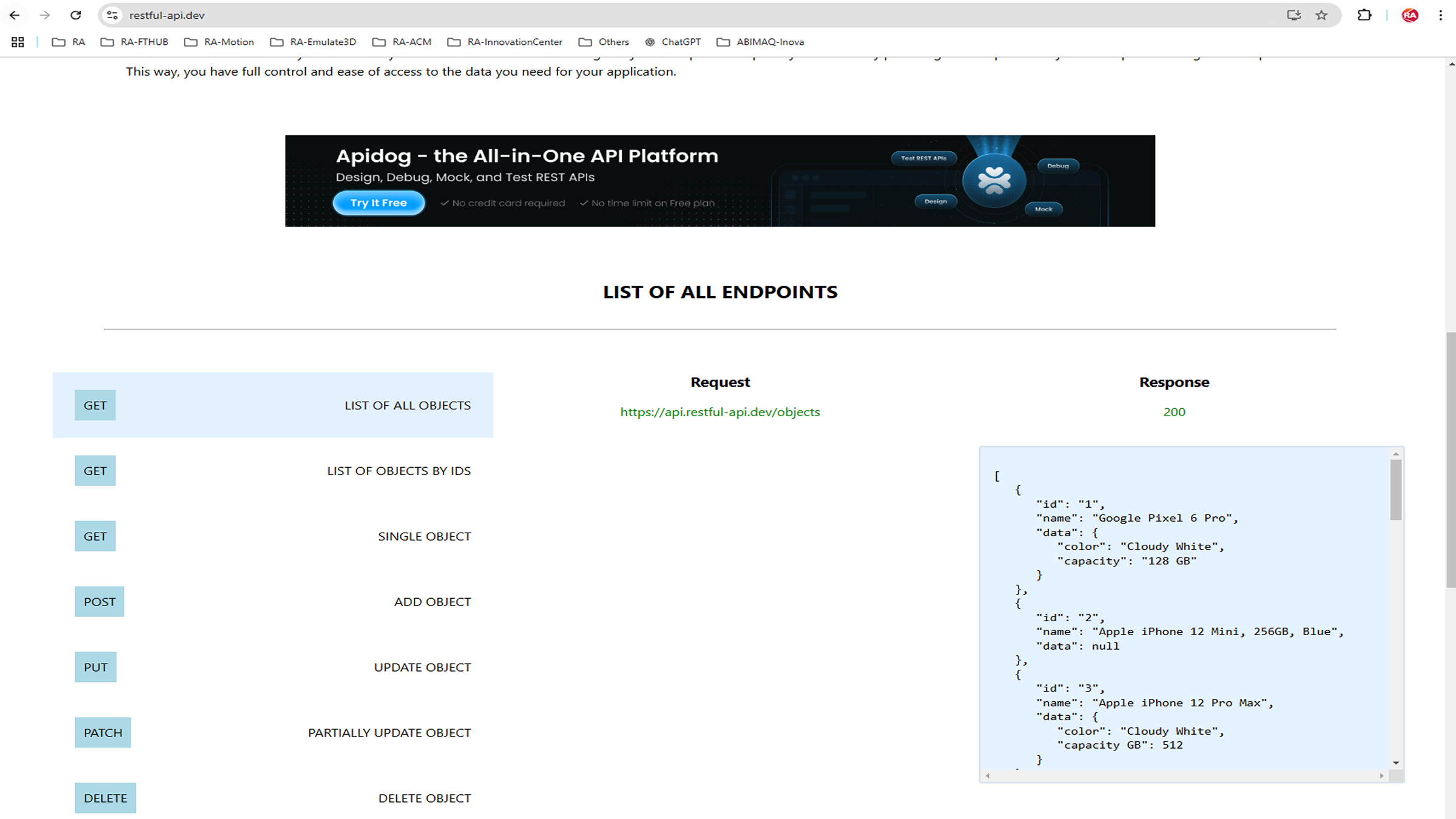
Sample application uses REST-API from the https://restful-api.dev/rest-fundamentals site. A website containing server for demonstration projects and testing systems.


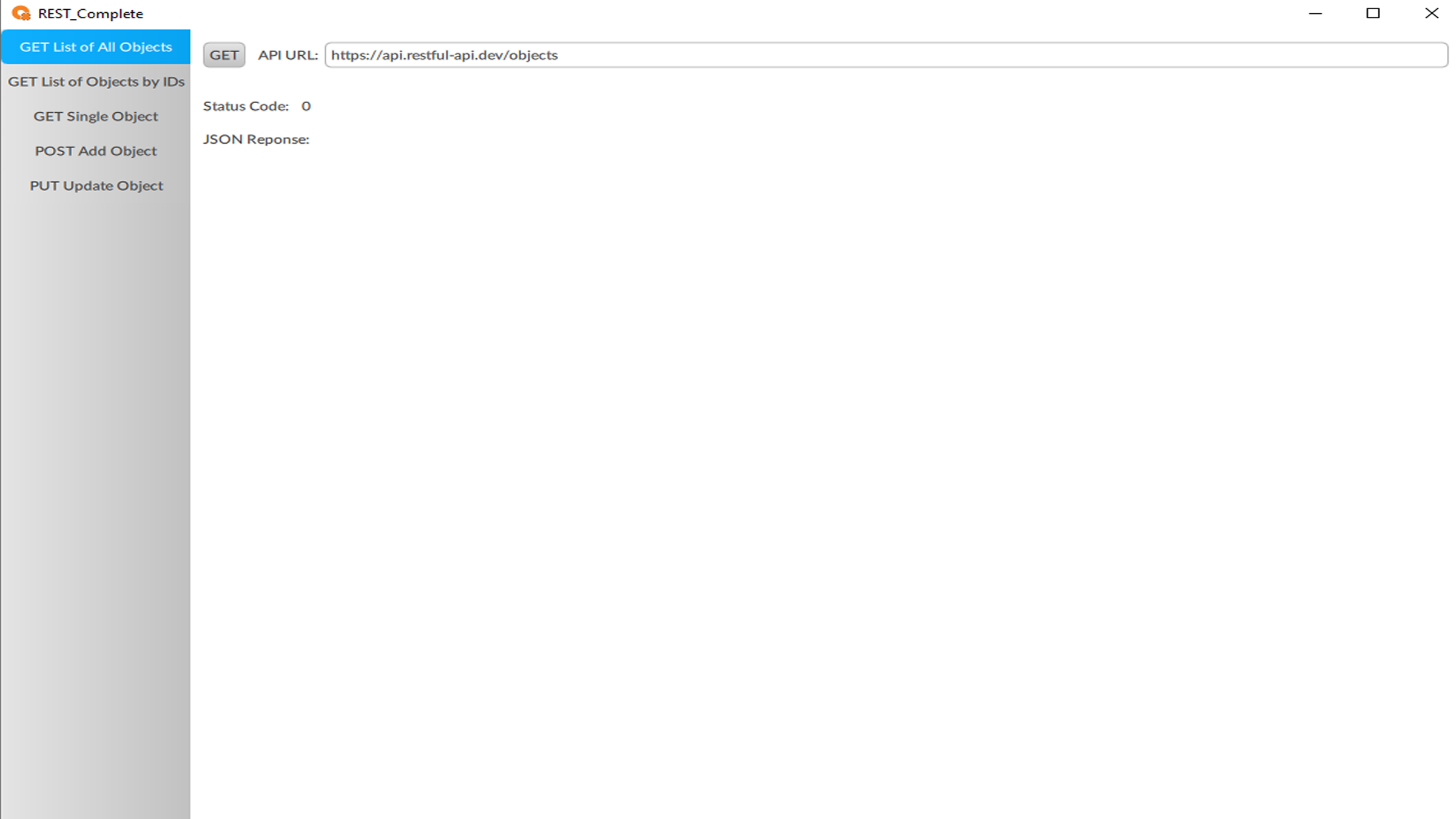
Open the application in FT-Optix Studio.


Automatically convert application if you have a newer version of FT-Optix.


connect-automation-with-it-systems-using-ft-optix-and-rest-api_Image2

connect-automation-with-it-systems-using-ft-optix-and-rest-api_Image2

Step 2


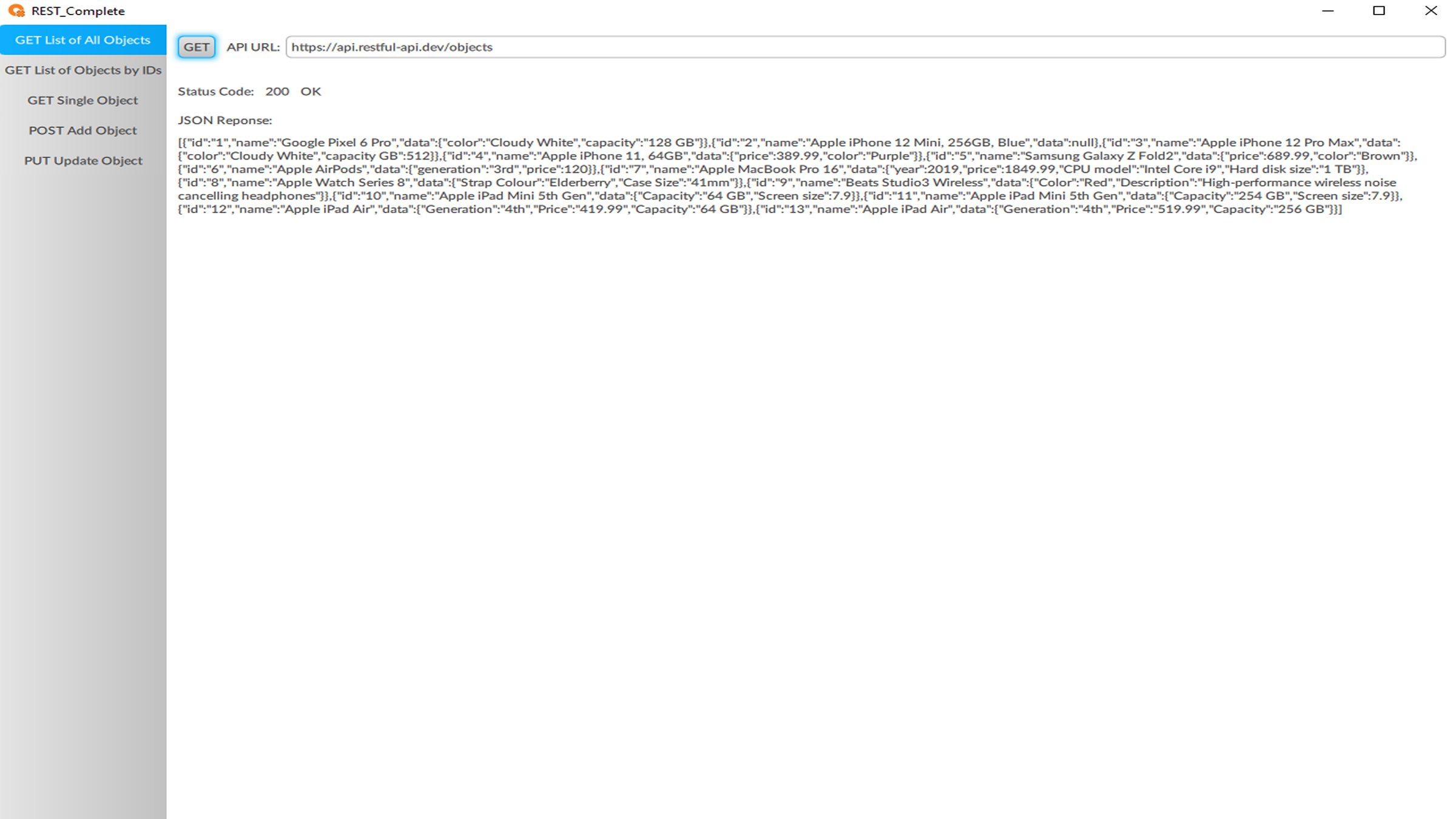
  • Run application and check operation
  • Click the menu: GET List of All Objects, then click the GET button


Via REST-API, the command executes a script that requests (GET) to the server (REST-API) all available objects and returns a Status Code and the response in JSON format.


 
connect-automation-with-it-systems-using-ft-optix-and-rest-api_Image3

connect-automation-with-it-systems-using-ft-optix-and-rest-api_Image3

connect-automation-with-it-systems-using-ft-optix-and-rest-api_Image4

connect-automation-with-it-systems-using-ft-optix-and-rest-api_Image4


connect-automation-with-it-systems-using-ft-optix-and-rest-api_Image1

connect-automation-with-it-systems-using-ft-optix-and-rest-api_Image1

connect-automation-with-it-systems-using-ft-optix-and-rest-api_Image2

connect-automation-with-it-systems-using-ft-optix-and-rest-api_Image2

connect-automation-with-it-systems-using-ft-optix-and-rest-api_Image3

connect-automation-with-it-systems-using-ft-optix-and-rest-api_Image3

connect-automation-with-it-systems-using-ft-optix-and-rest-api_Image4

connect-automation-with-it-systems-using-ft-optix-and-rest-api_Image4


Connect Automation with IT Systems using FT-Optix and REST API

Version 2.0 - September 2026


AHIC White Logo

Receive new applications and Innovation Center updates directly in your inbox.

Subscribe!
 
  1. Chevron LeftChevron Left Rockwell Automation Home
  2. Chevron LeftChevron Left Sup...
  3. Chevron LeftChevron Left Pro...
  4. Chevron LeftChevron Left Downloads
  5. Chevron LeftChevron Left Innovation Center
  6. Chevron LeftChevron Left Connect Automation with IT Systems using FT-Optix and REST API
Please update your cookie preferences to continue.
This feature requires cookies to enhance your experience. Please update your preferences to allow for these cookies:
  • Social Media Cookies
  • Functional Cookies
  • Performance Cookies
  • Marketing Cookies
  • All Cookies
You can update your preferences at any time. For more information please see our {0} Privacy Policy
CloseClose