
Command prompt
Use the
FactoryTalk Batch
Server methods at the command prompt. This is useful for trouble-shooting purposes.
TIP:
If the item or execute command line contains any white space, such as tabs or spaces, be sure to enclose the command line in double-quotes. Otherwise, the Item or Execute can be issued as shown in this document.
When using the command prompt, change to the
Batch/bin
directory and format the Item or Execute commands similar to these examples:Execute Syntax:
Execute ["]FormattedServerAPIExecuteString["] [options]
Options:
-a
or /a
enables the ASCII dump of data
>filename
places the data into a fileExample:
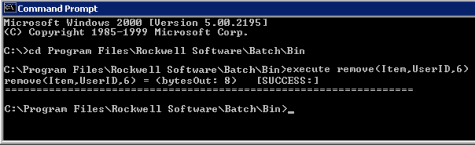
GetItem Syntax:
GetItem ["]ServerAPIItem["] [options]
Options:
-a
or/a
enables the ASCII dump of data
and removes any embedded time fields
-t
or /t
>filename
places the data into a fileExample:

Provide Feedback