
Enter a valid Expansion I/O value
This field is available for 1769-L1x CompactLogix controllers.
When the controller's
I/O Expansion
selection does not match the actual number of
physical modules present, when the controller is online: - The controller does not make any I/O connections.
- The module generates a fault.
To enter a valid Expansion I/O value:
- If creating a new controller and the number of local input and output modules for the new controller is unknown, in theNew Controllerdialog box,Expansion I/Olist, select0 Modules.If modifying a controller, in theController Propertiesdialog box,Generaltab, select the number of physical input and output modules for the controller from theExpansion I/Olist. For example, if adding two Expansion I/O modules for the controller, select2 Modules.
- Add the new Expansion I/O module using theI/O Configurationtree. Right-clickExpansion I/Oand selectNew Moduleto open theSelect Moduledialog box.
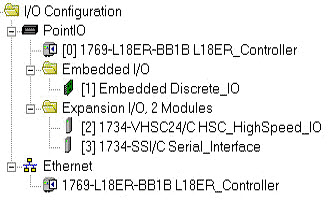
This example shows two Expansion I/O modules.
IMPORTANT:
A correct POINT I/O system does not have any
empty terminal bases. Going online with mismatched I/O settings can potentially cause
unintended control in the system. For more information refer to the
POINT I/O,
EtherNet/IP, Adapter Module User Manual
(Publication 1734-UM011).Provide Feedback