
Install and Run FactoryTalk View SE - FactoryTalk DataMosaix Connector (Manual‑Console)
Perform the following steps to install
FactoryTalk View SE - FactoryTalk DataMosaix
connector:- Download the InstallerObtain theFT View SE DataMosaix Connectorinstaller file (FTDataMosaix_ViewSE_Connector.exe) from the from the Product Compatibility and Download Center (PCDC).
- Prepare the FilesPlace the downloaded installer and theconfig.ymlfile in the same folder.
- Open Command PromptNavigate to the folder where the files are located and openCommand Prompt (cmd).
- Run the Installation CommandExecute the following command:<path-to-your-folder> "FTDataMosaix_ViewSE_ConnectorR1.0.0.exe" "config.yml"
- Connector InitializationAfter running the command, the FT View SE Extractor will start and perform the following actions:
- Validate user authentication.
- Upon successful authentication, connect to the specified application.
- If no time-series tags are found, the extractor will automatically create one during the first run.
FT View SE - DataMosaix Connector Initialization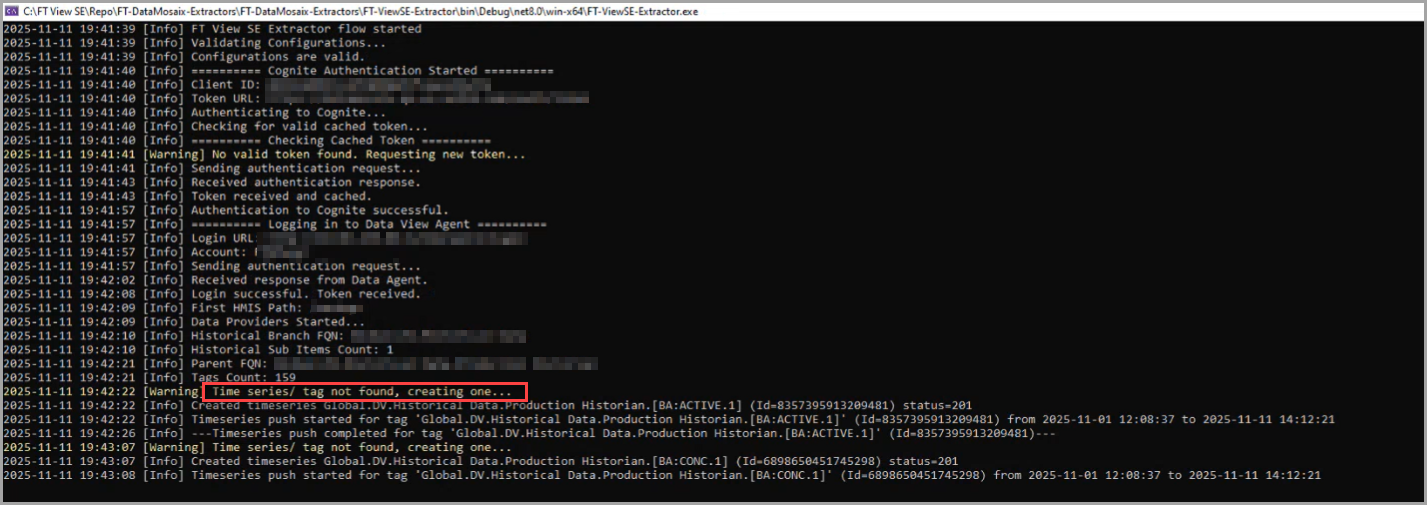
Provide Feedback