
Install and Configure FactoryTalk View Data Agent
FactoryTalk View Data Agent
integrates its REST server with the FactoryTalk View SE
platform, enabling seamless access to live tag values from PLC
s or HMI
s, as well as data from the Data Log Model and FactoryTalk Historian SE. This integration allows users to easily retrieve real-time and historical data for analysis. With Data Agent, users can generate automation reports and interactive dashboards using FactoryTalk View SE tag data.Perform the following steps to install
FactoryTalk View Data Agent
:- Download the SDK
- Obtain theFactoryTalk View Data Agent SDKfrom the Product Compatibility and Download Center (PCDC).
- The installation package will be named:FactoryTalk View Data Agent SDK.msi
- Install the SDK
- Locate the downloaded.msifile.
- Right-click the file and selectRun as Administratorto begin the installation.
- Access the SDK Application
- After installation, navigate to:C:\Program Files (x86)\Rockwell Software\RSView Enterprise\Data Agent SDK
- Launch the Data Agent Client
- Run the executable:RA.DataAgent.SDK.App.Host.exe
- Configure the Application
- Set up the application and configure the HMIs.
- Select the appropriate tags to view data in the Data Agent.
Configuration Application and HMIs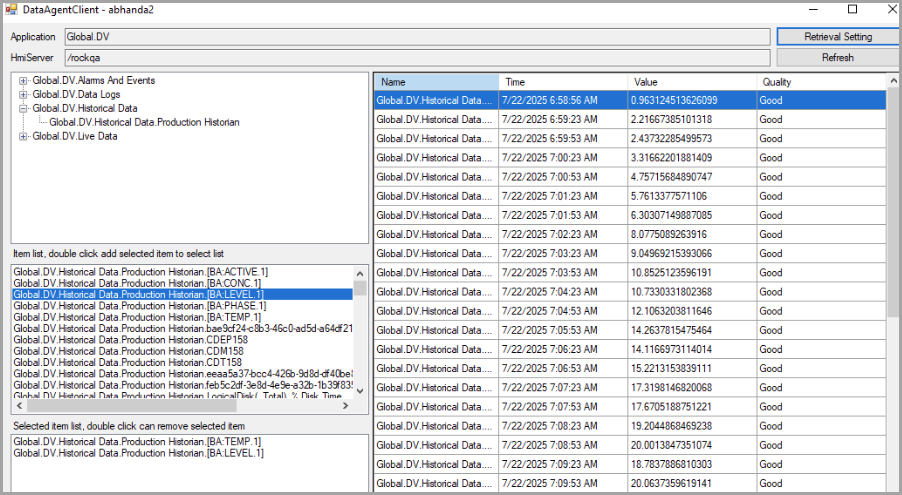
- Verify SDK Web Service
- Once installed, theData Agent SDK web servicestarts automatically.
- No system restart is required.
- Confirm the service is running by checking theWindows Serviceslist.
Data Agent SDK in Windows Service List
Provide Feedback